Solved Where is the wifi network connection status dialog in win 10/11?


wuser

Member
Local time
9:56 AM
Posts
54
OS
windows 10
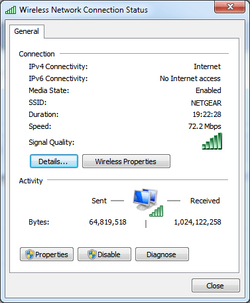
In Windows 7, to bring up the Wifi Network Connection Status dialog (so I can see the send/receive bytes)

1. I will click on the wifi 5-bar icon in the system tray,
2. right-click to select my wifi connection
3. select Status
wuser_1110_wifi-network-connection-status.png
 

My Computer My Computer

At a glance

windows 10Intel Celeron N4120 (Gemini Lake)6 GB
OS
windows 10
Computer type
Tablet
Manufacturer/Model
Chuwi Hi10 X
CPU
Intel Celeron N4120 (Gemini Lake)
Motherboard
American Megatrends
Memory
6 GB
Screen Resolution
1920x1200
Hard Drives
SSD 128 GB
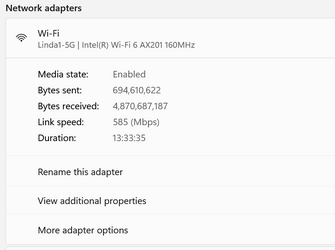
Settings>network & Internet>advanced network settings>
Under the “Network adapters” section, click the WiFi or Ethernet adapter you want to view its information.
 

My Computers My Computers

  • At a glance

    Windows 11 Pro 25H2 26200.8655i9-10900 10 core 20 threads32 gbnone-Intel UHD Graphics 630
    OS
    Windows 11 Pro 25H2 26200.8655
    Computer type
    PC/Desktop
    Manufacturer/Model
    Dell Optiplex 7080
    CPU
    i9-10900 10 core 20 threads
    Motherboard
    DELL 0J37VM
    Memory
    32 gb
    Graphics Card(s)
    none-Intel UHD Graphics 630
    Sound Card
    Integrated Realtek
    Monitor(s) Displays
    Benq 27
    Screen Resolution
    2560x1440
    Hard Drives
    2x1tb Solidigm m.2 nvme /External drives 512gb Samsung m.2 sata+2tb Kingston m2.nvme
    PSU
    500w
    Case
    MT
    Cooling
    Dell Premium
    Keyboard
    Logitech wired
    Mouse
    Logitech wireless
    Internet Speed
    so slow I'm too embarrassed to tell
    Browser
    #1 Edge #2 Firefox
    Antivirus
    Defender+MWB Premium
  • At a glance

    Windows 11 Pro 24H2 26200.8457AMD Ryzen 7 6800U32 gbintegrated
    Operating System
    Windows 11 Pro 24H2 26200.8457
    Computer type
    PC/Desktop
    Manufacturer/Model
    Beelink Mini PC SER5
    CPU
    AMD Ryzen 7 6800U
    Memory
    32 gb
    Graphics card(s)
    integrated
    Sound Card
    integrated
    Monitor(s) Displays
    Benq 27
    Screen Resolution
    2560x1440
    Hard Drives
    1TB Crucial nvme
    Keyboard
    Logitech wired
    Mouse
    Logitech wireless
    Internet Speed
    still too embarrassed to tell
    Browser
    Firefox
    Antivirus
    Defender
    Other Info
    System 3 is non compliant Dell 9020 i7-4770/24gb ram Win11 PRO 26200.8457
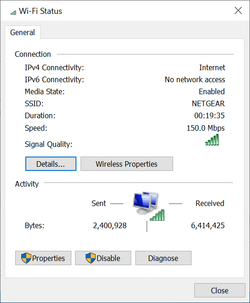
Unfortunately, that does not show the real-time stats for the data coming in and data going out of my computer/device, like the screenshot I posted, showing just under the Activity section. I recall in one of my older tablets with win8.1 you would do the same or similar steps and it would read out the in/out bytes, if I call correctly. I can't find that tablet at the moment to double-check for that.
 

My Computer My Computer

At a glance

windows 10Intel Celeron N4120 (Gemini Lake)6 GB
OS
windows 10
Computer type
Tablet
Manufacturer/Model
Chuwi Hi10 X
CPU
Intel Celeron N4120 (Gemini Lake)
Motherboard
American Megatrends
Memory
6 GB
Screen Resolution
1920x1200
Hard Drives
SSD 128 GB
OH, because there is no Settings>network & Internet>advanced network settings in win10 using your steps.
 

My Computer My Computer

At a glance

windows 10Intel Celeron N4120 (Gemini Lake)6 GB
OS
windows 10
Computer type
Tablet
Manufacturer/Model
Chuwi Hi10 X
CPU
Intel Celeron N4120 (Gemini Lake)
Motherboard
American Megatrends
Memory
6 GB
Screen Resolution
1920x1200
Hard Drives
SSD 128 GB
Ahaa! I found it.

1. open control panel
2. select Network and Internet
3. select View network status and tasks
4. done

wuser_1111_wifi-network-connection-status.png
 

My Computer My Computer

At a glance

windows 10Intel Celeron N4120 (Gemini Lake)6 GB
OS
windows 10
Computer type
Tablet
Manufacturer/Model
Chuwi Hi10 X
CPU
Intel Celeron N4120 (Gemini Lake)
Motherboard
American Megatrends
Memory
6 GB
Screen Resolution
1920x1200
Hard Drives
SSD 128 GB
Currently in Windows 11, you can still get to the status window from both control panel and settings. Soon, MS will be phasing out its presence in control panel as they're moving everything to settings.
Screenshot 2023-11-27 004916.png
 

My Computers My Computers

  • At a glance

    Windows 11 Pro 25H2 26200.8655i9-10900 10 core 20 threads32 gbnone-Intel UHD Graphics 630
    OS
    Windows 11 Pro 25H2 26200.8655
    Computer type
    PC/Desktop
    Manufacturer/Model
    Dell Optiplex 7080
    CPU
    i9-10900 10 core 20 threads
    Motherboard
    DELL 0J37VM
    Memory
    32 gb
    Graphics Card(s)
    none-Intel UHD Graphics 630
    Sound Card
    Integrated Realtek
    Monitor(s) Displays
    Benq 27
    Screen Resolution
    2560x1440
    Hard Drives
    2x1tb Solidigm m.2 nvme /External drives 512gb Samsung m.2 sata+2tb Kingston m2.nvme
    PSU
    500w
    Case
    MT
    Cooling
    Dell Premium
    Keyboard
    Logitech wired
    Mouse
    Logitech wireless
    Internet Speed
    so slow I'm too embarrassed to tell
    Browser
    #1 Edge #2 Firefox
    Antivirus
    Defender+MWB Premium
  • At a glance

    Windows 11 Pro 24H2 26200.8457AMD Ryzen 7 6800U32 gbintegrated
    Operating System
    Windows 11 Pro 24H2 26200.8457
    Computer type
    PC/Desktop
    Manufacturer/Model
    Beelink Mini PC SER5
    CPU
    AMD Ryzen 7 6800U
    Memory
    32 gb
    Graphics card(s)
    integrated
    Sound Card
    integrated
    Monitor(s) Displays
    Benq 27
    Screen Resolution
    2560x1440
    Hard Drives
    1TB Crucial nvme
    Keyboard
    Logitech wired
    Mouse
    Logitech wireless
    Internet Speed
    still too embarrassed to tell
    Browser
    Firefox
    Antivirus
    Defender
    Other Info
    System 3 is non compliant Dell 9020 i7-4770/24gb ram Win11 PRO 26200.8457
Back
Top Bottom