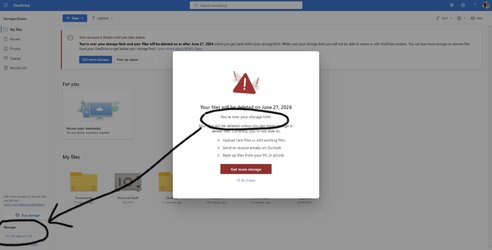
Solved Why does one drive say I dont have enough space when I only have 1.5gb used?


sdowney717

Well-known member
Member
VIP
Local time
2:09 AM
Posts
1,335
OS
windows 11
Is something wrong about my understanding of how one drive works?

1690449017364.png
 

My Computer

System One

  • OS
    windows 11
    Computer type
    PC/Desktop
    Manufacturer/Model
    some kind of old ASUS MB
    CPU
    old AMD B95
    Motherboard
    ASUS
    Memory
    8gb
    Hard Drives
    ssd WD 500 gb
Could it be that OneDrive is not online? There is a white cross in a red circle on the OneDrive icon on the TB. This means it is unable to sync/update perhaps. Just guessing.

Also you have 13 Notifications awaiting your attention. See blue circle with '13' in the centre.
 

My Computers

System One System Two

  • OS
    Windows 11 Pro
    Computer type
    PC/Desktop
    Manufacturer/Model
    GMKtec K11
    CPU
    AMD Ryzen 9 8945HS
    Memory
    32GB DDR5 SO-DIMM
    Graphics Card(s)
    Integrated AMD Radeon 780M (4.00 GHz)
    Monitor(s) Displays
    Benq 2250HM
    Screen Resolution
    1920 x 1080
    Hard Drives
    1 TB PCIe 4.0 NVMe M.2 SSD
  • Operating System
    Windows 11 Home
    Computer type
    Laptop
    Manufacturer/Model
    ASUS Zenbook 14 OLED 14" Laptop - UX3405CA-QL192W
    CPU
    Intel® Core™ Ultra 7 - 255H processor
    Memory
    16 GB LPDDR5 SDRAM
    Graphics card(s)
    Intel Arc 140T onboard graphics
    Screen Resolution
    1920 x 1200 (16:10 WUXGA resolution) OLED Touchscreen
    Hard Drives
    1TB SSD
Could it be that OneDrive is not online? There is a white cross in a red circle on the OneDrive icon on the TB. This means it is unable to sync/update perhaps. Just guessing.

Also you have 13 Notifications awaiting your attention. See blue circle with '13' in the centre.
who knows. When I click one drive, it pops up the out of space message. Someone said if I uninstall then reinstall it might fix itself

it has claimed out of space for months
 

My Computer

System One

  • OS
    windows 11
    Computer type
    PC/Desktop
    Manufacturer/Model
    some kind of old ASUS MB
    CPU
    old AMD B95
    Motherboard
    ASUS
    Memory
    8gb
    Hard Drives
    ssd WD 500 gb
Okay have you checked the Notifications in case one or more may be relevant?
 

My Computers

System One System Two

  • OS
    Windows 11 Pro
    Computer type
    PC/Desktop
    Manufacturer/Model
    GMKtec K11
    CPU
    AMD Ryzen 9 8945HS
    Memory
    32GB DDR5 SO-DIMM
    Graphics Card(s)
    Integrated AMD Radeon 780M (4.00 GHz)
    Monitor(s) Displays
    Benq 2250HM
    Screen Resolution
    1920 x 1080
    Hard Drives
    1 TB PCIe 4.0 NVMe M.2 SSD
  • Operating System
    Windows 11 Home
    Computer type
    Laptop
    Manufacturer/Model
    ASUS Zenbook 14 OLED 14" Laptop - UX3405CA-QL192W
    CPU
    Intel® Core™ Ultra 7 - 255H processor
    Memory
    16 GB LPDDR5 SDRAM
    Graphics card(s)
    Intel Arc 140T onboard graphics
    Screen Resolution
    1920 x 1200 (16:10 WUXGA resolution) OLED Touchscreen
    Hard Drives
    1TB SSD
Okay have you checked the Notifications in case one or more may be relevant?
just looked, all junk, I cleared them all. Nothing relevant.
 

My Computer

System One

  • OS
    windows 11
    Computer type
    PC/Desktop
    Manufacturer/Model
    some kind of old ASUS MB
    CPU
    old AMD B95
    Motherboard
    ASUS
    Memory
    8gb
    Hard Drives
    ssd WD 500 gb
Found the answer, simply reset OneDrive, now it is working
--------------------------------------------------------------------
Hello Gene
I am V. Arya, Independent Advisor, to work with you on this issue.

1. Reset Onedrive
Windows Key+R > Copy the below and paste and Enter
%localappdata%\Microsoft\OneDrive\onedrive.exe /reset
 

My Computer

System One

  • OS
    windows 11
    Computer type
    PC/Desktop
    Manufacturer/Model
    some kind of old ASUS MB
    CPU
    old AMD B95
    Motherboard
    ASUS
    Memory
    8gb
    Hard Drives
    ssd WD 500 gb
I, too, am having the issue of trying to sign into OneDrive only for it to tell me I am over my storage limit. As can be seen by the 2 pics attached it is clearly not the case. Using the fix listed above does not work either. Any suggestions, without having to send MS more of my money. (I am over subscription based cr-p) As can be seen I get the error message, then when I hit fix this it sends me to the second screen which clearly shows I have plenty of room. I have deleted everything from the OneDrive folder.
 

Attachments

  • One Drive screenshot1.png
    One Drive screenshot1.png
    279.4 KB · Views: 2
  • One Drive screenshot2.jpg
    One Drive screenshot2.jpg
    110.4 KB · Views: 1

My Computer

System One

  • OS
    Win 11 Home build 22631.2191 ver 23H2
    Computer type
    PC/Desktop
    Manufacturer/Model
    self built
    CPU
    Intel i7-8700 3.20GHz
    Motherboard
    GigaByte Z370 HD3
    Memory
    64 GB
    Graphics Card(s)
    nVidia 2070 8GB
    Monitor(s) Displays
    2 x 32 AOC and 1 x 32 LG
    Screen Resolution
    2560 x 1440
    Hard Drives
    1TB SSD and 2TB HD
    Keyboard
    Langtu
    Mouse
    Logitech
    Internet Speed
    100Mbps
    Browser
    Chrome usually
I think whatever is in your onedrive recycle bin counts towards your storage total.
 

My Computers

System One System Two

  • OS
    Windows 11 Home
    Computer type
    PC/Desktop
    Manufacturer/Model
    Custom build
    CPU
    Ryzen 5 5600G 3.9GHz, 6 Cores, 12 Logical Processors
    Motherboard
    ASUS PRIME B550M-A AC
    Memory
    32GB DDR4 3200 MHz
    Graphics Card(s)
    NVIDIA GeForce GTX 1660 Super 6GB GDDR6
    Monitor(s) Displays
    ASUS 27"
    Screen Resolution
    1920x1080
    Hard Drives
    512MB NVMe M.2 + 2-2TB internal HDs
    PSU
    650 Watt
    Case
    LIANLI 205M TG MATX CASE WHITE
    Cooling
    Thermaltake Contac 9 SE 120W TDP CPU Cooler
    Keyboard
    Redragon K552 Mechanical Gaming Keyboard 87 Key Rainbow LED Backlit Wired
    Internet Speed
    Google Fiber 1 Gbps
  • Operating System
    Windows 11 Home
    Computer type
    PC/Desktop
    Manufacturer/Model
    Custom build
    CPU
    AMD Ryzen 5 5600G
    Motherboard
    MSI B550-A Pro ATX
    Memory
    32GB(4x8) G.Skill Ripjaws DDR4-3200 PC4-25600 CL16 - Black
    Graphics card(s)
    NVIDIA GeForce 1660 Super 6GB
    Monitor(s) Displays
    Samsung 27" UHD
    Screen Resolution
    1920x1080
    Hard Drives
    Samsung NVMe m.2 500GB, 1TB SSD, 2TB HDD
    PSU
    650W
    Case
    Lian Li Lancool 205 Mesh Type C Tempered Glass ATX Mid-Tower - Black
    Keyboard
    Redragon K552 Mechanical Gaming Keyboard 87 Key Rainbow LED Backlit Wired
    Internet Speed
    Google Fiber 1GB
Back
Top Bottom