JavaScript is disabled. For a better experience, please enable JavaScript in your browser before proceeding.
You are using an out of date browser. It may not display this or other websites correctly.
You should upgrade or use an
alternative browser .
Solved Why is a Security Audit running so much
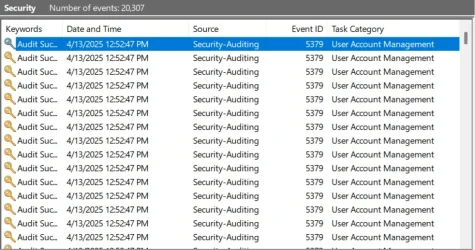
There was an incident where I was moving my cursor and it stopped for a second and then resumed. Curious, I opened the event log. I could find nothing noteworthy in Applications or System. However, when I opened Security I found that an audit was running multiple times every second. I have not seen this before. Does anyone know why something like this would occur? I also found multiples of this:
Subject:
Security ID: BOBS-PC\Bob
Account Name: Bob
Account Domain: BOBS-PC
Logon ID: 0x5215B
User:
Security ID: BOBS-PC\Guest
Account Name: Guest
Account Domain: BOBS-PC
Does this mean that there's activity on a Guest ID (I have Guest disabled in GPEDIT)?
Windows Build/Version
24H2 build 26100.3775
Last edited: Apr 13, 2025
Win 11Pro v25H2 build 26200.7171 AMD Ryzen 7 9800X3D 64G DDR5 6000 ASUS RTX 4070 Ti Super OC Win 11Pro v25H2 build 26200.7171 PC/Desktop DIY AMD Ryzen 7 9800X3D Gigabyte X670 Aorus Elite AX 64G DDR5 6000 ASUS RTX 4070 Ti Super OC Soundblaster Z SE LG 24" 3480 x 2160 C: drive SOLIDIGM P44 PRO 2TB SSD Corsair RM850X GameMax NZXT Kraken Elite 360 RGB 2024 Corsair Razor Gigabyte Firefox Norton 360
That's normal, it audits multiple things in batches, at intervals or on demand, its basically the credential manager.
Windows 11 Pro Ryzen 5 5800X 32Gb Corsair 3200 Gigabyte RTX4070-Super Windows 11 Pro PC/Desktop Ryzen 5 5800X Asus B550 Strix gaming 32Gb Corsair 3200 Gigabyte RTX4070-Super 2x 1440, 1x 1080
Well-known member
Member
Thread Starter
Never noticed this before. Seems like overkill running 20-25 times each minute. Only noticed after updating OS to 26100.3775.
Win 11Pro v25H2 build 26200.7171 AMD Ryzen 7 9800X3D 64G DDR5 6000 ASUS RTX 4070 Ti Super OC Win 11Pro v25H2 build 26200.7171 PC/Desktop DIY AMD Ryzen 7 9800X3D Gigabyte X670 Aorus Elite AX 64G DDR5 6000 ASUS RTX 4070 Ti Super OC Soundblaster Z SE LG 24" 3480 x 2160 C: drive SOLIDIGM P44 PRO 2TB SSD Corsair RM850X GameMax NZXT Kraken Elite 360 RGB 2024 Corsair Razor Gigabyte Firefox Norton 360
Well-known member
Pro User
VIP
Never noticed this before. Seems like overkill running 20-25 times each minute. Only noticed after updating OS to 26100.3775.
It's been doing this for ages. I got Windows to suppress the audit success with this command (run Powershell/Terminal as Admin):
Auditpol /set /subcategory:"User Account Management" /success:disable
Windows 11 Pro 25H2 (RP channel) AMD Ryzen 7 9800X3D 8-core 64GB Corsair Titanium 6000/CL30 MSI Suprim 5080 SOC Windows 11 Pro 25H2 (RP channel) PC/Desktop MSI AMD Ryzen 7 9800X3D 8-core MEG X870E Godlike 64GB Corsair Titanium 6000/CL30 MSI Suprim 5080 SOC Soundblaster AE-9 ASUS TUF Gaming VG289Q 3840x2160 Samsung 9100 Pro 4TB (gen 5 x4, system drive/games) Seasonic PX-2200 Bequiet! Dark Base Pro 901 Noctua NH-D15S Chromax black Logitech G915 X (wired) Logitech G903 with PowerPlay charger 900Mb/sec Microsoft Edge Windows Defender
Well-known member
Member
Thread Starter
That seemed to do it. Thanks for your help. Quick question, does the command stay permanent until you issue another or does it change back on boot/reboot?
Win 11Pro v25H2 build 26200.7171 AMD Ryzen 7 9800X3D 64G DDR5 6000 ASUS RTX 4070 Ti Super OC Win 11Pro v25H2 build 26200.7171 PC/Desktop DIY AMD Ryzen 7 9800X3D Gigabyte X670 Aorus Elite AX 64G DDR5 6000 ASUS RTX 4070 Ti Super OC Soundblaster Z SE LG 24" 3480 x 2160 C: drive SOLIDIGM P44 PRO 2TB SSD Corsair RM850X GameMax NZXT Kraken Elite 360 RGB 2024 Corsair Razor Gigabyte Firefox Norton 360
Well-known member
Pro User
VIP
That seemed to do it. Thanks for your help. Quick question, does the command stay permanent until you issue another or does it change back on boot/reboot?
It stays, not sure what will happen after a Windows update but reboots etc is fine
Windows 11 Pro 25H2 (RP channel) AMD Ryzen 7 9800X3D 8-core 64GB Corsair Titanium 6000/CL30 MSI Suprim 5080 SOC Windows 11 Pro 25H2 (RP channel) PC/Desktop MSI AMD Ryzen 7 9800X3D 8-core MEG X870E Godlike 64GB Corsair Titanium 6000/CL30 MSI Suprim 5080 SOC Soundblaster AE-9 ASUS TUF Gaming VG289Q 3840x2160 Samsung 9100 Pro 4TB (gen 5 x4, system drive/games) Seasonic PX-2200 Bequiet! Dark Base Pro 901 Noctua NH-D15S Chromax black Logitech G915 X (wired) Logitech G903 with PowerPlay charger 900Mb/sec Microsoft Edge Windows Defender