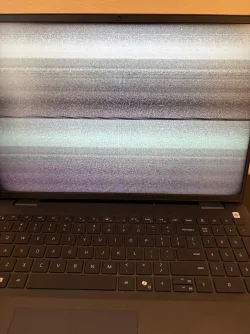
Why is my laptop showing weird lines when i start it up?


bryan123

Well-known member
Local time
6:44 AM
Posts
34
OS
Windows 11 Home
For the past month my laptop sometimes shows these weird lines when i turn it on and it looks so odd. I dont know what is causing it. I can hit things on my keyboard like if i hit caps lock the light on that key will go on. But not sure why my laptop is doing this all of a sudden? I would have to restart it again and its fine. Not sure something with my graphics card or something. I have My CPU is AMD Ryzen 7 8840U with Radeon 780M Graphics. And my AMD software Adrenalin edition version is up to date. Its 25.12.1. I have Win 11 25H2 Build 26200.7462. My laptop is a Dell Inspiron 16 5645 I attached some pictures of the lines im seeing. I just hit power button my laptop and after a second or two it shows that and i gotta restart to fix it and its fine. It only happens time to time but its annoying.
 
Windows Build/Version
Win 11 25H2 Build 26200.7462

Attachments
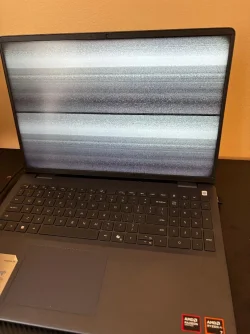
  • pic 1.webp
    pic 1.webp
    149.5 KB · Views: 4
  • pic 2.webp
    pic 2.webp
    213.3 KB · Views: 4

My Computer My Computer

At a glance

Windows 11 Home
OS
Windows 11 Home
Computer type
Laptop
Manufacturer/Model
Dell
I've never had this problem. I think your Dell has component tests if it's like mine. There should be a key to press at startup to launch a genetic test, then once this genetic test is finished you can choose component tests and there should be these tests in advanced mode including for the screen. That's how it is for me with my Dell laptop.
 

My Computer My Computer

At a glance

windows 11
OS
windows 11
I feel you've got 2 possible issues here. One, your laptop graphics hardware is glitching or two, you've got a conflict with the video driver. You might try booting in Safe Mode and see if the video issue remains. If you don't see the issue while in Safe Mode this helps narrow down the possible issue to the graphics driver being used. The other possibility could be with the AMD driver being used. Are you using the one from AMD itself or the one provided by Dell? I ask because even AMD suggests to using the graphics driver provided by the vendor over their own in certain circumstances.
 

My Computer My Computer

At a glance

Win 7/10/11
OS
Win 7/10/11
Computer type
PC/Desktop
Other Info
I'm a computer enthusiast so have quite a few systems that I run. More like an advanced hobby.
Have you noticed if it does this when only using battery power?

My previous older Dell that I still have would do something a bit like that on battery and the fix was a setting in the graphics driver control panel. From my notes at the time:

Code:
                              ******Settings to change on Intel Video Driver to prevent driver crashing on battery******


1) Goto control panel and open "Intel (R) Graphics and Media".

2) Select the advanced option (this gives all options)

3) Select "Power" menu. 5) Select "On Battery" from the dropdown.

4) Untick the "display refresh rate..." and "display power saving..."

5) Apply the settings And that's it... all seems good so far.

--------------------------------------------------------------------------------------------------------------------------------------------------------

Latest driver installed by Windows resets these back to the default state.
 

My Computer My Computer

At a glance

W11 Pro x64 ongoing Canary 29500 latest buildsIntel i58GbIntel HD Graphics
OS
W11 Pro x64 ongoing Canary 29500 latest builds
Computer type
Laptop
Manufacturer/Model
Dell 7760 Mobile Precision 17"
CPU
Intel i5
Motherboard
Unknown
Memory
8Gb
Graphics Card(s)
Intel HD Graphics
Sound Card
Realtek
Monitor(s) Displays
Internal
Hard Drives
2 x 256Gb SSD
PSU
Dell 240 watt
Mouse
Dell Premier Bluetooth
Internet Speed
50Mbps
Browser
Edge
Antivirus
Default Microsoft Security
I always download my driver from the amd website or if amd adrenalin on my computer prompts me to update then i do. I usually dont do drivers from dell except for like BIOS update. Its hard to see whats going on cause it just happens randomly. It doesnt just happen every time i turn on my laptop. Is there like something if it happens again and i reboot i can hit something on my keyboard and it goes to like a specific test or something and tells what happened from previous boot in a way if that makes sense to kinda pinpoint whats going on? My laptop wasnt charging when the screen lines happened by the way. My charger wasnt connected at the time.
 

My Computer My Computer

At a glance

Windows 11 Home
OS
Windows 11 Home
Computer type
Laptop
Manufacturer/Model
Dell
The other possibility could be with the AMD driver being used. Are you using the one from AMD itself or the one provided by Dell? I ask because even AMD suggests to using the graphics driver provided by the vendor over their own in certain circumstances.
Laptops tend to be finicky when it comes to graphics drivers. Usually best to stick with the laptop manufacturer driver vs the latest website driver even though they're usually older.
 

My Computers My Computers

  • At a glance

    Windows 11 25H2Intel Core Ultra 9 275HX (24-Core)64GB DDR5 6400MT/sNVIDIA GeForce RTX 5080 and Intel UHD Graphics
    OS
    Windows 11 25H2
    Computer type
    Laptop
    Manufacturer/Model
    Alienware 18 Area-51
    CPU
    Intel Core Ultra 9 275HX (24-Core)
    Motherboard
    Alienware
    Memory
    64GB DDR5 6400MT/s
    Graphics Card(s)
    NVIDIA GeForce RTX 5080 and Intel UHD Graphics
    Sound Card
    Onboard, Realtek high-performance Audio chips (ALC3329 & ALC1708))
    Monitor(s) Displays
    300HZ 18-inch QHD 500 nit Comfort View+
    Screen Resolution
    2560 x 1600
    Hard Drives
    2TB NVMe M.2 PCIe Gen 5 SSD
    Case
    Magnesium Alloy
    Cooling
    Advanced Cryo-Tech Quad-Fan Cooling system & large vapor chamber
    Keyboard
    Cherry MX ultra low profile mechanical keyboard with per key AlienFX RGB lighting
    Mouse
    Logitech MX Master 4
    Browser
    Vivaldi (main), Firefox, Chrome, Edge
    Antivirus
    MS Defender and Malwarebytes Free
  • At a glance

    Windows 11 25H2Qualcomm Snapdragon X Elite (12 Core) ARM bas...16GB LPDDR5Qualcomm Adreno X1-85
    Operating System
    Windows 11 25H2
    Computer type
    Laptop
    Manufacturer/Model
    Microsoft Surface Laptop 7
    CPU
    Qualcomm Snapdragon X Elite (12 Core) ARM based CPU
    Motherboard
    Microsoft Corp.
    Memory
    16GB LPDDR5
    Graphics card(s)
    Qualcomm Adreno X1-85
    Sound Card
    Omnisonic speakers with Dolby Atmos spatial sound
    Monitor(s) Displays
    120 Hz 13.8-inch 600 nit PixelSense Flow touchscreen
    Screen Resolution
    2304x1536
    Hard Drives
    1TB NVMe Gen 4 SSD
    Case
    Anodized Aluminum
    Cooling
    Traditional active cooling fan system
    Keyboard
    Mechanical QWERTY, backlit when in use
    Mouse
    Logitech MX Master 4 and Surface Arc Mouse
    Browser
    Vivaldi (main), Firefox, Chrome, Edge
    Antivirus
    MS Defender and Malwarebytes Free
All Drivers for Dell's and any other OEM computers are specifically written from the hardware manufacturer for this Dell model.
If having problems, first update the driver from the Dell Web site
Even if if is older.
If you downloaded the latest driver, then try using an external monitor or TV. If you are still having the same issue, then run a Diagnostic test
Support for Inspiron 16 5645 | Diagnostics | Dell US

If you continue to have the same issue, Your video chip that is soldered onto the motherboard is failing. The whole motherboard would need to be replaced.
 

My Computer My Computer

At a glance

Windows 11 Pro Insider 64 bit 25H2 26200.5742Intel Core i7 9700K 3.6016 GBnVidia GEForce RTX 2060 Super
OS
Windows 11 Pro Insider 64 bit 25H2 26200.5742
Computer type
PC/Desktop
Manufacturer/Model
Gigabyte Z390 UD
CPU
Intel Core i7 9700K 3.60
Motherboard
Gigabyte Z390 UD
Memory
16 GB
Graphics Card(s)
nVidia GEForce RTX 2060 Super
Sound Card
onboard
Monitor(s) Displays
Two 27" Dell 4K monitors
Screen Resolution
3840 x 2160
Hard Drives
M.2 NVME SSD, 500 GB; Two 2TB Mechanical HDD's
PSU
850w PSU
Case
Cyberpower PC
Cooling
Water cooled
Keyboard
Backlit Cyberpower gaming keyboard
Mouse
Backlit Cyberpower gaming mouse
Internet Speed
1 GB mbps
Browser
Brave
Antivirus
Windows Security

My Computer My Computer

At a glance

Windows 11 Home
OS
Windows 11 Home
Computer type
Laptop
Manufacturer/Model
Dell
We need to be respectful of others and follow the forum rules, taking everyone's sensitivities into account. Hardware specifications, showing your desktop, photos, etc., are all optional. Saying it's not considerate to list them is disrespectful to other members.
Hardware and OS spec's are the minimum information required to be able to diagnose an issue and are hardly state secrets and has nothing to do with respect.
 

My Computers My Computers

  • At a glance

    Windows 11 Enterprise 25H2 26200 7462Intel XEON E5-2699 v364GB Teamgroup UD4-3600NVIDIA GeForce GTX 1080 Ti
    OS
    Windows 11 Enterprise 25H2 26200 7462
    Computer type
    PC/Desktop
    Manufacturer/Model
    Custom Build
    CPU
    Intel XEON E5-2699 v3
    Motherboard
    ASUS X99-A
    Memory
    64GB Teamgroup UD4-3600
    Graphics Card(s)
    NVIDIA GeForce GTX 1080 Ti
    Sound Card
    Integrated
    Monitor(s) Displays
    ACER X34 Predator
    Screen Resolution
    3440 x 1440
    Hard Drives
    Crucial CT1000P 3P SSD8 1TB
    Crucial CT1000 BX500 SSD 1TB
    PSU
    GameMax Pro
    Case
    Fractal Design
    Cooling
    Corsair H110iGT + 6 140mm Fans
    Keyboard
    Corsair K4
    Mouse
    G-Skill G502
    Internet Speed
    300MBs
    Browser
    Chrome
    Antivirus
    OEM
    Other Info
    ASUS RT-AC87U Router
  • At a glance

    25H2 26200.50748GB
    Operating System
    25H2 26200.5074
    Computer type
    Laptop
    Manufacturer/Model
    ASUS X555LA
    Memory
    8GB
    Browser
    Chrome
    Antivirus
    OEM
All Drivers for Dell's and any other OEM computers are specifically written from the hardware manufacturer for this Dell model.

No. The core driver code is almost always written by the original hardware manufacturer (NVIDIA writes the core GPU driver - Intel writes the core chipset driver). Then comes the OEM (Dell in this case) takes this core driver (which could have all kinds of issues - as many do at a given time) and applies their custom modifications (if necessary) and runs some tests for the sake of stability. If the Driver proves to be broken in one way or another - yet stable enough for the GPU to work in general, the OEM - might give it another try with a future release - that's deemed good enough. But then a new driver from Nvidia/AMD is released - which fixes more stuff - but your laptop is already 3 years OLD and most OEM devs will pretend it doesn't have a GPU anymore - and expect you to be grateful - you still get some security updates. In those 3 years since the last GPU Driver from the OEM site - Nvidia/AMD released 35 other drivers - which can fix A LOT of issues - while also optimizing the drivers for latest games and all kind of creative apps - running considerably smoother than that 3 years old driver (again, we're talking 35 driver releases).

Coincidentally, last weekend - i solved an old client's issue by simply installing the AMD driver instead of the 2 year old OEM driver - which had some weird Power Saving Bug (randomly switching to iGPU after some time playing a game). For past 2 years he kept restarting the PC - while playing games - cause the friendly neighborhood tech-guy - advised him to use "only" the OEM video driver.

Experience wise - i only agree to the OEM part - when it comes to Sound Drivers, Card Reader - or any other component - where the original manufacturer does not release drivers on its own. Since, even if it shares the same chip - a newer version made by a different OEM and for an entirely different product (customized particularity for that system) - is usually less than adequate (can cause all kinds of issues). The higher version number - says very little in that case.
 

My Computer My Computer

At a glance

WinDOS 25H2Intel & AMDSO-DIMM SK Hynix 15.8 GB Dual-Channel DDR4-26...nVidia RTX 2060 6GB Mobile GPU (TU106M)
OS
WinDOS 25H2
Computer type
Laptop
CPU
Intel & AMD
Memory
SO-DIMM SK Hynix 15.8 GB Dual-Channel DDR4-2666 (2 x 8 GB) 1329MHz (19-19-19-43)
Graphics Card(s)
nVidia RTX 2060 6GB Mobile GPU (TU106M)
Sound Card
Onbord Realtek ALC1220
Screen Resolution
1920 x 1080
Hard Drives
1x Samsung PM981 NVMe PCIe M.2 512GB / 1x Seagate Expansion ST1000LM035 1TB
Does your laptop have the lid open all the time - or do you open/close it?

Pinching or a loose connection of the eDP/LVDS cable - could also be the culprit (due to bad design/construction - the protective sleeve wears down on some laptops - causing the tiny internal copper wires to break or short against each other).

Wiggle it to test this out - by moving the lid back and forth. If the screen flickers, changes pattern or clears up at a certain angle - then it's some issue with the display cable.
 

My Computer My Computer

At a glance

WinDOS 25H2Intel & AMDSO-DIMM SK Hynix 15.8 GB Dual-Channel DDR4-26...nVidia RTX 2060 6GB Mobile GPU (TU106M)
OS
WinDOS 25H2
Computer type
Laptop
CPU
Intel & AMD
Memory
SO-DIMM SK Hynix 15.8 GB Dual-Channel DDR4-2666 (2 x 8 GB) 1329MHz (19-19-19-43)
Graphics Card(s)
nVidia RTX 2060 6GB Mobile GPU (TU106M)
Sound Card
Onbord Realtek ALC1220
Screen Resolution
1920 x 1080
Hard Drives
1x Samsung PM981 NVMe PCIe M.2 512GB / 1x Seagate Expansion ST1000LM035 1TB
Does your laptop have the lid open all the time - or do you open/close it?

Pinching or a loose connection of the eDP/LVDS cable - could also be the culprit (due to bad design/construction - the protective sleeve wears down on some laptops - causing the tiny internal copper wires to break or short against each other).

Wiggle it to test this out - by moving the lid back and forth. If the screen flickers, changes pattern or clears up at a certain angle - then it's some issue with the display cable.
One could also try an external display to see if the external display behaves correctly. If it does, then @neves is correct.
 

My Computer My Computer

At a glance

Windows 11 Pro 26200.9168Ryzen 5 5600G24GB
OS
Windows 11 Pro 26200.9168
Computer type
PC/Desktop
Manufacturer/Model
Home Built
CPU
Ryzen 5 5600G
Motherboard
ASUS X470 Prime Pro
Memory
24GB
Monitor(s) Displays
Alienware 2518HF
Screen Resolution
1920 x 1080
Hard Drives
Boot: NVME WDC WDS500G; ASUS M.2 Riser card with 3 additional NVME drives
Various Internal SDD (Samsung and WDC) and HDD drives mostly Western Digital
PSU
Seasonic Focus Gold 650W
Case
Corsair 200R
Cooling
Noctua PWM fans x 3
Keyboard
Corsair K60 SE Pro
Mouse
Corsair Dark Core RGB Pro SE
Internet Speed
500/500
Browser
MS Edge
Antivirus
Malwarebytes Premium
Trying out all your suggestions but still same issue going on. I noticed it shows my dell logo when it boots up but when that dell boot screen goes away then that screen issue pops up after. So weird. i keep my laptop lid open most of the time. I even wiggled my lid when it does the screen issue to see if it fixes it but no it doesnt. Someone said about rolling back graphics or something? I had AMD Adrenalin Edition drivers 25.11.1 and i thought that that was causing the issues at first but when i updated to the new drivers that came out on 12/10 and now its 25.12.1 i am still having this issue. I just got this laptop like maybe 2 or 3 years ago. Can it be something if it over heats or something when i use it? I know when i am using my laptop and browsing the web or something my computer freezes sometimes and then a few seconds later the fans go on and then my computers unfreezes. I am wondering if i should do a windows reset. I am clueless at this point now. Any other information about my laptop do you need that can be helpful pinpointing this issue? Thanks!
 

My Computer My Computer

At a glance

Windows 11 Home
OS
Windows 11 Home
Computer type
Laptop
Manufacturer/Model
Dell
Does it behave the same booting into safe mode?
 

My Computer My Computer

At a glance

Windows 11 25H2i7 7700k16 GB DDR4nVidia GeForce GTX1070 (Pascal)
OS
Windows 11 25H2
Computer type
PC/Desktop
Manufacturer/Model
MSI
CPU
i7 7700k
Motherboard
B250 Bazooka (MS-7A70)
Memory
16 GB DDR4
Graphics Card(s)
nVidia GeForce GTX1070 (Pascal)
Sound Card
Realtek HDA (ALC887)
Monitor(s) Displays
ASUS VG278QR 1920x1080 165Hz 5ms
Screen Resolution
FullHD
Hard Drives
SSD NVMe + Hardisk SATA III
Case
Aerocool
Cooling
Air regular one
Keyboard
Logitech G213
Mouse
Logitech G203 Prodigy
Internet Speed
600Mb/s
Browser
Firefox
Antivirus
Microsoft Defender
Does it behave the same booting into safe mode?
Im not sure. Like i said the screen issue happens randomly. One day i can turn my laptop on and its fine and another day i can turn it on and the screen problem appears. Its a hit or miss. Maybe i should replace my laptop im not sure.
 

My Computer My Computer

At a glance

Windows 11 Home
OS
Windows 11 Home
Computer type
Laptop
Manufacturer/Model
Dell
1) you state ‘when you turn it on’. Is it powered off or in hibernate when you do so?

2) is fast startup enabled? If so disable it to get a true full shutdown

3) in device manager, change your display driver to Microsoft basic adapter and leave it like that for a bit and see if it happens again
 

My Computer My Computer

At a glance

Windows 11 Pro
OS
Windows 11 Pro
Many Dell laptops including my Inspiron 7000 have a poorly designed GPU cable routing which routes the GPU cable around one of the screen hinges. After a long period of use, the strain on the cable can cause a poor connection where the GPU cable connects with the screen. This causes all manner of problems like screen tearing or in my case intermittent black screens. Check the laptop HDMI output and see if that is OK. If so, then suspect the GPU cable. The fix is to resecure the GPU cable to screen connection. I stuck a wound closure plaster over the connection to apply tension to the connection. I also inserted foam where the cable wraps around the hinge to prevent chafing. The Dell manual indicates you have to disassemble the laptop to do this but I was able to fix it by removing the touch screen and screen behind taking care not to stress the cables. In the worst case the GPU cable could be damaged requiring replacement.
 

My Computer My Computer

At a glance

Windows 11 ProCore i7-13700K64 GB Kingston Fury Beast DDR5Gigabyte GeForce RTX 2060 Super Gaming OC 8G
OS
Windows 11 Pro
Computer type
PC/Desktop
Manufacturer/Model
Self build
CPU
Core i7-13700K
Motherboard
Asus TUF Gaming Plus WiFi Z790
Memory
64 GB Kingston Fury Beast DDR5
Graphics Card(s)
Gigabyte GeForce RTX 2060 Super Gaming OC 8G
Sound Card
Realtek S1200A
Monitor(s) Displays
Viewsonic VP2770 & Dell (secondary)
Screen Resolution
2560 x 1440
Hard Drives
Kingston KC3000 2TB NVME SSD & SATA HDDs & SSD
PSU
EVGA SuperNova G2 850W
Case
Nanoxia Deep Silence 1
Cooling
Noctua NH-D14
Keyboard
Microsoft Digital Media Pro
Mouse
Logitech Wireless
Internet Speed
80 Mb / s
Browser
Chrome
Antivirus
Defender, Malwarebytes Free & AdwCleaner
Im not sure. Like i said the screen issue happens randomly. One day i can turn my laptop on and its fine and another day i can turn it on and the screen problem appears. Its a hit or miss. Maybe i should replace my laptop im not sure.
Perform the more in-depth Dell tests at startup if you haven't already done so.
 

My Computer My Computer

At a glance

windows 11
OS
windows 11
Hardware and OS spec's are the minimum information required to be able to diagnose an issue and are hardly state secrets and has nothing to do with respect.
This isn't important personal/digital data. It's more of an Obsessive-Compulsive Disorder (OCD) than anything else. I've already mentioned computer components in my posts in a few threads, and if I start a new one, I'll include them in the opening post.
The OCD manifests itself in the "my computers" section perhaps I'll fill that in later. This needs to be respected.

This same comment was deleted, or it didn't post.
 

My Computer My Computer

At a glance

windows 11
OS
windows 11

Latest Support Threads

Back
Top Bottom