My Computer
At a glance
Windows 11
- OS
- Windows 11
- Computer type
- PC/Desktop
- Manufacturer/Model
- Asus
Follow along with the video below to see how to install our site as a web app on your home screen.
Note: This feature may not be available in some browsers.
I deleted the usage history and it still came up with 1 second of cpu time.Hi Secrios,
I would check to see it is in your Startup apps (in Task Manager). If it is, you can disable it. Just taking a stab.
Kind regards,
tecknot
www.elevenforum.com
So I have disabled notepad running in the background via the app settings but it still shows up in app history.uwp apps run sporadically in the background all the time. just disable background apps...
![]()
Enable or Disable Background Apps in Windows 11
This tutorial will show you how to enable or disable let apps run in the background for your account or all users in Windows 11. In Windows 11, you can use apps that can continue to perform actions even when you are not actively in the app’s window. These are commonly called background apps...www.elevenforum.com
So I have disabled notepad running in the background via the app settings but it still shows up in app history.
How many tens of minutes have you spent trying to sort something that uses 1 second of CPU?I deleted the usage history and it still came up with 1 second of cpu time.
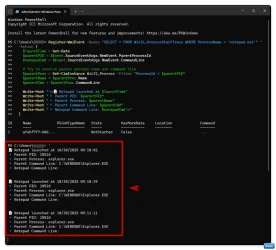
Register-WmiEvent -Query "SELECT * FROM Win32_ProcessStartTrace WHERE ProcessName = 'notepad.exe'" `
-Action {
$launchTime = Get-Date
$parentPID = $Event.SourceEventArgs.NewEvent.ParentProcessId
$notepadCmd = $Event.SourceEventArgs.NewEvent.CommandLine
# Try to resolve parent process name and command line
$parentProc = Get-CimInstance Win32_Process -Filter "ProcessId = $parentPID"
$parentName = $parentProc.Name
$parentCmd = $parentProc.CommandLine
Write-Host "`n📝 Notepad launched at $launchTime"
Write-Host "🔹 Parent PID: $parentPID"
Write-Host "🔹 Parent Process: $parentName"
Write-Host "🔹 Parent Command Line: $parentCmd"
Write-Host "🔹 Notepad Command Line: $notepadCmd`n"
}

Get-EventSubscriber | Unregister-Event
Parent Process: explorer.exe
Parent Command Line: C:\Windows\explorer.exe
Parent Process: svchost.exe
Parent Command Line: C:\Windows\System32\svchost.exe -k netsvcs
Parent Process: RuntimeBroker.exe
Parent Command Line: RuntimeBroker.exe -Embedding
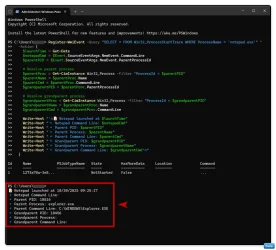
Register-WmiEvent -Query "SELECT * FROM Win32_ProcessStartTrace WHERE ProcessName = 'notepad.exe'" `
-Action {
$launchTime = Get-Date
$notepadCmd = $Event.SourceEventArgs.NewEvent.CommandLine
$parentPID = $Event.SourceEventArgs.NewEvent.ParentProcessId
# Resolve parent process
$parentProc = Get-CimInstance Win32_Process -Filter "ProcessId = $parentPID"
$parentName = $parentProc.Name
$parentCmd = $parentProc.CommandLine
$grandparentPID = $parentProc.ParentProcessId
# Resolve grandparent process
$grandparentProc = Get-CimInstance Win32_Process -Filter "ProcessId = $grandparentPID"
$grandparentName = $grandparentProc.Name
$grandparentCmd = $grandparentProc.CommandLine
Write-Host "`n📝 Notepad launched at $launchTime"
Write-Host "🔹 Notepad Command Line: $notepadCmd"
Write-Host "🔹 Parent PID: $parentPID"
Write-Host "🔹 Parent Process: $parentName"
Write-Host "🔹 Parent Command Line: $parentCmd"
Write-Host "🔹 Grandparent PID: $grandparentPID"
Write-Host "🔹 Grandparent Process: $grandparentName"
Write-Host "🔹 Grandparent Command Line: $grandparentCmd`n"
}

Get-EventSubscriber | Unregister-Event