Why is windows not removing the apps when I uninstall them


vsub

Active member
Member
VIP
Local time
11:11 AM
Posts
212
OS
Windows 11
I uninstall them but I can still see them in "C:\Program Files\WindowsApps" taking space
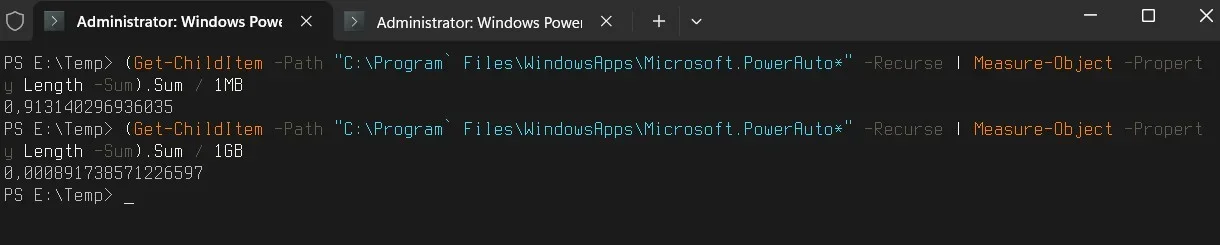
For example I have no use at all for the Power Automate and that program is taking over 1gb of space
I also removed some other apps long time ago and just notest that they are still there
 

My Computer My Computer

At a glance

Windows 1114700HX64GBRTX 4070
OS
Windows 11
Computer type
Laptop
Manufacturer/Model
MSI Sword 17 HX
CPU
14700HX
Memory
64GB
Graphics Card(s)
RTX 4070
Really 1Gb ?

1.webp
 

My Computer My Computer

At a glance

Microsoft Windows 11 HomeIntel Core i5-13490F2 x 16 Patriot Memory (PDP Systems) PSD516G56...GIGABYTE GeForce RTX 4070 WINDFORCE OC 12G (G...
OS
Microsoft Windows 11 Home
Computer type
PC/Desktop
Manufacturer/Model
MSI MS-7D98
CPU
Intel Core i5-13490F
Motherboard
MSI B760 GAMING PLUS WIFI
Memory
2 x 16 Patriot Memory (PDP Systems) PSD516G560081 6400MT (32-37-37-74); 1.35V)
Graphics Card(s)
GIGABYTE GeForce RTX 4070 WINDFORCE OC 12G (GV-N4070WF3OC-12GD)
Sound Card
Bluetooth Аудио
Monitor(s) Displays
INNOCN 15K1F
Screen Resolution
1920 x 1080
Hard Drives
WD_BLACK SN770 250GB
KINGSTON SNV2S1000G (ELFK0S.6)
PSU
Thermaltake Toughpower GF3 1000W
Case
CG560 - DeepCool
Cooling
ID-COOLING SE-224-XTS / 2 x 140Mm Fan - rear and top; 3 x 120Mm - front
Keyboard
Corsair K70 RGB TKL
Mouse
Corsair KATAR PRO XT
Internet Speed
100 Mbps
Browser
Firefox
Antivirus
Microsoft Defender Antivirus
Other Info
https://www.userbenchmark.com/UserRun/66553205
1735221010752.webp
 

My Computer My Computer

At a glance

Windows 1114700HX64GBRTX 4070
OS
Windows 11
Computer type
Laptop
Manufacturer/Model
MSI Sword 17 HX
CPU
14700HX
Memory
64GB
Graphics Card(s)
RTX 4070
It could be mis-reporting due to some corruption. Try running the batch file to fix corruption. You'll need to unzip it first.
The file runs sfc /scannow, DISM and chkdsk commands in sequence and it takes 10 minutes on my PC so be patient. Good luck.

It is an easy first step in discovering the culprit.
 

Attachments

My Computers My Computers

  • At a glance

    Windows 11 ProAMD Ryzen 9 8945HS32GB DDR5 SO-DIMMIntegrated AMD Radeon 780M (4.00 GHz)
    OS
    Windows 11 Pro
    Computer type
    PC/Desktop
    Manufacturer/Model
    GMKtec K11
    CPU
    AMD Ryzen 9 8945HS
    Memory
    32GB DDR5 SO-DIMM
    Graphics Card(s)
    Integrated AMD Radeon 780M (4.00 GHz)
    Monitor(s) Displays
    Benq 2250HM
    Screen Resolution
    1920 x 1080
    Hard Drives
    1 TB PCIe 4.0 NVMe M.2 SSD
  • At a glance

    Windows 11 HomeIntel® Core™ Ultra 7 - 255H processor16 GB LPDDR5 SDRAMIntel Arc 140T onboard graphics
    Operating System
    Windows 11 Home
    Computer type
    Laptop
    Manufacturer/Model
    ASUS Zenbook 14 OLED 14" Laptop - UX3405CA-QL192W
    CPU
    Intel® Core™ Ultra 7 - 255H processor
    Memory
    16 GB LPDDR5 SDRAM
    Graphics card(s)
    Intel Arc 140T onboard graphics
    Screen Resolution
    1920 x 1200 (16:10 WUXGA resolution) OLED Touchscreen
    Hard Drives
    1TB SSD

My Computer My Computer

At a glance

Win 11 Pro 25H2 26200 8875Intel Core I9 12900K32 GBNvidia GeForce RTX 3060 24GB
OS
Win 11 Pro 25H2 26200 8875
Computer type
PC/Desktop
Manufacturer/Model
HP Omen45L
CPU
Intel Core I9 12900K
Motherboard
HP 8917
Memory
32 GB
Graphics Card(s)
Nvidia GeForce RTX 3060 24GB
Sound Card
HP
Monitor(s) Displays
2 HP 27 & 23
Screen Resolution
3840x2160
Hard Drives
2 TB Samsung 990 EVO 2 TB Samsung 1 TB SATA ST1000
PSU
HP 800 Watt
Case
HP
Cooling
Water
Keyboard
Logo Tech G 213
Mouse
Logi Tech 502
Browser
FireFox
Antivirus
MS Defender / Malwarebytes Prem.
Other Info
Omen 45SL purchased from HP 12 2022 - Brother Printer MFC-L2700DW APC 500 Back UPS Macrium Reflect Home 8.1 25H2 Oct 2025 KEK CA 2023 cert April 2026
If you don't run the program that checks the folder size as admin,it will be reported as empty(0 bytes used)
It could be mis-reporting due to some corruption. Try running the batch file to fix corruption. You'll need to unzip it first.
The file runs sfc /scannow, DISM and chkdsk commands in sequence and it takes 10 minutes on my PC so be patient. Good luck.

It is an easy first step in discovering the culprit.
No problems found
 

My Computer My Computer

At a glance

Windows 1114700HX64GBRTX 4070
OS
Windows 11
Computer type
Laptop
Manufacturer/Model
MSI Sword 17 HX
CPU
14700HX
Memory
64GB
Graphics Card(s)
RTX 4070
Modifying the registry can be dangerous but if you are confident in doing this then you can search it for the term Microsoft PowerAutomate and delete any references found.
Know that changes you make happen in real time so if you make a mistake you need to be able to restore the registry so make an image beforehand or backup the registry before editing.
 

My Computers My Computers

  • At a glance

    Windows 11 ProAMD Ryzen 9 8945HS32GB DDR5 SO-DIMMIntegrated AMD Radeon 780M (4.00 GHz)
    OS
    Windows 11 Pro
    Computer type
    PC/Desktop
    Manufacturer/Model
    GMKtec K11
    CPU
    AMD Ryzen 9 8945HS
    Memory
    32GB DDR5 SO-DIMM
    Graphics Card(s)
    Integrated AMD Radeon 780M (4.00 GHz)
    Monitor(s) Displays
    Benq 2250HM
    Screen Resolution
    1920 x 1080
    Hard Drives
    1 TB PCIe 4.0 NVMe M.2 SSD
  • At a glance

    Windows 11 HomeIntel® Core™ Ultra 7 - 255H processor16 GB LPDDR5 SDRAMIntel Arc 140T onboard graphics
    Operating System
    Windows 11 Home
    Computer type
    Laptop
    Manufacturer/Model
    ASUS Zenbook 14 OLED 14" Laptop - UX3405CA-QL192W
    CPU
    Intel® Core™ Ultra 7 - 255H processor
    Memory
    16 GB LPDDR5 SDRAM
    Graphics card(s)
    Intel Arc 140T onboard graphics
    Screen Resolution
    1920 x 1200 (16:10 WUXGA resolution) OLED Touchscreen
    Hard Drives
    1TB SSD
I install it again and RevoUninstaller did not find it
In the end I use this command and that remove it
get-appxpackage -allusers Microsoft.PowerAutomateDesktop | remove-appxpackage -allusers
 

My Computer My Computer

At a glance

Windows 1114700HX64GBRTX 4070
OS
Windows 11
Computer type
Laptop
Manufacturer/Model
MSI Sword 17 HX
CPU
14700HX
Memory
64GB
Graphics Card(s)
RTX 4070
UWP (or "Store") apps are designed around the concept of user provisioning. The base software package is written to "C:\Program Files\WindowsApps" in one or more folders (some of them are just resources). For every user, Windows tries to provision or create an individual app profile.

When you use Remove-AppPackage, by default it only removes your AppData\Local profile but leaves the base package installed in WindowsApps. The reason is a PC may be shared by two or more users, and other users may still want to use that same app. Windows won't clean up the base package unless you force removal using the "-AllUsers" flag (which de-provisions the app from all user profiles). This is the normal behavior, and how UWP packages should be removed.
 
Last edited:

My Computer My Computer

At a glance

Windows 7
OS
Windows 7
UWP (or "Store") apps are designed around the concept of user provisioning. The base software package is written to "C:\Program Files\WindowsApps" in one or more folders (some of them are just resources). For every user, Windows tries to provision or create an individual app profile.

Wouldn't that take up useless, bloated space for Store apps that are no longer used?

I would think some kind of global cleanup would be required...


When you use Remove-AppPackage, by default it only removes your AppData\Local profile but leaves the base package installed in WindowsApps. The reason is a PC may be shared by two or more users, and other users may still want to use that same app.

If there's only one user and one user profile, then the whole thing needs to go. I could be wrong, but I believe many (if not most) computers out there are set up for only one user, anyway.


Windows won't clean up the base package unless you force removal using the "-AllUsers" flag (which de-provisions the app from all user profiles).

I tried to look up a tutorial on how to do that and couldn't find one, so how would you do that?

This is the normal behavior, and how UWP packages should be removed.

So if it happens to show up in Revo, it won't clean it all up? Not even for the user profile that's being logged into?

Interesting topic. Sorry for all the questions...
 

My Computers My Computers

  • At a glance

    Windows 11 Pro 25H2 build: (26200.7623)32GB
    OS
    Windows 11 Pro 25H2 build: (26200.7623)
    Computer type
    Laptop
    Manufacturer/Model
    Microsoft Surface Pro
    Memory
    32GB
  • At a glance

    Microsoft 25H2 ProIntel Core Ultra 764GBIntel Integrated Graphics
    Operating System
    Microsoft 25H2 Pro
    Computer type
    Laptop
    Manufacturer/Model
    Dell Pro 14 - PC14250
    CPU
    Intel Core Ultra 7
    Memory
    64GB
    Graphics card(s)
    Intel Integrated Graphics
    Hard Drives
    Micron 1TB SSD
I have a feeling that the command remove-appxpackage just delete the folder but all traces of the app are left
LIke installing an app,run it for a while and then delete the folder without using the uninstaller

When I scan the registry and the C drive,there is A LOT of leftovers
If there is only one account AND that account is the admin one,I would expect the app will actually be removed

Once you install for of the apps,when you uninstall it,it feels like you are just removing the shortcut
 

My Computer My Computer

At a glance

Windows 1114700HX64GBRTX 4070
OS
Windows 11
Computer type
Laptop
Manufacturer/Model
MSI Sword 17 HX
CPU
14700HX
Memory
64GB
Graphics Card(s)
RTX 4070
@cheaterslick
This is how UWP apps are designed, they have features which mostly benefit workplace users. A work PC may be shared by more than one user (like a shift worker), or the same PC is re-issued to the next hire (and it's not wiped clean).

In these cases, IT doesn't want to re-install the app again. An individual user may chose not to use a specific app, or that app is denied to them by policy restrictions. For example, students are not allowed to use the Store App on a school PC but their teacher can. The Store App is provisioned for teachers but not students.

So the base package remains installed, until it's absolutely clear no one will be using the app, now or in the future. Remove-AppxPackage (by itself) only refers to removing your private app profile for the named app. MS doesn't really promote that "Remove-AppxPackage -AllUsers" should be used, since they're trying to maximize app usage. Especially because Windows ships with so many default Apps, and they want you using them ("engagement").

I don't use Revo, so I can't comment on it. From reading user comments, it can remove any UWP package which doesn't have the non-removable flag set. PowerAutomation is an optional feature, so it should be removable.

Many frustrating Windows features exist because they're put in for workplaces, and not necessarily for a single home user.
 

My Computer My Computer

At a glance

Windows 7
OS
Windows 7
@cheaterslick
This is how UWP apps are designed, they have features which mostly benefit workplace users. A work PC may be shared by more than one user (like a shift worker), or the same PC is re-issued to the next hire (and it's not wiped clean).

In these cases, IT doesn't want to re-install the app again. An individual user may chose not to use a specific app, or that app is denied to them by policy restrictions. For example, students are not allowed to use the Store App on a school PC but their teacher can. The Store App is provisioned for teachers but not students.

Yup, I get all that, but it doesn't really apply to many home users, now does it?

That's why some kind of workaround needs to be applied. A form of junk cleanup. Like for example, nuking XBOX stuff, stuff that I don't need and don't use.

So the base package remains installed, until it's absolutely clear no one will be using the app, now or in the future. Remove-AppxPackage (by itself) only refers to removing your private app profile for the named app. MS doesn't really promote that "Remove-AppxPackage -AllUsers" should be used, since they're trying to maximize app usage. Especially because Windows ships with so many default Apps, and they want you using them ("engagement").

Yeah, but I don't want to always do that. Most of the time, if it's a choice between a Store app or a 3rd party app, I'll usually pick the 3rd party app. I don't want MS to control all the apps I choose. That's not 100% the case but that would be how I would want it, if possible.

So "Remove-AppxPackage -AllUsers" is applied as a admin command in cmd? That will get rid of them?

I don't use Revo, so I can't comment on it. From reading user comments, it can remove any UWP package which doesn't have the non-removable flag set. PowerAutomation is an optional feature, so it should be removable.

Many frustrating Windows features exist because they're put in for workplaces, and not necessarily for a single home user.

Some things are hidden from Revo. Hard to believe since it's a remarkable program and that's one of the first things I install in Windows when I have to re-image for some reason.
 

My Computers My Computers

  • At a glance

    Windows 11 Pro 25H2 build: (26200.7623)32GB
    OS
    Windows 11 Pro 25H2 build: (26200.7623)
    Computer type
    Laptop
    Manufacturer/Model
    Microsoft Surface Pro
    Memory
    32GB
  • At a glance

    Microsoft 25H2 ProIntel Core Ultra 764GBIntel Integrated Graphics
    Operating System
    Microsoft 25H2 Pro
    Computer type
    Laptop
    Manufacturer/Model
    Dell Pro 14 - PC14250
    CPU
    Intel Core Ultra 7
    Memory
    64GB
    Graphics card(s)
    Intel Integrated Graphics
    Hard Drives
    Micron 1TB SSD
MS thinks that it is for user's convenience (time/bandwidth), steam does the same, in case you change your mind and want to reinstall.
 

My Computer My Computer

At a glance

Home26H2CanAMD Ryzen 5 8600G (07/24)2x32GB Kingston FURY DDR5 5600 MHz CL36 @5200...ASROCK Radeon RX 6600 Challenger D 8G @48FPS ...
OS
Home26H2Can
Computer type
PC/Desktop
CPU
AMD Ryzen 5 8600G (07/24)
Motherboard
ASROCK B650M-HDV/M.2 (07/24) BIOS 4.43 AGESA ComboAM5 1.3.0.1b Patch A (07/26)
Memory
2x32GB Kingston FURY DDR5 5600 MHz CL36 @5200 CL36 (07/24)
Graphics Card(s)
ASROCK Radeon RX 6600 Challenger D 8G @48FPS (08/24)
Sound Card
Creative Sound BlasterX AE-5 Plus (05/24)
Monitor(s) Displays
24" Philips 24M1N3200ZS/00 (05/24)
Screen Resolution
1920×1080@165Hz via DP1.4
Hard Drives
Kingston KC3000 NVMe 2TB (05/24)
ADATA XPG GAMMIX S11 Pro 512GB (07/19)
PSU
Seasonic Core GM 550 Gold (04/24)
Case
Fractal Design Define 7 Mini with 3x Noctua NF-P14s/12@555rpm (04/24)
Cooling
Noctua NH-U12S with Noctua NF-P12 (04/24)
Keyboard
HP Pavilion Wired Keyboard 300 (07/24) + Rabalux 76017 Parker (01/24)
Mouse
Logitech M330 Silent Plus (07/26)
Internet Speed
500/100 Mbps via RouterOS (05/21) & TCP Optimizer
Browser
Edge, Brave for YouTube, LibreWolf for FB
Antivirus
NextDNS blocking 1/3 Traffic
Other Info
Phone: Motorola Moto G86 (02/26)
Backup: Hasleo Backup Suite (PreOS)
Headphones: Sennheiser RS170 (09/10)
Chair: Huzaro Force 4.4 Grey Mesh (05/24)
Notifier: Xiaomi Mi Band 9 Milanese (10/24)
FlexCore USB-C 3.2 Gen 1 (M) to LAN (F) (08/25)
I install it again and RevoUninstaller did not find it
Did you look under the Uninstaller tab or Windows Apps tab?

I sometimes have to resort to GeekUninstaller if Revo doesn't list it.
 

My Computers My Computers

  • At a glance

    Windows 11 2xH2 (latest update ... forever anal)Intel i5-124008GBNVIDIA GeForce GT730
    OS
    Windows 11 2xH2 (latest update ... forever anal)
    Computer type
    PC/Desktop
    Manufacturer/Model
    HP Slim S01
    CPU
    Intel i5-12400
    Memory
    8GB
    Graphics Card(s)
    NVIDIA GeForce GT730
    Sound Card
    OOBE
    Monitor(s) Displays
    Acer 32"
    Screen Resolution
    1920x1080
    Hard Drives
    512GB KIOXIA NVMe
    1TB SATA SSD
    PSU
    OOBE
    Case
    OOBE
    Cooling
    OOBE
    Keyboard
    BT
    Mouse
    BT
    Browser
    Brave FFox Chrome Opera
    Antivirus
    KIS
  • At a glance

    Windows 11 Pro 2xH2 (latest update ... 4ever ...i7-1165G7 @ 2.80GHzIntel Iris Xe Graphics
    Operating System
    Windows 11 Pro 2xH2 (latest update ... 4ever anal)
    Computer type
    Laptop
    Manufacturer/Model
    HP Pavillion 15
    CPU
    i7-1165G7 @ 2.80GHz
    Graphics card(s)
    Intel Iris Xe Graphics
    Hard Drives
    Samsung NVMe 512GB
    + numerous/multiple SSD Type C USB enclosures
    Internet Speed
    NBN FTTN 50
    Browser
    Brave
    Antivirus
    KIS
Some things are hidden from Revo. Hard to believe since it's a remarkable program and that's one of the first things I install in Windows when I have to re-image for some reason.

Very rarely are things completely hidden from Revo. When they appear to be hidden you can use "hunter" mode. The only thing I've ever found completely hidden from Revo was malware that was embedded in the BIOS. I had to completely remove it from BIOS via reboot first and even then my client was not pleased with the fact that I reinstalled their OS after ward, but the malware was completely gone at that point and no personal data was lost. Whether or not it remained that way is unknown to me as it was a Lenovo laptop so one never really knows. Hit Man Pro also used to be pretty good in the day but you'll have to pay for it if it's still around.
 

My Computer My Computer

At a glance

WIN 11, WIN 10, WIN 8.1, WIN 7 U, WIN 7 PRO, ...Intel i7 6900K and i9-7960X / AMD 3800X (8 core)128 GB CORSAIR DOMINATOR PLATINUM (B DIE)NVIDIA 1070 and RTX 3070
OS
WIN 11, WIN 10, WIN 8.1, WIN 7 U, WIN 7 PRO, WIN 7 HOME (32 Bit), LINUX MINT
Computer type
PC/Desktop
Manufacturer/Model
DIY, ASUS, and DELL
CPU
Intel i7 6900K and i9-7960X / AMD 3800X (8 core)
Motherboard
ASUS X99E-WS USB 3.1 and ASUS X299 SAGE
Memory
128 GB CORSAIR DOMINATOR PLATINUM (B DIE)
Graphics Card(s)
NVIDIA 1070 and RTX 3070
Sound Card
Crystal Sound (onboard)
Monitor(s) Displays
single Samsung 30" 4K and 8" aux monitor
Screen Resolution
4K and something equally attrocious. I'll be working on this.
Hard Drives
A, B, C, D, E, F, G, H, I, J, K, L, M, N, O, P, Q, R, S, T, U, V, W

Ports X, Y, and Z are reserved for USB access and removable drives.

Drive types consist of the following: Various mechanical hard drives bearing the brand names, Seagate, Toshiba, and Western Digital. Various NVMe drives bearing the brand names Kingston, Intel, Silicon Power, Crucial, Western Digital, and Team Group. Various SATA SSDs bearing various different brand names.

RAID arrays included:

LSI RAID 10 (WD Velociraptors) 1115.72 GB
LSI RAID 10 (WD SSDS) 463.80 GB

INTEL RAID 0 (KINGSTON HYPER X) System 447.14 GB
INTEL RAID 1 TOSHIBA ENTERPRIZE class Data 2794.52 GB
INTEL RAID 1 SEAGATE HYBRID 931.51 GB
PSU
SEVERAL. I prefer my Corsair Platinum HX1000i but I also like EVGA power supplies
Case
ThermalTake Level 10 GT (among others)
Cooling
Noctua is my favorite and I use it in my main. I also own various other coolers.
Keyboard
all kinds.
Mouse
all kinds
Internet Speed
360 mbps - 1 gbps (depending)
Browser
FIREFOX
Antivirus
KASPERSKY (no apologies)
Other Info
Gave Dell touch screen with Windows 11 to daughter and got me an OTVOC. Being a PC builder I own many desktop PCs as well. I am a father of five providing PCs, laptops, and tablets for all my family, most of which I have modified, rebuilt, or simply built from scratch. I do not own a cell phone, never have, never will.
Very rarely are things completely hidden from Revo.
Ditto. In cases where I've seen this, it mostly was down to the way a program was installed (user had changed Windows/software installation defaults). In those cases, GeekUninstaller has succeeded.

EDIT
However, Microsoft's insidious deviousness with some apps can be frustrating
 

My Computers My Computers

  • At a glance

    Windows 11 2xH2 (latest update ... forever anal)Intel i5-124008GBNVIDIA GeForce GT730
    OS
    Windows 11 2xH2 (latest update ... forever anal)
    Computer type
    PC/Desktop
    Manufacturer/Model
    HP Slim S01
    CPU
    Intel i5-12400
    Memory
    8GB
    Graphics Card(s)
    NVIDIA GeForce GT730
    Sound Card
    OOBE
    Monitor(s) Displays
    Acer 32"
    Screen Resolution
    1920x1080
    Hard Drives
    512GB KIOXIA NVMe
    1TB SATA SSD
    PSU
    OOBE
    Case
    OOBE
    Cooling
    OOBE
    Keyboard
    BT
    Mouse
    BT
    Browser
    Brave FFox Chrome Opera
    Antivirus
    KIS
  • At a glance

    Windows 11 Pro 2xH2 (latest update ... 4ever ...i7-1165G7 @ 2.80GHzIntel Iris Xe Graphics
    Operating System
    Windows 11 Pro 2xH2 (latest update ... 4ever anal)
    Computer type
    Laptop
    Manufacturer/Model
    HP Pavillion 15
    CPU
    i7-1165G7 @ 2.80GHz
    Graphics card(s)
    Intel Iris Xe Graphics
    Hard Drives
    Samsung NVMe 512GB
    + numerous/multiple SSD Type C USB enclosures
    Internet Speed
    NBN FTTN 50
    Browser
    Brave
    Antivirus
    KIS
I use Revo Uninstaller to uninstall, it can uninstall any hidden Apps if we select Hunter Mode.
 

Attachments

  • Screenshot 2024-12-29 003005.webp
    Screenshot 2024-12-29 003005.webp
    14.2 KB · Views: 1

My Computers My Computers

  • At a glance

    Windows 11 Home ((26100.2894)Intel Core Ultra 5 226VLPDDR5X16GBIntel Arc Graphics
    OS
    Windows 11 Home ((26100.2894)
    Computer type
    Laptop
    Manufacturer/Model
    Acer Swift SF14-51
    CPU
    Intel Core Ultra 5 226V
    Motherboard
    Icefresh_LNV
    Memory
    LPDDR5X16GB
    Graphics Card(s)
    Intel Arc Graphics
    Sound Card
    Realtek
    Monitor(s) Displays
    Samsung ATNA40YK11-0
    Screen Resolution
    2880x1800
    Hard Drives
    512GB NVMe Gen 4 M.2 SSD
    Keyboard
    Generic
    Browser
    Edge
    Antivirus
    Windows Defender
  • At a glance

    Windows 11Home(26120.3073)24H2i7-155hLPDDR5X 32GBIntel Arc Graphics
    Operating System
    Windows 11Home(26120.3073)24H2
    Computer type
    Laptop
    Manufacturer/Model
    Acer Swift SFG14-72
    CPU
    i7-155h
    Motherboard
    Coral_MTH
    Memory
    LPDDR5X 32GB
    Graphics card(s)
    Intel Arc Graphics
    Sound Card
    Realtek
    Monitor(s) Displays
    SamsungATNA40YK 11-0
    Screen Resolution
    2880x1800
    Hard Drives
    1TB NVMe Gen 4 M.2 SSD
    Browser
    Edge, Google Chrome
    Antivirus
    Windows Defender
When they appear to be hidden you can use "hunter" mode.

Never really had to use that before, but that's good to know in case something like that happens again.

Thanks

~

So basically you have to open the app you want to remove.
Then open Revo, select the hunter mode and then drag and drop the floating icon on to the app window or app GUI that's open, correct?

And then what? Does the "hidden" app suddenly appear in Revo's main GUI so I can uninstall it like anything else that's not hidden?
 

My Computers My Computers

  • At a glance

    Windows 11 Pro 25H2 build: (26200.7623)32GB
    OS
    Windows 11 Pro 25H2 build: (26200.7623)
    Computer type
    Laptop
    Manufacturer/Model
    Microsoft Surface Pro
    Memory
    32GB
  • At a glance

    Microsoft 25H2 ProIntel Core Ultra 764GBIntel Integrated Graphics
    Operating System
    Microsoft 25H2 Pro
    Computer type
    Laptop
    Manufacturer/Model
    Dell Pro 14 - PC14250
    CPU
    Intel Core Ultra 7
    Memory
    64GB
    Graphics card(s)
    Intel Integrated Graphics
    Hard Drives
    Micron 1TB SSD
Never really had to use that before, but that's good to know in case something like that happens again.

Thanks

~

So basically you have to open the app you want to remove.
Then open Revo, select the hunter mode and then drag and drop the floating icon on to the app window or app GUI that's open, correct?

And then what? Does the "hidden" app suddenly appear in Revo's main GUI so I can uninstall it like anything else that's not hidden?
 

My Computer My Computer

At a glance

WIN 11, WIN 10, WIN 8.1, WIN 7 U, WIN 7 PRO, ...Intel i7 6900K and i9-7960X / AMD 3800X (8 core)128 GB CORSAIR DOMINATOR PLATINUM (B DIE)NVIDIA 1070 and RTX 3070
OS
WIN 11, WIN 10, WIN 8.1, WIN 7 U, WIN 7 PRO, WIN 7 HOME (32 Bit), LINUX MINT
Computer type
PC/Desktop
Manufacturer/Model
DIY, ASUS, and DELL
CPU
Intel i7 6900K and i9-7960X / AMD 3800X (8 core)
Motherboard
ASUS X99E-WS USB 3.1 and ASUS X299 SAGE
Memory
128 GB CORSAIR DOMINATOR PLATINUM (B DIE)
Graphics Card(s)
NVIDIA 1070 and RTX 3070
Sound Card
Crystal Sound (onboard)
Monitor(s) Displays
single Samsung 30" 4K and 8" aux monitor
Screen Resolution
4K and something equally attrocious. I'll be working on this.
Hard Drives
A, B, C, D, E, F, G, H, I, J, K, L, M, N, O, P, Q, R, S, T, U, V, W

Ports X, Y, and Z are reserved for USB access and removable drives.

Drive types consist of the following: Various mechanical hard drives bearing the brand names, Seagate, Toshiba, and Western Digital. Various NVMe drives bearing the brand names Kingston, Intel, Silicon Power, Crucial, Western Digital, and Team Group. Various SATA SSDs bearing various different brand names.

RAID arrays included:

LSI RAID 10 (WD Velociraptors) 1115.72 GB
LSI RAID 10 (WD SSDS) 463.80 GB

INTEL RAID 0 (KINGSTON HYPER X) System 447.14 GB
INTEL RAID 1 TOSHIBA ENTERPRIZE class Data 2794.52 GB
INTEL RAID 1 SEAGATE HYBRID 931.51 GB
PSU
SEVERAL. I prefer my Corsair Platinum HX1000i but I also like EVGA power supplies
Case
ThermalTake Level 10 GT (among others)
Cooling
Noctua is my favorite and I use it in my main. I also own various other coolers.
Keyboard
all kinds.
Mouse
all kinds
Internet Speed
360 mbps - 1 gbps (depending)
Browser
FIREFOX
Antivirus
KASPERSKY (no apologies)
Other Info
Gave Dell touch screen with Windows 11 to daughter and got me an OTVOC. Being a PC builder I own many desktop PCs as well. I am a father of five providing PCs, laptops, and tablets for all my family, most of which I have modified, rebuilt, or simply built from scratch. I do not own a cell phone, never have, never will.
Back
Top Bottom