Solved widgets problem


alexhob123

Active member
Member
Local time
5:44 PM
Posts
229
OS
Windows 11 Pro X64 Version 25H2 Build 26200.8973
when i click on the widgets in the lower left corner of taskbar i get a message saying your no longer seeing some content because an application backing your feed was installed to see this content in your feed again please reinstall widgets what do I do I have reinstalled Windows Web Experience Pack but it still shows and WebView2 Runtime reinstalled but it says I already have it installed even though it's not showing on my add or remove programmes list anyway to fix thos
 

My Computer My Computer

At a glance

Windows 11 Pro X64 Version 25H2 Build 26200.8973Intel(R) Core(TM) i5-8400 CPU @ 2.80GHz24GBNVIDIA GeForce GTX 960
OS
Windows 11 Pro X64 Version 25H2 Build 26200.8973
Computer type
PC/Desktop
Manufacturer/Model
Custom Build
CPU
Intel(R) Core(TM) i5-8400 CPU @ 2.80GHz
Motherboard
ASROCK B360M Pro4
Memory
24GB
Graphics Card(s)
NVIDIA GeForce GTX 960
Sound Card
Realtek(R) Audio 6.0.9231.1
Monitor(s) Displays
Generic Monitor (Dell S2721HN)
Screen Resolution
1920x1080
Hard Drives
CT240BX500SSD1
EDILOCA ES106 500GB
SATA SDD
Keyboard
TECKNET Wired Gaming Keyboard Model TK-B002
Mouse
Logitech G203 LIGHTSYNC Gaming Mouse
Browser
Firefox/Chrome
Antivirus
Malwarebytes
In this guide, you will learn how to use the Winget package manager to install, update, and remove packages on Microsoft Windows.
 

My Computer My Computer

At a glance

Windows 11AMD Ryzen 7 5700GMicron Technology DDR4-3200 16GBNVIDIA GeForce RTX 3060
OS
Windows 11
Computer type
PC/Desktop
Manufacturer/Model
HP Pavilion
CPU
AMD Ryzen 7 5700G
Motherboard
Erica6
Memory
Micron Technology DDR4-3200 16GB
Graphics Card(s)
NVIDIA GeForce RTX 3060
Sound Card
Realtek ALC671
Monitor(s) Displays
Samsung SyncMaster U28E590
Screen Resolution
3840 x 2160
Hard Drives
SAMSUNG MZVLQ1T0HALB-000H1
In this guide, you will learn how to use the Winget package manager to install, update, and remove packages on Microsoft Windows.

this has nothing to do with it or i tried winget package manager to remove windows web experience pack and then reinstall but I still got the same message
 

My Computer My Computer

At a glance

Windows 11 Pro X64 Version 25H2 Build 26200.8973Intel(R) Core(TM) i5-8400 CPU @ 2.80GHz24GBNVIDIA GeForce GTX 960
OS
Windows 11 Pro X64 Version 25H2 Build 26200.8973
Computer type
PC/Desktop
Manufacturer/Model
Custom Build
CPU
Intel(R) Core(TM) i5-8400 CPU @ 2.80GHz
Motherboard
ASROCK B360M Pro4
Memory
24GB
Graphics Card(s)
NVIDIA GeForce GTX 960
Sound Card
Realtek(R) Audio 6.0.9231.1
Monitor(s) Displays
Generic Monitor (Dell S2721HN)
Screen Resolution
1920x1080
Hard Drives
CT240BX500SSD1
EDILOCA ES106 500GB
SATA SDD
Keyboard
TECKNET Wired Gaming Keyboard Model TK-B002
Mouse
Logitech G203 LIGHTSYNC Gaming Mouse
Browser
Firefox/Chrome
Antivirus
Malwarebytes
You said winget problem so i show you how to use Winget on Command Prompt to see that works.
 

My Computer My Computer

At a glance

Windows 11AMD Ryzen 7 5700GMicron Technology DDR4-3200 16GBNVIDIA GeForce RTX 3060
OS
Windows 11
Computer type
PC/Desktop
Manufacturer/Model
HP Pavilion
CPU
AMD Ryzen 7 5700G
Motherboard
Erica6
Memory
Micron Technology DDR4-3200 16GB
Graphics Card(s)
NVIDIA GeForce RTX 3060
Sound Card
Realtek ALC671
Monitor(s) Displays
Samsung SyncMaster U28E590
Screen Resolution
3840 x 2160
Hard Drives
SAMSUNG MZVLQ1T0HALB-000H1
Oh you're saying widgets i have no clue what its.
 

My Computer My Computer

At a glance

Windows 11AMD Ryzen 7 5700GMicron Technology DDR4-3200 16GBNVIDIA GeForce RTX 3060
OS
Windows 11
Computer type
PC/Desktop
Manufacturer/Model
HP Pavilion
CPU
AMD Ryzen 7 5700G
Motherboard
Erica6
Memory
Micron Technology DDR4-3200 16GB
Graphics Card(s)
NVIDIA GeForce RTX 3060
Sound Card
Realtek ALC671
Monitor(s) Displays
Samsung SyncMaster U28E590
Screen Resolution
3840 x 2160
Hard Drives
SAMSUNG MZVLQ1T0HALB-000H1
it's the thing on bottom left of taskbar that shows a weather icon in my case do i need Microsoft edge
 

My Computer My Computer

At a glance

Windows 11 Pro X64 Version 25H2 Build 26200.8973Intel(R) Core(TM) i5-8400 CPU @ 2.80GHz24GBNVIDIA GeForce GTX 960
OS
Windows 11 Pro X64 Version 25H2 Build 26200.8973
Computer type
PC/Desktop
Manufacturer/Model
Custom Build
CPU
Intel(R) Core(TM) i5-8400 CPU @ 2.80GHz
Motherboard
ASROCK B360M Pro4
Memory
24GB
Graphics Card(s)
NVIDIA GeForce GTX 960
Sound Card
Realtek(R) Audio 6.0.9231.1
Monitor(s) Displays
Generic Monitor (Dell S2721HN)
Screen Resolution
1920x1080
Hard Drives
CT240BX500SSD1
EDILOCA ES106 500GB
SATA SDD
Keyboard
TECKNET Wired Gaming Keyboard Model TK-B002
Mouse
Logitech G203 LIGHTSYNC Gaming Mouse
Browser
Firefox/Chrome
Antivirus
Malwarebytes
oh, okay haven't used that for while.

Reset via PowerShell
    • Right-click the Start button and select Terminal or PowerShell (Admin).
    • Paste the following command and press Enter:
    Powershell:
    Get-AppxPackage MicrosoftWindows.Client.WebExperience | Reset-AppxPackage
    • Restart your computer.
 

My Computer My Computer

At a glance

Windows 11AMD Ryzen 7 5700GMicron Technology DDR4-3200 16GBNVIDIA GeForce RTX 3060
OS
Windows 11
Computer type
PC/Desktop
Manufacturer/Model
HP Pavilion
CPU
AMD Ryzen 7 5700G
Motherboard
Erica6
Memory
Micron Technology DDR4-3200 16GB
Graphics Card(s)
NVIDIA GeForce RTX 3060
Sound Card
Realtek ALC671
Monitor(s) Displays
Samsung SyncMaster U28E590
Screen Resolution
3840 x 2160
Hard Drives
SAMSUNG MZVLQ1T0HALB-000H1
oh, okay haven't used that for while.

Reset via PowerShell
    • Right-click the Start button and select Terminal or PowerShell (Admin).
    • Paste the following command and press Enter:
    Powershell:
    Get-AppxPackage MicrosoftWindows.Client.WebExperience | Reset-AppxPackage
    • Restart your computer.
done that still showing same message
 

My Computer My Computer

At a glance

Windows 11 Pro X64 Version 25H2 Build 26200.8973Intel(R) Core(TM) i5-8400 CPU @ 2.80GHz24GBNVIDIA GeForce GTX 960
OS
Windows 11 Pro X64 Version 25H2 Build 26200.8973
Computer type
PC/Desktop
Manufacturer/Model
Custom Build
CPU
Intel(R) Core(TM) i5-8400 CPU @ 2.80GHz
Motherboard
ASROCK B360M Pro4
Memory
24GB
Graphics Card(s)
NVIDIA GeForce GTX 960
Sound Card
Realtek(R) Audio 6.0.9231.1
Monitor(s) Displays
Generic Monitor (Dell S2721HN)
Screen Resolution
1920x1080
Hard Drives
CT240BX500SSD1
EDILOCA ES106 500GB
SATA SDD
Keyboard
TECKNET Wired Gaming Keyboard Model TK-B002
Mouse
Logitech G203 LIGHTSYNC Gaming Mouse
Browser
Firefox/Chrome
Antivirus
Malwarebytes
working now need microsoft edge
 

My Computer My Computer

At a glance

Windows 11 Pro X64 Version 25H2 Build 26200.8973Intel(R) Core(TM) i5-8400 CPU @ 2.80GHz24GBNVIDIA GeForce GTX 960
OS
Windows 11 Pro X64 Version 25H2 Build 26200.8973
Computer type
PC/Desktop
Manufacturer/Model
Custom Build
CPU
Intel(R) Core(TM) i5-8400 CPU @ 2.80GHz
Motherboard
ASROCK B360M Pro4
Memory
24GB
Graphics Card(s)
NVIDIA GeForce GTX 960
Sound Card
Realtek(R) Audio 6.0.9231.1
Monitor(s) Displays
Generic Monitor (Dell S2721HN)
Screen Resolution
1920x1080
Hard Drives
CT240BX500SSD1
EDILOCA ES106 500GB
SATA SDD
Keyboard
TECKNET Wired Gaming Keyboard Model TK-B002
Mouse
Logitech G203 LIGHTSYNC Gaming Mouse
Browser
Firefox/Chrome
Antivirus
Malwarebytes
i have turned it off on taskbar settings since I don't even need it
 

My Computer My Computer

At a glance

Windows 11 Pro X64 Version 25H2 Build 26200.8973Intel(R) Core(TM) i5-8400 CPU @ 2.80GHz24GBNVIDIA GeForce GTX 960
OS
Windows 11 Pro X64 Version 25H2 Build 26200.8973
Computer type
PC/Desktop
Manufacturer/Model
Custom Build
CPU
Intel(R) Core(TM) i5-8400 CPU @ 2.80GHz
Motherboard
ASROCK B360M Pro4
Memory
24GB
Graphics Card(s)
NVIDIA GeForce GTX 960
Sound Card
Realtek(R) Audio 6.0.9231.1
Monitor(s) Displays
Generic Monitor (Dell S2721HN)
Screen Resolution
1920x1080
Hard Drives
CT240BX500SSD1
EDILOCA ES106 500GB
SATA SDD
Keyboard
TECKNET Wired Gaming Keyboard Model TK-B002
Mouse
Logitech G203 LIGHTSYNC Gaming Mouse
Browser
Firefox/Chrome
Antivirus
Malwarebytes
The weather widget should be linked to a weather app. You can go to Settings, Apps, Installed apps and note any relevant entries. Then try uninstall one and reinstall it from Microsoft Store. See if the issue is fixed. I don't use widgets, I prefer the "traditional" desktop gadgets from Windows Vista and 7. To use them install 8gadgetpack 37.0 (last version to support old 32-bit gadgets), don't install newer versions.
 

My Computers My Computers

  • At a glance

    Windows 11 Pro 23H2 (5699), 25H2 (9168)Mobile DualCore Intel Core 2 Duo T7250, 2000 MHz4GBMobile Intel(R) GMA 4500M (Mobile 4 series)
    OS
    Windows 11 Pro 23H2 (5699), 25H2 (9168)
    Computer type
    Laptop
    Manufacturer/Model
    Acer Extensa 5630EZ
    CPU
    Mobile DualCore Intel Core 2 Duo T7250, 2000 MHz
    Motherboard
    Acer Extensa 5630
    Memory
    4GB
    Graphics Card(s)
    Mobile Intel(R) GMA 4500M (Mobile 4 series)
    Sound Card
    Realtek ALC268 @ Intel 82801IB ICH9 - High Definition Audio Controller
    Monitor(s) Displays
    1
    Screen Resolution
    1280x800
    Hard Drives
    Samsung SSD 850 EVO 250GB SATA Device (250 GB, SATA-III)
    Internet Speed
    802.11g wireless 54 Mbps
    Browser
    MICROSOFT EDGE
    Antivirus
    WINDOWS DEFENDER
    Other Info
    Legacy MBR installation, no TPM, no Secure Boot, no WDDM 2.0 graphics drivers, no SSE4.2, cannot get more unsupported ;) This is only my test laptop. I had installed Windows 11 here before upgrading my main PC. For my main PC I use everyday see my 2nd system specs.
  • At a glance

    Windows 11 Pro v25H2 (build 26200.9168)Intel Core-i7 3770 3.40GHz s1155 (3rd generat...2x Kingston Hyper-X Blu 8GB DDR3-1600GIGABYTE GeForce RTX 3050 WINDFORCE OC V2 6GB...
    Operating System
    Windows 11 Pro v25H2 (build 26200.9168)
    Computer type
    PC/Desktop
    Manufacturer/Model
    Custom-built PC
    CPU
    Intel Core-i7 3770 3.40GHz s1155 (3rd generation)
    Motherboard
    Asus P8H61 s1155 ATX
    Memory
    2x Kingston Hyper-X Blu 8GB DDR3-1600
    Graphics card(s)
    GIGABYTE GeForce RTX 3050 WINDFORCE OC V2 6GB (GV-N3050WF2OCV2-6GD)
    Sound Card
    Realtek HD audio (ALC887)
    Monitor(s) Displays
    Sony Bravia KDL-19L4000 19" LCD TV via VGA
    Screen Resolution
    1440x900 32-bit 60Hz
    Hard Drives
    WD Blue SA510 2.5 1000GB SSD as system disk, Western Digital Caviar Purple 4TB SATA III (WD40PURZ) as second
    PSU
    Thermaltake Litepower RGB 550W Full Wired
    Case
    SUPERCASE MIDI-TOWER
    Cooling
    Deepcool Gamma Archer CPU cooler, 1x 8cm fan at the back
    Keyboard
    Mitsumi 101-key PS/2
    Mouse
    Microsoft Compact Optical Mouse
    Internet Speed
    802.11ac 5GHz wireless 260Mpbs
    Browser
    Microsoft Edge, Mozilla Firefox
    Antivirus
    Microsoft Windows Defender
    Other Info
    Legacy BIOS (MBR) installation, no TPM, no Secure Boot, WDDM 3.0 graphics drivers, WEI score 7.4
The weather widget should be linked to a weather app. You can go to Settings, Apps, Installed apps and note any relevant entries. Then try uninstall one and reinstall it from Microsoft Store. See if the issue is fixed. I don't use widgets, I prefer the "traditional" desktop gadgets from Windows Vista and 7. To use them install 8gadgetpack 37.0 (last version to support old 32-bit gadgets), don't install newer versions.
okay is there an easier guide to this
 

My Computer My Computer

At a glance

Windows 11 Pro X64 Version 25H2 Build 26200.8973Intel(R) Core(TM) i5-8400 CPU @ 2.80GHz24GBNVIDIA GeForce GTX 960
OS
Windows 11 Pro X64 Version 25H2 Build 26200.8973
Computer type
PC/Desktop
Manufacturer/Model
Custom Build
CPU
Intel(R) Core(TM) i5-8400 CPU @ 2.80GHz
Motherboard
ASROCK B360M Pro4
Memory
24GB
Graphics Card(s)
NVIDIA GeForce GTX 960
Sound Card
Realtek(R) Audio 6.0.9231.1
Monitor(s) Displays
Generic Monitor (Dell S2721HN)
Screen Resolution
1920x1080
Hard Drives
CT240BX500SSD1
EDILOCA ES106 500GB
SATA SDD
Keyboard
TECKNET Wired Gaming Keyboard Model TK-B002
Mouse
Logitech G203 LIGHTSYNC Gaming Mouse
Browser
Firefox/Chrome
Antivirus
Malwarebytes
they showed up before without edge last time but I don't know what I did to get them to show i only want the weather widget nothing else
 

My Computer My Computer

At a glance

Windows 11 Pro X64 Version 25H2 Build 26200.8973Intel(R) Core(TM) i5-8400 CPU @ 2.80GHz24GBNVIDIA GeForce GTX 960
OS
Windows 11 Pro X64 Version 25H2 Build 26200.8973
Computer type
PC/Desktop
Manufacturer/Model
Custom Build
CPU
Intel(R) Core(TM) i5-8400 CPU @ 2.80GHz
Motherboard
ASROCK B360M Pro4
Memory
24GB
Graphics Card(s)
NVIDIA GeForce GTX 960
Sound Card
Realtek(R) Audio 6.0.9231.1
Monitor(s) Displays
Generic Monitor (Dell S2721HN)
Screen Resolution
1920x1080
Hard Drives
CT240BX500SSD1
EDILOCA ES106 500GB
SATA SDD
Keyboard
TECKNET Wired Gaming Keyboard Model TK-B002
Mouse
Logitech G203 LIGHTSYNC Gaming Mouse
Browser
Firefox/Chrome
Antivirus
Malwarebytes

In the widgets panel just go to settings and turn off feed under personalize

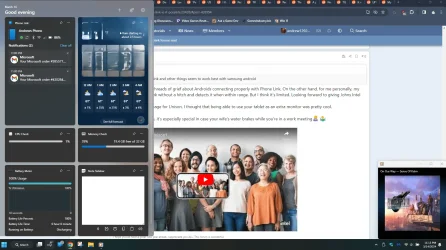
This is my widgets panel from awhile ago as an example with no ads

1785524134275.webp
 
Last edited:

My Computers My Computers

  • At a glance

    Windows 11 ProRyzen 7 5700 X3D64 GB DDR4 3600mhz Gskill Ripjaws VRTX 4070 Super , 12GB VRAM Asus EVO Overclock
    OS
    Windows 11 Pro
    Computer type
    PC/Desktop
    Manufacturer/Model
    Custom Built
    CPU
    Ryzen 7 5700 X3D
    Motherboard
    MSI MPG B550 GAMING PLUS
    Memory
    64 GB DDR4 3600mhz Gskill Ripjaws V
    Graphics Card(s)
    RTX 4070 Super , 12GB VRAM Asus EVO Overclock
    Monitor(s) Displays
    Gigabyte M27Q (rev. 2.0) 2560 x 1440 @ 170hz HDR
    Hard Drives
    2TB Samsung nvme ssd
    4TB Western Digital nvme ssd
    PSU
    CORSAIR RMx SHIFT Series™ RM750x 80 PLUS Gold Fully Modular ATX Power Supply
    Case
    CORSAIR 3500X ARGB Mid-Tower ATX PC Case – Black
    Cooling
    ID-COOLING FROSTFLOW X 240 CPU Water Cooler
    Keyboard
    Logitech G213
    Mouse
    Logitech G203
    Internet Speed
    1.2gbps Fiber 😎
  • At a glance

    Chrome OSIntel Pentium Quad Core4GB LPDDR4
    Operating System
    Chrome OS
    Computer type
    Laptop
    Manufacturer/Model
    HP Chromebook
    CPU
    Intel Pentium Quad Core
    Memory
    4GB LPDDR4
    Monitor(s) Displays
    14 Inch HD SVA anti glare micro edge display
    Hard Drives
    64 GB emmc
From Google AI:

Widgets do not work after uninstalling Microsoft Edge because the Windows Widget board relies directly on Edge components, specifically Edge WebView2 Runtime and Edge-backed rendering engines, to display and render its live online web content. [1, 2]

Why the Dependency Exists
    • Rendering Engine: Windows widgets (like weather, news, and sports feeds) are not native standalone apps; they are built using web technologies (HTML, CSS, JavaScript) that require a Chromium-based engine to show up on your screen. [1, 2, 3, 4]
    • Core Integration: Microsoft deeply integrates the browser's framework into the Windows shell. For example, when Edge or its runtime files are forcibly deleted, the system loses the mechanism required to load dynamic web pages inside the user interface.
So you must reinstall Microsoft Edge to make the widgets work again, simply make another browser default and don't use Edge.

The alternative is to install 8gadgetpack to use the "traditional" desktop gadgets. Version 37.0 also supports old 32-bit gadgets from Windows Vista and 7, newer versions only support modern 64-bit gadgets. I prefer the old version to use whatever I want, both 32-bit and 64-bit gadgets, let alone I prefer the appearance of the original ones, not their modern equivalents. A good desktop weather gadget is "Mein Wetter" (German for My Weather), included with 8gadgetpack. If it ever stops working, download a newer version of Mein Wetter to connect to the newer servers.

 
Last edited:

My Computers My Computers

  • At a glance

    Windows 11 Pro 23H2 (5699), 25H2 (9168)Mobile DualCore Intel Core 2 Duo T7250, 2000 MHz4GBMobile Intel(R) GMA 4500M (Mobile 4 series)
    OS
    Windows 11 Pro 23H2 (5699), 25H2 (9168)
    Computer type
    Laptop
    Manufacturer/Model
    Acer Extensa 5630EZ
    CPU
    Mobile DualCore Intel Core 2 Duo T7250, 2000 MHz
    Motherboard
    Acer Extensa 5630
    Memory
    4GB
    Graphics Card(s)
    Mobile Intel(R) GMA 4500M (Mobile 4 series)
    Sound Card
    Realtek ALC268 @ Intel 82801IB ICH9 - High Definition Audio Controller
    Monitor(s) Displays
    1
    Screen Resolution
    1280x800
    Hard Drives
    Samsung SSD 850 EVO 250GB SATA Device (250 GB, SATA-III)
    Internet Speed
    802.11g wireless 54 Mbps
    Browser
    MICROSOFT EDGE
    Antivirus
    WINDOWS DEFENDER
    Other Info
    Legacy MBR installation, no TPM, no Secure Boot, no WDDM 2.0 graphics drivers, no SSE4.2, cannot get more unsupported ;) This is only my test laptop. I had installed Windows 11 here before upgrading my main PC. For my main PC I use everyday see my 2nd system specs.
  • At a glance

    Windows 11 Pro v25H2 (build 26200.9168)Intel Core-i7 3770 3.40GHz s1155 (3rd generat...2x Kingston Hyper-X Blu 8GB DDR3-1600GIGABYTE GeForce RTX 3050 WINDFORCE OC V2 6GB...
    Operating System
    Windows 11 Pro v25H2 (build 26200.9168)
    Computer type
    PC/Desktop
    Manufacturer/Model
    Custom-built PC
    CPU
    Intel Core-i7 3770 3.40GHz s1155 (3rd generation)
    Motherboard
    Asus P8H61 s1155 ATX
    Memory
    2x Kingston Hyper-X Blu 8GB DDR3-1600
    Graphics card(s)
    GIGABYTE GeForce RTX 3050 WINDFORCE OC V2 6GB (GV-N3050WF2OCV2-6GD)
    Sound Card
    Realtek HD audio (ALC887)
    Monitor(s) Displays
    Sony Bravia KDL-19L4000 19" LCD TV via VGA
    Screen Resolution
    1440x900 32-bit 60Hz
    Hard Drives
    WD Blue SA510 2.5 1000GB SSD as system disk, Western Digital Caviar Purple 4TB SATA III (WD40PURZ) as second
    PSU
    Thermaltake Litepower RGB 550W Full Wired
    Case
    SUPERCASE MIDI-TOWER
    Cooling
    Deepcool Gamma Archer CPU cooler, 1x 8cm fan at the back
    Keyboard
    Mitsumi 101-key PS/2
    Mouse
    Microsoft Compact Optical Mouse
    Internet Speed
    802.11ac 5GHz wireless 260Mpbs
    Browser
    Microsoft Edge, Mozilla Firefox
    Antivirus
    Microsoft Windows Defender
    Other Info
    Legacy BIOS (MBR) installation, no TPM, no Secure Boot, WDDM 3.0 graphics drivers, WEI score 7.4

In the widgets panel just go to settings and turn off feed under personalize

This is my widgets panel from awhile ago as an example with no ads

View attachment 178117

do you have Microsoft edge installed for this to work
 

My Computer My Computer

At a glance

Windows 11 Pro X64 Version 25H2 Build 26200.8973Intel(R) Core(TM) i5-8400 CPU @ 2.80GHz24GBNVIDIA GeForce GTX 960
OS
Windows 11 Pro X64 Version 25H2 Build 26200.8973
Computer type
PC/Desktop
Manufacturer/Model
Custom Build
CPU
Intel(R) Core(TM) i5-8400 CPU @ 2.80GHz
Motherboard
ASROCK B360M Pro4
Memory
24GB
Graphics Card(s)
NVIDIA GeForce GTX 960
Sound Card
Realtek(R) Audio 6.0.9231.1
Monitor(s) Displays
Generic Monitor (Dell S2721HN)
Screen Resolution
1920x1080
Hard Drives
CT240BX500SSD1
EDILOCA ES106 500GB
SATA SDD
Keyboard
TECKNET Wired Gaming Keyboard Model TK-B002
Mouse
Logitech G203 LIGHTSYNC Gaming Mouse
Browser
Firefox/Chrome
Antivirus
Malwarebytes

My Computers My Computers

  • At a glance

    Windows 11 ProRyzen 7 5700 X3D64 GB DDR4 3600mhz Gskill Ripjaws VRTX 4070 Super , 12GB VRAM Asus EVO Overclock
    OS
    Windows 11 Pro
    Computer type
    PC/Desktop
    Manufacturer/Model
    Custom Built
    CPU
    Ryzen 7 5700 X3D
    Motherboard
    MSI MPG B550 GAMING PLUS
    Memory
    64 GB DDR4 3600mhz Gskill Ripjaws V
    Graphics Card(s)
    RTX 4070 Super , 12GB VRAM Asus EVO Overclock
    Monitor(s) Displays
    Gigabyte M27Q (rev. 2.0) 2560 x 1440 @ 170hz HDR
    Hard Drives
    2TB Samsung nvme ssd
    4TB Western Digital nvme ssd
    PSU
    CORSAIR RMx SHIFT Series™ RM750x 80 PLUS Gold Fully Modular ATX Power Supply
    Case
    CORSAIR 3500X ARGB Mid-Tower ATX PC Case – Black
    Cooling
    ID-COOLING FROSTFLOW X 240 CPU Water Cooler
    Keyboard
    Logitech G213
    Mouse
    Logitech G203
    Internet Speed
    1.2gbps Fiber 😎
  • At a glance

    Chrome OSIntel Pentium Quad Core4GB LPDDR4
    Operating System
    Chrome OS
    Computer type
    Laptop
    Manufacturer/Model
    HP Chromebook
    CPU
    Intel Pentium Quad Core
    Memory
    4GB LPDDR4
    Monitor(s) Displays
    14 Inch HD SVA anti glare micro edge display
    Hard Drives
    64 GB emmc
so how did you get them to show then and do I need edge to show them
 

My Computer My Computer

At a glance

Windows 11 Pro X64 Version 25H2 Build 26200.8973Intel(R) Core(TM) i5-8400 CPU @ 2.80GHz24GBNVIDIA GeForce GTX 960
OS
Windows 11 Pro X64 Version 25H2 Build 26200.8973
Computer type
PC/Desktop
Manufacturer/Model
Custom Build
CPU
Intel(R) Core(TM) i5-8400 CPU @ 2.80GHz
Motherboard
ASROCK B360M Pro4
Memory
24GB
Graphics Card(s)
NVIDIA GeForce GTX 960
Sound Card
Realtek(R) Audio 6.0.9231.1
Monitor(s) Displays
Generic Monitor (Dell S2721HN)
Screen Resolution
1920x1080
Hard Drives
CT240BX500SSD1
EDILOCA ES106 500GB
SATA SDD
Keyboard
TECKNET Wired Gaming Keyboard Model TK-B002
Mouse
Logitech G203 LIGHTSYNC Gaming Mouse
Browser
Firefox/Chrome
Antivirus
Malwarebytes

My Computers My Computers

  • At a glance

    Windows 11 ProRyzen 7 5700 X3D64 GB DDR4 3600mhz Gskill Ripjaws VRTX 4070 Super , 12GB VRAM Asus EVO Overclock
    OS
    Windows 11 Pro
    Computer type
    PC/Desktop
    Manufacturer/Model
    Custom Built
    CPU
    Ryzen 7 5700 X3D
    Motherboard
    MSI MPG B550 GAMING PLUS
    Memory
    64 GB DDR4 3600mhz Gskill Ripjaws V
    Graphics Card(s)
    RTX 4070 Super , 12GB VRAM Asus EVO Overclock
    Monitor(s) Displays
    Gigabyte M27Q (rev. 2.0) 2560 x 1440 @ 170hz HDR
    Hard Drives
    2TB Samsung nvme ssd
    4TB Western Digital nvme ssd
    PSU
    CORSAIR RMx SHIFT Series™ RM750x 80 PLUS Gold Fully Modular ATX Power Supply
    Case
    CORSAIR 3500X ARGB Mid-Tower ATX PC Case – Black
    Cooling
    ID-COOLING FROSTFLOW X 240 CPU Water Cooler
    Keyboard
    Logitech G213
    Mouse
    Logitech G203
    Internet Speed
    1.2gbps Fiber 😎
  • At a glance

    Chrome OSIntel Pentium Quad Core4GB LPDDR4
    Operating System
    Chrome OS
    Computer type
    Laptop
    Manufacturer/Model
    HP Chromebook
    CPU
    Intel Pentium Quad Core
    Memory
    4GB LPDDR4
    Monitor(s) Displays
    14 Inch HD SVA anti glare micro edge display
    Hard Drives
    64 GB emmc
okay I will just get edge and just leave it installed and not use it
 

My Computer My Computer

At a glance

Windows 11 Pro X64 Version 25H2 Build 26200.8973Intel(R) Core(TM) i5-8400 CPU @ 2.80GHz24GBNVIDIA GeForce GTX 960
OS
Windows 11 Pro X64 Version 25H2 Build 26200.8973
Computer type
PC/Desktop
Manufacturer/Model
Custom Build
CPU
Intel(R) Core(TM) i5-8400 CPU @ 2.80GHz
Motherboard
ASROCK B360M Pro4
Memory
24GB
Graphics Card(s)
NVIDIA GeForce GTX 960
Sound Card
Realtek(R) Audio 6.0.9231.1
Monitor(s) Displays
Generic Monitor (Dell S2721HN)
Screen Resolution
1920x1080
Hard Drives
CT240BX500SSD1
EDILOCA ES106 500GB
SATA SDD
Keyboard
TECKNET Wired Gaming Keyboard Model TK-B002
Mouse
Logitech G203 LIGHTSYNC Gaming Mouse
Browser
Firefox/Chrome
Antivirus
Malwarebytes

Latest Support Threads

Back
Top Bottom