- Local time
- 1:38 PM
- Posts
- 451
- OS
- Windows 11 Home, ver 25H2 build 26200.8894
I'm gonna upgrade my original SSD ( 128GB, M2, SATA3 solid-state drive supporting MLC, HP pt # 813146-001) for this 256GB drive (Micron 256GB M.2 2280 NGFF SSD (Solid State Drive) 3D NARD TLC SATA III (MTFDDAV256TBN). It should arrive Oct. 5. Just getting my ducks in a row with this question.
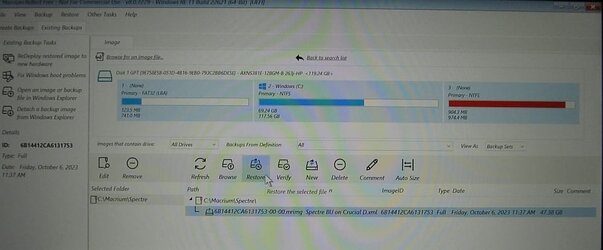
See my specs for the laptop I'm working with, the HP Spectre, born on 25 Feb 2012. I will have a Reflect image ready for it on the day it arrives, a full image of the current Adata drive. I have a good Reflect rescue disk that I've used recently to restore so I'm confident in using it.
I'm upgrading only to have more room on the laptop's drive, I just did a repair upgrade on the machine and after removing the unnecessaries I have 71 GB used and 47GB free. So since this Micron was only $22 on Amazon I knew it was time to swap out the SSD. Probably won't see performance improvement but the machine is working fine but I'll be grateful for the extra space.
Anyway . . . I plan on taking the new Micron out of the package when it arrives and immediately putting it into the Spectre. Then I'll boot the Rescue Disk and plug in the Corsair 1TB removable drive that contains the fresh image. My slight concern is that the Rescue Disk will see the new blank unformatted uninitiated drive. From everything I've researched, it should see it and Macrium should slap the fresh image onto the Micron without a problem and it should immediately boot up ready to do my bidding. Should the Rescue Disk see the new drive straight from the box? In the chance that it doesn't I have copied the DISKPART commands in order to try to initialize it:
I don't know if all these Diskpart commands would be required. Any advice here is appreciated as I'm new to this command.
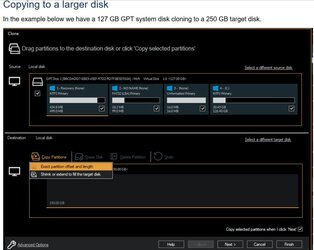
A Macrium Reflect forum discussion implies (but doesn't state outright) that my plan should succeed. And I don't want to buy an enclosure in which to put the old drive in order to clone it.
So how successful do you think I'll be, and that I won't even have to deal with DISKPART?
See my specs for the laptop I'm working with, the HP Spectre, born on 25 Feb 2012. I will have a Reflect image ready for it on the day it arrives, a full image of the current Adata drive. I have a good Reflect rescue disk that I've used recently to restore so I'm confident in using it.
I'm upgrading only to have more room on the laptop's drive, I just did a repair upgrade on the machine and after removing the unnecessaries I have 71 GB used and 47GB free. So since this Micron was only $22 on Amazon I knew it was time to swap out the SSD. Probably won't see performance improvement but the machine is working fine but I'll be grateful for the extra space.
Anyway . . . I plan on taking the new Micron out of the package when it arrives and immediately putting it into the Spectre. Then I'll boot the Rescue Disk and plug in the Corsair 1TB removable drive that contains the fresh image. My slight concern is that the Rescue Disk will see the new blank unformatted uninitiated drive. From everything I've researched, it should see it and Macrium should slap the fresh image onto the Micron without a problem and it should immediately boot up ready to do my bidding. Should the Rescue Disk see the new drive straight from the box? In the chance that it doesn't I have copied the DISKPART commands in order to try to initialize it:
Code:
diskpart
list disk
select disk n (n is number of the ssd that is having problems)
clean (be sure you have chosen right disk so you wipe correct drive)
convert gpt
create partition primary
format fs=ntfs quick
assign
exit
I don't know if all these Diskpart commands would be required. Any advice here is appreciated as I'm new to this command.
A Macrium Reflect forum discussion implies (but doesn't state outright) that my plan should succeed. And I don't want to buy an enclosure in which to put the old drive in order to clone it.
So how successful do you think I'll be, and that I won't even have to deal with DISKPART?
Last edited:
My Computers
-
At a glance
Windows 11 Home, ver 25H2 build 26200.8894Intel Core i5 5200U @ 2.20GH4 GBIntel HD Graphics 5500 on board- OS
- Windows 11 Home, ver 25H2 build 26200.8894
- Computer type
- Laptop
- Manufacturer/Model
- Hewlett-Packard Spectre 13-4001 x360 convertable
- CPU
- Intel Core i5 5200U @ 2.20GH
- Motherboard
- Hewlett-Packard 802D
- Memory
- 4 GB
- Graphics Card(s)
- Intel HD Graphics 5500 on board
- Sound Card
- Intel Smart Sound Technology (Intel SST)
- Hard Drives
- Micron 256GB M.2 2280 NGFF SSD MTFDDAV256TBN, (SATA 6.0 Gb/s)
- Keyboard
- Model # G01KB
- Antivirus
- Microsoft Defender
- Other Info
- born on date: 25 Feb 2016
-
At a glance
Win 11 Home 25H2 build 26200.8894Intel Core i7 4th Gen 4790 (3.60GHz), Haswell...Samsung 16 GB DDR3 (8GB in 2 modules)NVIDIA GeForce GTX 760, 3GB, and on-board Int...- Operating System
- Win 11 Home 25H2 build 26200.8894
- Computer type
- PC/Desktop
- Manufacturer/Model
- Asus Desktop model M32AD-US019S (DOM: 6/9/2014 )
- CPU
- Intel Core i7 4th Gen 4790 (3.60GHz), Haswell 22nm Technology, SOCKET 1150
- Motherboard
- H81M-E/M51AD/DP_MB
- Memory
- Samsung 16 GB DDR3 (8GB in 2 modules)
- Graphics card(s)
- NVIDIA GeForce GTX 760, 3GB, and on-board Intel HD Graphics 4600 Rev 6
- Monitor(s) Displays
- HP EliteDisplay E241i LED; HP EliteDisplay E243
- Hard Drives
- Samsung 500GB SSD, 870 EVO (SATA 6.0 )
Micron 250GB SSD, CT250MX500
Toshiba HDD, 3GB (original drive w/PC)
- Case
- ASUS
- Keyboard
- ASUS-------------------------
- Antivirus
- MS Defender
- Other Info
- purchased 8/28/2015 from Newegg.
-
HEWLETT PACKARD
HP OmniBook X Flip NGAI (Next Gen AI),
Model: 16-as0023dx
PT# B5UH1UA#ABA Product #: B5UH1UA
delivered and setup 7/25/25
16" 2K Touch-Screen Laptop
Intel Core Ultra 7 256V '24 Series 2 - CPU
Boost Clock Frequency 4.8 gigahertz; Neural Processing Unit (NPU) Yes;
16GB Memory, LPDDR5X
1TB SSD PCIe 4.0
Graphics: Intel Arc 140V
1 x HDMI 2.1
1 x Thunderbolt 4
2K Touch-Screen display, LED, IPS; 1920 x 1200 (Full HD+)
USB Ports: 1 x USB-C 3.1, 2 x USB-A 3.1
Wi-Fi 6E
DELL
Model:I7591-7483BLK-PUS 2-in-1 (7000 Series)
purchased new 12/3/2019,
15.6 inch 2-IN-1;
4K Ultra HD Touch-Screen, 3840 x 2160,
Intel Core i7 10510U CPU 1.80GHz,
16GB RAM DDR4 SDRAM 2400 megahert (2 slots),
dedicated graphics Nvidia GeForce MX250 2 GB Graphics,
PCIe 512GB Intel SSD + 32GB Optane Memory (Intel Optane Memory H10 with solid-state storage),
wireless-AX & Bluetooth
Battery: 68wh, Type 4VGMP 4 cell