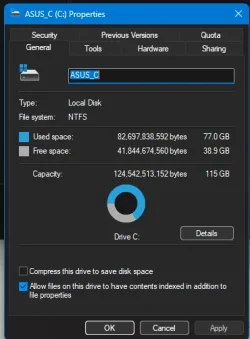
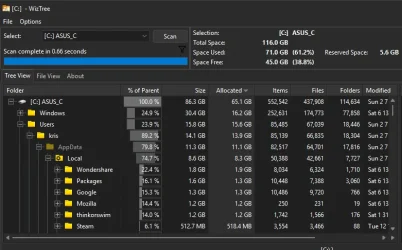
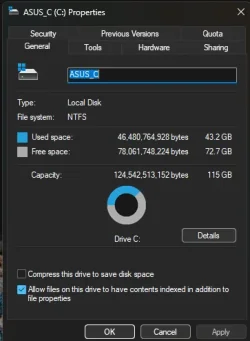
Win 11 c drive is 77GB. Normal? or time to clean install?


krism

Well-known member
Member
Local time
4:37 PM
Posts
508
Location
MA, US
OS
win 11Pro 25H2 26200.8246
I used to spend all my time on linux so didn't care, now, for a while, I am back to only win 11. Linux partition is erased.
Seems excessive! Been a while since I did a clean install - maybe time?
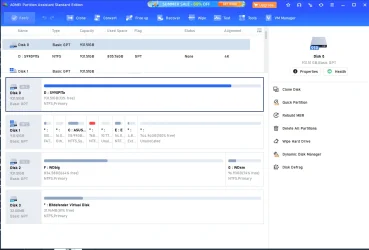
I have all my 44GB of source stuff on a separate partition so that is not included in C. Games are on different partitions.
Yes I have done a CP/Win Tools/Disk cleanup but doing it now just to be sure. (I got back 0.6GB.)
Thanks!
Edition Windows 11 Pro
Version 25H2
Installed on ‎Sun ‎8/‎24/‎2025
OS build 26200.8246
Experience Windows Feature Experience Pack 1000.26100.297.0
-- Asus ROG STRIX Z790-E Gaming wifi-6E, I9-13900k, UEFI/GPT, 32GB, Sam 980 Pro 1T M.2, Win11 24H2, GeForce RTX™ 3060 Ti VISION OC 8G (rev. 2.0) parts: Lian Li 207 case, Corsair RM750E PSU, Arctic liquid freezer iii Pro 360 aio. lasers: HP M254dw color, HP 4001dw. Epson scanner. Terabyte.
 
Windows Build/Version
win 11 25H2

Attachments

  • Screenshot 2026-06-13 130630.webp
    Screenshot 2026-06-13 130630.webp
    18.4 KB · Views: 1
Last edited:

My Computers

System One System Two

  • OS
    win 11Pro 25H2 26200.8246
    Computer type
    PC/Desktop
    Manufacturer/Model
    DIY: LianLi 207 case, ASUS mobo, Arctic aio cooling
    CPU
    I9-13900k
    Motherboard
    ASUS ROG STRIX Z790-E Gaming wifi-6E, latest AMI BIOS 3107
    Memory
    G.Skill Ripjaws S5 32GB Kit DDR5 6000.
    Graphics Card(s)
    GeForce RTX™ 3060 Ti VISION OC 8G (rev. 2.0)
    Sound Card
    on mobo
    Monitor(s) Displays
    Dell S3221QS (curved 32")
    Screen Resolution
    4K but I usually display at 1K
    Hard Drives
    Sam 980 Pro 1T M.2, 990Pro, WD 570, others(all NVMe)
    PSU
    Corsair RM750e fully modular
    Case
    Lian Li 207
    Cooling
    CPU:Arctic liq frz iii Pro 360 on top, CASE: 2 front fans IN, 2 bottom fans in.
    Keyboard
    Corsair K70 RGB Core
    Mouse
    Logitech M510
    Internet Speed
    100Mbps Comcast; I226-V NIC
    Browser
    Firefox(current)
    Antivirus
    on win BitDefender AV Free
    Other Info
    Terabyte Unlimited Image
    WuMgr, StartAllBack, , Revo Uninstaller Pro Portable.

    Davinci Resolve or Wondershare Filmora Basic to process my vlogs. DJI Pocket 2
  • Operating System
    win 10, Mint
    Computer type
    Laptop
    Manufacturer/Model
    Lenovo P15s
    CPU
    i7-10510U 1.8-4.9GHz
    Motherboard
    Intel SoC
    Memory
    16GB DDR4
    Graphics card(s)
    Nvidia Quadro P520 2GB DDR5 supports 4K external via HDMI or USB-C
    Sound Card
    Realtek ALC3287 HD
    Monitor(s) Displays
    15.6"
    Screen Resolution
    1K
    Hard Drives
    NVMe various
77 used; 39 available; not time to panic yet.

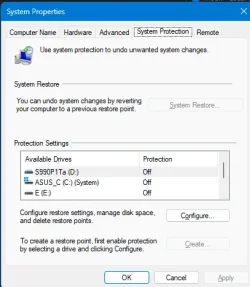
How much of the 77 is taken up by System Restore?
 

My Computer

System One

  • OS
    Windows 11 Pro
    Computer type
    PC/Desktop
    Manufacturer/Model
    Fishmill Special
    CPU
    Intel 265K
    Motherboard
    MSI Pro Z890-A
    Memory
    G Skill DDR5 2 x 16 kit 6000/36
    Graphics Card(s)
    none
    Sound Card
    none
    Monitor(s) Displays
    Dell 2316H
    Screen Resolution
    1600 x 900
    Hard Drives
    WD SN770 NVME 500 GB boot; Intel 660p NVME 2 TB and WD Green 3 TB storage
    PSU
    Be Quiet 13M 750 ATX 3.1
    Case
    Lancool PC-K65
    Cooling
    Noctua U12S
    Keyboard
    Logitech K120 Wired
    Mouse
    Dell MS-116
    Browser
    Chrome
    Antivirus
    Microsoft Defender and Malwarebytes
77 used; 39 available; not time to panic yet.

How much of the 77 is taken up by System Restore?
Where would I find "system restore"? I have win backup shut off. I use Terabyte to image my partitions and drives and that backup goes to yet another drive and partition. I have 3 1T NVMe's.
 

Attachments

  • Screenshot 2026-06-13 151501.webp
    Screenshot 2026-06-13 151501.webp
    56.4 KB · Views: 1

My Computers

System One System Two

  • OS
    win 11Pro 25H2 26200.8246
    Computer type
    PC/Desktop
    Manufacturer/Model
    DIY: LianLi 207 case, ASUS mobo, Arctic aio cooling
    CPU
    I9-13900k
    Motherboard
    ASUS ROG STRIX Z790-E Gaming wifi-6E, latest AMI BIOS 3107
    Memory
    G.Skill Ripjaws S5 32GB Kit DDR5 6000.
    Graphics Card(s)
    GeForce RTX™ 3060 Ti VISION OC 8G (rev. 2.0)
    Sound Card
    on mobo
    Monitor(s) Displays
    Dell S3221QS (curved 32")
    Screen Resolution
    4K but I usually display at 1K
    Hard Drives
    Sam 980 Pro 1T M.2, 990Pro, WD 570, others(all NVMe)
    PSU
    Corsair RM750e fully modular
    Case
    Lian Li 207
    Cooling
    CPU:Arctic liq frz iii Pro 360 on top, CASE: 2 front fans IN, 2 bottom fans in.
    Keyboard
    Corsair K70 RGB Core
    Mouse
    Logitech M510
    Internet Speed
    100Mbps Comcast; I226-V NIC
    Browser
    Firefox(current)
    Antivirus
    on win BitDefender AV Free
    Other Info
    Terabyte Unlimited Image
    WuMgr, StartAllBack, , Revo Uninstaller Pro Portable.

    Davinci Resolve or Wondershare Filmora Basic to process my vlogs. DJI Pocket 2
  • Operating System
    win 10, Mint
    Computer type
    Laptop
    Manufacturer/Model
    Lenovo P15s
    CPU
    i7-10510U 1.8-4.9GHz
    Motherboard
    Intel SoC
    Memory
    16GB DDR4
    Graphics card(s)
    Nvidia Quadro P520 2GB DDR5 supports 4K external via HDMI or USB-C
    Sound Card
    Realtek ALC3287 HD
    Monitor(s) Displays
    15.6"
    Screen Resolution
    1K
    Hard Drives
    NVMe various
Been a while since I did a clean install - maybe time
- I've not done one or needed to on my 2 Win 10 laptops in 8 years or so.. and they have a LOT of progs installed.

That 77GB, assuming it's the used space onyour Windows partition includes:
- installed programs
- personal data in the default library folders - and that often includes folders related to installed progs
- Store apps
- Browser-related data
Etc.

So you need to see where your space has gone.

Wiztree (free) is a very good way to see everything, viewed in 2 different ways:
1.webp

The cushion map at the bottom immediately shows where most space has gone at at glace- the largest square or rectangle. Simply hover over it to see details.
 

My Computer

System One

  • OS
    Windows 11 Pro
    Computer type
    Laptop
    Manufacturer/Model
    Lenovo t480s
    CPU
    i7-8650U
    Memory
    16GB
    Graphics Card(s)
    Intel UHD 620
    Screen Resolution
    1920x1080
    Hard Drives
    C SN810 SDCPNRY-512G-1006
    Browser
    Edge, Firefox
    Antivirus
    Defender
Type "system restore" into the search box; that should lead you there.

No telling how much space it is using. Could be 10 or 20 gb, but you can control the maximum.
 

My Computer

System One

  • OS
    Windows 11 Pro
    Computer type
    PC/Desktop
    Manufacturer/Model
    Fishmill Special
    CPU
    Intel 265K
    Motherboard
    MSI Pro Z890-A
    Memory
    G Skill DDR5 2 x 16 kit 6000/36
    Graphics Card(s)
    none
    Sound Card
    none
    Monitor(s) Displays
    Dell 2316H
    Screen Resolution
    1600 x 900
    Hard Drives
    WD SN770 NVME 500 GB boot; Intel 660p NVME 2 TB and WD Green 3 TB storage
    PSU
    Be Quiet 13M 750 ATX 3.1
    Case
    Lancool PC-K65
    Cooling
    Noctua U12S
    Keyboard
    Logitech K120 Wired
    Mouse
    Dell MS-116
    Browser
    Chrome
    Antivirus
    Microsoft Defender and Malwarebytes
I do not store personal files or the .exe etc files (used to install all my stuff) on the C partition - that is all on the E partition.
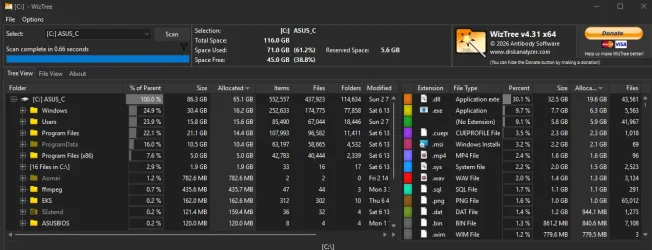
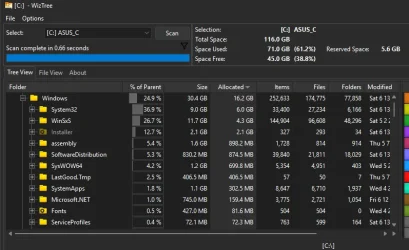
I use tree size free but here it is in your form:

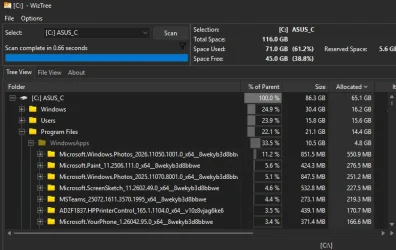
edit - I just uninstalled Blackmagic/Davinci Resolve and that brought me down to 70.9GB. Still strikes me an awful lot. Yes, I know that some folks never do clean installs but I do not live in that world. :)

attached pics now represent that...

@Fishmill - zero.
 

Attachments

  • Screenshot 2026-06-13 153850.webp
    Screenshot 2026-06-13 153850.webp
    81.1 KB · Views: 1
  • Screenshot 2026-06-13 153912.webp
    Screenshot 2026-06-13 153912.webp
    48.6 KB · Views: 1
  • Screenshot 2026-06-13 154017.webp
    Screenshot 2026-06-13 154017.webp
    48.4 KB · Views: 1
  • Screenshot 2026-06-13 154123.webp
    Screenshot 2026-06-13 154123.webp
    48.6 KB · Views: 1
  • Screenshot 2026-06-13 160532.webp
    Screenshot 2026-06-13 160532.webp
    23.9 KB · Views: 1
Last edited:

My Computers

System One System Two

  • OS
    win 11Pro 25H2 26200.8246
    Computer type
    PC/Desktop
    Manufacturer/Model
    DIY: LianLi 207 case, ASUS mobo, Arctic aio cooling
    CPU
    I9-13900k
    Motherboard
    ASUS ROG STRIX Z790-E Gaming wifi-6E, latest AMI BIOS 3107
    Memory
    G.Skill Ripjaws S5 32GB Kit DDR5 6000.
    Graphics Card(s)
    GeForce RTX™ 3060 Ti VISION OC 8G (rev. 2.0)
    Sound Card
    on mobo
    Monitor(s) Displays
    Dell S3221QS (curved 32")
    Screen Resolution
    4K but I usually display at 1K
    Hard Drives
    Sam 980 Pro 1T M.2, 990Pro, WD 570, others(all NVMe)
    PSU
    Corsair RM750e fully modular
    Case
    Lian Li 207
    Cooling
    CPU:Arctic liq frz iii Pro 360 on top, CASE: 2 front fans IN, 2 bottom fans in.
    Keyboard
    Corsair K70 RGB Core
    Mouse
    Logitech M510
    Internet Speed
    100Mbps Comcast; I226-V NIC
    Browser
    Firefox(current)
    Antivirus
    on win BitDefender AV Free
    Other Info
    Terabyte Unlimited Image
    WuMgr, StartAllBack, , Revo Uninstaller Pro Portable.

    Davinci Resolve or Wondershare Filmora Basic to process my vlogs. DJI Pocket 2
  • Operating System
    win 10, Mint
    Computer type
    Laptop
    Manufacturer/Model
    Lenovo P15s
    CPU
    i7-10510U 1.8-4.9GHz
    Motherboard
    Intel SoC
    Memory
    16GB DDR4
    Graphics card(s)
    Nvidia Quadro P520 2GB DDR5 supports 4K external via HDMI or USB-C
    Sound Card
    Realtek ALC3287 HD
    Monitor(s) Displays
    15.6"
    Screen Resolution
    1K
    Hard Drives
    NVMe various
Thank you very much for your polite, kind and gracious reply.

What do YOU think is odd about what you've posted?

It could have been helpful also to post the cushion map as I carefully did for you.

Space is not simply taken up by folders under C: as you saw from my cushion map. Wiztree shows the 'hidden' areas on the disk too.
 

My Computer

System One

  • OS
    Windows 11 Pro
    Computer type
    Laptop
    Manufacturer/Model
    Lenovo t480s
    CPU
    i7-8650U
    Memory
    16GB
    Graphics Card(s)
    Intel UHD 620
    Screen Resolution
    1920x1080
    Hard Drives
    C SN810 SDCPNRY-512G-1006
    Browser
    Edge, Firefox
    Antivirus
    Defender
Back
Top Bottom