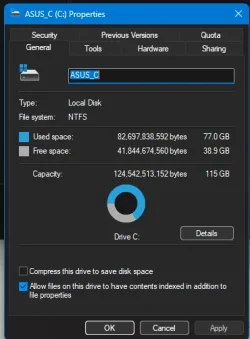
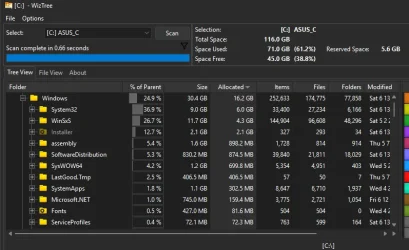
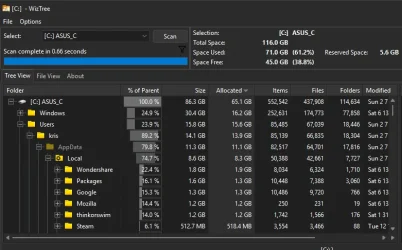
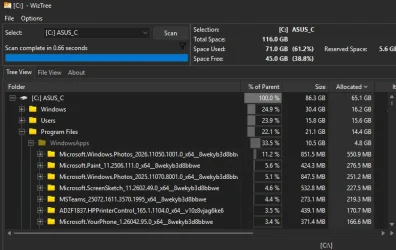
Win 11 c drive is 77GB. Normal? or time to clean install?


krism

Well-known member
Member
Local time
3:44 PM
Posts
507
Location
MA, US
OS
win 11Pro 25H2 26200.8246
I used to spend all my time on linux so didn't care, now, for a while, I am back to only win 11. Linux partition is erased.
Seems excessive! Been a while since I did a clean install - maybe time?
I have all my 44GB of source stuff on a separate partition so that is not included in C. Games are on different partitions.
Yes I have done a CP/Win Tools/Disk cleanup but doing it now just to be sure. (I got back 0.6GB.)
Thanks!
Edition Windows 11 Pro
Version 25H2
Installed on ‎Sun ‎8/‎24/‎2025
OS build 26200.8246
Experience Windows Feature Experience Pack 1000.26100.297.0
-- Asus ROG STRIX Z790-E Gaming wifi-6E, I9-13900k, UEFI/GPT, 32GB, Sam 980 Pro 1T M.2, Win11 24H2, GeForce RTX™ 3060 Ti VISION OC 8G (rev. 2.0) parts: Lian Li 207 case, Corsair RM750E PSU, Arctic liquid freezer iii Pro 360 aio. lasers: HP M254dw color, HP 4001dw. Epson scanner. Terabyte.
 
Windows Build/Version
win 11 25H2

Attachments

  • Screenshot 2026-06-13 130630.webp
    Screenshot 2026-06-13 130630.webp
    18.4 KB · Views: 1
Last edited:

My Computers

System One System Two

  • OS
    win 11Pro 25H2 26200.8246
    Computer type
    PC/Desktop
    Manufacturer/Model
    DIY: LianLi 207 case, ASUS mobo, Arctic aio cooling
    CPU
    I9-13900k
    Motherboard
    ASUS ROG STRIX Z790-E Gaming wifi-6E, latest AMI BIOS 3107
    Memory
    G.Skill Ripjaws S5 32GB Kit DDR5 6000.
    Graphics Card(s)
    GeForce RTX™ 3060 Ti VISION OC 8G (rev. 2.0)
    Sound Card
    on mobo
    Monitor(s) Displays
    Dell S3221QS (curved 32")
    Screen Resolution
    4K but I usually display at 1K
    Hard Drives
    Sam 980 Pro 1T M.2, 990Pro, WD 570, others(all NVMe)
    PSU
    Corsair RM750e fully modular
    Case
    Lian Li 207
    Cooling
    CPU:Arctic liq frz iii Pro 360 on top, CASE: 2 front fans IN, 2 bottom fans in.
    Keyboard
    Corsair K70 RGB Core
    Mouse
    Logitech M510
    Internet Speed
    100Mbps Comcast; I226-V NIC
    Browser
    Firefox(current)
    Antivirus
    on win BitDefender AV Free
    Other Info
    Terabyte Unlimited Image
    WuMgr, StartAllBack, , Revo Uninstaller Pro Portable.

    Davinci Resolve or Wondershare Filmora Basic to process my vlogs. DJI Pocket 2
  • Operating System
    win 10, Mint
    Computer type
    Laptop
    Manufacturer/Model
    Lenovo P15s
    CPU
    i7-10510U 1.8-4.9GHz
    Motherboard
    Intel SoC
    Memory
    16GB DDR4
    Graphics card(s)
    Nvidia Quadro P520 2GB DDR5 supports 4K external via HDMI or USB-C
    Sound Card
    Realtek ALC3287 HD
    Monitor(s) Displays
    15.6"
    Screen Resolution
    1K
    Hard Drives
    NVMe various
77 used; 39 available; not time to panic yet.

How much of the 77 is taken up by System Restore?
 

My Computer

System One

  • OS
    Windows 11 Pro
    Computer type
    PC/Desktop
    Manufacturer/Model
    Fishmill Special
    CPU
    Intel 265K
    Motherboard
    MSI Pro Z890-A
    Memory
    G Skill DDR5 2 x 16 kit 6000/36
    Graphics Card(s)
    none
    Sound Card
    none
    Monitor(s) Displays
    Dell 2316H
    Screen Resolution
    1600 x 900
    Hard Drives
    WD SN770 NVME 500 GB boot; Intel 660p NVME 2 TB and WD Green 3 TB storage
    PSU
    Be Quiet 13M 750 ATX 3.1
    Case
    Lancool PC-K65
    Cooling
    Noctua U12S
    Keyboard
    Logitech K120 Wired
    Mouse
    Dell MS-116
    Browser
    Chrome
    Antivirus
    Microsoft Defender and Malwarebytes
77 used; 39 available; not time to panic yet.

How much of the 77 is taken up by System Restore?
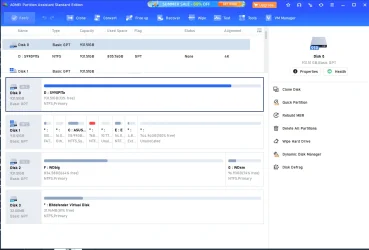
Where would I find "system restore"? I have win backup shut off. I use Terabyte to image my partitions and drives and that backup goes to yet another drive and partition. I have 3 1T NVMe's.
 

Attachments

  • Screenshot 2026-06-13 151501.webp
    Screenshot 2026-06-13 151501.webp
    56.4 KB · Views: 1

My Computers

System One System Two

  • OS
    win 11Pro 25H2 26200.8246
    Computer type
    PC/Desktop
    Manufacturer/Model
    DIY: LianLi 207 case, ASUS mobo, Arctic aio cooling
    CPU
    I9-13900k
    Motherboard
    ASUS ROG STRIX Z790-E Gaming wifi-6E, latest AMI BIOS 3107
    Memory
    G.Skill Ripjaws S5 32GB Kit DDR5 6000.
    Graphics Card(s)
    GeForce RTX™ 3060 Ti VISION OC 8G (rev. 2.0)
    Sound Card
    on mobo
    Monitor(s) Displays
    Dell S3221QS (curved 32")
    Screen Resolution
    4K but I usually display at 1K
    Hard Drives
    Sam 980 Pro 1T M.2, 990Pro, WD 570, others(all NVMe)
    PSU
    Corsair RM750e fully modular
    Case
    Lian Li 207
    Cooling
    CPU:Arctic liq frz iii Pro 360 on top, CASE: 2 front fans IN, 2 bottom fans in.
    Keyboard
    Corsair K70 RGB Core
    Mouse
    Logitech M510
    Internet Speed
    100Mbps Comcast; I226-V NIC
    Browser
    Firefox(current)
    Antivirus
    on win BitDefender AV Free
    Other Info
    Terabyte Unlimited Image
    WuMgr, StartAllBack, , Revo Uninstaller Pro Portable.

    Davinci Resolve or Wondershare Filmora Basic to process my vlogs. DJI Pocket 2
  • Operating System
    win 10, Mint
    Computer type
    Laptop
    Manufacturer/Model
    Lenovo P15s
    CPU
    i7-10510U 1.8-4.9GHz
    Motherboard
    Intel SoC
    Memory
    16GB DDR4
    Graphics card(s)
    Nvidia Quadro P520 2GB DDR5 supports 4K external via HDMI or USB-C
    Sound Card
    Realtek ALC3287 HD
    Monitor(s) Displays
    15.6"
    Screen Resolution
    1K
    Hard Drives
    NVMe various
Been a while since I did a clean install - maybe time
- I've not done one or needed to on my 2 Win 10 laptops in 8 years or so.. and they have a LOT of progs installed.

That 77GB, assuming it's the used space onyour Windows partition includes:
- installed programs
- personal data in the default library folders - and that often includes folders related to installed progs
- Store apps
- Browser-related data
Etc.

So you need to see where your space has gone.

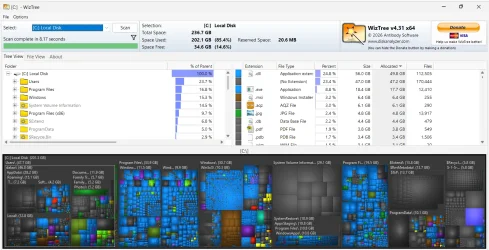
Wiztree (free) is a very good way to see everything, viewed in 2 different ways:
1.webp

The cushion map at the bottom immediately shows where most space has gone at at glace- the largest square or rectangle. Simply hover over it to see details.
 

My Computer

System One

  • OS
    Windows 11 Pro
    Computer type
    Laptop
    Manufacturer/Model
    Lenovo t480s
    CPU
    i7-8650U
    Memory
    16GB
    Graphics Card(s)
    Intel UHD 620
    Screen Resolution
    1920x1080
    Hard Drives
    C SN810 SDCPNRY-512G-1006
    Browser
    Edge, Firefox
    Antivirus
    Defender
Type "system restore" into the search box; that should lead you there.

No telling how much space it is using. Could be 10 or 20 gb, but you can control the maximum.
 

My Computer

System One

  • OS
    Windows 11 Pro
    Computer type
    PC/Desktop
    Manufacturer/Model
    Fishmill Special
    CPU
    Intel 265K
    Motherboard
    MSI Pro Z890-A
    Memory
    G Skill DDR5 2 x 16 kit 6000/36
    Graphics Card(s)
    none
    Sound Card
    none
    Monitor(s) Displays
    Dell 2316H
    Screen Resolution
    1600 x 900
    Hard Drives
    WD SN770 NVME 500 GB boot; Intel 660p NVME 2 TB and WD Green 3 TB storage
    PSU
    Be Quiet 13M 750 ATX 3.1
    Case
    Lancool PC-K65
    Cooling
    Noctua U12S
    Keyboard
    Logitech K120 Wired
    Mouse
    Dell MS-116
    Browser
    Chrome
    Antivirus
    Microsoft Defender and Malwarebytes
I do not store personal files or the .exe etc files (used to install all my stuff) on the C partition - that is all on the E partition.
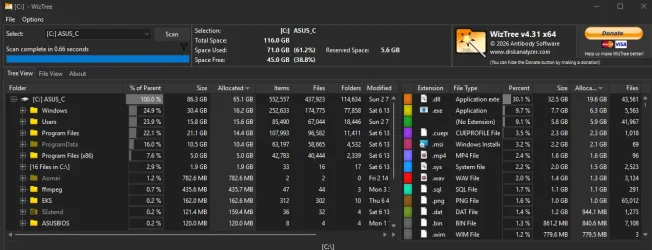
I use tree size free but here it is in your form:

edit - I just uninstalled Blackmagic/Davinci Resolve and that brought me down to 70.9GB. Still strikes me an awful lot. Yes, I know that some folks never do clean installs but I do not live in that world. :)

attached pics now represent that...
 

Attachments

  • Screenshot 2026-06-13 153850.webp
    Screenshot 2026-06-13 153850.webp
    81.1 KB · Views: 0
  • Screenshot 2026-06-13 153912.webp
    Screenshot 2026-06-13 153912.webp
    48.6 KB · Views: 0
  • Screenshot 2026-06-13 154017.webp
    Screenshot 2026-06-13 154017.webp
    48.4 KB · Views: 0
  • Screenshot 2026-06-13 154123.webp
    Screenshot 2026-06-13 154123.webp
    48.6 KB · Views: 0
Last edited:

My Computers

System One System Two

  • OS
    win 11Pro 25H2 26200.8246
    Computer type
    PC/Desktop
    Manufacturer/Model
    DIY: LianLi 207 case, ASUS mobo, Arctic aio cooling
    CPU
    I9-13900k
    Motherboard
    ASUS ROG STRIX Z790-E Gaming wifi-6E, latest AMI BIOS 3107
    Memory
    G.Skill Ripjaws S5 32GB Kit DDR5 6000.
    Graphics Card(s)
    GeForce RTX™ 3060 Ti VISION OC 8G (rev. 2.0)
    Sound Card
    on mobo
    Monitor(s) Displays
    Dell S3221QS (curved 32")
    Screen Resolution
    4K but I usually display at 1K
    Hard Drives
    Sam 980 Pro 1T M.2, 990Pro, WD 570, others(all NVMe)
    PSU
    Corsair RM750e fully modular
    Case
    Lian Li 207
    Cooling
    CPU:Arctic liq frz iii Pro 360 on top, CASE: 2 front fans IN, 2 bottom fans in.
    Keyboard
    Corsair K70 RGB Core
    Mouse
    Logitech M510
    Internet Speed
    100Mbps Comcast; I226-V NIC
    Browser
    Firefox(current)
    Antivirus
    on win BitDefender AV Free
    Other Info
    Terabyte Unlimited Image
    WuMgr, StartAllBack, , Revo Uninstaller Pro Portable.

    Davinci Resolve or Wondershare Filmora Basic to process my vlogs. DJI Pocket 2
  • Operating System
    win 10, Mint
    Computer type
    Laptop
    Manufacturer/Model
    Lenovo P15s
    CPU
    i7-10510U 1.8-4.9GHz
    Motherboard
    Intel SoC
    Memory
    16GB DDR4
    Graphics card(s)
    Nvidia Quadro P520 2GB DDR5 supports 4K external via HDMI or USB-C
    Sound Card
    Realtek ALC3287 HD
    Monitor(s) Displays
    15.6"
    Screen Resolution
    1K
    Hard Drives
    NVMe various
Back
Top Bottom