[Win 11] Select on hover (for icons, not windows)


Jose Hidalgo

Active member
Member
Local time
7:32 AM
Posts
150
Location
France
OS
Windows 11
Hi guys,

With Win 7, I'm really used to the single-click mode + hover to focus (hovering on a window selects it).
So on Win 11, I have enabled both these options. That part works.

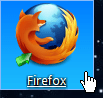
However, on Win 7 I can just hover on any icon and it will get selected.
2023.12.02 - 21.31.30.png

On Win 11 hovering on an icon (be it on the desktop or in any Explorer window) does nothing:
  • On the desktop it does nothing,
  • In any Explorer window, it displays a tooltip with info, but the icon still doesn't get selected.
How can that be changed? Thank you. :-)
 

My Computer My Computer

At a glance

Windows 11AMD Ryzen 7700DDR5 = 32 GB = 2x16 GB (Corsair Dominator - D...Not yet
OS
Windows 11
Computer type
PC/Desktop
Manufacturer/Model
Personal build
CPU
AMD Ryzen 7700
Motherboard
Asus TUF Gaming B650M-Plus WiFi
Memory
DDR5 = 32 GB = 2x16 GB (Corsair Dominator - DDR5 RGB - 6000 MT/s)
Graphics Card(s)
Not yet
Sound Card
No
Monitor(s) Displays
Philips BDM3270QP2
Screen Resolution
2560x1440
Hard Drives
M.2 = 2 TB (Samsung 990 Pro)
SATA = 12 TB (Western Digital Red - WD120EFAX - 5400 rpm)
PSU
Corsair RM850e (850W - ATX 3.0)
Case
Corsair Crystal 280X TG (White, RGB)
Cooling
Intake = 2x120mm fans (Corsair LL120 RGB) / Exhaust = 2x120mm AIO (Aerocool Mirage L240)
Keyboard
Corsair K55 RGB
Mouse
Vertical mouse from AliExpress, very good for the price and a lifesaver for my wrist :)
Internet Speed
Fiber
Browser
Firefox, Brave, Tor
Antivirus
Windows Defender
Other Info
UPS = 1000VA (Nitram PB1000 LCD), protecting PC + Monitor + Speakers

My Computers My Computers

  • At a glance

    Windows 11 Pro 26H2 26300.9457i9-10900 10 core 20 threads32 gbnone-Intel UHD Graphics 630
    OS
    Windows 11 Pro 26H2 26300.9457
    Computer type
    PC/Desktop
    Manufacturer/Model
    Dell Optiplex 7080
    CPU
    i9-10900 10 core 20 threads
    Motherboard
    DELL 0J37VM
    Memory
    32 gb
    Graphics Card(s)
    none-Intel UHD Graphics 630
    Sound Card
    Integrated Realtek
    Monitor(s) Displays
    Benq 27
    Screen Resolution
    2560x1440
    Hard Drives
    2x1tb Solidigm m.2 nvme /External drives 512gb Samsung m.2 sata+2tb Kingston m2.nvme
    PSU
    500w
    Case
    MT
    Cooling
    Dell Premium
    Keyboard
    Logitech wired
    Mouse
    Logitech wireless
    Internet Speed
    so slow I'm too embarrassed to tell
    Browser
    #1 Edge #2 Firefox
    Antivirus
    Defender+MWB Premium
  • At a glance

    Windows 11 Pro 24H2 26200.9457AMD Ryzen 7 6800U32 gbintegrated
    Operating System
    Windows 11 Pro 24H2 26200.9457
    Computer type
    PC/Desktop
    Manufacturer/Model
    Beelink Mini PC SER5
    CPU
    AMD Ryzen 7 6800U
    Memory
    32 gb
    Graphics card(s)
    integrated
    Sound Card
    integrated
    Monitor(s) Displays
    Benq 27
    Screen Resolution
    2560x1440
    Hard Drives
    1TB Crucial nvme
    Keyboard
    Logitech wired
    Mouse
    Logitech wireless
    Internet Speed
    still too embarrassed to tell
    Browser
    Firefox
    Antivirus
    Defender
  • System 3 is non compliant Dell 9020 i7-4770/24gb ram Win11 PRO 26200.9457
Sorry, it's not. I had already visited that link, and unless I'm wrong it's only meant for windows, not icons.
 

My Computer My Computer

At a glance

Windows 11AMD Ryzen 7700DDR5 = 32 GB = 2x16 GB (Corsair Dominator - D...Not yet
OS
Windows 11
Computer type
PC/Desktop
Manufacturer/Model
Personal build
CPU
AMD Ryzen 7700
Motherboard
Asus TUF Gaming B650M-Plus WiFi
Memory
DDR5 = 32 GB = 2x16 GB (Corsair Dominator - DDR5 RGB - 6000 MT/s)
Graphics Card(s)
Not yet
Sound Card
No
Monitor(s) Displays
Philips BDM3270QP2
Screen Resolution
2560x1440
Hard Drives
M.2 = 2 TB (Samsung 990 Pro)
SATA = 12 TB (Western Digital Red - WD120EFAX - 5400 rpm)
PSU
Corsair RM850e (850W - ATX 3.0)
Case
Corsair Crystal 280X TG (White, RGB)
Cooling
Intake = 2x120mm fans (Corsair LL120 RGB) / Exhaust = 2x120mm AIO (Aerocool Mirage L240)
Keyboard
Corsair K55 RGB
Mouse
Vertical mouse from AliExpress, very good for the price and a lifesaver for my wrist :)
Internet Speed
Fiber
Browser
Firefox, Brave, Tor
Antivirus
Windows Defender
Other Info
UPS = 1000VA (Nitram PB1000 LCD), protecting PC + Monitor + Speakers
Is that what you say?
MrBison Horário 19.55 20 Segundos 872 Milissegundos.gif
 

My Computer My Computer

At a glance

Windows 11, Pro for Workstations 23H2core 2 duo E74004G DDR2NVIDIA Geforce 6200 TurboCache
OS
Windows 11, Pro for Workstations 23H2
Computer type
PC/Desktop
Manufacturer/Model
Custom
CPU
core 2 duo E7400
Motherboard
MSI G31M3-L V2 (MS-7529)
Memory
4G DDR2
Graphics Card(s)
NVIDIA Geforce 6200 TurboCache
Sound Card
None
Monitor(s) Displays
Philips TV 43PFG5102/78
Screen Resolution
1920x1080
Hard Drives
HDD: Old 930gb, Second HDD 698gb
PSU
300W
Case
Goldship
Cooling
default
Keyboard
Exbom
Mouse
Exbom
Internet Speed
600mb
Browser
Opera
Antivirus
Windows Segurity
Other Info
I no longer have my old computer—the one with the Ryzen 5500, GeForce 1650 Super, and 16GB of DDR4 3200 MHz RAM.
on Win 7 I can just hover on any icon and it will get selected.
I think that was an AeroPeek feature that went out with Windows 10, or earlier.
Now you have to click n drag the mouse a bit, or use checkboxes...

5736.gif
 

My Computers My Computers

  • At a glance

    Windows 11 Pro
    OS
    Windows 11 Pro
    Computer type
    PC/Desktop
    Manufacturer/Model
    ASUS ROG Strix
  • At a glance

    Windows 11 Pro
    Operating System
    Windows 11 Pro
    Computer type
    Laptop
    Manufacturer/Model
    ASUS VivoBook
  • ASUS VivoBook 'Lite' ~ Windows 11 Home
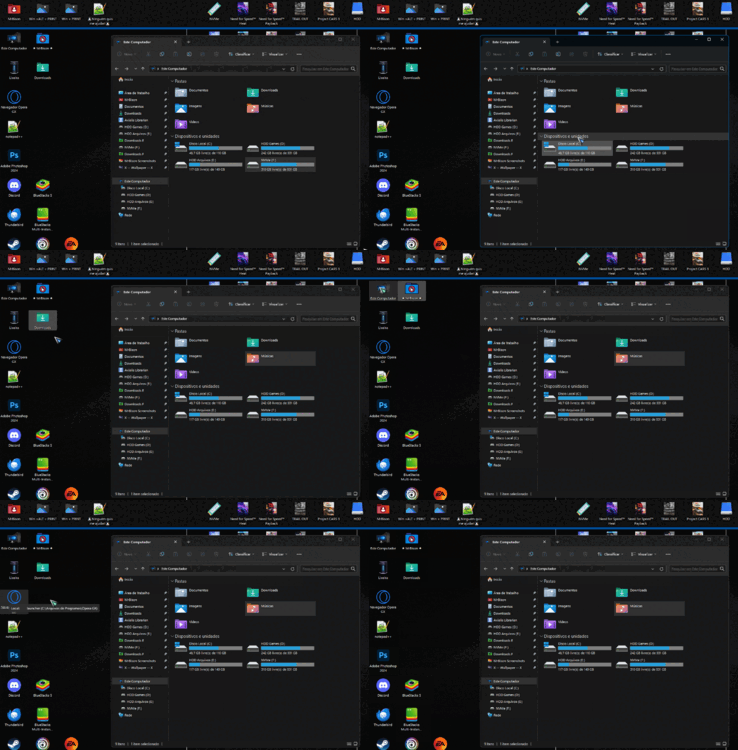
I thought this is it, but the desktop icons are being selected just by hovering the mouse over them, I'm not clicking, I just clicked once to open the folder.
This option is in the folder options, click to open, point to select.

EOIiWnc.gif
 

Attachments

  • MrBison Horário 20.14 56 Segundos 029 Milissegundos.gif
    MrBison Horário 20.14 56 Segundos 029 Milissegundos.gif
    506.1 KB · Views: 2

My Computer My Computer

At a glance

Windows 11, Pro for Workstations 23H2core 2 duo E74004G DDR2NVIDIA Geforce 6200 TurboCache
OS
Windows 11, Pro for Workstations 23H2
Computer type
PC/Desktop
Manufacturer/Model
Custom
CPU
core 2 duo E7400
Motherboard
MSI G31M3-L V2 (MS-7529)
Memory
4G DDR2
Graphics Card(s)
NVIDIA Geforce 6200 TurboCache
Sound Card
None
Monitor(s) Displays
Philips TV 43PFG5102/78
Screen Resolution
1920x1080
Hard Drives
HDD: Old 930gb, Second HDD 698gb
PSU
300W
Case
Goldship
Cooling
default
Keyboard
Exbom
Mouse
Exbom
Internet Speed
600mb
Browser
Opera
Antivirus
Windows Segurity
Other Info
I no longer have my old computer—the one with the Ryzen 5500, GeForce 1650 Super, and 16GB of DDR4 3200 MHz RAM.
Oooh, I get it now! @Alex__ASSR is right! :D @Edwin, the feature is still there! 🙏

Indeed it's right there in the folder options: click to open, point to select. I shouldn't have missed that. 😅
I'm sorry, I thought that feature had been lost between W7 and W11 and that some external tool or registry hack could bring it back.
Turns out it's still there. 😊

For the record, for the feature to work, the folder must have focus first. Here's two examples:

EXAMPLE 1:
  • Two windows side to side (A and B)
  • Window A has focus (= it's selected)
  • I can point to select any window A item
  • However, I can't do it with window B items: window B must have focus first
EXAMPLE 2:
  • One window (A) and some icons directly on the desktop
  • Window A has focus
  • I can point to select any window B item
  • However, pointing on desktop items will have no effect: desktop (which is a folder too) must have focus first, so we have to click on an empty part of the desktop first
Those two examples are slightly different. Why?
  • In example 1, hovering over window B is enough for it to get focus
  • In example 2, hovering over desktop is NOT enough for it to get focus: we must click on an empty part of it first, otherwise it will never get focus! ☝️ That's only one of the many Windows weirdnesses... 🤭
:wink:
 
Last edited:

My Computer My Computer

At a glance

Windows 11AMD Ryzen 7700DDR5 = 32 GB = 2x16 GB (Corsair Dominator - D...Not yet
OS
Windows 11
Computer type
PC/Desktop
Manufacturer/Model
Personal build
CPU
AMD Ryzen 7700
Motherboard
Asus TUF Gaming B650M-Plus WiFi
Memory
DDR5 = 32 GB = 2x16 GB (Corsair Dominator - DDR5 RGB - 6000 MT/s)
Graphics Card(s)
Not yet
Sound Card
No
Monitor(s) Displays
Philips BDM3270QP2
Screen Resolution
2560x1440
Hard Drives
M.2 = 2 TB (Samsung 990 Pro)
SATA = 12 TB (Western Digital Red - WD120EFAX - 5400 rpm)
PSU
Corsair RM850e (850W - ATX 3.0)
Case
Corsair Crystal 280X TG (White, RGB)
Cooling
Intake = 2x120mm fans (Corsair LL120 RGB) / Exhaust = 2x120mm AIO (Aerocool Mirage L240)
Keyboard
Corsair K55 RGB
Mouse
Vertical mouse from AliExpress, very good for the price and a lifesaver for my wrist :)
Internet Speed
Fiber
Browser
Firefox, Brave, Tor
Antivirus
Windows Defender
Other Info
UPS = 1000VA (Nitram PB1000 LCD), protecting PC + Monitor + Speakers
Latest Support Threads

Latest Tutorials

Back
Top Bottom