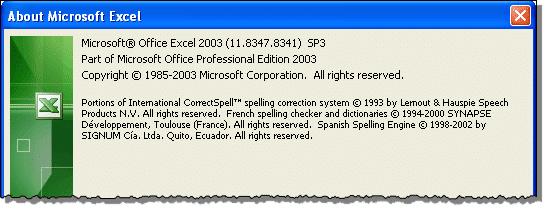
Win 11 - trying to install copy of Office 2003 and getting issues


In the end, even if you get it working, you cannot fix the security risks it poses.

Ask youself if it is a good plan to keep using a 20+ year old version no longer supported?
This is a common problem with non-techie people. My wife [for example] refuses to apply updates to her PC because she doesn’t like (or want) to deal with the changes that often brings. No amount of explaining about lack of support or security issues will change that. She’s used to things being a certain way - email (still runs Outlook 2013), browser (IE or Edge) and other software. Getting her to Photoshop’s Creative Cloud version - she was still running 2016 and paying Adobe’s subscription - took a major effort on my part. She’s not alone in that regard. I’ve run across plenty of others who don’t like/want the changes updates bring.

I KNOW that’s not us on here, but we need to be aware that those types DO EXIST.
 

My Computer My Computer

At a glance

Win11 Pro 25H2 Latest GA buildIntel(R) Core(TM) i9-14900KF 3.20 GHzG.Skill DDR5-5600 / PC5-44800 DDR5 SDRAM UDIMMGIGABYTE GeForce RTX 4070 Ti WINDFORCE OC 12G...
OS
Win11 Pro 25H2 Latest GA build
Computer type
PC/Desktop
Manufacturer/Model
Powerspec
CPU
Intel(R) Core(TM) i9-14900KF 3.20 GHz
Motherboard
MSI PRO Z690-A WIFI (latest BIOS)
Memory
G.Skill DDR5-5600 / PC5-44800 DDR5 SDRAM UDIMM
Graphics Card(s)
GIGABYTE GeForce RTX 4070 Ti WINDFORCE OC 12G (GV-N407TWF3OC-12GD)
Sound Card
OnBoard
Monitor(s) Displays
Dell - various (3)
Screen Resolution
1920x1080
Hard Drives
SSD/HDD/NVME
PSU
850 Watt 80+ Gold Modular
Case
PowerSpec/Lian Li ATX 205 Mesh
Cooling
Coolermaster MASTERLIQUID ML240L V2 RGB
Keyboard
Logi MX Keys S
Mouse
MX Master 3S
Internet Speed
600 mbps
Browser
various (Opera, Vivaldi, Edge, Brave, Chrome)
Antivirus
anitmalwarebytes; superantispyware; defender
Other Info
Windows Feature Experience Pack 1000.26100.36.0
This is a common problem with non-techie people. My wife [for example] refuses to apply updates to her PC because she doesn’t like (or want) to deal with the changes that often brings. No amount of explaining about lack of support or security issues will change that. She’s used to things being a certain way - email (still runs Outlook 2013), browser (IE or Edge) and other software. Getting her to Photoshop’s Creative Cloud version - she was still running 2016 and paying Adobe’s subscription - took a major effort on my part. She’s not alone in that regard. I’ve run across plenty of others who don’t like/want the changes updates bring.

I KNOW that’s not us on here, but we need to be aware that those types DO EXIST.
Of course I am blinking aware.

So what anyway?

I can't force people to get real and move with the times but no way will I smile sweetly ignoring the real issue.

I just do not hold with nonsense that "I am not going to change how I have always done things". One is never too old to learn - actually my experience is it is often middle aged people who are like that!
 

My Computer My Computer

At a glance

Windows 11 Pro + Win11 Canary VM.I9 13th gen i9-13900H 2.60 GHZ16 GB solderedIntegrated Intel Iris XE
OS
Windows 11 Pro + Win11 Canary VM.
Computer type
Laptop
Manufacturer/Model
ASUS Zenbook 14
CPU
I9 13th gen i9-13900H 2.60 GHZ
Motherboard
Yep, Laptop has one.
Memory
16 GB soldered
Graphics Card(s)
Integrated Intel Iris XE
Sound Card
Realtek built in
Monitor(s) Displays
laptop OLED screen
Screen Resolution
2880x1800 touchscreen
Hard Drives
1 TB NVME SSD (only weakness is only one slot)
PSU
Internal + 65W thunderbolt USB4 charger
Case
Yep, got one
Cooling
Stella Artois (UK pint cans - 568 ml) - extra cost.
Keyboard
Built in UK keybd
Mouse
Bluetooth , wireless dongled, wired
Internet Speed
900 mbs (ethernet), wifi 6 typical 350-450 mb/s both up and down
Browser
Edge
Antivirus
Defender
Other Info
TPM 2.0, 2xUSB4 thunderbolt, 1xUsb3 (usb a), 1xUsb-c, hdmi out, 3.5 mm audio out/in combo, ASUS backlit trackpad (inc. switchable number pad)

Macrium Reflect Home V8
Office 365 Family (6 users each 1TB onedrive space)
Hyper-V (a vm runs almost as fast as my older laptop)
Of course I am blinking aware.

So what anyway?

I can't force people to get real and move with the times but no way will I smile sweetly ignoring the real issue.

I just do not hold with nonsense that "I am not going to change how I have always done things". One is never too old to learn - actually my experience is it is often middle aged people who are like that!
It goes back to the old “you can lead a horse to water, but you can’t make them drink”… analogy.
 

My Computer My Computer

At a glance

Win11 Pro 25H2 Latest GA buildIntel(R) Core(TM) i9-14900KF 3.20 GHzG.Skill DDR5-5600 / PC5-44800 DDR5 SDRAM UDIMMGIGABYTE GeForce RTX 4070 Ti WINDFORCE OC 12G...
OS
Win11 Pro 25H2 Latest GA build
Computer type
PC/Desktop
Manufacturer/Model
Powerspec
CPU
Intel(R) Core(TM) i9-14900KF 3.20 GHz
Motherboard
MSI PRO Z690-A WIFI (latest BIOS)
Memory
G.Skill DDR5-5600 / PC5-44800 DDR5 SDRAM UDIMM
Graphics Card(s)
GIGABYTE GeForce RTX 4070 Ti WINDFORCE OC 12G (GV-N407TWF3OC-12GD)
Sound Card
OnBoard
Monitor(s) Displays
Dell - various (3)
Screen Resolution
1920x1080
Hard Drives
SSD/HDD/NVME
PSU
850 Watt 80+ Gold Modular
Case
PowerSpec/Lian Li ATX 205 Mesh
Cooling
Coolermaster MASTERLIQUID ML240L V2 RGB
Keyboard
Logi MX Keys S
Mouse
MX Master 3S
Internet Speed
600 mbps
Browser
various (Opera, Vivaldi, Edge, Brave, Chrome)
Antivirus
anitmalwarebytes; superantispyware; defender
Other Info
Windows Feature Experience Pack 1000.26100.36.0
Chiming in . . .
Just bought new Dell computer.
I still Excel 2003.
Security risk: Yes, of course.
But I only use it for some very complicated old spreadsheets that I created with lots of macros.
I use LibreOffice for all new stuff and for opening anything created by anyone other than me.

So I installed my old Office 2003 on the new computer.
And this very problem happened.

After reading through the replies and considering the fact that I do not use and hate Microsoft OneDrive, I uninstalled OneDrive.
The problem instantly went away.
 

My Computer My Computer

At a glance

Windows 1132 gb
OS
Windows 11
Computer type
PC/Desktop
Manufacturer/Model
Dell DECT1250
Memory
32 gb
Office 2019 is the oldest supported version to run on Windows 11.
 

My Computers My Computers

  • At a glance

    Windows 11 Education For 25H2Intel® Core i7 5500u8 GBIntel HD Family Graphics 5500 AMD Firepro 4150M
    OS
    Windows 11 Education For 25H2
    Computer type
    Laptop
    Manufacturer/Model
    HP ZBook G2
    CPU
    Intel® Core i7 5500u
    Motherboard
    HP
    Memory
    8 GB
    Graphics Card(s)
    Intel HD Family Graphics 5500 AMD Firepro 4150M
    Sound Card
    Realtek High Audio
    Hard Drives
    1 TB SSD
    Mouse
    HP USB Mouse
    Antivirus
    Windows Defender
  • At a glance

    Windows 11 Pro For Workstations 25H2Xeon 1535m v632 GBAMD Quadro Pro 4100
    Operating System
    Windows 11 Pro For Workstations 25H2
    Computer type
    Laptop
    Manufacturer/Model
    HP Zbook G4
    CPU
    Xeon 1535m v6
    Motherboard
    HP
    Memory
    32 GB
    Graphics card(s)
    AMD Quadro Pro 4100
    Sound Card
    Bang and Olufson Audio
    Hard Drives
    1TB SSD
    Mouse
    HP USB Mouse
    Antivirus
    Windows Defender
I was talking about the version that ran on Windows 11. Office 2021 LTSC is still quite capable.
 

My Computers My Computers

  • At a glance

    Windows 11 Education For 25H2Intel® Core i7 5500u8 GBIntel HD Family Graphics 5500 AMD Firepro 4150M
    OS
    Windows 11 Education For 25H2
    Computer type
    Laptop
    Manufacturer/Model
    HP ZBook G2
    CPU
    Intel® Core i7 5500u
    Motherboard
    HP
    Memory
    8 GB
    Graphics Card(s)
    Intel HD Family Graphics 5500 AMD Firepro 4150M
    Sound Card
    Realtek High Audio
    Hard Drives
    1 TB SSD
    Mouse
    HP USB Mouse
    Antivirus
    Windows Defender
  • At a glance

    Windows 11 Pro For Workstations 25H2Xeon 1535m v632 GBAMD Quadro Pro 4100
    Operating System
    Windows 11 Pro For Workstations 25H2
    Computer type
    Laptop
    Manufacturer/Model
    HP Zbook G4
    CPU
    Xeon 1535m v6
    Motherboard
    HP
    Memory
    32 GB
    Graphics card(s)
    AMD Quadro Pro 4100
    Sound Card
    Bang and Olufson Audio
    Hard Drives
    1TB SSD
    Mouse
    HP USB Mouse
    Antivirus
    Windows Defender
So I installed my old Office 2003 on the new computer.
And this very problem happened.

After reading through the replies and considering the fact that I do not use and hate Microsoft OneDrive, I uninstalled OneDrive.
The problem instantly went away.
Welcome to Eleven Forum.

Office 2019 is the oldest supported version to run on Windows 11.

Apparently my Office 2003 didn't get the memo. Works with everything, including opening and saving files on OneDrive.

1782492229313.webp 1782492296000.webp
 

My Computers My Computers

  • At a glance

    Windows 11 HomeAMD Athlon Silver 3050U8GBRadeon Graphics
    OS
    Windows 11 Home
    Computer type
    Laptop
    Manufacturer/Model
    Acer Aspire 3 A315-23-R9VY
    CPU
    AMD Athlon Silver 3050U
    Memory
    8GB
    Graphics Card(s)
    Radeon Graphics
    Monitor(s) Displays
    laptop screen
    Screen Resolution
    1366x768 native resolution, up to 2560x1440 with Radeon Virtual Super Resolution
    Hard Drives
    1TB Samsung EVO 870 SSD (from April 2026: 250GB EVO 850)
    Internet Speed
    150 Mbps
    Browser
    Edge, Firefox
    Antivirus
    Defender
    Other Info
    fully 'Windows 11 ready' laptop. Windows 10 C: partition migrated from my old unsupported 'main machine' then upgraded to 11. A test migration ran Insider builds for 2 months. When 11 was released on 5th October 2021 it was re-imaged back to 10 and was offered the upgrade in Windows Update on 20th October. Windows Update offered the 22H2 Feature Update on 20th September 2022. It got the 23H2 Feature Update on 4th November 2023 through Windows Update, 24H2 on 3rd October 2024 through Windows Update by setting the Target Release Version for 24H2, and 25H2 on 30th September 2025 through Windows Update by setting the Target Release Version for 25H2.

    UPDATE - 11 April 2026: due to mechanical deterioration this PC has been retired from active duty. The OS with all software and files has been migrated to my System Seven in 'Other systems' to carry on as my general purpose 'main machine'.

    I've now clean installed 25H2 and used Garlin's scripts to update Secure Boot to CA 2023 and revoke the PCA 2011 certificates. It's new role is to test secure boot issues.
  • At a glance

    Windows 11 ProIntel® Core™ i5-520M8GB(integrated graphics) Intel HD Graphics
    Operating System
    Windows 11 Pro
    Computer type
    Laptop
    Manufacturer/Model
    Dell Latitude E4310
    CPU
    Intel® Core™ i5-520M
    Motherboard
    0T6M8G
    Memory
    8GB
    Graphics card(s)
    (integrated graphics) Intel HD Graphics
    Screen Resolution
    1366x768
    Hard Drives
    500GB Crucial MX500 SSD
    Browser
    Firefox, Edge
    Antivirus
    Defender
    Other Info
    unsupported machine: Legacy bios, MBR, TPM 1.2, upgraded from W10 to W11 using W10/W11 hybrid install media workaround.

    In-place upgrade to 22H2 using ISO and a workaround.
    Feature Update to 23H2 by manually installing the Enablement Package.
    In-place upgrade to 24H2 using hybrid 23H2/24H2 install media.
    Upgraded to 25H2 by Enablement Package.

    Also running Insider Dev, and Canary builds and Windows 10 as native boot .vhdx.
  • My SYSTEM THREE is a Dell Latitude 5410, i7-10610U, 32GB RAM, 512GB NVMe ssd, supported device running Windows 11 Pro.

    My SYSTEM FOUR is a 2-in-1 convertible Lenovo Yoga 11e 20DA, Celeron N2930, 8GB RAM, 256GB ssd. Unsupported device: currently running Win10 Pro, plus Win11 Pro RTM and Insider Dev, Beta, and RP 24H2 as native boot vhdx.

    My SYSTEM FIVE is a Dell Latitude 3190 2-in-1, Pentium Silver N5030, 8GB RAM, 1TB NVMe ssd, supported device running Windows 11 Pro, plus Insider Beta, Dev, and Canary builds (and a few others) as a native boot .vhdx.

    My SYSTEM SIX is a Dell Latitude 5550, Core Ultra 7 165H, 64GB RAM, 1TB NVMe SSD, supported device, Windows 11 Pro 24H2, Hyper-V host machine. Updated to 25H2 on 30th September 2025.

    My SYSTEM SEVEN is a Lenovo Thinkpad T580, Intel Core i7-8650U, 16GB RAM, 512GB NVMe SSD + 2nd 512GB NVMe SSD, a supported device for Windows 11. This is my current general purpose 'main machine'. The installed Windows 11 Home from my System One has been migrated to this machine.
Supported != Works
 

My Computer My Computer

At a glance

Windows 11 Enterprise 25H2 [rev. 8893]
OS
Windows 11 Enterprise 25H2 [rev. 8893]
I also use Office 2003 on Win 11 Pro. What specifically are these security risks being mentioned? Are they documented somewhere?
 

My Computer My Computer

At a glance

Windows 11 Pro
OS
Windows 11 Pro

My Computer My Computer

At a glance

Windows 11 Home x64 Version 25H2 Build 26200....
OS
Windows 11 Home x64 Version 25H2 Build 26200.8037
I also use Office 2003 on Win 11 Pro. What specifically are these security risks being mentioned?
There is a huge list of CVE vulnerabilities for Office 2003.
As long as you use apps like Word 2003 only to make (or edit) your own documents, no harm will be done to your system. But if you would download any document ending with .doc, .docx, .xls, .xlsx etc. to your PC from an unreliable source (or you get one from anybody you know), the risk is severe that your computer gets infected with a virus or ransomware. Because all these vulnerabilities have been publiced and Office 2003 has been a very commonly used program, there are people in the world using that to infect computers.

I used Office 2003 for a very long time, until about a year ago. To make the risk as low as possible, on my browser I had an extension to open online .doc (etc.) documents using Google documents. In that way I separated the use: My own made documents I can safely open in Office 2003 and the more risky ones I open in Google Documents online. I never opened any such a document when sent to me by someone I know, always asked if it could be sent again in PDF format.

Nowadays I am using Softmaker Ofiice 2021, which is much less known and having much less reports at the CVE site.
 

My Computer My Computer

At a glance

Windows 11 Pro 25H2AMD Ryzen 7 5700GKingston FURY Beast 2x16GB DIMM DDR4 2666 CL16MSI GeForce GT 730 2GB LP V1
OS
Windows 11 Pro 25H2
Computer type
PC/Desktop
Manufacturer/Model
Build by vendor to my specs
CPU
AMD Ryzen 7 5700G
Motherboard
MSI PRO B550M-P Gen3
Memory
Kingston FURY Beast 2x16GB DIMM DDR4 2666 CL16
Graphics Card(s)
MSI GeForce GT 730 2GB LP V1
Sound Card
Creative Sound Blaster Audigy FX
Monitor(s) Displays
Samsung S24E450F 24"
Screen Resolution
1920 x 1080
Hard Drives
1. SSD Crucial P5 Plus 500GB PCIe M.2
2. SSD-SATA Crucial MX500-2TB
PSU
Corsair CV650W
Case
Cooler Master Silencio S400
Cooling
Cooler Master Hyper H412R with Be Quiet Pure Wings 2 PWM BL038 fan
Keyboard
Cherry Stream (wired, scissor keys)
Mouse
Asus WT465 (wireless)
Internet Speed
70 Mbps down / 80 Mbps up
Browser
Firefox 130.0
Antivirus
F-Secure (Internetprovider version)
Other Info
Router: FRITZBox 7490
Oracle VirtualBox 7 for testing software on Win 10 or 11
I also use Office 2003 on Win 11 Pro. What specifically are these security risks being mentioned? Are they documented somewhere?
Yes, but not as an easy to read single list of Office 2003 vulnerabilities. Every individual vulnerability has its own security bulletin, and a patch. From 2014 onwards Office 2003 was no longer getting patches for new vulnerabilities.


For example, this one was only patched for Office 2007 or later.


A more accessible assessment of the risks can be found here:


Disclosure: I have and use Office 2003, 2007, 2010 and 2013 on various machines - just be careful what you open, especially if it comes in an email ;)
 

My Computers My Computers

  • At a glance

    Windows 11 HomeAMD Athlon Silver 3050U8GBRadeon Graphics
    OS
    Windows 11 Home
    Computer type
    Laptop
    Manufacturer/Model
    Acer Aspire 3 A315-23-R9VY
    CPU
    AMD Athlon Silver 3050U
    Memory
    8GB
    Graphics Card(s)
    Radeon Graphics
    Monitor(s) Displays
    laptop screen
    Screen Resolution
    1366x768 native resolution, up to 2560x1440 with Radeon Virtual Super Resolution
    Hard Drives
    1TB Samsung EVO 870 SSD (from April 2026: 250GB EVO 850)
    Internet Speed
    150 Mbps
    Browser
    Edge, Firefox
    Antivirus
    Defender
    Other Info
    fully 'Windows 11 ready' laptop. Windows 10 C: partition migrated from my old unsupported 'main machine' then upgraded to 11. A test migration ran Insider builds for 2 months. When 11 was released on 5th October 2021 it was re-imaged back to 10 and was offered the upgrade in Windows Update on 20th October. Windows Update offered the 22H2 Feature Update on 20th September 2022. It got the 23H2 Feature Update on 4th November 2023 through Windows Update, 24H2 on 3rd October 2024 through Windows Update by setting the Target Release Version for 24H2, and 25H2 on 30th September 2025 through Windows Update by setting the Target Release Version for 25H2.

    UPDATE - 11 April 2026: due to mechanical deterioration this PC has been retired from active duty. The OS with all software and files has been migrated to my System Seven in 'Other systems' to carry on as my general purpose 'main machine'.

    I've now clean installed 25H2 and used Garlin's scripts to update Secure Boot to CA 2023 and revoke the PCA 2011 certificates. It's new role is to test secure boot issues.
  • At a glance

    Windows 11 ProIntel® Core™ i5-520M8GB(integrated graphics) Intel HD Graphics
    Operating System
    Windows 11 Pro
    Computer type
    Laptop
    Manufacturer/Model
    Dell Latitude E4310
    CPU
    Intel® Core™ i5-520M
    Motherboard
    0T6M8G
    Memory
    8GB
    Graphics card(s)
    (integrated graphics) Intel HD Graphics
    Screen Resolution
    1366x768
    Hard Drives
    500GB Crucial MX500 SSD
    Browser
    Firefox, Edge
    Antivirus
    Defender
    Other Info
    unsupported machine: Legacy bios, MBR, TPM 1.2, upgraded from W10 to W11 using W10/W11 hybrid install media workaround.

    In-place upgrade to 22H2 using ISO and a workaround.
    Feature Update to 23H2 by manually installing the Enablement Package.
    In-place upgrade to 24H2 using hybrid 23H2/24H2 install media.
    Upgraded to 25H2 by Enablement Package.

    Also running Insider Dev, and Canary builds and Windows 10 as native boot .vhdx.
  • My SYSTEM THREE is a Dell Latitude 5410, i7-10610U, 32GB RAM, 512GB NVMe ssd, supported device running Windows 11 Pro.

    My SYSTEM FOUR is a 2-in-1 convertible Lenovo Yoga 11e 20DA, Celeron N2930, 8GB RAM, 256GB ssd. Unsupported device: currently running Win10 Pro, plus Win11 Pro RTM and Insider Dev, Beta, and RP 24H2 as native boot vhdx.

    My SYSTEM FIVE is a Dell Latitude 3190 2-in-1, Pentium Silver N5030, 8GB RAM, 1TB NVMe ssd, supported device running Windows 11 Pro, plus Insider Beta, Dev, and Canary builds (and a few others) as a native boot .vhdx.

    My SYSTEM SIX is a Dell Latitude 5550, Core Ultra 7 165H, 64GB RAM, 1TB NVMe SSD, supported device, Windows 11 Pro 24H2, Hyper-V host machine. Updated to 25H2 on 30th September 2025.

    My SYSTEM SEVEN is a Lenovo Thinkpad T580, Intel Core i7-8650U, 16GB RAM, 512GB NVMe SSD + 2nd 512GB NVMe SSD, a supported device for Windows 11. This is my current general purpose 'main machine'. The installed Windows 11 Home from my System One has been migrated to this machine.
As long as you use apps like Word 2003 only to make (or edit) your own documents, no harm will be done to your system.
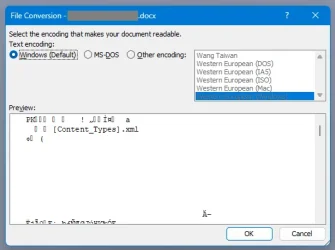
Yes, I only use it for my own documents. In the rare case that I have downloaded a ".docx" file, Word 2003 just refuses to open it (below). So I open those in Google Docs instead.
 

Attachments

  • Word.webp
    Word.webp
    16.5 KB · Views: 2

My Computer My Computer

At a glance

Windows 11 Pro
OS
Windows 11 Pro
In the rare case that I have downloaded a ".docx" file, Word 2003 just refuses to open it (below). So I open those in Google Docs instead.
There is (or rather, was) a Microsoft Office Compatibility Pack for Office versions from XP up to 2007 that allows you to open and save as .docx. This has been removed from Microsoft's servers but can still be found in the Internet Archive Wayback Machine.


1784453205204.webp
 

My Computers My Computers

  • At a glance

    Windows 11 HomeAMD Athlon Silver 3050U8GBRadeon Graphics
    OS
    Windows 11 Home
    Computer type
    Laptop
    Manufacturer/Model
    Acer Aspire 3 A315-23-R9VY
    CPU
    AMD Athlon Silver 3050U
    Memory
    8GB
    Graphics Card(s)
    Radeon Graphics
    Monitor(s) Displays
    laptop screen
    Screen Resolution
    1366x768 native resolution, up to 2560x1440 with Radeon Virtual Super Resolution
    Hard Drives
    1TB Samsung EVO 870 SSD (from April 2026: 250GB EVO 850)
    Internet Speed
    150 Mbps
    Browser
    Edge, Firefox
    Antivirus
    Defender
    Other Info
    fully 'Windows 11 ready' laptop. Windows 10 C: partition migrated from my old unsupported 'main machine' then upgraded to 11. A test migration ran Insider builds for 2 months. When 11 was released on 5th October 2021 it was re-imaged back to 10 and was offered the upgrade in Windows Update on 20th October. Windows Update offered the 22H2 Feature Update on 20th September 2022. It got the 23H2 Feature Update on 4th November 2023 through Windows Update, 24H2 on 3rd October 2024 through Windows Update by setting the Target Release Version for 24H2, and 25H2 on 30th September 2025 through Windows Update by setting the Target Release Version for 25H2.

    UPDATE - 11 April 2026: due to mechanical deterioration this PC has been retired from active duty. The OS with all software and files has been migrated to my System Seven in 'Other systems' to carry on as my general purpose 'main machine'.

    I've now clean installed 25H2 and used Garlin's scripts to update Secure Boot to CA 2023 and revoke the PCA 2011 certificates. It's new role is to test secure boot issues.
  • At a glance

    Windows 11 ProIntel® Core™ i5-520M8GB(integrated graphics) Intel HD Graphics
    Operating System
    Windows 11 Pro
    Computer type
    Laptop
    Manufacturer/Model
    Dell Latitude E4310
    CPU
    Intel® Core™ i5-520M
    Motherboard
    0T6M8G
    Memory
    8GB
    Graphics card(s)
    (integrated graphics) Intel HD Graphics
    Screen Resolution
    1366x768
    Hard Drives
    500GB Crucial MX500 SSD
    Browser
    Firefox, Edge
    Antivirus
    Defender
    Other Info
    unsupported machine: Legacy bios, MBR, TPM 1.2, upgraded from W10 to W11 using W10/W11 hybrid install media workaround.

    In-place upgrade to 22H2 using ISO and a workaround.
    Feature Update to 23H2 by manually installing the Enablement Package.
    In-place upgrade to 24H2 using hybrid 23H2/24H2 install media.
    Upgraded to 25H2 by Enablement Package.

    Also running Insider Dev, and Canary builds and Windows 10 as native boot .vhdx.
  • My SYSTEM THREE is a Dell Latitude 5410, i7-10610U, 32GB RAM, 512GB NVMe ssd, supported device running Windows 11 Pro.

    My SYSTEM FOUR is a 2-in-1 convertible Lenovo Yoga 11e 20DA, Celeron N2930, 8GB RAM, 256GB ssd. Unsupported device: currently running Win10 Pro, plus Win11 Pro RTM and Insider Dev, Beta, and RP 24H2 as native boot vhdx.

    My SYSTEM FIVE is a Dell Latitude 3190 2-in-1, Pentium Silver N5030, 8GB RAM, 1TB NVMe ssd, supported device running Windows 11 Pro, plus Insider Beta, Dev, and Canary builds (and a few others) as a native boot .vhdx.

    My SYSTEM SIX is a Dell Latitude 5550, Core Ultra 7 165H, 64GB RAM, 1TB NVMe SSD, supported device, Windows 11 Pro 24H2, Hyper-V host machine. Updated to 25H2 on 30th September 2025.

    My SYSTEM SEVEN is a Lenovo Thinkpad T580, Intel Core i7-8650U, 16GB RAM, 512GB NVMe SSD + 2nd 512GB NVMe SSD, a supported device for Windows 11. This is my current general purpose 'main machine'. The installed Windows 11 Home from my System One has been migrated to this machine.
Wow, thank you! I never knew this existed. :D And bless the Internet Archive.

[Edit] Just tried it, and it works perfectly! Thank you so much again. (y)
 

My Computer My Computer

At a glance

Windows 11 Pro
OS
Windows 11 Pro
Wow, thank you! I never knew this existed. :D And bless the Internet Archive.

[Edit] Just tried it, and it works perfectly! Thank you so much again. (y)
Note the compatibility pack just allows you read/write .docx, xlsx, and pptx files. If you try to open a document from a much newer version of Word, Excel, or PowerPoint Office then Office 2003 might not be able to handle features not in it. However, if you stick with basic functions you shouldn't have a problem.

If you create a lot of documents then a side benefits is that .docx, xlsx, and pptx files tend to be much smaller than the corresponding .doc, xls, and ppt files. That can add up to a lot of savings in space on your computers drives.

BTW, I have been using Office since 1995 with Office 95. For a time I had some computers with Office 2003 and some with Office 2007. It was nice to install the Microsoft Office Compatibility Pack in Office 2003 so all the computers could read the documents.
 

My Computers My Computers

  • At a glance

    Windows 11 Pro 25H2 (26200.6901)AMD Ryzen 7 6800H with Radeon 680M GPU (486MB...Crucial DDR5-4800 (2400MHz) 32GB (2 x 16GB)NVIDIA RTX 3060 Laptop (6GB RAM)
    OS
    Windows 11 Pro 25H2 (26200.6901)
    Computer type
    Laptop
    Manufacturer/Model
    ASUS TUF Gaming A15 (2022)
    CPU
    AMD Ryzen 7 6800H with Radeon 680M GPU (486MB RAM)
    Memory
    Crucial DDR5-4800 (2400MHz) 32GB (2 x 16GB)
    Graphics Card(s)
    NVIDIA RTX 3060 Laptop (6GB RAM)
    Sound Card
    n/a
    Monitor(s) Displays
    15.6-inch
    Screen Resolution
    1920x1080 300Hz
    Hard Drives
    2 x Samsung 990 Evo Plus (2TB M.2 NVME SSD)
    PSU
    n/a
    Mouse
    Wireless Mouse M510
    Internet Speed
    2100Mbps/300Mbps
    Browser
    Firefox
    Antivirus
    Malwarebytes
  • At a glance

    Windows 11 Pro 25H2 (26200.8246)AMD Ryzen 7 5700X3DG.SKILL Flare X 32GB (2x16GB) DDR4ASUS ROG-STRIX-RTX3060TI-08G-V2-GAMING (RTX 3...
    Operating System
    Windows 11 Pro 25H2 (26200.8246)
    Computer type
    PC/Desktop
    Manufacturer/Model
    Custom build
    CPU
    AMD Ryzen 7 5700X3D
    Motherboard
    ASUS ROG Strix B550-F Gaming WiFi II
    Memory
    G.SKILL Flare X 32GB (2x16GB) DDR4
    Graphics card(s)
    ASUS ROG-STRIX-RTX3060TI-08G-V2-GAMING (RTX 3060-Ti, 8GB RAM)
    Monitor(s) Displays
    Samsung G50D IPS 27"
    Screen Resolution
    1440p/180Hz
    Hard Drives
    SAMSUNG 990 EVO Plus (2TB] M.2 NVME SSD
    SAMSUNG 990 EVO Plus (4TB) M.2 NVME SSD
    PSU
    Corsair RM750x (750 watts)
    Case
    Cooler Master MasterCase 5
    Cooling
    Scythe Mugen 6
    Keyboard
    Logitech K520 (MK540 keyboard/mouse combo)
    Mouse
    Logitech M310 (MK540 keyboard/mouse combo)
    Internet Speed
    2100 Mbps down / 300 Mbps up
    Browser
    Firefox, Edge, Chrome
    Antivirus
    Malwarebytes (Premium)
    Other Info
    ASUS Blu-ray Burner BW-16D1HT (SATA) || Western Digital Easystore 20TB USB 3.0 external hard drive used with Acronis True Image 2025 backup software || HP OfficeJet Pro 6975 Printer/Scanner
Back
Top Bottom