ssssss
New member
- Local time
- 10:42 PM
- Posts
- 14
- OS
- Windows 11
I'm a newbie, please give me some guidance.
Hi everyone, I'd like to ask if anyone has encountered a "File History" issue on Windows 10 or Windows 11.
My laptop is running Windows 11 version 25H2. The File History feature worked fine before installing KB5101684 on July 29, 2026.
After the update, I started noticing some strange issues:
The last backup time was not updated correctly.
When I save the contents of a new file (such as a Word document or an image) to a previous version, the new version does not display.
However, these files were still successfully backed up to drive D.
Even without actually changing the contents of folders like the desktop and favorites, their modification dates may still change.
I haven't manually changed file history settings, registry settings, or deleted Event Viewer entries.
My Windows 10 version 22H2 desktop PC encountered a similar issue after installing KB5120249 on August 13, 2026.
The current solution is to temporarily restore normal operation by reselecting the backup drive: Control Panel → File History → Select Drive → Select D: Drive again.
If you encounter the same situation as me, please feel free to leave a message below or post it on the Microsoft Forums and Microsoft Learning Website.
Although the backup has been successfully transferred to drive D, the backup time has not been synchronized or updated.
When I save the contents of a new file (such as a Word document or an image) to a previous version, the new version does not display.
I have not deleted any system folders, tampered with my login file, or changed any settings.
I don't know what Microsoft is doing; you have made a serious mistake. You have not processed, verified, or documented the release process for security patches. If Microsoft does not investigate and confirm whether the recent update caused this problem and does not provide a fix in a future security update, I will have no choice but to continue reporting this issue through all available official channels and urge other affected users to do the same.
Windows Build/Version windows 10/11
Screenshots of the following questions
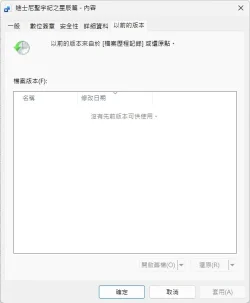
When I go to the contents of a new file (such as a Word document or image) → Previous Versions, it shows that no previous version is available.
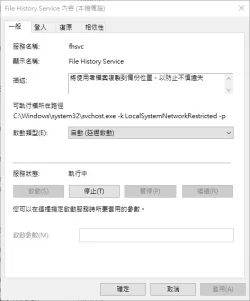
Service is enabled, not disabled.
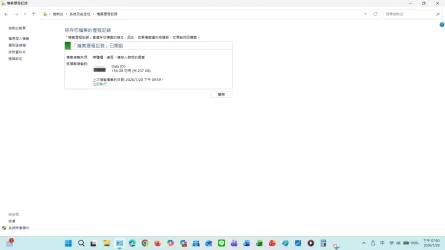
Although I successfully backed up files, pictures, etc. to the D drive, the backup time was not synchronized or updated.
I did not delete any system folders, tamper with login files, or change any settings.
I don't know what Microsoft is doing; you have made a serious mistake. You have not processed, verified, or documented the release process for security patches. If Microsoft does not investigate and confirm whether the recent update caused this issue and does not provide a fix in a future security update, I will have no choice but to continue reporting this issue through all available official channels and urge other affected users to do the same.
Hi everyone, I'd like to ask if anyone has encountered a "File History" issue on Windows 10 or Windows 11.
My laptop is running Windows 11 version 25H2. The File History feature worked fine before installing KB5101684 on July 29, 2026.
After the update, I started noticing some strange issues:
The last backup time was not updated correctly.
When I save the contents of a new file (such as a Word document or an image) to a previous version, the new version does not display.
However, these files were still successfully backed up to drive D.
Even without actually changing the contents of folders like the desktop and favorites, their modification dates may still change.
I haven't manually changed file history settings, registry settings, or deleted Event Viewer entries.
My Windows 10 version 22H2 desktop PC encountered a similar issue after installing KB5120249 on August 13, 2026.
The current solution is to temporarily restore normal operation by reselecting the backup drive: Control Panel → File History → Select Drive → Select D: Drive again.
If you encounter the same situation as me, please feel free to leave a message below or post it on the Microsoft Forums and Microsoft Learning Website.
Although the backup has been successfully transferred to drive D, the backup time has not been synchronized or updated.
When I save the contents of a new file (such as a Word document or an image) to a previous version, the new version does not display.
I have not deleted any system folders, tampered with my login file, or changed any settings.
I don't know what Microsoft is doing; you have made a serious mistake. You have not processed, verified, or documented the release process for security patches. If Microsoft does not investigate and confirm whether the recent update caused this problem and does not provide a fix in a future security update, I will have no choice but to continue reporting this issue through all available official channels and urge other affected users to do the same.
Windows Build/Version windows 10/11
Screenshots of the following questions
When I go to the contents of a new file (such as a Word document or image) → Previous Versions, it shows that no previous version is available.
Service is enabled, not disabled.
Although I successfully backed up files, pictures, etc. to the D drive, the backup time was not synchronized or updated.
I did not delete any system folders, tamper with login files, or change any settings.
I don't know what Microsoft is doing; you have made a serious mistake. You have not processed, verified, or documented the release process for security patches. If Microsoft does not investigate and confirm whether the recent update caused this issue and does not provide a fix in a future security update, I will have no choice but to continue reporting this issue through all available official channels and urge other affected users to do the same.
My Computer
At a glance
Windows 11
- OS
- Windows 11
- Computer type
- Laptop