Windows 11 24H2 Install - From UEFI+GPT+Secure Boot - Single NTFS partition - Without Rufus


Using this page : Append, apply, and export volume images with a Windows Image (.wim) file

Figured out the 2x "dism commands". to extract the 2x following wims, creating new install.wim:
  • Windows 11 Pro
  • Windows 11 Pro for Workstations
Result was still approx 4.6gb, so not much point going on with this, really.
May as well just stick with, splitting install.wim on 3.8GB boundary, WMCT does similar, and Linux script for it, is easy.
 
Last edited:

My Computers

System One System Two

  • OS
    Fedora/KDE Plasma F43
    Computer type
    PC/Desktop
    Manufacturer/Model
    HP Z640
    CPU
    Xeon 2667 v4
    Motherboard
    Xeon V4 Motherboard
    Memory
    48GB ECC DDR4
    Graphics Card(s)
    nVidia GTX 1650
    Monitor(s) Displays
    LG 27"
    Screen Resolution
    1920x1080@144hz
    Hard Drives
    NVME, SSD
    PSU
    850W
  • Operating System
    Windows 11 IOT Enterprise LTSC/RHEL 10.1 KDE Plasma
    Computer type
    PC/Desktop
    Manufacturer/Model
    HP Z440
    CPU
    Intel Xeom 2680 V4
    Motherboard
    HP Z440
    Memory
    64gb DDR4 ECC
    Graphics card(s)
    AMD RX560
    Monitor(s) Displays
    LG Gsync 27" 144hz
    Screen Resolution
    1920x1080@144hz
    Hard Drives
    SSD/nVme/HDD
    PSU
    standard 700W
    Case
    standard
    Cooling
    Standard
    Browser
    MS Edge
    Antivirus
    BitDefender
Using this page : Append, apply, and export volume images with a Windows Image (.wim) file

Figured out the 2x "dism commands". to extract the 2x following wims, creating new install.wim:
  • Windows 11 Pro
  • Windows 11 Pro for Workstations
Result was still approx 4.6gb, so not much point going on with this, really.
Unless someone can be bothered, to figure out, how to remove 1gb of the AI crap, from the download iso, without breaking anything. :lmao:

I'll just stick with fat32+ntfs partition on usb, as already have Linux script tested for this.
I just made a conversion from install.wim of size 5.74 GB to install.esd of size 4.33 GB. A size reduction of 1.41 GB but it is still not enough to fit into FAT32 file system. I am not sure if FAT32 file system is a must for clean installation of Windows on UEFI systems. I will check if NTFS formatted disk is okay for UEFI install.
 

My Computers

System One System Two

  • OS
    Windows 11 Pro build 26200.8524
    Computer type
    PC/Desktop
    Manufacturer/Model
    Home Built
    CPU
    Intel i7-4790
    Motherboard
    Asus H97 Pro Gamer with add-on TPM1.2 module
    Memory
    Teams DDR3-1600 4x4 GB
    Graphics Card(s)
    MSI Nvidia GeForce GTX 1050Ti
    Sound Card
    Realtek ALC1150
    Monitor(s) Displays
    Dell P2425D
    Screen Resolution
    2560 by 1440 pixels
    Hard Drives
    Corsair NVMe M.2 Core XT 1000 GB (Windows 11 v.25H2); Samsung SATA Evo 870 500 GB (Windows 11 v.25H2);
    PSU
    Corsair HX850
    Case
    Gigabyte Solo 210
    Cooling
    Zalman CNPS7X Tower
    Keyboard
    Microsoft AIO Wireless (includes touchpad)
    Mouse
    HP S1000 Plus Wireless
    Internet Speed
    500 Mb fiber optic
    Browser
    Chrome; MS Edge
    Antivirus
    Windows Defender
  • Operating System
    MacOS 12 Monterey
    Computer type
    Laptop
    Manufacturer/Model
    Apple Macbook Air
    CPU
    Intel Core i5
    Memory
    8 GB
    Graphics card(s)
    Intel integrated
    Screen Resolution
    1440 by 900 pixels
    Hard Drives
    128 GB
    Keyboard
    Built-in
    Mouse
    Microsoft Wireless
    Internet Speed
    802.11 ac
    Browser
    Chrome; Safari
    Antivirus
    N/A
I just made a conversion from install.wim of size 5.74 GB to install.esd of size 4.33 GB. A size reduction of 1.41 GB but it is still not enough to fit into FAT32 file system. I am not sure if FAT32 file system is a must for clean installation of Windows on UEFI systems. I will check if NTFS formatted disk is okay for UEFI install.

Have a look earlier in this thread, I made UEFI/Secure mode bootable usb, with gpt table, fat32 BOOT part, and ntfs INSTALL part.

"Sources" on the NTFS part, no wim splitting, no additional efi drivers or apps needed.

Just would be nice and neat, for everything to fit in 1x gpt/fat32 part, with just reducing install.wim".
 

My Computers

System One System Two

  • OS
    Fedora/KDE Plasma F43
    Computer type
    PC/Desktop
    Manufacturer/Model
    HP Z640
    CPU
    Xeon 2667 v4
    Motherboard
    Xeon V4 Motherboard
    Memory
    48GB ECC DDR4
    Graphics Card(s)
    nVidia GTX 1650
    Monitor(s) Displays
    LG 27"
    Screen Resolution
    1920x1080@144hz
    Hard Drives
    NVME, SSD
    PSU
    850W
  • Operating System
    Windows 11 IOT Enterprise LTSC/RHEL 10.1 KDE Plasma
    Computer type
    PC/Desktop
    Manufacturer/Model
    HP Z440
    CPU
    Intel Xeom 2680 V4
    Motherboard
    HP Z440
    Memory
    64gb DDR4 ECC
    Graphics card(s)
    AMD RX560
    Monitor(s) Displays
    LG Gsync 27" 144hz
    Screen Resolution
    1920x1080@144hz
    Hard Drives
    SSD/nVme/HDD
    PSU
    standard 700W
    Case
    standard
    Cooling
    Standard
    Browser
    MS Edge
    Antivirus
    BitDefender
Have you tried booting to NTFS formatted USB flash disk for Windows installation on your UEFI system ?

I now tested NTFS-formatted USB flash drive on my PC.

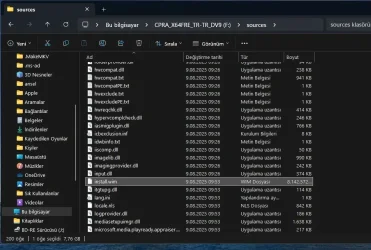
The flash drive had install.wim file of size 7.76 GB.

NTFS-1.webp

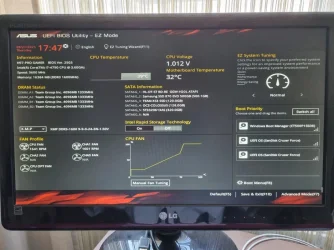
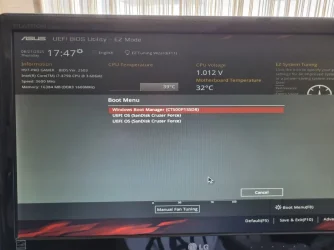
I restarted my PC and got to boot priority page in BIOS. This is what I got:

NTFS-2.webp

NTFS-3.webp

I did not go any further than this. But I guess if I continued I would be able to install from NTFS-formatted USB flash drive.

My motherboard is ASUS H97-Pro Gamer. I bought it late 2014 or early 2015. It is an incompatible motherboard by Windows 11 system requirements.
 

My Computers

System One System Two

  • OS
    Windows 11 Pro build 26200.8524
    Computer type
    PC/Desktop
    Manufacturer/Model
    Home Built
    CPU
    Intel i7-4790
    Motherboard
    Asus H97 Pro Gamer with add-on TPM1.2 module
    Memory
    Teams DDR3-1600 4x4 GB
    Graphics Card(s)
    MSI Nvidia GeForce GTX 1050Ti
    Sound Card
    Realtek ALC1150
    Monitor(s) Displays
    Dell P2425D
    Screen Resolution
    2560 by 1440 pixels
    Hard Drives
    Corsair NVMe M.2 Core XT 1000 GB (Windows 11 v.25H2); Samsung SATA Evo 870 500 GB (Windows 11 v.25H2);
    PSU
    Corsair HX850
    Case
    Gigabyte Solo 210
    Cooling
    Zalman CNPS7X Tower
    Keyboard
    Microsoft AIO Wireless (includes touchpad)
    Mouse
    HP S1000 Plus Wireless
    Internet Speed
    500 Mb fiber optic
    Browser
    Chrome; MS Edge
    Antivirus
    Windows Defender
  • Operating System
    MacOS 12 Monterey
    Computer type
    Laptop
    Manufacturer/Model
    Apple Macbook Air
    CPU
    Intel Core i5
    Memory
    8 GB
    Graphics card(s)
    Intel integrated
    Screen Resolution
    1440 by 900 pixels
    Hard Drives
    128 GB
    Keyboard
    Built-in
    Mouse
    Microsoft Wireless
    Internet Speed
    802.11 ac
    Browser
    Chrome; Safari
    Antivirus
    N/A
Yep,

On 1st page I detailed, I created gpt usb, with single NTFS partition.

2x of my 8th Gen laptops identified the USB as UEFI, in Secure Mode, booted and started install, my 8th Gen desktop, did not identify the USB key as UEFI boot option.

Don't think I tried, msdos partition table, ntfs partition, to see if UEFI boot would work with Secure boot on.
 

My Computers

System One System Two

  • OS
    Fedora/KDE Plasma F43
    Computer type
    PC/Desktop
    Manufacturer/Model
    HP Z640
    CPU
    Xeon 2667 v4
    Motherboard
    Xeon V4 Motherboard
    Memory
    48GB ECC DDR4
    Graphics Card(s)
    nVidia GTX 1650
    Monitor(s) Displays
    LG 27"
    Screen Resolution
    1920x1080@144hz
    Hard Drives
    NVME, SSD
    PSU
    850W
  • Operating System
    Windows 11 IOT Enterprise LTSC/RHEL 10.1 KDE Plasma
    Computer type
    PC/Desktop
    Manufacturer/Model
    HP Z440
    CPU
    Intel Xeom 2680 V4
    Motherboard
    HP Z440
    Memory
    64gb DDR4 ECC
    Graphics card(s)
    AMD RX560
    Monitor(s) Displays
    LG Gsync 27" 144hz
    Screen Resolution
    1920x1080@144hz
    Hard Drives
    SSD/nVme/HDD
    PSU
    standard 700W
    Case
    standard
    Cooling
    Standard
    Browser
    MS Edge
    Antivirus
    BitDefender
Sorry sometimes I forgot what was written on first page when I come to last page.

You said you couldn't boot when secure boot was on. Have you made any certificate update in UEFI firmware as to Windows CA 2023 ? Could it be a reason for not being able to boot to USB flash disk if it contained CA 2011 certificate ? When I download iso files from UUPDUMP, I always have updated boot files because I updated Windows CA 2023 certificate and revoked CA 2011 certificate in firmware.
 

My Computers

System One System Two

  • OS
    Windows 11 Pro build 26200.8524
    Computer type
    PC/Desktop
    Manufacturer/Model
    Home Built
    CPU
    Intel i7-4790
    Motherboard
    Asus H97 Pro Gamer with add-on TPM1.2 module
    Memory
    Teams DDR3-1600 4x4 GB
    Graphics Card(s)
    MSI Nvidia GeForce GTX 1050Ti
    Sound Card
    Realtek ALC1150
    Monitor(s) Displays
    Dell P2425D
    Screen Resolution
    2560 by 1440 pixels
    Hard Drives
    Corsair NVMe M.2 Core XT 1000 GB (Windows 11 v.25H2); Samsung SATA Evo 870 500 GB (Windows 11 v.25H2);
    PSU
    Corsair HX850
    Case
    Gigabyte Solo 210
    Cooling
    Zalman CNPS7X Tower
    Keyboard
    Microsoft AIO Wireless (includes touchpad)
    Mouse
    HP S1000 Plus Wireless
    Internet Speed
    500 Mb fiber optic
    Browser
    Chrome; MS Edge
    Antivirus
    Windows Defender
  • Operating System
    MacOS 12 Monterey
    Computer type
    Laptop
    Manufacturer/Model
    Apple Macbook Air
    CPU
    Intel Core i5
    Memory
    8 GB
    Graphics card(s)
    Intel integrated
    Screen Resolution
    1440 by 900 pixels
    Hard Drives
    128 GB
    Keyboard
    Built-in
    Mouse
    Microsoft Wireless
    Internet Speed
    802.11 ac
    Browser
    Chrome; Safari
    Antivirus
    N/A
@Silvio, if you have not already done so, take a look at option #3 in this tutorial:


This will allow you to create your bootable in a way that has these advantages:

- Requires no third-party software.
- Works with both BIOS and UEFI systems
- Has no 4GB file size limitation. You can have as many large files as you want.
- Doesn't care if a machine cannot boot from NTFS media but still leverages NTFS to its advantage.
- I have never ever had this method not work and I've been using it for years.

If you try it and like it, let me know. I have a batch file that can automate this procedure for you.

While I'm at it, I also just finished a batch file that can generate answer files to automate Windows installation. It will

- Bypass Windows 11 system requirements
- Prevent automatic device encryption
- Prevent download and installation of quality updates during installation
- Allow for complete customization of partition sizes
- Create a local account and skip the need for an MS account during setup
- Works for both BIOS and UEFI systems
- more
 

My Computers

System One System Two

  • OS
    Win11 Pro 25H2 (RTM+)
    Computer type
    PC/Desktop
    Manufacturer/Model
    Acemagic
    CPU
    Intel i7-14650HX
    Memory
    32 GB
    Graphics Card(s)
    No GPU - Built-in Intel Graphics
    Sound Card
    Integrated
    Monitor(s) Displays
    Varies as machine will often be moved to locations with different monitors
    Screen Resolution
    Varies
    Hard Drives
    1 x 1TB Gen 4 NVMe SSD
    PSU
    120W Power Brick
    Keyboard
    Corsair K70 Max RGB Magnetic Keyboard
    Mouse
    Logitech MX Master 3
    Internet Speed
    1Gb Up / 1 Gb Down
    Browser
    Edge
    Antivirus
    Windows Defender
  • Operating System
    Win11 Pro 25H2 (RTM+)
    Computer type
    Laptop
    Manufacturer/Model
    Lenovo ThinkBook 13x Gen 2
    CPU
    Intel i7-1255U
    Memory
    16 GB
    Graphics card(s)
    Intel Iris Xe Graphics
    Sound Card
    Realtek® ALC3306-CG codec
    Monitor(s) Displays
    13.3-inch IPS Display
    Screen Resolution
    WQXGA (2560 x 1600)
    Hard Drives
    2 TB 4 x 4 NVMe SSD
    PSU
    USB-C / Thunderbolt 4 Power / Charging
    Keyboard
    Backlit, spill resistant keyboard
    Mouse
    Buttonless Glass Precision Touchpad
    Internet Speed
    1Gb Up / 1Gb Down
    Browser
    Edge
    Antivirus
    Windows Defender
    Other Info
    WiFi 6e / Bluetooth 5.1 / Facial Recognition / Fingerprint Sensor / ToF (Time of Flight) Human Presence Sensor
UEFI booting a usb with single ntfs partition, is down to vendor providing that support in BIOS, nothing to do with certs.

Will work on some machines. not on others.
 

My Computers

System One System Two

  • OS
    Fedora/KDE Plasma F43
    Computer type
    PC/Desktop
    Manufacturer/Model
    HP Z640
    CPU
    Xeon 2667 v4
    Motherboard
    Xeon V4 Motherboard
    Memory
    48GB ECC DDR4
    Graphics Card(s)
    nVidia GTX 1650
    Monitor(s) Displays
    LG 27"
    Screen Resolution
    1920x1080@144hz
    Hard Drives
    NVME, SSD
    PSU
    850W
  • Operating System
    Windows 11 IOT Enterprise LTSC/RHEL 10.1 KDE Plasma
    Computer type
    PC/Desktop
    Manufacturer/Model
    HP Z440
    CPU
    Intel Xeom 2680 V4
    Motherboard
    HP Z440
    Memory
    64gb DDR4 ECC
    Graphics card(s)
    AMD RX560
    Monitor(s) Displays
    LG Gsync 27" 144hz
    Screen Resolution
    1920x1080@144hz
    Hard Drives
    SSD/nVme/HDD
    PSU
    standard 700W
    Case
    standard
    Cooling
    Standard
    Browser
    MS Edge
    Antivirus
    BitDefender
Yep, I already created working UEFI bootable usb, using fat32 and ntfs partitions.
 
Last edited:

My Computers

System One System Two

  • OS
    Fedora/KDE Plasma F43
    Computer type
    PC/Desktop
    Manufacturer/Model
    HP Z640
    CPU
    Xeon 2667 v4
    Motherboard
    Xeon V4 Motherboard
    Memory
    48GB ECC DDR4
    Graphics Card(s)
    nVidia GTX 1650
    Monitor(s) Displays
    LG 27"
    Screen Resolution
    1920x1080@144hz
    Hard Drives
    NVME, SSD
    PSU
    850W
  • Operating System
    Windows 11 IOT Enterprise LTSC/RHEL 10.1 KDE Plasma
    Computer type
    PC/Desktop
    Manufacturer/Model
    HP Z440
    CPU
    Intel Xeom 2680 V4
    Motherboard
    HP Z440
    Memory
    64gb DDR4 ECC
    Graphics card(s)
    AMD RX560
    Monitor(s) Displays
    LG Gsync 27" 144hz
    Screen Resolution
    1920x1080@144hz
    Hard Drives
    SSD/nVme/HDD
    PSU
    standard 700W
    Case
    standard
    Cooling
    Standard
    Browser
    MS Edge
    Antivirus
    BitDefender
UEFI booting a usb with single ntfs partition, is down to vendor providing that support in BIOS, nothing to do with certs.

Will work on some machines. not on others.

Yeas and no. The vendor has to support bootable media formatted as NTFS but certs also make a difference. When I first patched my systems for Blacklotus, I had to regen all my boot media with updated WinPE also patched for Blacklotus. This is well documented.
 

My Computers

System One System Two

  • OS
    Win11 Pro 25H2 (RTM+)
    Computer type
    PC/Desktop
    Manufacturer/Model
    Acemagic
    CPU
    Intel i7-14650HX
    Memory
    32 GB
    Graphics Card(s)
    No GPU - Built-in Intel Graphics
    Sound Card
    Integrated
    Monitor(s) Displays
    Varies as machine will often be moved to locations with different monitors
    Screen Resolution
    Varies
    Hard Drives
    1 x 1TB Gen 4 NVMe SSD
    PSU
    120W Power Brick
    Keyboard
    Corsair K70 Max RGB Magnetic Keyboard
    Mouse
    Logitech MX Master 3
    Internet Speed
    1Gb Up / 1 Gb Down
    Browser
    Edge
    Antivirus
    Windows Defender
  • Operating System
    Win11 Pro 25H2 (RTM+)
    Computer type
    Laptop
    Manufacturer/Model
    Lenovo ThinkBook 13x Gen 2
    CPU
    Intel i7-1255U
    Memory
    16 GB
    Graphics card(s)
    Intel Iris Xe Graphics
    Sound Card
    Realtek® ALC3306-CG codec
    Monitor(s) Displays
    13.3-inch IPS Display
    Screen Resolution
    WQXGA (2560 x 1600)
    Hard Drives
    2 TB 4 x 4 NVMe SSD
    PSU
    USB-C / Thunderbolt 4 Power / Charging
    Keyboard
    Backlit, spill resistant keyboard
    Mouse
    Buttonless Glass Precision Touchpad
    Internet Speed
    1Gb Up / 1Gb Down
    Browser
    Edge
    Antivirus
    Windows Defender
    Other Info
    WiFi 6e / Bluetooth 5.1 / Facial Recognition / Fingerprint Sensor / ToF (Time of Flight) Human Presence Sensor
Yeas and no. The vendor has to support bootable media formatted as NTFS but certs also make a difference. When I first patched my systems for Blacklotus, I had to regen all my boot media with updated WinPE also patched for Blacklotus. This is well documented.
If your mainboard's BIOS has "buggy" UEFI ntfs boot code, your machine is not booting that UEFI usb key with single ntfs partition, regardless of updated certs.

Did another test today, this time HP Z440, built before my 8th Gen PC, but does have 2023 bios, and it booted the USB.

So also, "not just" dependent on the age of the machine, just the quality/"recentness", of the BIOS version.
 

My Computers

System One System Two

  • OS
    Fedora/KDE Plasma F43
    Computer type
    PC/Desktop
    Manufacturer/Model
    HP Z640
    CPU
    Xeon 2667 v4
    Motherboard
    Xeon V4 Motherboard
    Memory
    48GB ECC DDR4
    Graphics Card(s)
    nVidia GTX 1650
    Monitor(s) Displays
    LG 27"
    Screen Resolution
    1920x1080@144hz
    Hard Drives
    NVME, SSD
    PSU
    850W
  • Operating System
    Windows 11 IOT Enterprise LTSC/RHEL 10.1 KDE Plasma
    Computer type
    PC/Desktop
    Manufacturer/Model
    HP Z440
    CPU
    Intel Xeom 2680 V4
    Motherboard
    HP Z440
    Memory
    64gb DDR4 ECC
    Graphics card(s)
    AMD RX560
    Monitor(s) Displays
    LG Gsync 27" 144hz
    Screen Resolution
    1920x1080@144hz
    Hard Drives
    SSD/nVme/HDD
    PSU
    standard 700W
    Case
    standard
    Cooling
    Standard
    Browser
    MS Edge
    Antivirus
    BitDefender
Back
Top Bottom