Windows 11 25H2 (Build 26200.8655) — Official ISO Availability / Download Method


yastil

Active member
Member
Local time
11:42 PM
Posts
56
OS
Windows 11 Pro 25H2 build 26200.8655
Hello,
I’m looking for the current clean installation ISO for Windows 11 25H2 (build 26200.8655).


I want to clarify what the correct and official way is to obtain this specific build at the moment — whether it is already available as a direct ISO download via Microsoft (e.g. Media Creation Tool or official download portal), or if it still needs to be generated through UUP.


My requirement is strictly a clean, unmodified Microsoft image, as I’m using it for DISM/SFC validation and recovery scenario testing.


If anyone knows the current recommended or most reliable method to obtain this exact build, I’d appreciate a brief pointer.


Thanks in advance.
 

My Computer

System One

  • OS
    Windows 11 Pro 25H2 build 26200.8655
    Computer type
    PC/Desktop
    Manufacturer/Model
    Custom build (Gigabyte)
    CPU
    AMD Ryzen 7 7700X
    Motherboard
    Gigabyte B650M GAMING X AX
    Memory
    RAM: 64 GB DDR5
    Graphics Card(s)
    AMD Radeon RX 7800 XT (16 GB)
    Sound Card
    Realtek (onboard)
    Monitor(s) Displays
    Samsung
    Screen Resolution
    1920 x 1080
    Hard Drives
    Samsung 990 PRO 1 TB (NVM-e),
    Keyboard
    Logitech MX Master
    Mouse
    Logitech
    Internet Speed
    13ms/250Mbps/25Mbps
    Browser
    Microsoft Edge
    Antivirus
    Bitdefender
    Other Info
    UEFI, Secure Boot ON, TPM 2.0 ON
Last edited:

My Computer

System One

  • OS
    Windows 11 Pro 25H2, OS build: 26200.8655
    Computer type
    Laptop
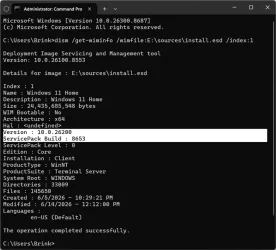
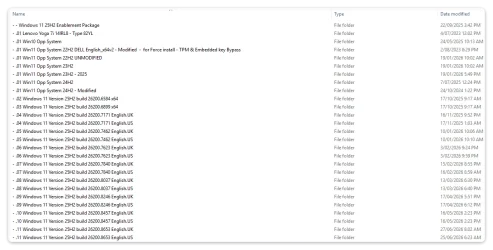
MCT currently is only for Windows 11 Version 25H2 build 26200.8653 instead.

You'll need to use UUP Dump if you want a direct 26200.8655 instead for now.


MCT.webp
 

My Computers

System One System Two

  • OS
    Windows 11 Pro for Workstations
    Computer type
    PC/Desktop
    Manufacturer/Model
    Custom self build
    CPU
    Intel i7-8700K 5 GHz
    Motherboard
    ASUS ROG Maximus XI Formula Z390
    Memory
    64 GB (4x16GB) G.SKILL TridentZ RGB DDR4 3600 MHz (F4-3600C18D-32GTZR)
    Graphics Card(s)
    ASUS ROG-STRIX-GTX1080TI-O11G-GAMING (11GB GDDR5X)
    Sound Card
    Integrated Digital Audio (S/PDIF)
    Monitor(s) Displays
    2 x Samsung Odyssey G75 27"
    Screen Resolution
    2560x1440
    Hard Drives
    1TB Samsung 990 PRO M.2,
    4TB Samsung 990 PRO M.2,
    TerraMaster F8 SSD Plus NAS
    PSU
    Seasonic Prime Titanium 850W
    Case
    Thermaltake Core P3 wall mounted
    Cooling
    Corsair Hydro H115i
    Keyboard
    Amazon Basics Wired Full Keyboard MD005
    Mouse
    Logitech MX Master 4
    Internet Speed
    2 Gbps Download and 100 Mbps Upload
    Browser
    Chrome and Edge
    Antivirus
    Microsoft Defender
    Other Info
    Logitech Z625 speaker system,
    Logitech BRIO 4K Pro webcam,
    HP Color LaserJet Pro MFP M477fdn,
    CyberPower CP1500PFCLCD
    Galaxy S23 Plus phone
  • Operating System
    Windows 11 Pro
    Computer type
    Laptop
    Manufacturer/Model
    Surface Laptop 7 Copilot+ PC
    CPU
    Snapdragon X Elite (12 core) 3.42 GHz
    Memory
    16 GB LPDDR5x-7467 MHz
    Monitor(s) Displays
    15" HDR
    Screen Resolution
    2496 x 1664
    Hard Drives
    1 TB SSD
    Internet Speed
    Wi-Fi 7 and Bluetooth 5.4
    Browser
    Chrome and Edge
    Antivirus
    Microsoft Defender
Brink beat me (again!). I downloaded MCT this morning, and it seems to be downloading 10.0.26200.8653, which then updates to 8655.
 

My Computer

System One

  • OS
    Windows 11 Pro 25H2
    Computer type
    PC/Desktop
    Manufacturer/Model
    Intel NUC12WSHi7
    CPU
    12th Gen Core i7-1260P
    Motherboard
    NUC12WSBi7
    Memory
    64 GB Micron PC4-25600
    Graphics Card(s)
    Intel Iris Xe Graphics
    Sound Card
    on-board Realtek HD Audio
    Monitor(s) Displays
    Dell U3219Q
    Screen Resolution
    3840 x 2160
    Hard Drives
    Samsung SSD 990 PRO 1TB
    Crucial MX500 2 TB
    Antivirus
    Microsoft Defender
So they're saying that the MCT will create the latest build image but still produces .8653 and not 8655?
🤷‍♂️
 

My Computer

System One

  • OS
    Windows 11
    Computer type
    Laptop
    Manufacturer/Model
    ASUS
By the way, the mighty garlin has a batch file over here that will show you which version MCT is downloading.


Code:
> .\MCT_ISO_version.bat
26200.8653.260606-0206.25h2_ge_release_svc_refresh
 

My Computer

System One

  • OS
    Windows 11 Pro 25H2
    Computer type
    PC/Desktop
    Manufacturer/Model
    Intel NUC12WSHi7
    CPU
    12th Gen Core i7-1260P
    Motherboard
    NUC12WSBi7
    Memory
    64 GB Micron PC4-25600
    Graphics Card(s)
    Intel Iris Xe Graphics
    Sound Card
    on-board Realtek HD Audio
    Monitor(s) Displays
    Dell U3219Q
    Screen Resolution
    3840 x 2160
    Hard Drives
    Samsung SSD 990 PRO 1TB
    Crucial MX500 2 TB
    Antivirus
    Microsoft Defender
By the way, the mighty garlin has a batch file over here that will show you which version MCT is downloading.


Code:
> .\MCT_ISO_version.bat
26200.8653.260606-0206.25h2_ge_release_svc_refresh
A most useful batch, but for now I'm curious as to why the MCT isn't pulling 8655. Is it still in experimental phase or that's the way it's gonna be? Because if it pulls 8653 and then installs 8655 it contradicts the official announcement.
 

My Computer

System One

  • OS
    Windows 11
    Computer type
    Laptop
    Manufacturer/Model
    ASUS

Latest Support Threads

Back
Top Bottom