

- Local time
- 12:56 PM
- Posts
- 121
- OS
- Windows 11 Pro 64 Bit 26H2 26300 9457
Problem
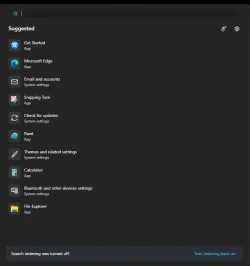
The search menu dialog box appearance has changed on my system (I am assuming this is the new look in Windows 11 26H2, though I am not certain). I do not like the appearance of it at all and would like help restoring it back to its default appearance and settings.
What I tried
Extra details
Any suggestions would be greatly appreciated.
The search menu dialog box appearance has changed on my system (I am assuming this is the new look in Windows 11 26H2, though I am not certain). I do not like the appearance of it at all and would like help restoring it back to its default appearance and settings.
What I tried
- Ran all the DISM commands and SFC (i.e. sfc, etc.), but nothing has helped.
- Used a point-in-time restore to an earlier date, but the search menu still looks like this.
Extra details
- I am not using any third-party tools on the system.
- This change occurred on my primary system, but not on my other system, so I am not sure what caused it.
Any suggestions would be greatly appreciated.
Attachments
My Computer
At a glance
Windows 11 Pro 64 Bit 26H2 26300 9457Intel Core I5-8250U 1.80 GHZ16 GBIntel UHD Graphics 620
- OS
- Windows 11 Pro 64 Bit 26H2 26300 9457
- Computer type
- Laptop
- Manufacturer/Model
- Asus X510UAR
- CPU
- Intel Core I5-8250U 1.80 GHZ
- Memory
- 16 GB
- Graphics Card(s)
- Intel UHD Graphics 620
- Sound Card
- Conexant
- Monitor(s) Displays
- Dell 24" ST2420
- Screen Resolution
- 1920x1080
- Hard Drives
- ADATA SU635 DDS
- Keyboard
- Logitech
- Mouse
- Logitech
- Internet Speed
- 465
- Browser
- Google Chrome, MS Edge
- Antivirus
- Norton 360
- Other Info
- Windows Feature Experience Pack 1000.26100.297






