
Windows 11 attempt to upgrade to KB5121003 (26200.9168) was a horrible failure!


JaQuille

Member
Local time
4:19 PM
Posts
9
OS
Windows 10/11, Linux Mint/Ubuntu
Windows update shows I have 2 updates to install, one being KB5121003 (26200.9168). I tried to do this the first time by taking no pre-prep steps. That is to say, I just expected it work. It didn't work. It failed and in the process wasted my good time. If there's one thing I can't stand about the Windows update process it's how long it can linger on a random "percentage completed" value. What becomes the purpose of telling me that something is 66% done, or 92% done if it lingers and lingers and lingers on that same percentage value for ridiculously long amounts of time? It loses value, it loses purpose. The twirling circle is nice. It shows me exactly 1 thing, that my PC hasn't literally frozen up. That's it. The update process need improved and advanced visual feedback. I wanna see what files are being copied, what transactions are taking place. Microsoft could do this by simply adding a checkbox with text on the update screen "Click the box to see details about the update process".

So my first failure there was no research done to prevent failure. For my second attempt I did research. I used dism.exe to clean up and restore image health. I stopped the "Windows Update" service. I stopped the "Bits" service. I stopped "Cryptographic" service. I renamed "SoftwareDistribution" by appending .old to the folder name. I renamed "System32/catroo2" by appending .old to the name.

And tried again. After lots of wasted time and watching the twirling circle go for ages stuck at XX percentage. It failed a second time.

The next advice given by my research was to literally use the Media Creation Tool and download the latest version of Windows. And then to perform an in place upgrade from the USB flash drive. I tried this. For the 3rd time, it fails.

The only good thing I can say about Microsoft's horrible, amateurish sloppy upgrade routines are that after 3 failures it did put my system back to where I first began. I'm up and running on the same version I was prior to Windows wasting 3 or 4 hours of my precious time.

I'm not asking for help, really to get around this. This is an FYI, a rant, a complaint about how XXXXX this attempted upgrade experience was. And how Microsoft could do things so much better. But probably never will. But I do still have hope which is why I write this post.
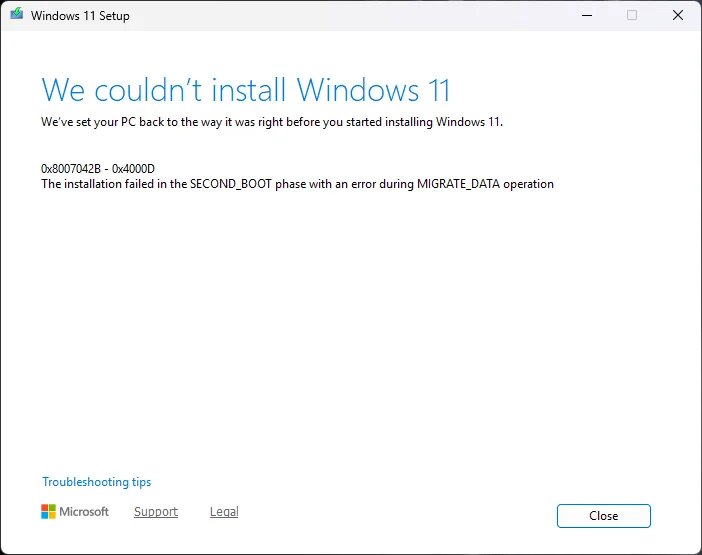
1786554580765.webp
 
Last edited:

My Computer My Computer

At a glance

Windows 10/11, Linux Mint/UbuntuRyzen 5 5600GG.Skill FlareX 2x8GB 3200MHzRadeon Vega 7 iGPU Graphics
OS
Windows 10/11, Linux Mint/Ubuntu
Computer type
PC/Desktop
Manufacturer/Model
DIY Build
CPU
Ryzen 5 5600G
Motherboard
Gigabyte A520 DS3H/AC
Memory
G.Skill FlareX 2x8GB 3200MHz
Graphics Card(s)
Radeon Vega 7 iGPU Graphics
Sound Card
Realtek integrated
Monitor(s) Displays
LG QHD 27"
Screen Resolution
2560x1440p
Hard Drives
Samsung 500GB SSD

Take it with a grain of salt but here is what Co-Pilot says about your error:

Most of the time when Windows Setup fails in the SECOND_BOOT phase during MIGRATE_DATA (0x8007042B – 0x4000D), it isn’t the update itself that’s broken — it’s something in the user’s profile or data migration path that Setup can’t process.

Here’s the concise, expert‑level breakdown:

The cause is almost always corrupted, locked, or incompatible user‑profile data that Windows can’t migrate during the upgrade. SECOND_BOOT is the phase where Windows reboots into the upgrade environment and begins copying user data, apps, and settings into the new OS image. MIGRATE_DATA is specifically the step where it tries to move user profiles.

The most common triggers are:

  • A corrupted user profile (NTUSER.DAT, registry hive issues, profile service errors)
  • Third‑party antivirus or endpoint protection locking files during migration
  • Sysprep‑like modifications, redirected folders, or nonstandard profile locations
  • Pending file operations or services that refuse to stop
  • Broken Windows Update components or partially‑installed updates
  • Disk errors in the user profile area (bad sectors, failing SSD/HDD)
Because MIGRATE_DATA only touches user data, this error almost never comes from drivers, TPM, Secure Boot, or hardware compatibility.
 

My Computers My Computers

  • At a glance

    Windows 11 25H2Intel Core Ultra 9 275HX (24-Core)64GB DDR5 6400MT/sNVIDIA GeForce RTX 5080 and Intel UHD Graphics
    OS
    Windows 11 25H2
    Computer type
    Laptop
    Manufacturer/Model
    Alienware 18 Area-51
    CPU
    Intel Core Ultra 9 275HX (24-Core)
    Motherboard
    Alienware
    Memory
    64GB DDR5 6400MT/s
    Graphics Card(s)
    NVIDIA GeForce RTX 5080 and Intel UHD Graphics
    Sound Card
    Onboard, Realtek high-performance Audio chips (ALC3329 & ALC1708))
    Monitor(s) Displays
    300HZ 18-inch QHD 500 nit Comfort View+
    Screen Resolution
    2560 x 1600
    Hard Drives
    2TB NVMe M.2 PCIe Gen 5 SSD
    Case
    Magnesium Alloy
    Cooling
    Advanced Cryo-Tech Quad-Fan Cooling system & large vapor chamber
    Keyboard
    Cherry MX ultra low profile mechanical keyboard with per key AlienFX RGB lighting
    Mouse
    Logitech MX Master 4
    Browser
    Vivaldi (main), Firefox, Chrome, Edge
    Antivirus
    MS Defender and Malwarebytes Free
  • At a glance

    Windows 11 25H2Qualcomm Snapdragon X Elite (12 Core) ARM bas...16GB LPDDR5Qualcomm Adreno X1-85
    Operating System
    Windows 11 25H2
    Computer type
    Laptop
    Manufacturer/Model
    Microsoft Surface Laptop 7
    CPU
    Qualcomm Snapdragon X Elite (12 Core) ARM based CPU
    Motherboard
    Microsoft Corp.
    Memory
    16GB LPDDR5
    Graphics card(s)
    Qualcomm Adreno X1-85
    Sound Card
    Omnisonic speakers with Dolby Atmos spatial sound
    Monitor(s) Displays
    120 Hz 13.8-inch 600 nit PixelSense Flow touchscreen
    Screen Resolution
    2304x1536
    Hard Drives
    1TB NVMe Gen 4 SSD
    Case
    Anodized Aluminum
    Cooling
    Traditional active cooling fan system
    Keyboard
    Mechanical QWERTY, backlit when in use
    Mouse
    Logitech MX Master 4 and Surface Arc Mouse
    Browser
    Vivaldi (main), Firefox, Chrome, Edge
    Antivirus
    MS Defender and Malwarebytes Free
Also:

For KB5121003 (build 26200.9168) specifically, the 0x8007042B – 0x4000D SECOND_BOOT / MIGRATE_DATA failure almost always points to one thing:

Something in the user’s profile cannot be migrated during the upgrade to 26200.9168.

And with this particular update, there are two very common triggers seen in the field:


1. Corrupted or non‑standard user profile data

This update performs a heavier‑than‑usual migration of profile data because it’s part of the Windows 11 Release Preview → 26200 platform transition.If any of the following are true, MIGRATE_DATA breaks:

  • NTUSER.DAT corruption
  • Redirected Documents/Desktop/Pictures to OneDrive with inconsistent folder states
  • Third‑party AV locking profile hives
  • Profiles stored on another drive or moved via unsupported methods
  • Broken symlinks inside AppData or Documents
This is the #1 cause of SECOND_BOOT failures on 26200.x builds.


2. OneDrive folder‑redirection inconsistencies

This update is notorious for failing when:

  • “Documents” or “Pictures” are redirected but partially unsynced
  • The user has duplicate OneDrive folders (e.g., “Documents” and “Documents 1”)
  • Files are mid‑sync during upgrade
  • Known Folder Move was previously interrupted
This is the #2 most common cause for this specific update.


Why this update triggers it more often

KB5121003 includes the new migration logic for the 26200 platform, which touches more user‑profile data than typical cumulative updates.Anything unusual in the profile becomes a hard stop.
 

My Computers My Computers

  • At a glance

    Windows 11 25H2Intel Core Ultra 9 275HX (24-Core)64GB DDR5 6400MT/sNVIDIA GeForce RTX 5080 and Intel UHD Graphics
    OS
    Windows 11 25H2
    Computer type
    Laptop
    Manufacturer/Model
    Alienware 18 Area-51
    CPU
    Intel Core Ultra 9 275HX (24-Core)
    Motherboard
    Alienware
    Memory
    64GB DDR5 6400MT/s
    Graphics Card(s)
    NVIDIA GeForce RTX 5080 and Intel UHD Graphics
    Sound Card
    Onboard, Realtek high-performance Audio chips (ALC3329 & ALC1708))
    Monitor(s) Displays
    300HZ 18-inch QHD 500 nit Comfort View+
    Screen Resolution
    2560 x 1600
    Hard Drives
    2TB NVMe M.2 PCIe Gen 5 SSD
    Case
    Magnesium Alloy
    Cooling
    Advanced Cryo-Tech Quad-Fan Cooling system & large vapor chamber
    Keyboard
    Cherry MX ultra low profile mechanical keyboard with per key AlienFX RGB lighting
    Mouse
    Logitech MX Master 4
    Browser
    Vivaldi (main), Firefox, Chrome, Edge
    Antivirus
    MS Defender and Malwarebytes Free
  • At a glance

    Windows 11 25H2Qualcomm Snapdragon X Elite (12 Core) ARM bas...16GB LPDDR5Qualcomm Adreno X1-85
    Operating System
    Windows 11 25H2
    Computer type
    Laptop
    Manufacturer/Model
    Microsoft Surface Laptop 7
    CPU
    Qualcomm Snapdragon X Elite (12 Core) ARM based CPU
    Motherboard
    Microsoft Corp.
    Memory
    16GB LPDDR5
    Graphics card(s)
    Qualcomm Adreno X1-85
    Sound Card
    Omnisonic speakers with Dolby Atmos spatial sound
    Monitor(s) Displays
    120 Hz 13.8-inch 600 nit PixelSense Flow touchscreen
    Screen Resolution
    2304x1536
    Hard Drives
    1TB NVMe Gen 4 SSD
    Case
    Anodized Aluminum
    Cooling
    Traditional active cooling fan system
    Keyboard
    Mechanical QWERTY, backlit when in use
    Mouse
    Logitech MX Master 4 and Surface Arc Mouse
    Browser
    Vivaldi (main), Firefox, Chrome, Edge
    Antivirus
    MS Defender and Malwarebytes Free
You're railing that it's all Microsoft's fault when neither the web or this forum have been bombarded with complaints about that update. I updated 4 systems last night without a hitch.

Are you running any third‑party antivirus, VPN, or system‑tuning utilities on this machine?
Those are the most common culprits for 0x8007042B – 0x4000D.

Things to try when windows update fails:

1. Run troubleshooter-settings-system-troubleshoot-other troubleshooters-windows update-RUN.

2. Reset Windows update using Brink's tutorial Reset Windows Update in Windows 11 Tutorial

3. Open command prompt as administrator. Enter this command.
dism /online /cleanup-image /restorehealth
When complete, Restart computer

Then open command prompt as admin again and run sfc /scannow
Pay attention to the scan results to see if SFC found anything it could not repair

4. CLEAN UP COMPONENT STORE - dism /online /cleanup-image /startcomponentcleanup
Analyze and Clean Up Component Store (WinSxS folder) in Windows 11 Tutorial

5. Try to apply the update in clean boot state. Perform a Clean Boot in Windows 11 to Troubleshoot Software Conflicts

6. Try to directly apply the msu by downloading from here. Microsoft Update Catalog


My Computers My Computers

  • At a glance

    Windows 11 Pro 25H2 26200.9168i9-10900 10 core 20 threads32 gbnone-Intel UHD Graphics 630
    OS
    Windows 11 Pro 25H2 26200.9168
    Computer type
    PC/Desktop
    Manufacturer/Model
    Dell Optiplex 7080
    CPU
    i9-10900 10 core 20 threads
    Motherboard
    DELL 0J37VM
    Memory
    32 gb
    Graphics Card(s)
    none-Intel UHD Graphics 630
    Sound Card
    Integrated Realtek
    Monitor(s) Displays
    Benq 27
    Screen Resolution
    2560x1440
    Hard Drives
    2x1tb Solidigm m.2 nvme /External drives 512gb Samsung m.2 sata+2tb Kingston m2.nvme
    PSU
    500w
    Case
    MT
    Cooling
    Dell Premium
    Keyboard
    Logitech wired
    Mouse
    Logitech wireless
    Internet Speed
    so slow I'm too embarrassed to tell
    Browser
    #1 Edge #2 Firefox
    Antivirus
    Defender+MWB Premium
  • At a glance

    Windows 11 Pro 24H2 26200.9168AMD Ryzen 7 6800U32 gbintegrated
    Operating System
    Windows 11 Pro 24H2 26200.9168
    Computer type
    PC/Desktop
    Manufacturer/Model
    Beelink Mini PC SER5
    CPU
    AMD Ryzen 7 6800U
    Memory
    32 gb
    Graphics card(s)
    integrated
    Sound Card
    integrated
    Monitor(s) Displays
    Benq 27
    Screen Resolution
    2560x1440
    Hard Drives
    1TB Crucial nvme
    Keyboard
    Logitech wired
    Mouse
    Logitech wireless
    Internet Speed
    still too embarrassed to tell
    Browser
    Firefox
    Antivirus
    Defender
  • System 3 is non compliant Dell 9020 i7-4770/24gb ram Win11 PRO 26200.9168
Thank You all for your very kind and helpful replies. And yes, I do still blame some of this failure on Microsoft because it seems like Microsoft could have checked for these issues from the very beginning. Why take the time to install a brand new version of an operating system from scratch. And then revert everything back to how it was prior to this update because you can't migrate one file/folder/application to the new version? Hell, I could have lived with that. Just let it be and I could go in afterwards and migrate what failed to move over. It's just so ridiculous to revert everything after so much investment of time.

@glasskuter I actually did perform step #3 in your recommendations above. I forgot to execute step #4 (unnumbered above). But let's be honest. Would that have helped given this is a failure to migrate user data? Probably not.

I'm very frustrated right now but at least I can take a break and go back and try a smarter way when I have had time to reset, myself, not Windows. You know what I mean.
 

My Computer My Computer

At a glance

Windows 10/11, Linux Mint/UbuntuRyzen 5 5600GG.Skill FlareX 2x8GB 3200MHzRadeon Vega 7 iGPU Graphics
OS
Windows 10/11, Linux Mint/Ubuntu
Computer type
PC/Desktop
Manufacturer/Model
DIY Build
CPU
Ryzen 5 5600G
Motherboard
Gigabyte A520 DS3H/AC
Memory
G.Skill FlareX 2x8GB 3200MHz
Graphics Card(s)
Radeon Vega 7 iGPU Graphics
Sound Card
Realtek integrated
Monitor(s) Displays
LG QHD 27"
Screen Resolution
2560x1440p
Hard Drives
Samsung 500GB SSD
Yep. When one gets mad or frustrated he should walk away and get some chill time. It will still be there when you settle yourself and come back to it.
actually did perform step #3 in your recommendations above. I forgot to execute step #4 (unnumbered above). But let's be honest. Would that have helped given this is a failure to migrate user data? Probably not.
If the issue is indeed corrupted user data, then no. I ran into that when I upgraded from 24h2 to 25h2. I ended up clean installing which turned out to be a good thing since I had a lot of stuff over the years I did not need.

You run DISM (Deployment Image Servicing and Management) before running SFC (System File Checker) because DISM repairs the underlying system image and component store, which SFC relies on for healthy backup files. If the component store is broken, SFC cannot fix damaged operating system files. SFC is what actually repairs any active corrupted OS files.

Let me point out one thing. Everyone keeps calling this an upgrade. KB5121003 Is a windows update, not an upgrade. It only became an upgrade when you downloaded the iso and did a repair install. I'm curious if that failure you listed came from the failed update or if it was when you used the iso to do a repair install (ie: otherwise known as an inplace upgrade).
 

My Computers My Computers

  • At a glance

    Windows 11 Pro 25H2 26200.9168i9-10900 10 core 20 threads32 gbnone-Intel UHD Graphics 630
    OS
    Windows 11 Pro 25H2 26200.9168
    Computer type
    PC/Desktop
    Manufacturer/Model
    Dell Optiplex 7080
    CPU
    i9-10900 10 core 20 threads
    Motherboard
    DELL 0J37VM
    Memory
    32 gb
    Graphics Card(s)
    none-Intel UHD Graphics 630
    Sound Card
    Integrated Realtek
    Monitor(s) Displays
    Benq 27
    Screen Resolution
    2560x1440
    Hard Drives
    2x1tb Solidigm m.2 nvme /External drives 512gb Samsung m.2 sata+2tb Kingston m2.nvme
    PSU
    500w
    Case
    MT
    Cooling
    Dell Premium
    Keyboard
    Logitech wired
    Mouse
    Logitech wireless
    Internet Speed
    so slow I'm too embarrassed to tell
    Browser
    #1 Edge #2 Firefox
    Antivirus
    Defender+MWB Premium
  • At a glance

    Windows 11 Pro 24H2 26200.9168AMD Ryzen 7 6800U32 gbintegrated
    Operating System
    Windows 11 Pro 24H2 26200.9168
    Computer type
    PC/Desktop
    Manufacturer/Model
    Beelink Mini PC SER5
    CPU
    AMD Ryzen 7 6800U
    Memory
    32 gb
    Graphics card(s)
    integrated
    Sound Card
    integrated
    Monitor(s) Displays
    Benq 27
    Screen Resolution
    2560x1440
    Hard Drives
    1TB Crucial nvme
    Keyboard
    Logitech wired
    Mouse
    Logitech wireless
    Internet Speed
    still too embarrassed to tell
    Browser
    Firefox
    Antivirus
    Defender
  • System 3 is non compliant Dell 9020 i7-4770/24gb ram Win11 PRO 26200.9168
I've got to say the 'MIGRATE_DATA' has gotten me more than once.
 

My Computer My Computer

At a glance

Windows 11 25H212th Gen i9 -12900K64GBIntel UHD Graphics
OS
Windows 11 25H2
Computer type
PC/Desktop
Manufacturer/Model
Dell
CPU
12th Gen i9 -12900K
Memory
64GB
Graphics Card(s)
Intel UHD Graphics
Monitor(s) Displays
Dual Dell U2717D
Screen Resolution
2560x1440
Hard Drives
2TB Lexar SSD, 2TB Crucial SSD, 2TB Kingston SSD
And then to perform an in place upgrade from the USB flash drive. I tried this. For the 3rd time, it fails.

The only good thing I can say about Microsoft's horrible, amateurish sloppy upgrade routines are that after 3 failures it did put my system back to where I first began. I'm up and running on the same version I was prior to Windows wasting 3 or 4 hours of my precious time.

I'm not asking for help, really to get around this.
View attachment 179452


If you decide to upgrade again steps can be made to decrease the likelihood of failure.

And if there is a failure the log files can be troubleshooted.
 

My Computer My Computer

At a glance

Windows 10Intel(R) Core(TM) i7-4800MQ CPU @ 2.70GHz16 GB Total: Manufacturer : Samsung MemoryTyp...NVIDIA Quadro K3100M; Intel(R) HD Graphics 4600
OS
Windows 10
Computer type
Laptop
Manufacturer/Model
HP
CPU
Intel(R) Core(TM) i7-4800MQ CPU @ 2.70GHz
Motherboard
Product : 190A Version : KBC Version 94.56
Memory
16 GB Total: Manufacturer : Samsung MemoryType : DDR3 FormFactor : SODIMM Capacity : 8GB Speed : 1600
Graphics Card(s)
NVIDIA Quadro K3100M; Intel(R) HD Graphics 4600
Sound Card
IDT High Definition Audio CODEC; PNP Device ID HDAUDIO\FUNC_01&VEN_111D&DEV_76E0
Hard Drives
Model Hitachi HTS727575A9E364
Antivirus
Microsoft Defender
Other Info
Mobile Workstation
it maybe worthwhile checking these

#####
please check the 'reliability monitor' to check for recent errors.
control panel > security and maintenance > maintenance > reliability monitor

#####
then check 'problem devices'
system tools > system information > components > problem devices

#####
also please open a command prompt as Administrator and write
sfc /scannow

which should repair any system errors

#####
then you can download the update and install from the download.

best of luck Steve ..
 

My Computers My Computers

  • At a glance

    Windows 11 HomeRyzen 7 5825u64GB DDR4 3200Ryzen 7 5825u
    OS
    Windows 11 Home
    Computer type
    PC/Desktop
    Manufacturer/Model
    HP 24" AiO
    CPU
    Ryzen 7 5825u
    Motherboard
    HP
    Memory
    64GB DDR4 3200
    Graphics Card(s)
    Ryzen 7 5825u
    Sound Card
    RealTek
    Monitor(s) Displays
    24" HP AiO
    Screen Resolution
    1920 x 1080 @60 Hz
    Hard Drives
    1TB WD Blue SN580 M2 SSD Partitioned.
    2x 1TB USB HDD External Backup/Storage.
    PSU
    90W external power brick
    Case
    24" All in One
    Cooling
    Default Air Cooling
    Keyboard
    HP WiFi UK extended
    Mouse
    HP WiFi 3 Button
    Internet Speed
    1GB full fibre
    Browser
    Edge & Firefox
    Antivirus
    AVG Internet Security/Windows Defender
    Other Info
    Mainly Open Source Software
  • At a glance

    Ubuntu 22.04.5 LTSi5 7200u16GB DDR4Intel
    Operating System
    Ubuntu 22.04.5 LTS
    Computer type
    Laptop
    Manufacturer/Model
    Dell 13" Latitude 2017
    CPU
    i5 7200u
    Motherboard
    Dell
    Memory
    16GB DDR4
    Graphics card(s)
    Intel
    Sound Card
    Intel
    Monitor(s) Displays
    13" Dell Laptop
    Hard Drives
    250GB Crucial 2.5" SSD
    Mouse
    Generic WiFi 3 button
    Internet Speed
    WiFi only
    Browser
    Firefox
    Antivirus
    ClamAV TK
    Other Info
    Mainly Open Source Software
glasskuter pointed on one potential cause that should be easy to test: Antivirus software. Try disabling this temporarily and see if you still get the same results. I'm pointing this one out simply because it should be rather easy to test.
 

My Computers My Computers

  • At a glance

    Win11 Pro 25H2 (RTM+)Intel i7-14650HX32 GBNo GPU - Built-in Intel Graphics
    OS
    Win11 Pro 25H2 (RTM+)
    Computer type
    PC/Desktop
    Manufacturer/Model
    Acemagic
    CPU
    Intel i7-14650HX
    Memory
    32 GB
    Graphics Card(s)
    No GPU - Built-in Intel Graphics
    Sound Card
    Integrated
    Monitor(s) Displays
    Varies as machine will often be moved to locations with different monitors
    Screen Resolution
    Varies
    Hard Drives
    1 x 1TB Gen 4 NVMe SSD
    PSU
    120W Power Brick
    Keyboard
    Corsair K70 Max RGB Magnetic Keyboard
    Mouse
    Logitech MX Master 3
    Internet Speed
    1Gb Up / 1 Gb Down
    Browser
    Edge
    Antivirus
    Windows Defender
  • At a glance

    Win11 Pro 25H2 (RTM+)Intel i7-1255U16 GBIntel Iris Xe Graphics
    Operating System
    Win11 Pro 25H2 (RTM+)
    Computer type
    Laptop
    Manufacturer/Model
    Lenovo ThinkBook 13x Gen 2
    CPU
    Intel i7-1255U
    Memory
    16 GB
    Graphics card(s)
    Intel Iris Xe Graphics
    Sound Card
    Realtek® ALC3306-CG codec
    Monitor(s) Displays
    13.3-inch IPS Display
    Screen Resolution
    WQXGA (2560 x 1600)
    Hard Drives
    2 TB 4 x 4 NVMe SSD
    PSU
    USB-C / Thunderbolt 4 Power / Charging
    Keyboard
    Backlit, spill resistant keyboard
    Mouse
    Buttonless Glass Precision Touchpad
    Internet Speed
    1Gb Up / 1Gb Down
    Browser
    Edge
    Antivirus
    Windows Defender
    Other Info
    WiFi 6e / Bluetooth 5.1 / Facial Recognition / Fingerprint Sensor / ToF (Time of Flight) Human Presence Sensor
MSU.webp

Ok, I just created that one! :devilish:
 

My Computer My Computer

At a glance

Windows 11 Pro 24H2i7 Ultra16GBIntel
OS
Windows 11 Pro 24H2
Computer type
Laptop
Manufacturer/Model
LG
CPU
i7 Ultra
Memory
16GB
Graphics Card(s)
Intel
Sound Card
Intel Realtek
Monitor(s) Displays
Laptop 17" & TB4 Dell 27" QHD Ultrasharp w/integral TB4 hub
Screen Resolution
2560x1600
Hard Drives
1TB SSD, 5 external WDs
Mouse
Logitech Master MX 3S
Browser
Vivaldi
Antivirus
Kaspersky Premium Suite
glasskuter pointed on one potential cause that should be easy to test: Antivirus software. Try disabling this temporarily and see if you still get the same results. I'm pointing this one out simply because it should be rather easy to test.
I have to ask the question of whether or not your referring to native anti-virus software or 3rd party anti-virus software. Because Windows 11 comes with all the native anti-malware, anti-virus, and whatever else anti they install that seems to be running constantly on the system. I haven't really used or installed any 3rd party anti-virus software for awhile now. I wouldn't think I need to disable Microsoft's native suite of anti-softwares but what the hell do I know? :p
 

My Computer My Computer

At a glance

Windows 10/11, Linux Mint/UbuntuRyzen 5 5600GG.Skill FlareX 2x8GB 3200MHzRadeon Vega 7 iGPU Graphics
OS
Windows 10/11, Linux Mint/Ubuntu
Computer type
PC/Desktop
Manufacturer/Model
DIY Build
CPU
Ryzen 5 5600G
Motherboard
Gigabyte A520 DS3H/AC
Memory
G.Skill FlareX 2x8GB 3200MHz
Graphics Card(s)
Radeon Vega 7 iGPU Graphics
Sound Card
Realtek integrated
Monitor(s) Displays
LG QHD 27"
Screen Resolution
2560x1440p
Hard Drives
Samsung 500GB SSD
Back
Top Bottom






