
Windows update shows I have 2 updates to install, one being KB5121003 (26200.9168). I tried to do this the first time by taking no pre-prep steps. That is to say, I just expected it work. It didn't work. It failed and in the process wasted my good time. If there's one thing I can't stand about the Windows update process it's how long it can linger on a random "percentage completed" value. What becomes the purpose of telling me that something is 66% done, or 92% done if it lingers and lingers and lingers on that same percentage value for ridiculously long amounts of time? It loses value, it loses purpose. The twirling circle is nice. It shows me exactly 1 thing, that my PC hasn't literally frozen up. That's it. The update process need improved and advanced visual feedback. I wanna see what files are being copied, what transactions are taking place. Microsoft could do this by simply adding a checkbox with text on the update screen "Click the box to see details about the update process".
So my first failure there was no research done to prevent failure. For my second attempt I did research. I used dism.exe to clean up and restore image health. I stopped the "Windows Update" service. I stopped the "Bits" service. I stopped "Cryptographic" service. I renamed "SoftwareDistribution" by appending .old to the folder name. I renamed "System32/catroo2" by appending .old to the name.
And tried again. After lots of wasted time and watching the twirling circle go for ages stuck at XX percentage. It failed a second time.
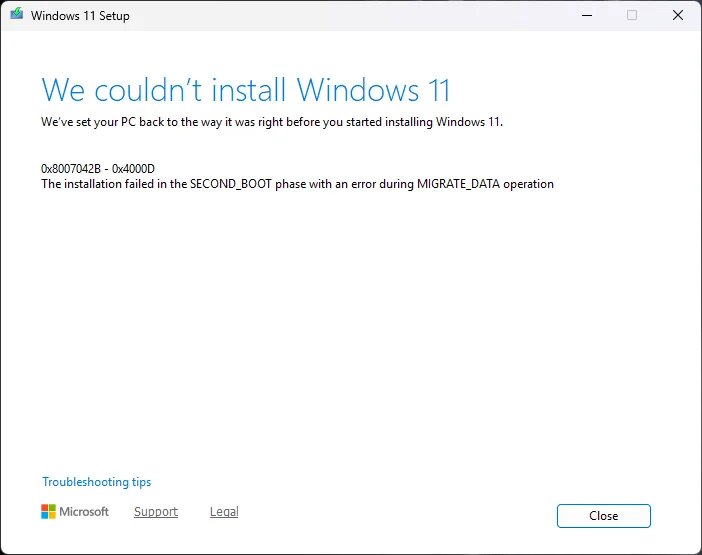
The next advice given by my research was to literally use the Media Creation Tool and download the latest version of Windows. And then to perform an in place upgrade from the USB flash drive. I tried this. For the 3rd time, it fails.
The only good thing I can say about Microsoft's horrible, amateurish sloppy upgrade routines are that after 3 failures it did put my system back to where I first began. I'm up and running on the same version I was prior to Windows wasting 3 or 4 hours of my precious time.
I'm not asking for help, really to get around this. This is an FYI, a rant, a complaint about how XXXXX this attempted upgrade experience was. And how Microsoft could do things so much better. But probably never will. But I do still have hope which is why I write this post.
So my first failure there was no research done to prevent failure. For my second attempt I did research. I used dism.exe to clean up and restore image health. I stopped the "Windows Update" service. I stopped the "Bits" service. I stopped "Cryptographic" service. I renamed "SoftwareDistribution" by appending .old to the folder name. I renamed "System32/catroo2" by appending .old to the name.
And tried again. After lots of wasted time and watching the twirling circle go for ages stuck at XX percentage. It failed a second time.
The next advice given by my research was to literally use the Media Creation Tool and download the latest version of Windows. And then to perform an in place upgrade from the USB flash drive. I tried this. For the 3rd time, it fails.
The only good thing I can say about Microsoft's horrible, amateurish sloppy upgrade routines are that after 3 failures it did put my system back to where I first began. I'm up and running on the same version I was prior to Windows wasting 3 or 4 hours of my precious time.
I'm not asking for help, really to get around this. This is an FYI, a rant, a complaint about how XXXXX this attempted upgrade experience was. And how Microsoft could do things so much better. But probably never will. But I do still have hope which is why I write this post.
Last edited:
My Computer
At a glance
Windows 10/11, Linux Mint/UbuntuRyzen 5 5600GG.Skill FlareX 2x8GB 3200MHzRadeon Vega 7 iGPU Graphics
- OS
- Windows 10/11, Linux Mint/Ubuntu
- Computer type
- PC/Desktop
- Manufacturer/Model
- DIY Build
- CPU
- Ryzen 5 5600G
- Motherboard
- Gigabyte A520 DS3H/AC
- Memory
- G.Skill FlareX 2x8GB 3200MHz
- Graphics Card(s)
- Radeon Vega 7 iGPU Graphics
- Sound Card
- Realtek integrated
- Monitor(s) Displays
- LG QHD 27"
- Screen Resolution
- 2560x1440p
- Hard Drives
- Samsung 500GB SSD













