Solved Windows 11 & Chkdsk on External


bikemanAMD

Well-known member
Power User
VIP
Local time
7:50 AM
Posts
1,043
OS
Windows 11 Pro 25H2 26200.8037
Hello

Chkdsk on External drive, says gonna take 49 Hours, wondering if its safe to use system for other tasks while it runs? or is it best i move most of my Activiies to PC 2 til its done.

WD Drive utilities got stuck at 90 percent, and waited for 3 hours and never finished, ended up cancelling that, and start this task
 
Windows Build/Version
Windows 11 Pro x64 22621.1105

My Computers My Computers

  • At a glance

    Windows 11 Pro 25H2 26200.8037AMD Ryzen 7700X32GB DDR 5 RGB 5600MhzRadeon 7800XT
    OS
    Windows 11 Pro 25H2 26200.8037
    Computer type
    PC/Desktop
    Manufacturer/Model
    PreBuilt
    CPU
    AMD Ryzen 7700X
    Motherboard
    MSI B650 VC WIfi Rev 1.0
    Memory
    32GB DDR 5 RGB 5600Mhz
    Graphics Card(s)
    Radeon 7800XT
    Sound Card
    Onboard Audio
    Monitor(s) Displays
    Asus VG245H
    Screen Resolution
    1920x1080
    Hard Drives
    Samsung 990 Evo Plus NVMe Boot
    Samsung 990 Pro 1TB Game NVMe


    External
    Western Digital Elements 500GB
    Western Digital My Passport 2TB Blue
    Western Digital My Passport 2TB Red
    Toshiba 2TB in External Enclosure
    Seagate 8TB in External Enclosure
    Seagate 1TB Portable USB 3 External Drive
    Western Digital My Book 8TB (Primary Backup drive)
    Western Digital Black 4TB In External Enclosure
    PSU
    750 Watt High Power
    Case
    Lian Li Lan Cool 216 ARGB Airflow
    Cooling
    2 160MM Front, 1 140MM Rear Exhaust
    Keyboard
    Logitech G513
    Mouse
    Logitech G502 X
    Internet Speed
    Gigabit 1100Mb/35 Upload
    Browser
    MS Edge Chromium and Bing Search
    Antivirus
    Windows Defender, Malwarebytes Premium
    Other Info
    UEFI, Secure Boot, TPM 2.0, Macrium Reflect X
  • At a glance

    Windows 11 Pro 25H2 26200.8037Ryzen 7 7735HS16GB DDR 5AMD Radeon™ 680M & Radeon 7700S
    Operating System
    Windows 11 Pro 25H2 26200.8037
    Computer type
    Laptop
    Manufacturer/Model
    Asus TUF A16 Advantage Edition FA617NT.A16.R7700
    CPU
    Ryzen 7 7735HS
    Motherboard
    OEM Asus Motherboard
    Memory
    16GB DDR 5
    Graphics card(s)
    AMD Radeon™ 680M & Radeon 7700S
    Sound Card
    Onboard
    Monitor(s) Displays
    16inch FHD 165hz
    Screen Resolution
    1920x1080
    Hard Drives
    512GB NVMe Boot Drive
    PSU
    Laptop PSU
    Case
    Laptop Case
    Cooling
    OEM Cooling
    Keyboard
    OEM Laptop Keyboard
    Mouse
    Touchpad & G502 Hero
    Internet Speed
    Gigabit 1100 Download/35 Upload
    Browser
    MS Edge with Bing search
    Antivirus
    Windows Defender & Malwarebytes Premium
    Other Info
    Macrium Reflect X
I've done it a couple of times without issue but I wasn't doing much more than Internet activity.

As for the time, it was a WD 4TB USB 3 drive plugged into a USB 3 port, probably wasn't too slow but I didn't time it. Using a USB 2 port is slower, take longer on larger-capacity drives.
 

My Computers My Computers

  • At a glance

    Win11 Pro RTM Version 24H2 Build 26100.4202Intel Core i5 11th Gen. 2.40GHz12GB
    OS
    Win11 Pro RTM Version 24H2 Build 26100.4202
    Computer type
    Laptop
    Manufacturer/Model
    Dell Vostro 3400
    CPU
    Intel Core i5 11th Gen. 2.40GHz
    Memory
    12GB
    Hard Drives
    256GB SSD NVMe M.2
  • At a glance

    Win11 Pro RTM Version 24H2 Build 26100.4202Intel Core i5 10th Gen. 2.90GHz16GBOnboard, no VGA, using a DisplayPort-to-VGA a...
    Operating System
    Win11 Pro RTM Version 24H2 Build 26100.4202
    Computer type
    PC/Desktop
    Manufacturer/Model
    Dell Vostro 5890
    CPU
    Intel Core i5 10th Gen. 2.90GHz
    Memory
    16GB
    Graphics card(s)
    Onboard, no VGA, using a DisplayPort-to-VGA adapter
    Monitor(s) Displays
    24" Dell
    Hard Drives
    512GB SSD NVMe, 4TB Seagate HDD
    Browser
    Firefox, Edge
    Antivirus
    Windows Defender/Microsoft Security
Yeah well all i got in back is USB 3.0 ports (blue ones) usb 2.0 ports used up by Keyboard and Mouse lol

Rest of the Ports are Blue, USB 3.0, 3.1 Gen 1 possibly to be exact


Though Its not looking promising as the drive got stuck with WD Drive Utlities at 90 percent and never finished, and it ran over night, and a good 5-6 hours more. this shows 49 Hours:48minutes and some seconds currently lol
External is WD My Passport 2TB (Red)
 

My Computers My Computers

  • At a glance

    Windows 11 Pro 25H2 26200.8037AMD Ryzen 7700X32GB DDR 5 RGB 5600MhzRadeon 7800XT
    OS
    Windows 11 Pro 25H2 26200.8037
    Computer type
    PC/Desktop
    Manufacturer/Model
    PreBuilt
    CPU
    AMD Ryzen 7700X
    Motherboard
    MSI B650 VC WIfi Rev 1.0
    Memory
    32GB DDR 5 RGB 5600Mhz
    Graphics Card(s)
    Radeon 7800XT
    Sound Card
    Onboard Audio
    Monitor(s) Displays
    Asus VG245H
    Screen Resolution
    1920x1080
    Hard Drives
    Samsung 990 Evo Plus NVMe Boot
    Samsung 990 Pro 1TB Game NVMe


    External
    Western Digital Elements 500GB
    Western Digital My Passport 2TB Blue
    Western Digital My Passport 2TB Red
    Toshiba 2TB in External Enclosure
    Seagate 8TB in External Enclosure
    Seagate 1TB Portable USB 3 External Drive
    Western Digital My Book 8TB (Primary Backup drive)
    Western Digital Black 4TB In External Enclosure
    PSU
    750 Watt High Power
    Case
    Lian Li Lan Cool 216 ARGB Airflow
    Cooling
    2 160MM Front, 1 140MM Rear Exhaust
    Keyboard
    Logitech G513
    Mouse
    Logitech G502 X
    Internet Speed
    Gigabit 1100Mb/35 Upload
    Browser
    MS Edge Chromium and Bing Search
    Antivirus
    Windows Defender, Malwarebytes Premium
    Other Info
    UEFI, Secure Boot, TPM 2.0, Macrium Reflect X
  • At a glance

    Windows 11 Pro 25H2 26200.8037Ryzen 7 7735HS16GB DDR 5AMD Radeon™ 680M & Radeon 7700S
    Operating System
    Windows 11 Pro 25H2 26200.8037
    Computer type
    Laptop
    Manufacturer/Model
    Asus TUF A16 Advantage Edition FA617NT.A16.R7700
    CPU
    Ryzen 7 7735HS
    Motherboard
    OEM Asus Motherboard
    Memory
    16GB DDR 5
    Graphics card(s)
    AMD Radeon™ 680M & Radeon 7700S
    Sound Card
    Onboard
    Monitor(s) Displays
    16inch FHD 165hz
    Screen Resolution
    1920x1080
    Hard Drives
    512GB NVMe Boot Drive
    PSU
    Laptop PSU
    Case
    Laptop Case
    Cooling
    OEM Cooling
    Keyboard
    OEM Laptop Keyboard
    Mouse
    Touchpad & G502 Hero
    Internet Speed
    Gigabit 1100 Download/35 Upload
    Browser
    MS Edge with Bing search
    Antivirus
    Windows Defender & Malwarebytes Premium
    Other Info
    Macrium Reflect X
I neglected to ask how big the drive is and whether it uses a USB 3 cable. The drive end of the USB 3 cable for external drives usually don't fit anything else.
 

My Computers My Computers

  • At a glance

    Win11 Pro RTM Version 24H2 Build 26100.4202Intel Core i5 11th Gen. 2.40GHz12GB
    OS
    Win11 Pro RTM Version 24H2 Build 26100.4202
    Computer type
    Laptop
    Manufacturer/Model
    Dell Vostro 3400
    CPU
    Intel Core i5 11th Gen. 2.40GHz
    Memory
    12GB
    Hard Drives
    256GB SSD NVMe M.2
  • At a glance

    Win11 Pro RTM Version 24H2 Build 26100.4202Intel Core i5 10th Gen. 2.90GHz16GBOnboard, no VGA, using a DisplayPort-to-VGA a...
    Operating System
    Win11 Pro RTM Version 24H2 Build 26100.4202
    Computer type
    PC/Desktop
    Manufacturer/Model
    Dell Vostro 5890
    CPU
    Intel Core i5 10th Gen. 2.90GHz
    Memory
    16GB
    Graphics card(s)
    Onboard, no VGA, using a DisplayPort-to-VGA adapter
    Monitor(s) Displays
    24" Dell
    Hard Drives
    512GB SSD NVMe, 4TB Seagate HDD
    Browser
    Firefox, Edge
    Antivirus
    Windows Defender/Microsoft Security
Yes was USB 3 cable, had a blue like piece on computer connection part,

i only have 1 Free rear USB 3 port, as other one taken up by my USB 3 2.5gig ethernet adapter lol (not that i really need it, but wanted to get my Full provisioned internet speed lol--WIth this i get 1185Mbps download, and 23 Upload lol. Without i hit 940Mbps, and 23 upload


Drive 2TB
(Thankfully isn't the 8TB drive) gonna baby the newest 8TB Drive, and not even knock it over when its power is off if i can help it--i should be able to prevent that)

and do the same with the other My Passport Blue Drive--treat it like gold, and make sure it's stable on desk, make sure nothing falls on it, make sure not moved while on, and carefully put away when done with it, and might store my Seagate 8TB inside Closet ontop of older WD Elements 500GB drive perhaps or somewhere close to that one
 
Last edited:

My Computers My Computers

  • At a glance

    Windows 11 Pro 25H2 26200.8037AMD Ryzen 7700X32GB DDR 5 RGB 5600MhzRadeon 7800XT
    OS
    Windows 11 Pro 25H2 26200.8037
    Computer type
    PC/Desktop
    Manufacturer/Model
    PreBuilt
    CPU
    AMD Ryzen 7700X
    Motherboard
    MSI B650 VC WIfi Rev 1.0
    Memory
    32GB DDR 5 RGB 5600Mhz
    Graphics Card(s)
    Radeon 7800XT
    Sound Card
    Onboard Audio
    Monitor(s) Displays
    Asus VG245H
    Screen Resolution
    1920x1080
    Hard Drives
    Samsung 990 Evo Plus NVMe Boot
    Samsung 990 Pro 1TB Game NVMe


    External
    Western Digital Elements 500GB
    Western Digital My Passport 2TB Blue
    Western Digital My Passport 2TB Red
    Toshiba 2TB in External Enclosure
    Seagate 8TB in External Enclosure
    Seagate 1TB Portable USB 3 External Drive
    Western Digital My Book 8TB (Primary Backup drive)
    Western Digital Black 4TB In External Enclosure
    PSU
    750 Watt High Power
    Case
    Lian Li Lan Cool 216 ARGB Airflow
    Cooling
    2 160MM Front, 1 140MM Rear Exhaust
    Keyboard
    Logitech G513
    Mouse
    Logitech G502 X
    Internet Speed
    Gigabit 1100Mb/35 Upload
    Browser
    MS Edge Chromium and Bing Search
    Antivirus
    Windows Defender, Malwarebytes Premium
    Other Info
    UEFI, Secure Boot, TPM 2.0, Macrium Reflect X
  • At a glance

    Windows 11 Pro 25H2 26200.8037Ryzen 7 7735HS16GB DDR 5AMD Radeon™ 680M & Radeon 7700S
    Operating System
    Windows 11 Pro 25H2 26200.8037
    Computer type
    Laptop
    Manufacturer/Model
    Asus TUF A16 Advantage Edition FA617NT.A16.R7700
    CPU
    Ryzen 7 7735HS
    Motherboard
    OEM Asus Motherboard
    Memory
    16GB DDR 5
    Graphics card(s)
    AMD Radeon™ 680M & Radeon 7700S
    Sound Card
    Onboard
    Monitor(s) Displays
    16inch FHD 165hz
    Screen Resolution
    1920x1080
    Hard Drives
    512GB NVMe Boot Drive
    PSU
    Laptop PSU
    Case
    Laptop Case
    Cooling
    OEM Cooling
    Keyboard
    OEM Laptop Keyboard
    Mouse
    Touchpad & G502 Hero
    Internet Speed
    Gigabit 1100 Download/35 Upload
    Browser
    MS Edge with Bing search
    Antivirus
    Windows Defender & Malwarebytes Premium
    Other Info
    Macrium Reflect X
....shows 49 Hours:48minutes and some seconds currently lol
External is WD My Passport 2TB (Red)
That is an excessive time to run chkdsk /f /r on a 2TB drive. I've started a scan on one of my 2TB external HDDs and it's showing an ETA of a bit over three hours.

1674347025975.png

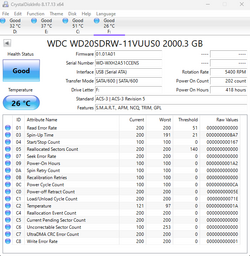
Your estimated time of nearly 50 hours suggests that Chkdsk is finding bad sectors. It always slows down if that's the case, it has to retry each bad sector. Once it finds a bad sector the ETA calculation assumes that all subsequent sectors may be bad, it should speed up if it gets past a bad patch. A quicker test of the drive's health would be to read its SMART data with something like CrystalDisk Info. Anything above zero for the raw values of '05 Reallocated Sector Count' or 'C5 Current Pending Sector Count' is a sign that the drive may be failing.
 

My Computers My Computers

  • At a glance

    Windows 11 HomeAMD Athlon Silver 3050U8GBRadeon Graphics
    OS
    Windows 11 Home
    Computer type
    Laptop
    Manufacturer/Model
    Acer Aspire 3 A315-23-R9VY
    CPU
    AMD Athlon Silver 3050U
    Memory
    8GB
    Graphics Card(s)
    Radeon Graphics
    Monitor(s) Displays
    laptop screen
    Screen Resolution
    1366x768 native resolution, up to 2560x1440 with Radeon Virtual Super Resolution
    Hard Drives
    1TB Samsung EVO 870 SSD (from April 2026: 250GB EVO 850)
    Internet Speed
    150 Mbps
    Browser
    Edge, Firefox
    Antivirus
    Defender
    Other Info
    fully 'Windows 11 ready' laptop. Windows 10 C: partition migrated from my old unsupported 'main machine' then upgraded to 11. A test migration ran Insider builds for 2 months. When 11 was released on 5th October 2021 it was re-imaged back to 10 and was offered the upgrade in Windows Update on 20th October. Windows Update offered the 22H2 Feature Update on 20th September 2022. It got the 23H2 Feature Update on 4th November 2023 through Windows Update, 24H2 on 3rd October 2024 through Windows Update by setting the Target Release Version for 24H2, and 25H2 on 30th September 2025 through Windows Update by setting the Target Release Version for 25H2.

    UPDATE - 11 April 2026: due to mechanical deterioration this PC has been retired from active duty. The OS with all software and files has been migrated to my System Seven in 'Other systems' to carry on as my general purpose 'main machine'.
  • At a glance

    Windows 11 ProIntel® Core™ i5-520M8GB(integrated graphics) Intel HD Graphics
    Operating System
    Windows 11 Pro
    Computer type
    Laptop
    Manufacturer/Model
    Dell Latitude E4310
    CPU
    Intel® Core™ i5-520M
    Motherboard
    0T6M8G
    Memory
    8GB
    Graphics card(s)
    (integrated graphics) Intel HD Graphics
    Screen Resolution
    1366x768
    Hard Drives
    500GB Crucial MX500 SSD
    Browser
    Firefox, Edge
    Antivirus
    Defender
    Other Info
    unsupported machine: Legacy bios, MBR, TPM 1.2, upgraded from W10 to W11 using W10/W11 hybrid install media workaround.

    In-place upgrade to 22H2 using ISO and a workaround.
    Feature Update to 23H2 by manually installing the Enablement Package.
    In-place upgrade to 24H2 using hybrid 23H2/24H2 install media.
    Upgraded to 25H2 by Enablement Package.

    Also running Insider Dev, and Canary builds and Windows 10 as native boot .vhdx.
  • My SYSTEM THREE is a Dell Latitude 5410, i7-10610U, 32GB RAM, 512GB NVMe ssd, supported device running Windows 11 Pro.

    My SYSTEM FOUR is a 2-in-1 convertible Lenovo Yoga 11e 20DA, Celeron N2930, 8GB RAM, 256GB ssd. Unsupported device: currently running Win10 Pro, plus Win11 Pro RTM and Insider Dev, Beta, and RP 24H2 as native boot vhdx.

    My SYSTEM FIVE is a Dell Latitude 3190 2-in-1, Pentium Silver N5030, 8GB RAM, 1TB NVMe ssd, supported device running Windows 11 Pro, plus Insider Beta, Dev, and Canary builds (and a few others) as a native boot .vhdx.

    My SYSTEM SIX is a Dell Latitude 5550, Core Ultra 7 165H, 64GB RAM, 1TB NVMe SSD, supported device, Windows 11 Pro 24H2, Hyper-V host machine. Updated to 25H2 on 30th September 2025.

    My SYSTEM SEVEN is a Lenovo Thinkpad T580, Intel Core i7-8650U, 16GB RAM, 512GB NVMe SSD + 2nd 512GB NVMe SSD, a supported device for Windows 11. This is my current general purpose 'main machine'. The installed Windows 11 Home from my System One has been migrated to this machine.
I can look at it further i suppose, might load up Crystal Disk info next just to see i suppose--not sure if i can even end this Chkdsk now lol

and Complete drive scan took all night, and when i woke up this morning was at 90 percent, and i used Gaming Laptop til 3pm, and still was at 90 percent

Fired up another game, and just let it run more in background longer, after game i cancelled WD Drive Utlities Complete Drive scan, then started Chkdsk, 49 Hours remaining lol

Crystal Diskinfo shows all the Drives as Good, (F) is the one that got the Fatal Hardware Error when i was simply updating the Music Folder other night when connected to usb Hub at the time.
 

Attachments

  • Crystaldisk info.png
    Crystaldisk info.png
    22.4 KB · Views: 1

My Computers My Computers

  • At a glance

    Windows 11 Pro 25H2 26200.8037AMD Ryzen 7700X32GB DDR 5 RGB 5600MhzRadeon 7800XT
    OS
    Windows 11 Pro 25H2 26200.8037
    Computer type
    PC/Desktop
    Manufacturer/Model
    PreBuilt
    CPU
    AMD Ryzen 7700X
    Motherboard
    MSI B650 VC WIfi Rev 1.0
    Memory
    32GB DDR 5 RGB 5600Mhz
    Graphics Card(s)
    Radeon 7800XT
    Sound Card
    Onboard Audio
    Monitor(s) Displays
    Asus VG245H
    Screen Resolution
    1920x1080
    Hard Drives
    Samsung 990 Evo Plus NVMe Boot
    Samsung 990 Pro 1TB Game NVMe


    External
    Western Digital Elements 500GB
    Western Digital My Passport 2TB Blue
    Western Digital My Passport 2TB Red
    Toshiba 2TB in External Enclosure
    Seagate 8TB in External Enclosure
    Seagate 1TB Portable USB 3 External Drive
    Western Digital My Book 8TB (Primary Backup drive)
    Western Digital Black 4TB In External Enclosure
    PSU
    750 Watt High Power
    Case
    Lian Li Lan Cool 216 ARGB Airflow
    Cooling
    2 160MM Front, 1 140MM Rear Exhaust
    Keyboard
    Logitech G513
    Mouse
    Logitech G502 X
    Internet Speed
    Gigabit 1100Mb/35 Upload
    Browser
    MS Edge Chromium and Bing Search
    Antivirus
    Windows Defender, Malwarebytes Premium
    Other Info
    UEFI, Secure Boot, TPM 2.0, Macrium Reflect X
  • At a glance

    Windows 11 Pro 25H2 26200.8037Ryzen 7 7735HS16GB DDR 5AMD Radeon™ 680M & Radeon 7700S
    Operating System
    Windows 11 Pro 25H2 26200.8037
    Computer type
    Laptop
    Manufacturer/Model
    Asus TUF A16 Advantage Edition FA617NT.A16.R7700
    CPU
    Ryzen 7 7735HS
    Motherboard
    OEM Asus Motherboard
    Memory
    16GB DDR 5
    Graphics card(s)
    AMD Radeon™ 680M & Radeon 7700S
    Sound Card
    Onboard
    Monitor(s) Displays
    16inch FHD 165hz
    Screen Resolution
    1920x1080
    Hard Drives
    512GB NVMe Boot Drive
    PSU
    Laptop PSU
    Case
    Laptop Case
    Cooling
    OEM Cooling
    Keyboard
    OEM Laptop Keyboard
    Mouse
    Touchpad & G502 Hero
    Internet Speed
    Gigabit 1100 Download/35 Upload
    Browser
    MS Edge with Bing search
    Antivirus
    Windows Defender & Malwarebytes Premium
    Other Info
    Macrium Reflect X
...started Chkdsk, 49 Hours remaining lol
If it's only a small patch of bad sectors the ETA can drop dramatically once it gets past them.
 

My Computers My Computers

  • At a glance

    Windows 11 HomeAMD Athlon Silver 3050U8GBRadeon Graphics
    OS
    Windows 11 Home
    Computer type
    Laptop
    Manufacturer/Model
    Acer Aspire 3 A315-23-R9VY
    CPU
    AMD Athlon Silver 3050U
    Memory
    8GB
    Graphics Card(s)
    Radeon Graphics
    Monitor(s) Displays
    laptop screen
    Screen Resolution
    1366x768 native resolution, up to 2560x1440 with Radeon Virtual Super Resolution
    Hard Drives
    1TB Samsung EVO 870 SSD (from April 2026: 250GB EVO 850)
    Internet Speed
    150 Mbps
    Browser
    Edge, Firefox
    Antivirus
    Defender
    Other Info
    fully 'Windows 11 ready' laptop. Windows 10 C: partition migrated from my old unsupported 'main machine' then upgraded to 11. A test migration ran Insider builds for 2 months. When 11 was released on 5th October 2021 it was re-imaged back to 10 and was offered the upgrade in Windows Update on 20th October. Windows Update offered the 22H2 Feature Update on 20th September 2022. It got the 23H2 Feature Update on 4th November 2023 through Windows Update, 24H2 on 3rd October 2024 through Windows Update by setting the Target Release Version for 24H2, and 25H2 on 30th September 2025 through Windows Update by setting the Target Release Version for 25H2.

    UPDATE - 11 April 2026: due to mechanical deterioration this PC has been retired from active duty. The OS with all software and files has been migrated to my System Seven in 'Other systems' to carry on as my general purpose 'main machine'.
  • At a glance

    Windows 11 ProIntel® Core™ i5-520M8GB(integrated graphics) Intel HD Graphics
    Operating System
    Windows 11 Pro
    Computer type
    Laptop
    Manufacturer/Model
    Dell Latitude E4310
    CPU
    Intel® Core™ i5-520M
    Motherboard
    0T6M8G
    Memory
    8GB
    Graphics card(s)
    (integrated graphics) Intel HD Graphics
    Screen Resolution
    1366x768
    Hard Drives
    500GB Crucial MX500 SSD
    Browser
    Firefox, Edge
    Antivirus
    Defender
    Other Info
    unsupported machine: Legacy bios, MBR, TPM 1.2, upgraded from W10 to W11 using W10/W11 hybrid install media workaround.

    In-place upgrade to 22H2 using ISO and a workaround.
    Feature Update to 23H2 by manually installing the Enablement Package.
    In-place upgrade to 24H2 using hybrid 23H2/24H2 install media.
    Upgraded to 25H2 by Enablement Package.

    Also running Insider Dev, and Canary builds and Windows 10 as native boot .vhdx.
  • My SYSTEM THREE is a Dell Latitude 5410, i7-10610U, 32GB RAM, 512GB NVMe ssd, supported device running Windows 11 Pro.

    My SYSTEM FOUR is a 2-in-1 convertible Lenovo Yoga 11e 20DA, Celeron N2930, 8GB RAM, 256GB ssd. Unsupported device: currently running Win10 Pro, plus Win11 Pro RTM and Insider Dev, Beta, and RP 24H2 as native boot vhdx.

    My SYSTEM FIVE is a Dell Latitude 3190 2-in-1, Pentium Silver N5030, 8GB RAM, 1TB NVMe ssd, supported device running Windows 11 Pro, plus Insider Beta, Dev, and Canary builds (and a few others) as a native boot .vhdx.

    My SYSTEM SIX is a Dell Latitude 5550, Core Ultra 7 165H, 64GB RAM, 1TB NVMe SSD, supported device, Windows 11 Pro 24H2, Hyper-V host machine. Updated to 25H2 on 30th September 2025.

    My SYSTEM SEVEN is a Lenovo Thinkpad T580, Intel Core i7-8650U, 16GB RAM, 512GB NVMe SSD + 2nd 512GB NVMe SSD, a supported device for Windows 11. This is my current general purpose 'main machine'. The installed Windows 11 Home from my System One has been migrated to this machine.
You could use Data Lifeguard Diagnostic for Windows utility to perform extended test to mark bad sectors.


My Computer My Computer

At a glance

Windows 11AMD Ryzen 7 5700GMicron Technology DDR4-3200 16GBNVIDIA GeForce RTX 3060
OS
Windows 11
Computer type
PC/Desktop
Manufacturer/Model
HP Pavilion
CPU
AMD Ryzen 7 5700G
Motherboard
Erica6
Memory
Micron Technology DDR4-3200 16GB
Graphics Card(s)
NVIDIA GeForce RTX 3060
Sound Card
Realtek ALC671
Monitor(s) Displays
Samsung SyncMaster U28E590
Screen Resolution
3840 x 2160
Hard Drives
SAMSUNG MZVLQ1T0HALB-000H1
I tried WD Drive utilities with the drive, and it got stuck at 90 percent, and never finished Complete drive scan

Short scan it did finish
Full Format did finish

Just the Complete drive scan it failed at, not sure why it did

Data Lifeguard discontinued, and doesn't support Windows 11

Will Install WD Dashboard, and see what can do with that program with the drive shortly here
 

My Computers My Computers

  • At a glance

    Windows 11 Pro 25H2 26200.8037AMD Ryzen 7700X32GB DDR 5 RGB 5600MhzRadeon 7800XT
    OS
    Windows 11 Pro 25H2 26200.8037
    Computer type
    PC/Desktop
    Manufacturer/Model
    PreBuilt
    CPU
    AMD Ryzen 7700X
    Motherboard
    MSI B650 VC WIfi Rev 1.0
    Memory
    32GB DDR 5 RGB 5600Mhz
    Graphics Card(s)
    Radeon 7800XT
    Sound Card
    Onboard Audio
    Monitor(s) Displays
    Asus VG245H
    Screen Resolution
    1920x1080
    Hard Drives
    Samsung 990 Evo Plus NVMe Boot
    Samsung 990 Pro 1TB Game NVMe


    External
    Western Digital Elements 500GB
    Western Digital My Passport 2TB Blue
    Western Digital My Passport 2TB Red
    Toshiba 2TB in External Enclosure
    Seagate 8TB in External Enclosure
    Seagate 1TB Portable USB 3 External Drive
    Western Digital My Book 8TB (Primary Backup drive)
    Western Digital Black 4TB In External Enclosure
    PSU
    750 Watt High Power
    Case
    Lian Li Lan Cool 216 ARGB Airflow
    Cooling
    2 160MM Front, 1 140MM Rear Exhaust
    Keyboard
    Logitech G513
    Mouse
    Logitech G502 X
    Internet Speed
    Gigabit 1100Mb/35 Upload
    Browser
    MS Edge Chromium and Bing Search
    Antivirus
    Windows Defender, Malwarebytes Premium
    Other Info
    UEFI, Secure Boot, TPM 2.0, Macrium Reflect X
  • At a glance

    Windows 11 Pro 25H2 26200.8037Ryzen 7 7735HS16GB DDR 5AMD Radeon™ 680M & Radeon 7700S
    Operating System
    Windows 11 Pro 25H2 26200.8037
    Computer type
    Laptop
    Manufacturer/Model
    Asus TUF A16 Advantage Edition FA617NT.A16.R7700
    CPU
    Ryzen 7 7735HS
    Motherboard
    OEM Asus Motherboard
    Memory
    16GB DDR 5
    Graphics card(s)
    AMD Radeon™ 680M & Radeon 7700S
    Sound Card
    Onboard
    Monitor(s) Displays
    16inch FHD 165hz
    Screen Resolution
    1920x1080
    Hard Drives
    512GB NVMe Boot Drive
    PSU
    Laptop PSU
    Case
    Laptop Case
    Cooling
    OEM Cooling
    Keyboard
    OEM Laptop Keyboard
    Mouse
    Touchpad & G502 Hero
    Internet Speed
    Gigabit 1100 Download/35 Upload
    Browser
    MS Edge with Bing search
    Antivirus
    Windows Defender & Malwarebytes Premium
    Other Info
    Macrium Reflect X
Update: Typing this from Gaming Laptop, Western Digital Dashboard Smart extended test on this External drive, Stuck at 90 percent, how long should i let this continue trying to finish another 3-5 hours? Been going since 2am last night, unknown when it reached 90 percent exactly as i was sleeping, but so far hasn't budged

Should i write this drive off, and move the data to one of the newer drives (Data already on WD Black 4TB internal desktop drive, just gotta move it to another drive sometime soon)

CrystalDisk info sees the Drive as Good though, but since seen Fatal Hardware error up to 4 times when using this drive, not too confident on storing important data on it

Only have 1 USB 3.2 Gen 1 available port on the rear, other ports taken up by the following

Pluggable USB A/C 2.5gig Ethernet adapter
Logitech Mix Adapter for Headset
UPS device usb cable for auto system shutdown if power outage occurred
leaving 1 port open for other uses

USB 2.0 Ports
used by Keyboard & Mouse

Front usb 1 usb 3.0 usually open, and 1 usb 2.0 open usually
 

My Computers My Computers

  • At a glance

    Windows 11 Pro 25H2 26200.8037AMD Ryzen 7700X32GB DDR 5 RGB 5600MhzRadeon 7800XT
    OS
    Windows 11 Pro 25H2 26200.8037
    Computer type
    PC/Desktop
    Manufacturer/Model
    PreBuilt
    CPU
    AMD Ryzen 7700X
    Motherboard
    MSI B650 VC WIfi Rev 1.0
    Memory
    32GB DDR 5 RGB 5600Mhz
    Graphics Card(s)
    Radeon 7800XT
    Sound Card
    Onboard Audio
    Monitor(s) Displays
    Asus VG245H
    Screen Resolution
    1920x1080
    Hard Drives
    Samsung 990 Evo Plus NVMe Boot
    Samsung 990 Pro 1TB Game NVMe


    External
    Western Digital Elements 500GB
    Western Digital My Passport 2TB Blue
    Western Digital My Passport 2TB Red
    Toshiba 2TB in External Enclosure
    Seagate 8TB in External Enclosure
    Seagate 1TB Portable USB 3 External Drive
    Western Digital My Book 8TB (Primary Backup drive)
    Western Digital Black 4TB In External Enclosure
    PSU
    750 Watt High Power
    Case
    Lian Li Lan Cool 216 ARGB Airflow
    Cooling
    2 160MM Front, 1 140MM Rear Exhaust
    Keyboard
    Logitech G513
    Mouse
    Logitech G502 X
    Internet Speed
    Gigabit 1100Mb/35 Upload
    Browser
    MS Edge Chromium and Bing Search
    Antivirus
    Windows Defender, Malwarebytes Premium
    Other Info
    UEFI, Secure Boot, TPM 2.0, Macrium Reflect X
  • At a glance

    Windows 11 Pro 25H2 26200.8037Ryzen 7 7735HS16GB DDR 5AMD Radeon™ 680M & Radeon 7700S
    Operating System
    Windows 11 Pro 25H2 26200.8037
    Computer type
    Laptop
    Manufacturer/Model
    Asus TUF A16 Advantage Edition FA617NT.A16.R7700
    CPU
    Ryzen 7 7735HS
    Motherboard
    OEM Asus Motherboard
    Memory
    16GB DDR 5
    Graphics card(s)
    AMD Radeon™ 680M & Radeon 7700S
    Sound Card
    Onboard
    Monitor(s) Displays
    16inch FHD 165hz
    Screen Resolution
    1920x1080
    Hard Drives
    512GB NVMe Boot Drive
    PSU
    Laptop PSU
    Case
    Laptop Case
    Cooling
    OEM Cooling
    Keyboard
    OEM Laptop Keyboard
    Mouse
    Touchpad & G502 Hero
    Internet Speed
    Gigabit 1100 Download/35 Upload
    Browser
    MS Edge with Bing search
    Antivirus
    Windows Defender & Malwarebytes Premium
    Other Info
    Macrium Reflect X

My Computer My Computer

At a glance

Windows 11AMD Ryzen 7 5700GMicron Technology DDR4-3200 16GBNVIDIA GeForce RTX 3060
OS
Windows 11
Computer type
PC/Desktop
Manufacturer/Model
HP Pavilion
CPU
AMD Ryzen 7 5700G
Motherboard
Erica6
Memory
Micron Technology DDR4-3200 16GB
Graphics Card(s)
NVIDIA GeForce RTX 3060
Sound Card
Realtek ALC671
Monitor(s) Displays
Samsung SyncMaster U28E590
Screen Resolution
3840 x 2160
Hard Drives
SAMSUNG MZVLQ1T0HALB-000H1
@FreeBooter @Bree

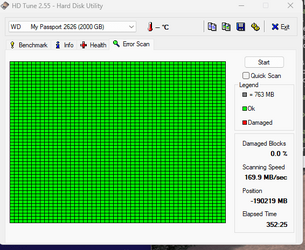
HD Tune was only one that successfully finished lol

All Green

Safe to Put its Original Files back on? or should i wait on that aspect

Don't know why it didn't finish with the other programs at all
 

Attachments

  • HD Tune Scan of External.png
    HD Tune Scan of External.png
    9.5 KB · Views: 1
Last edited:

My Computers My Computers

  • At a glance

    Windows 11 Pro 25H2 26200.8037AMD Ryzen 7700X32GB DDR 5 RGB 5600MhzRadeon 7800XT
    OS
    Windows 11 Pro 25H2 26200.8037
    Computer type
    PC/Desktop
    Manufacturer/Model
    PreBuilt
    CPU
    AMD Ryzen 7700X
    Motherboard
    MSI B650 VC WIfi Rev 1.0
    Memory
    32GB DDR 5 RGB 5600Mhz
    Graphics Card(s)
    Radeon 7800XT
    Sound Card
    Onboard Audio
    Monitor(s) Displays
    Asus VG245H
    Screen Resolution
    1920x1080
    Hard Drives
    Samsung 990 Evo Plus NVMe Boot
    Samsung 990 Pro 1TB Game NVMe


    External
    Western Digital Elements 500GB
    Western Digital My Passport 2TB Blue
    Western Digital My Passport 2TB Red
    Toshiba 2TB in External Enclosure
    Seagate 8TB in External Enclosure
    Seagate 1TB Portable USB 3 External Drive
    Western Digital My Book 8TB (Primary Backup drive)
    Western Digital Black 4TB In External Enclosure
    PSU
    750 Watt High Power
    Case
    Lian Li Lan Cool 216 ARGB Airflow
    Cooling
    2 160MM Front, 1 140MM Rear Exhaust
    Keyboard
    Logitech G513
    Mouse
    Logitech G502 X
    Internet Speed
    Gigabit 1100Mb/35 Upload
    Browser
    MS Edge Chromium and Bing Search
    Antivirus
    Windows Defender, Malwarebytes Premium
    Other Info
    UEFI, Secure Boot, TPM 2.0, Macrium Reflect X
  • At a glance

    Windows 11 Pro 25H2 26200.8037Ryzen 7 7735HS16GB DDR 5AMD Radeon™ 680M & Radeon 7700S
    Operating System
    Windows 11 Pro 25H2 26200.8037
    Computer type
    Laptop
    Manufacturer/Model
    Asus TUF A16 Advantage Edition FA617NT.A16.R7700
    CPU
    Ryzen 7 7735HS
    Motherboard
    OEM Asus Motherboard
    Memory
    16GB DDR 5
    Graphics card(s)
    AMD Radeon™ 680M & Radeon 7700S
    Sound Card
    Onboard
    Monitor(s) Displays
    16inch FHD 165hz
    Screen Resolution
    1920x1080
    Hard Drives
    512GB NVMe Boot Drive
    PSU
    Laptop PSU
    Case
    Laptop Case
    Cooling
    OEM Cooling
    Keyboard
    OEM Laptop Keyboard
    Mouse
    Touchpad & G502 Hero
    Internet Speed
    Gigabit 1100 Download/35 Upload
    Browser
    MS Edge with Bing search
    Antivirus
    Windows Defender & Malwarebytes Premium
    Other Info
    Macrium Reflect X
Looks good to me it's safe to use the drive.
 

My Computer My Computer

At a glance

Windows 11AMD Ryzen 7 5700GMicron Technology DDR4-3200 16GBNVIDIA GeForce RTX 3060
OS
Windows 11
Computer type
PC/Desktop
Manufacturer/Model
HP Pavilion
CPU
AMD Ryzen 7 5700G
Motherboard
Erica6
Memory
Micron Technology DDR4-3200 16GB
Graphics Card(s)
NVIDIA GeForce RTX 3060
Sound Card
Realtek ALC671
Monitor(s) Displays
Samsung SyncMaster U28E590
Screen Resolution
3840 x 2160
Hard Drives
SAMSUNG MZVLQ1T0HALB-000H1
THank you, and everyone else for the suggestions in this thread and help in this matter.

Maybe the issue was the previous cable i was using with the usb hub the 4 times i seen the fatal hardware error

Previous Scan with WD Dashboard was direct to PC with same cable used with HD Tune Scan

same for WD Drive Utilites prior to that

Glad though it's safe to use
 

My Computers My Computers

  • At a glance

    Windows 11 Pro 25H2 26200.8037AMD Ryzen 7700X32GB DDR 5 RGB 5600MhzRadeon 7800XT
    OS
    Windows 11 Pro 25H2 26200.8037
    Computer type
    PC/Desktop
    Manufacturer/Model
    PreBuilt
    CPU
    AMD Ryzen 7700X
    Motherboard
    MSI B650 VC WIfi Rev 1.0
    Memory
    32GB DDR 5 RGB 5600Mhz
    Graphics Card(s)
    Radeon 7800XT
    Sound Card
    Onboard Audio
    Monitor(s) Displays
    Asus VG245H
    Screen Resolution
    1920x1080
    Hard Drives
    Samsung 990 Evo Plus NVMe Boot
    Samsung 990 Pro 1TB Game NVMe


    External
    Western Digital Elements 500GB
    Western Digital My Passport 2TB Blue
    Western Digital My Passport 2TB Red
    Toshiba 2TB in External Enclosure
    Seagate 8TB in External Enclosure
    Seagate 1TB Portable USB 3 External Drive
    Western Digital My Book 8TB (Primary Backup drive)
    Western Digital Black 4TB In External Enclosure
    PSU
    750 Watt High Power
    Case
    Lian Li Lan Cool 216 ARGB Airflow
    Cooling
    2 160MM Front, 1 140MM Rear Exhaust
    Keyboard
    Logitech G513
    Mouse
    Logitech G502 X
    Internet Speed
    Gigabit 1100Mb/35 Upload
    Browser
    MS Edge Chromium and Bing Search
    Antivirus
    Windows Defender, Malwarebytes Premium
    Other Info
    UEFI, Secure Boot, TPM 2.0, Macrium Reflect X
  • At a glance

    Windows 11 Pro 25H2 26200.8037Ryzen 7 7735HS16GB DDR 5AMD Radeon™ 680M & Radeon 7700S
    Operating System
    Windows 11 Pro 25H2 26200.8037
    Computer type
    Laptop
    Manufacturer/Model
    Asus TUF A16 Advantage Edition FA617NT.A16.R7700
    CPU
    Ryzen 7 7735HS
    Motherboard
    OEM Asus Motherboard
    Memory
    16GB DDR 5
    Graphics card(s)
    AMD Radeon™ 680M & Radeon 7700S
    Sound Card
    Onboard
    Monitor(s) Displays
    16inch FHD 165hz
    Screen Resolution
    1920x1080
    Hard Drives
    512GB NVMe Boot Drive
    PSU
    Laptop PSU
    Case
    Laptop Case
    Cooling
    OEM Cooling
    Keyboard
    OEM Laptop Keyboard
    Mouse
    Touchpad & G502 Hero
    Internet Speed
    Gigabit 1100 Download/35 Upload
    Browser
    MS Edge with Bing search
    Antivirus
    Windows Defender & Malwarebytes Premium
    Other Info
    Macrium Reflect X
You are very welcome!
 

My Computer My Computer

At a glance

Windows 11AMD Ryzen 7 5700GMicron Technology DDR4-3200 16GBNVIDIA GeForce RTX 3060
OS
Windows 11
Computer type
PC/Desktop
Manufacturer/Model
HP Pavilion
CPU
AMD Ryzen 7 5700G
Motherboard
Erica6
Memory
Micron Technology DDR4-3200 16GB
Graphics Card(s)
NVIDIA GeForce RTX 3060
Sound Card
Realtek ALC671
Monitor(s) Displays
Samsung SyncMaster U28E590
Screen Resolution
3840 x 2160
Hard Drives
SAMSUNG MZVLQ1T0HALB-000H1

Latest Support Threads

Back
Top Bottom