Windows 11 drains battery when laptop is shutdown - Fast Startup is disabled


Me262

New member
Local time
5:01 PM
Posts
14
OS
Win11
Hello everyone. I have a MSI GL65 9SD laptop and my laptop loses about 5% of battery every day while the laptop is turned off, and the fast startup is disabled.

My problem is similar to this: Redirecting

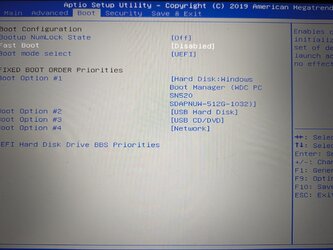
The OP in that thread mentioned it could be something with the BIOS. What can I look for mine to make sure the laptop actually shuts down and not entering some sort of sleep/standby state? I disabled C state CPU in BIOS.
 

My Computer My Computer

At a glance

Win11
OS
Win11

My Computers My Computers

  • At a glance

    Windows 11 ProAMD Ryzen 9 8945HS32GB DDR5 SO-DIMMIntegrated AMD Radeon 780M (4.00 GHz)
    OS
    Windows 11 Pro
    Computer type
    PC/Desktop
    Manufacturer/Model
    GMKtec K11
    CPU
    AMD Ryzen 9 8945HS
    Memory
    32GB DDR5 SO-DIMM
    Graphics Card(s)
    Integrated AMD Radeon 780M (4.00 GHz)
    Monitor(s) Displays
    Benq 2250HM
    Screen Resolution
    1920 x 1080
    Hard Drives
    1 TB PCIe 4.0 NVMe M.2 SSD
  • At a glance

    Windows 11 HomeIntel® Core™ Ultra 7 - 255H processor16 GB LPDDR5 SDRAMIntel Arc 140T onboard graphics
    Operating System
    Windows 11 Home
    Computer type
    Laptop
    Manufacturer/Model
    ASUS Zenbook 14 OLED 14" Laptop - UX3405CA-QL192W
    CPU
    Intel® Core™ Ultra 7 - 255H processor
    Memory
    16 GB LPDDR5 SDRAM
    Graphics card(s)
    Intel Arc 140T onboard graphics
    Screen Resolution
    1920 x 1200 (16:10 WUXGA resolution) OLED Touchscreen
    Hard Drives
    1TB SSD
Hello everyone. I have a MSI GL65 9SD laptop and my laptop loses about 5% of battery every day while the laptop is turned off.
That is because your laptop is not turned off when you shut it down. It is in Modern Standby.

1701776233142.png

More here:


For my Dell Latitude 5410 with Modern Standby I have enabled Hibernation and use that when I want it turned off without battery drain. @Try3 may have other suggestions for you.
 

My Computers My Computers

  • At a glance

    Windows 11 HomeAMD Athlon Silver 3050U8GBRadeon Graphics
    OS
    Windows 11 Home
    Computer type
    Laptop
    Manufacturer/Model
    Acer Aspire 3 A315-23-R9VY
    CPU
    AMD Athlon Silver 3050U
    Memory
    8GB
    Graphics Card(s)
    Radeon Graphics
    Monitor(s) Displays
    laptop screen
    Screen Resolution
    1366x768 native resolution, up to 2560x1440 with Radeon Virtual Super Resolution
    Hard Drives
    1TB Samsung EVO 870 SSD (from April 2026: 250GB EVO 850)
    Internet Speed
    150 Mbps
    Browser
    Edge, Firefox
    Antivirus
    Defender
    Other Info
    fully 'Windows 11 ready' laptop. Windows 10 C: partition migrated from my old unsupported 'main machine' then upgraded to 11. A test migration ran Insider builds for 2 months. When 11 was released on 5th October 2021 it was re-imaged back to 10 and was offered the upgrade in Windows Update on 20th October. Windows Update offered the 22H2 Feature Update on 20th September 2022. It got the 23H2 Feature Update on 4th November 2023 through Windows Update, 24H2 on 3rd October 2024 through Windows Update by setting the Target Release Version for 24H2, and 25H2 on 30th September 2025 through Windows Update by setting the Target Release Version for 25H2.

    UPDATE - 11 April 2026: due to mechanical deterioration this PC has been retired from active duty. The OS with all software and files has been migrated to my System Seven in 'Other systems' to carry on as my general purpose 'main machine'.
  • At a glance

    Windows 11 ProIntel® Core™ i5-520M8GB(integrated graphics) Intel HD Graphics
    Operating System
    Windows 11 Pro
    Computer type
    Laptop
    Manufacturer/Model
    Dell Latitude E4310
    CPU
    Intel® Core™ i5-520M
    Motherboard
    0T6M8G
    Memory
    8GB
    Graphics card(s)
    (integrated graphics) Intel HD Graphics
    Screen Resolution
    1366x768
    Hard Drives
    500GB Crucial MX500 SSD
    Browser
    Firefox, Edge
    Antivirus
    Defender
    Other Info
    unsupported machine: Legacy bios, MBR, TPM 1.2, upgraded from W10 to W11 using W10/W11 hybrid install media workaround.

    In-place upgrade to 22H2 using ISO and a workaround.
    Feature Update to 23H2 by manually installing the Enablement Package.
    In-place upgrade to 24H2 using hybrid 23H2/24H2 install media.
    Upgraded to 25H2 by Enablement Package.

    Also running Insider Dev, and Canary builds and Windows 10 as native boot .vhdx.
  • My SYSTEM THREE is a Dell Latitude 5410, i7-10610U, 32GB RAM, 512GB NVMe ssd, supported device running Windows 11 Pro.

    My SYSTEM FOUR is a 2-in-1 convertible Lenovo Yoga 11e 20DA, Celeron N2930, 8GB RAM, 256GB ssd. Unsupported device: currently running Win10 Pro, plus Win11 Pro RTM and Insider Dev, Beta, and RP 24H2 as native boot vhdx.

    My SYSTEM FIVE is a Dell Latitude 3190 2-in-1, Pentium Silver N5030, 8GB RAM, 1TB NVMe ssd, supported device running Windows 11 Pro, plus Insider Beta, Dev, and Canary builds (and a few others) as a native boot .vhdx.

    My SYSTEM SIX is a Dell Latitude 5550, Core Ultra 7 165H, 64GB RAM, 1TB NVMe SSD, supported device, Windows 11 Pro 24H2, Hyper-V host machine. Updated to 25H2 on 30th September 2025.

    My SYSTEM SEVEN is a Lenovo Thinkpad T580, Intel Core i7-8650U, 16GB RAM, 512GB NVMe SSD + 2nd 512GB NVMe SSD, a supported device for Windows 11. This is my current general purpose 'main machine'. The installed Windows 11 Home from my System One has been migrated to this machine.
Hi. I had the same problem with a couple of laptops. I finally tracked it down to not turning off WiFi, not just disconnecting, before shutting down. Laptop now only loses 1/2% when shut down over several days. Hope this helps.
 

My Computer My Computer

At a glance

Windows 11 Home
OS
Windows 11 Home
What can I look for mine to make sure the laptop actually shuts down and not entering some sort of sleep/standby state?
 

My Computer My Computer

At a glance

Windows 11, Windows 10, Linux Fedora Cinnamon
OS
Windows 11, Windows 10, Linux Fedora Cinnamon
Battery drivers say are up to date, altough the date is 2006. I have done the other things in the article, such as reconfiguring power management and unticked all drivers that showed up in wake_armed.

Not sure about 4, they only give example the Intel Management Engine Interface, and it's for disabling turning off device to save power (Allow this device to wake up computer is off and greyed out).

That is because your laptop is not turned off when you shut it down. It is in Modern Standby.

View attachment 80115

More here:


For my Dell Latitude 5410 with Modern Standby I have enabled Hibernation and use that when I want it turned off without battery drain. @Try3 may have other suggestions for you.
Great. Any way to have it disabled all together? I disabled hybernation. Is there a way to disable sleep mode as well so it won't enter standby?
 

My Computer My Computer

At a glance

Win11
OS
Win11
Hi. I had the same problem with a couple of laptops. I finally tracked it down to not turning off WiFi, not just disconnecting, before shutting down. Laptop now only loses 1/2% when shut down over several days. Hope this helps.
How did you make sure the wifi completely turns off?
I have done the PlatformAoAcOverride tutorial and now my only state is S3.

When I do windows -> Shutdown, does this mean my computer completely turns off, or is it now entering state S3?
 

My Computer My Computer

At a glance

Win11
OS
Win11
When I do windows -> Shutdown, does this mean my computer completely turns off
No, it should fully power off and when it does sleep, it will go into a far deeper sleep state which should hopefully conserve more of your battery power. If you want to be certain, then you can always use the following command from command prompt:

Code:
shutdown /p
 

My Computer My Computer

At a glance

Windows 11, Windows 10, Linux Fedora Cinnamon
OS
Windows 11, Windows 10, Linux Fedora Cinnamon
No, it should fully power off and when it does sleep, it will go into a far deeper sleep state which should hopefully conserve more of your battery power. If you want to be certain, then you can always use the following command from command prompt:

Code:
shutdown /p
I'm confused. I'm looking to completely shutdown my computer so that battery will no longer drain.

Wasn't S0 used for deeper sleep state, and now I disabled that so hopefully the computer fully shuts down? S3 I assume would consumes a lot more battery than S0 would, but I don't care as I want for my laptop to fully shutdown.

The documentation says /p shuts the computer but the power to the computer remains on. Why would I want to use /p??
 

My Computer My Computer

At a glance

Win11
OS
Win11
The documentation says /p shuts the computer but the power to the computer remains on. Why would I want to use /p??
That's if your machine doesn't support an S5 state, otherwise just use another switch like /s.

Wasn't S0 used for deeper sleep state, and now I disabled that so hopefully the computer fully shuts down? S3 I assume would consumes a lot more battery than S0 would, but I don't care as I want for my laptop to fully shutdown.
No, that isn't the case:

The system appears to be off. The amount of power consumed in states S1-S3 is less than S0 and more than S4.
Source:
I'm confused. I'm looking to completely shutdown my computer so that battery will no longer drain.
It will shutdown the system if you select the shut down option, however, if you leave your machine to idle and power settings dictate that the machine will sleep, then it will immediately go to the S3 sleep state rather than progressively go into a "deeper" sleep state. Alternatively, if you select the sleep option, then it should immediately go to S3 instead of S0.
 

My Computer My Computer

At a glance

Windows 11, Windows 10, Linux Fedora Cinnamon
OS
Windows 11, Windows 10, Linux Fedora Cinnamon
I finally tracked it down to not turning off WiFi, not just disconnecting, before shutting down.
As in Device Manager > Right click on Wifi-device > Disable or Settings > Network/Internet > Wi-fi > Off?
 

My Computer My Computer

At a glance

Windows 11 Pro for WorkstationsIntel Xeon w5-2465X (3.10 GHz)128 GBNvidia RTX A5000
OS
Windows 11 Pro for Workstations
Computer type
PC/Desktop
Manufacturer/Model
HP
CPU
Intel Xeon w5-2465X (3.10 GHz)
Motherboard
HP Z4 G5
Memory
128 GB
Graphics Card(s)
Nvidia RTX A5000
Sound Card
On board, Realtek
Monitor(s) Displays
ASUS Swift PG279Q (27")
Screen Resolution
2560x1440
Hard Drives
Samsung MZVL21T0HCLR-00BH1 m.2 1TB, Samsung 990 Pro m.2 4TB, Kingston SFYRD m.2 4TB, Corsair MP510 m.2 4TB, Corsair MP600 Pro m.2 8TB, Corsair MP600 Pro m.2 8TB, Micron 5300 SATA SSD 8TB.
Other Info
This is a HP Z4 G5 Workstation.
That's if your machine doesn't support an S5 state, otherwise just use another switch like /s.


No, that isn't the case:


Source:

It will shutdown the system if you select the shut down option, however, if you leave your machine to idle and power settings dictate that the machine will sleep, then it will immediately go to the S3 sleep state rather than progressively go into a "deeper" sleep state. Alternatively, if you select the sleep option, then it should immediately go to S3 instead of S0.
Oh i understand now. Thanks.
As in Device Manager > Right click on Wifi-device > Disable or Settings > Network/Internet > Wi-fi > Off?
Oh, I thought it was something automated to have it off at shutdown. I don't want to have to do that all the time manually.
 

My Computer My Computer

At a glance

Win11
OS
Win11
All I needed to do was click on the WiFi icon in system tray/ more WiFi settings and toggle WiFi off before shutting down. This worked for both Windows 10 and 11 PC's. I turned off Modern Standby beforehand but it didn't make any difference to the battery % loss.
 

My Computer My Computer

At a glance

Windows 11 Home
OS
Windows 11 Home
All I needed to do was click on the WiFi icon in system tray/ more WiFi settings and toggle WiFi off before shutting down. This worked for both Windows 10 and 11 PC's. I turned off Modern Standby beforehand but it didn't make any difference to the battery % loss.
Got it! :)

Modern Standby is turned off here but does not matter here as well, iow the battery drains out when the computer is turned off. Will test to turn off the Wi-Fi! :)
 

My Computer My Computer

At a glance

Windows 11 Pro for WorkstationsIntel Xeon w5-2465X (3.10 GHz)128 GBNvidia RTX A5000
OS
Windows 11 Pro for Workstations
Computer type
PC/Desktop
Manufacturer/Model
HP
CPU
Intel Xeon w5-2465X (3.10 GHz)
Motherboard
HP Z4 G5
Memory
128 GB
Graphics Card(s)
Nvidia RTX A5000
Sound Card
On board, Realtek
Monitor(s) Displays
ASUS Swift PG279Q (27")
Screen Resolution
2560x1440
Hard Drives
Samsung MZVL21T0HCLR-00BH1 m.2 1TB, Samsung 990 Pro m.2 4TB, Kingston SFYRD m.2 4TB, Corsair MP510 m.2 4TB, Corsair MP600 Pro m.2 8TB, Corsair MP600 Pro m.2 8TB, Micron 5300 SATA SSD 8TB.
Other Info
This is a HP Z4 G5 Workstation.
my laptop loses about 5% of battery every day while the laptop is turned off
1 Lenovo Support claims that losing 2% a day is normal. I'd never noticed it before because I don't leave my computers turned off for long enough. So my new Lenovo, which I only use intermittently, is the only example I have of a computer that spends a lot of time turned off and it loses 2% a day just as Lenovo Support said.

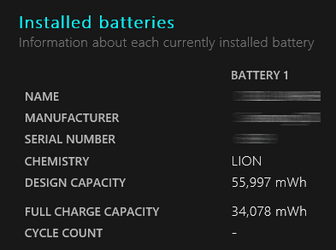
2 How worn out is your battery? Run a PowerCfg Battery report to find out the ratio of Full charge capacity to Design capacity. The syntax is
PowerCfg /batteryreport /output "C:\Users\%UserName%\Desktop\BatteryReport.html" /Duration 1
battery report main parameters.png

3 If it is shut down then it is shutdown; S0 Modern standby or not.
By the way, you can check whether or not you have S0 Modern standby by running the command
PowerCfg -a
This command can be run in Terminal using either the PowerShell or Command prompt modes.

4 If you want to make sure that you are really shutting down then ignore the Start menu and shut down using this command instead:-
shutdown.exe /s /t 0 /f
This command can also be run in Terminal using either the PowerShell or Command prompt modes.

5 Whilst I do not think it is significant in this case, Bios settings can have an effect. If, for example, your Bios allows you to power external USB devices when shutdown then making use of that facility would drain the battery.

Best of luck,
Denis
 
Last edited:

My Computer My Computer

At a glance

Windows 11 Home x64 Version 25H2 Build 26200....
OS
Windows 11 Home x64 Version 25H2 Build 26200.8037
How did you make sure the wifi completely turns off?

I have done the PlatformAoAcOverride tutorial and now my only state is S3.

When I do windows -> Shutdown, does this mean my computer completely turns off, or is it now entering state S3?
It doesn't as it will just shut down to hibernation mode regardless if you use S0 or S3.

Someone correct me if I am wrong but when you do Start Menu -> Power, hold down the shift key when you click on the Shutdown option as the shift key is supposed to do a real full shutdown. This works whether you’re clicking the option in the Start menu, on the sign-in screen, or on the screen that appears after you press Ctrl+Alt+Delete.

Quoting from the internet and modifying it so it is more clear:
"Shift + Shutdown is a way of forcing Windows 10/11 to shut down all the apps and sign out all the users for a full shutdown.
When you shutdown without holding the shift key, the system will just do the usual hybrid shutdown or hibernation which allows the system to pick up from where you left off."
 
Last edited:

My Computer My Computer

At a glance

WindowsXP/7/8/8.1/10/11,Linux,Android,FreeBSD...Intel® Core™ i7-8750H 8th Gen 2.2Ghz up to 4....64GB using 2x32GB CL16 Mushkin redLine modulesIntel UHD 630 & NVIDIA GeForce GTX 1050 Ti wi...
OS
WindowsXP/7/8/8.1/10/11,Linux,Android,FreeBSD Unix
Computer type
Laptop
Manufacturer/Model
Dell XPS 15 9570
CPU
Intel® Core™ i7-8750H 8th Gen 2.2Ghz up to 4.1Ghz
Motherboard
Dell XPS 15 9570
Memory
64GB using 2x32GB CL16 Mushkin redLine modules
Graphics Card(s)
Intel UHD 630 & NVIDIA GeForce GTX 1050 Ti with 4GB DDR5
Sound Card
Realtek ALC3266-CG
Monitor(s) Displays
15.6" 4K Touch UltraHD 3840x2160 made by Sharp
Screen Resolution
3840x2160 4K UltraHD
Hard Drives
Samsung MZ-V9P4T0B/AM 990 PRO 4TB PCIe®4.0 NVMe™ M.2 SSD was Toshiba KXG60ZNV1T02 NVMe 1TB SSD
PSU
Dell XPS 15 9570
Case
Dell XPS 15 9570
Cooling
Stock
Keyboard
Stock
Mouse
SwitftPoint ProPoint
Internet Speed
Comcast/XFinity 1.44Gbps/42.5Mbps
Browser
Microsoft EDGE (Chromium based) & Google Chrome
Antivirus
Windows Defender that came with Windows
All I needed to do was click on the WiFi icon in system tray/ more WiFi settings and toggle WiFi off before shutting down. This worked for both Windows 10 and 11 PC's. I turned off Modern Standby beforehand but it didn't make any difference to the battery % loss.

Got it! :)

Modern Standby is turned off here but does not matter here as well, iow the battery drains out when the computer is turned off. Will test to turn off the Wi-Fi! :)
Wifi didn't help because I often use airplane mode to tether via USB from my phone. So often I shutdown the computer on airplane mode and the battery still drains

It doesn't as it will just shut down to hibernation mode regardless if you use S0 or S3.

Someone correct me if I am wrong but when you do Start Menu -> Power, hold down the shift key when you click on the Shutdown option as the shift key is supposed to do a real full shutdown. This works whether you’re clicking the option in the Start menu, on the sign-in screen, or on the screen that appears after you press Ctrl+Alt+Delete.

Quoting from the internet and modifying it so it is more clear:
"Shift + Shutdown is a way of forcing Windows 10/11 to shut down all the apps and sign out all the users for a full shutdown.
When you shutdown without holding the shift key, the system will just do the usual hybrid shutdown or hibernation which allows the system to pick up from where you left off."
Unfortunately pressing shift while shutting down doesn't seem to be doing anything. I still lose battery while the laptop is turned off.
 

My Computer My Computer

At a glance

Win11
OS
Win11
It doesn't as it will just shut down to hibernation mode regardless if you use S0 or S3.

Someone correct me if I am wrong but when you do Start Menu -> Power, hold down the shift key when you click on the Shutdown option as the shift key is supposed to do a real full shutdown. This works whether you’re clicking the option in the Start menu, on the sign-in screen, or on the screen that appears after you press Ctrl+Alt+Delete.

Quoting from the internet and modifying it so it is more clear:
"Shift + Shutdown is a way of forcing Windows 10/11 to shut down all the apps and sign out all the users for a full shutdown.
When you shutdown without holding the shift key, the system will just do the usual hybrid shutdown or hibernation which allows the system to pick up from where you left off."
1 Lenovo Support claims that losing 2% a day is normal. I'd never noticed it before because I don't leave my computers turned off for long enough. So my new Lenovo, which I only use intermittently, is the only example I have of a computer that spends a lot of time turned off and it loses 2% a day just as Lenovo Support said.

2 How worn out is your battery? Run a PowerCfg Battery report to find out the ratio of Full charge capacity to Design capacity. The syntax is
PowerCfg /batteryreport /output "C:\Users\%UserName%\Desktop\BatteryReport.html" /Duration 1
View attachment 80213

3 If it is shut down then it is shutdown; S0 Modern standby or not.
By the way, you can check whether or not you have S0 Modern standby by running the command
PowerCfg -a
This command can be run in Terminal using either the PowerShell or Command prompt modes.

4 If you want to make sure that you are really shutting down then ignore the Start menu and shut down using this command instead:-

This command can also be run in Terminal using either the PowerShell or Command prompt modes.

5 Whilst I do not think it is significant in this case, Bios settings can have an effect. If, for example, your Bios allows you to power external USB devices when shutdown then making use of that facility would drain the battery.

Best of luck,
Denis
After trying everything in this thread I think my only hope is maybe something in BIOS. Because I still lose about 2-3% a day and it's extremely annoying.

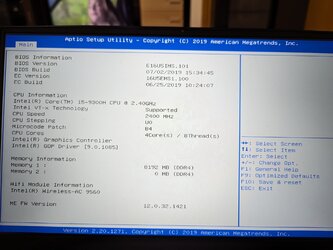
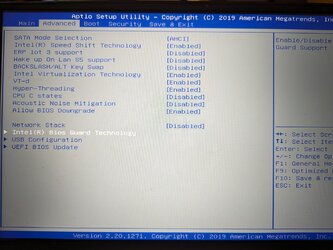
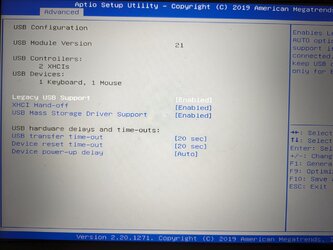
Attached is how my BIOS looks. Maybe there's something I'm missing. I have even disabled C state in BIOS hoping that might've been it.
Does MSI gaming laptops have a hidden BIOS that I can enable? I know my old gigabyte mobo had an advance mode. Is there a way to enable more options on the MSI? For example, where does Dragon Centre changes the battery charging in BIOS? Because like I mentioned, I capped it at 60%, and even after a full format with HDD wipped out, my laptop would now no longer charge past 60% until I reinstalled Dragon Centre to change the settings in there. So it must definitely write this in BIOS somewhere no?
 

Attachments

  • PXL_20231205_100510658.jpg
    PXL_20231205_100510658.jpg
    244.5 KB · Views: 1
  • PXL_20231205_100521498.jpg
    PXL_20231205_100521498.jpg
    315.6 KB · Views: 1
  • PXL_20231205_100538250.jpg
    PXL_20231205_100538250.jpg
    280 KB · Views: 1
  • PXL_20231205_100559035.jpg
    PXL_20231205_100559035.jpg
    287 KB · Views: 1
  • PXL_20231205_100633929.jpg
    PXL_20231205_100633929.jpg
    174.5 KB · Views: 1

My Computer My Computer

At a glance

Win11
OS
Win11
Please run the V2 log collector and post a share link into this thread using one drive, drop box, or google drive.


My Computer My Computer

At a glance

Windows 10Intel(R) Core(TM) i7-4800MQ CPU @ 2.70GHz16 GB Total: Manufacturer : Samsung MemoryTyp...NVIDIA Quadro K3100M; Intel(R) HD Graphics 4600
OS
Windows 10
Computer type
Laptop
Manufacturer/Model
HP
CPU
Intel(R) Core(TM) i7-4800MQ CPU @ 2.70GHz
Motherboard
Product : 190A Version : KBC Version 94.56
Memory
16 GB Total: Manufacturer : Samsung MemoryType : DDR3 FormFactor : SODIMM Capacity : 8GB Speed : 1600
Graphics Card(s)
NVIDIA Quadro K3100M; Intel(R) HD Graphics 4600
Sound Card
IDT High Definition Audio CODEC; PNP Device ID HDAUDIO\FUNC_01&VEN_111D&DEV_76E0
Hard Drives
Model Hitachi HTS727575A9E364
Antivirus
Microsoft Defender
Other Info
Mobile Workstation
Please run the V2 log collector and post a share link into this thread using one drive, drop box, or google drive.

Here it is
 

Attachments

My Computer My Computer

At a glance

Win11
OS
Win11

Latest Support Threads

Back
Top Bottom