Windows 11 File Explorer displaying photos on a phone


BEH

Active member
Member
Local time
4:55 AM
Posts
35
OS
Windows 11 HOME
I have an issue when displaying photos on a phone connected to my HP laptop.

I do the following:
- connect the phone, Moto G Power 2022 to my laptop via USB
- using File Explorer, open the device, as shown by File Explorer (Moto G Power 2022)
- open the photo folder containing my photos

At this point all photos are displayed, However, all are displayed as being rotated 90 degrees left
(counter clockwise). I have no idea why. On the phone they display correctly. Using File Explorer,
If I copy and paste them to a folder on my laptop (C drive), they display correctly.

Does anyone have any idea why Windows 11 (photo app ??) is doing this... I'd like to correct
this if its possible.

I'm running this on a HP 64 bit laptop.

Edition Windows 11 Home
Version 22H2
Installed on ‎8/‎27/‎2023
OS build 22621.2715
Experience Windows Feature Experience Pack 1000.22677.1000.0


I've attached a file showing the rotation display.

thanks BEH
 

Attachments

My Computer My Computer

At a glance

Windows 11 HOME13th Gen Intel(R) Core(TM) i5-1335U 1.30 GHz32.0 GB (31.7 GB usable)
OS
Windows 11 HOME
Computer type
Laptop
Manufacturer/Model
HP LAPTOP 17 - cn3xxx
CPU
13th Gen Intel(R) Core(TM) i5-1335U 1.30 GHz
Memory
32.0 GB (31.7 GB usable)
Hard Drives
2 TB
At this point all photos are displayed, However, all are displayed as being rotated 90 degrees left
(counter clockwise). I have no idea why. On the phone they display correctly. Using File Explorer,
If I copy and paste them to a folder on my laptop (C drive), they display correctly.
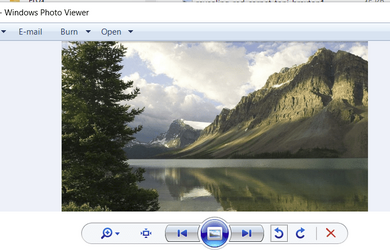
When I see that in Windows Photo Viewer on Win11 I get a choice to rotate them to the display I want then when closing or changing to another picture it gets saved.

1702409130259.png
 

My Computers My Computers

  • At a glance

    Win11 Pro RTM Version 24H2 Build 26100.4202Intel Core i5 11th Gen. 2.40GHz12GB
    OS
    Win11 Pro RTM Version 24H2 Build 26100.4202
    Computer type
    Laptop
    Manufacturer/Model
    Dell Vostro 3400
    CPU
    Intel Core i5 11th Gen. 2.40GHz
    Memory
    12GB
    Hard Drives
    256GB SSD NVMe M.2
  • At a glance

    Win11 Pro RTM Version 24H2 Build 26100.4202Intel Core i5 10th Gen. 2.90GHz16GBOnboard, no VGA, using a DisplayPort-to-VGA a...
    Operating System
    Win11 Pro RTM Version 24H2 Build 26100.4202
    Computer type
    PC/Desktop
    Manufacturer/Model
    Dell Vostro 5890
    CPU
    Intel Core i5 10th Gen. 2.90GHz
    Memory
    16GB
    Graphics card(s)
    Onboard, no VGA, using a DisplayPort-to-VGA adapter
    Monitor(s) Displays
    24" Dell
    Hard Drives
    512GB SSD NVMe, 4TB Seagate HDD
    Browser
    Firefox, Edge
    Antivirus
    Windows Defender/Microsoft Security
It's better to capture an image with Snipping Tool or similar app and paste the image here.
Not too many people like to download a random file from the internet.

1702409279761.png
 

My Computers My Computers

  • At a glance

    Win 11 Pro 25H2 26200.8655Intel® Core™ i7-14700KG.SKILL Ripjaws S5 Series 64GB (2 x 32GB) DDR5ASUS GeForce RTX 4070 Super 12GB
    OS
    Win 11 Pro 25H2 26200.8655
    Computer type
    PC/Desktop
    Manufacturer/Model
    Self Built
    CPU
    Intel® Core™ i7-14700K
    Motherboard
    ASUS TUF Z690-PLUS WIFI BIOS 4505 11/29/25
    Memory
    G.SKILL Ripjaws S5 Series 64GB (2 x 32GB) DDR5
    Graphics Card(s)
    ASUS GeForce RTX 4070 Super 12GB
    Sound Card
    Sound Blaster AE-5 Plus
    Monitor(s) Displays
    ASUS TUF Gaming 27" 2K HDR Gaming
    Screen Resolution
    2560 x 1440
    Hard Drives
    Samsung 990 Pro 1TB NVMe (Win 11 25H2)
    SK hynix P41 500GB NVMe 25H2 DEV/Games
    SK hynix P41 2TB NVMe (x3)
    Crucial P3 Plus 4TB
    PSU
    Corsair RM850x Shift
    Case
    Antec Dark Phantom DP502 FLUX
    Cooling
    Corsair Nautilus 360 RS AIO
    Keyboard
    Logitech MK 320
    Mouse
    Razer Basilisk V3
    Internet Speed
    750Mbs
    Browser
    Firefox
    Antivirus
    Winows Security
    Other Info
    MR 8.1 Home
  • At a glance

    Win 11 Pro 25H2 26200.8655Intel Core i7-11700F64 GB DDR4MSI GeForce RTX 3060 Ventus 2X 12GB
    Operating System
    Win 11 Pro 25H2 26200.8655
    Computer type
    PC/Desktop
    Manufacturer/Model
    Self Built
    CPU
    Intel Core i7-11700F
    Motherboard
    Asus TUF Gaming Z590 Plus WiFi (BIOS 2803)
    Memory
    64 GB DDR4
    Graphics card(s)
    MSI GeForce RTX 3060 Ventus 2X 12GB
    Sound Card
    SoundBlaster Audigy Fx V2
    Monitor(s) Displays
    Samsung F27T350
    Screen Resolution
    1920x1080
    Hard Drives
    Samsung 980 Pro 1TB
    Samsung 970 EVO Plus 2TB
    Samsung 870 EVO 500GB SSD
    PSU
    Corsair HX750
    Case
    Cougar MX330-G Window
    Cooling
    Thermalright Frozen Edge 240 Black AIO
    Internet Speed
    350Mbps
    Browser
    Firefox
    Antivirus
    Windows Security
  • System Three
    Win 11 Pro 25H2 26200.8655
    ASUS PRIME Z370-P II BIOS 3004 7/12/21
    Intel Core i7-8700 CPU @ 3.20GHz
    32GB DDR4 RAM (4x8)
    iGPU Intel UHD Graphics 630
    Mid-Tower Desktop
Berton and Scott... thanks for your replies.... I open the phone photo folder using the photo app in Windows 11. I don't
see any option to rotate them...

As for the attachment, I was unaware that most users did not attach pdf's, txt etc. files to their posts... I understand the concern...
So, since I have never done it, I'll take a screenshot whenever possible and try to paste it into the post... thanks for the tip
 

My Computer My Computer

At a glance

Windows 11 HOME13th Gen Intel(R) Core(TM) i5-1335U 1.30 GHz32.0 GB (31.7 GB usable)
OS
Windows 11 HOME
Computer type
Laptop
Manufacturer/Model
HP LAPTOP 17 - cn3xxx
CPU
13th Gen Intel(R) Core(TM) i5-1335U 1.30 GHz
Memory
32.0 GB (31.7 GB usable)
Hard Drives
2 TB
Look at the image I posted, Windows Photo Viewer has two arrows at the bottom, curved to the Left and Right. Click one to turn 90° with each click until it is as desired.
 

My Computers My Computers

  • At a glance

    Win11 Pro RTM Version 24H2 Build 26100.4202Intel Core i5 11th Gen. 2.40GHz12GB
    OS
    Win11 Pro RTM Version 24H2 Build 26100.4202
    Computer type
    Laptop
    Manufacturer/Model
    Dell Vostro 3400
    CPU
    Intel Core i5 11th Gen. 2.40GHz
    Memory
    12GB
    Hard Drives
    256GB SSD NVMe M.2
  • At a glance

    Win11 Pro RTM Version 24H2 Build 26100.4202Intel Core i5 10th Gen. 2.90GHz16GBOnboard, no VGA, using a DisplayPort-to-VGA a...
    Operating System
    Win11 Pro RTM Version 24H2 Build 26100.4202
    Computer type
    PC/Desktop
    Manufacturer/Model
    Dell Vostro 5890
    CPU
    Intel Core i5 10th Gen. 2.90GHz
    Memory
    16GB
    Graphics card(s)
    Onboard, no VGA, using a DisplayPort-to-VGA adapter
    Monitor(s) Displays
    24" Dell
    Hard Drives
    512GB SSD NVMe, 4TB Seagate HDD
    Browser
    Firefox, Edge
    Antivirus
    Windows Defender/Microsoft Security
Back
Top Bottom