Windows 11 ignoring power settings


GaryK4

Active member
Local time
11:29 PM
Posts
12
OS
Windows 11
Windows Version number: 22H2 (OS Build: 22621.2134)
I have: When plugged in, turn off my screen after 2 hours. put my device to sleep after Never.
However, If I am playing a You tube movie, the screen turns off after 20 minutes.
I have seen many posts on this and nothing helps.
Are there any new ideas on what to try?
 

My Computer

System One

  • OS
    Windows 11
    Computer type
    PC/Desktop
    Manufacturer/Model
    Dell
    CPU
    Intel(R) Core(TM) i7-8086K CPU @ 4.00GHz 4.01 GHz
    Memory
    32.0 GB
    Graphics Card(s)
    NVIDIA GeForce 1060 GB
    Monitor(s) Displays
    (4) Dell & ViewSonic
    Screen Resolution
    (2) 1920x1200, 1920x1080, 1280x1024
    Hard Drives
    C: 1.0 TB, D: 2.0TB, G: 500GB, H: 3.0GB
    Keyboard
    Dell
    Mouse
    Anka
    Internet Speed
    200x20
    Browser
    Chrome
    Antivirus
    McAfee
This is going to sound really stupid, but..... I have made changes in Windows and then found the change did not take!

My problem turned out to be that I forgot to hit "SAVE" at the end of my work.

Try your settings again, and look around for the SAVE button.

Cheers mate!
TM :cool:
 

My Computer

Verify that you have the latest bios update from Dell.

Make sure you have the latest graphics driver. Download the latest official NVIDIA drivers

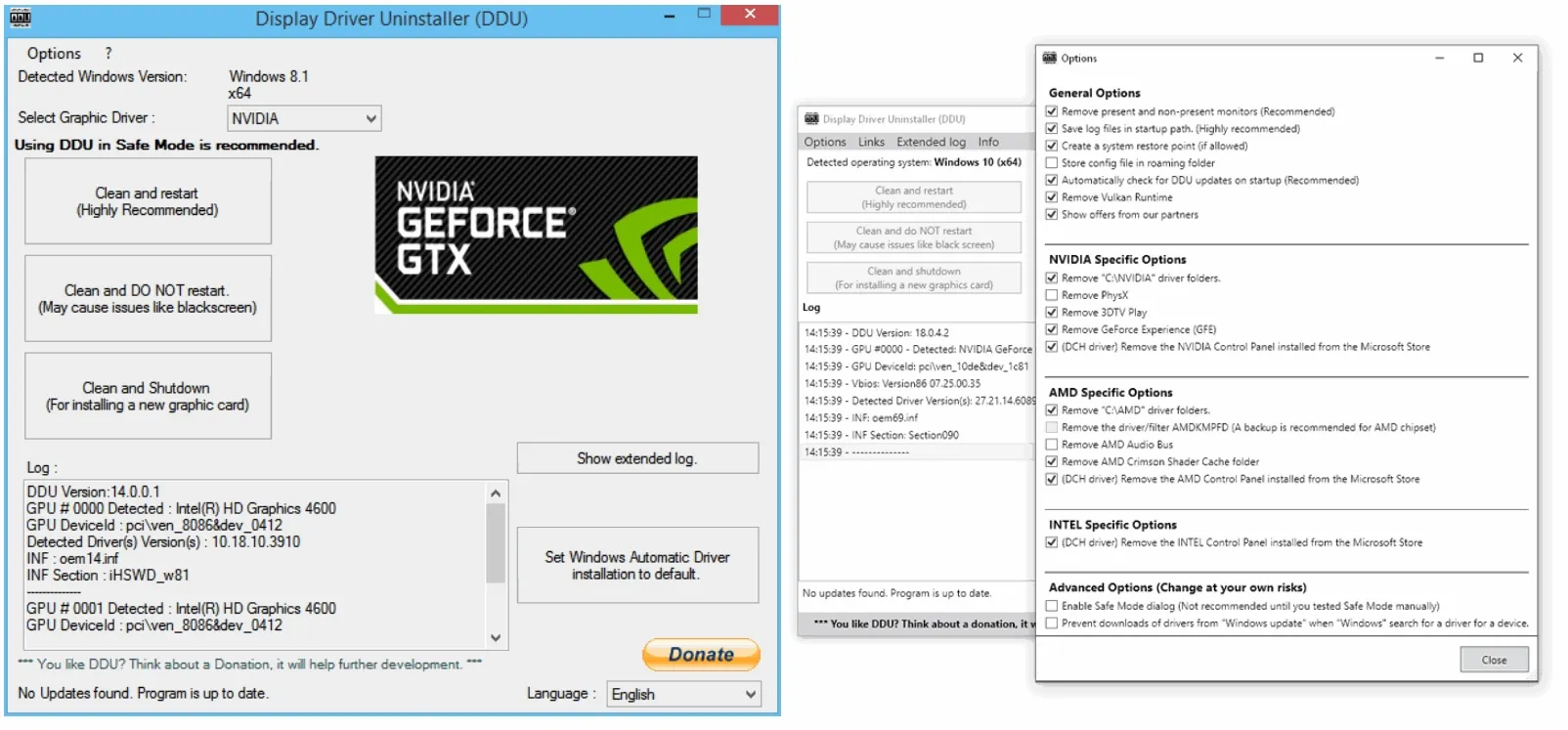
Remove old graphics driver in safe mode using DDU. Be sure to also select to remove the graphics software. Instructions & download here. Read carefully.
Restart and install new driver.

If problem still exists, check your UEFI bios for settings related to power.
 

My Computers

System One System Two

  • OS
    Windows 11 Pro 25H2
    Computer type
    PC/Desktop
    Manufacturer/Model
    Dell Optiplex 7080
    CPU
    i9-10900 10 core 20 threads
    Motherboard
    DELL 0J37VM
    Memory
    32 gb
    Graphics Card(s)
    none-Intel UHD Graphics 630
    Sound Card
    Integrated Realtek
    Monitor(s) Displays
    Benq 27
    Screen Resolution
    2560x1440
    Hard Drives
    2x1tb Solidigm m.2 nvme /External drives 512gb Samsung m.2 sata+2tb Kingston m2.nvme
    PSU
    500w
    Case
    MT
    Cooling
    Dell Premium
    Keyboard
    Logitech wired
    Mouse
    Logitech wireless
    Internet Speed
    so slow I'm too embarrassed to tell
    Browser
    #1 Edge #2 Firefox
    Antivirus
    Defender+MWB Premium
  • Operating System
    Windows 11 Pro 24H2 26200.8457
    Computer type
    PC/Desktop
    Manufacturer/Model
    Beelink Mini PC SER5
    CPU
    AMD Ryzen 7 6800U
    Memory
    32 gb
    Graphics card(s)
    integrated
    Sound Card
    integrated
    Monitor(s) Displays
    Benq 27
    Screen Resolution
    2560x1440
    Hard Drives
    1TB Crucial nvme
    Keyboard
    Logitech wired
    Mouse
    Logitech wireless
    Internet Speed
    still too embarrassed to tell
    Browser
    Firefox
    Antivirus
    Defender
    Other Info
    System 3 is non compliant Dell 9020 i7-4770/24gb ram Win11 PRO 26200.8457
I have seen many posts on this and nothing helps.
Are there any new ideas on what to try?
To save people repeating advice you have already tried, what have you tried?
 

My Computers

System One System Two

  • OS
    Windows 11 Pro 25H2 Build 26200.8524
    Computer type
    PC/Desktop
    Manufacturer/Model
    Sin-built 2013
    CPU
    Intel(R) Core(TM) i7-4770K CPU @ 3.50GHz
    Motherboard
    ASUS ROG Maximus VI Formula
    Memory
    32.0 GB of I forget and the box is in storage.
    Graphics Card(s)
    Gigabyte nVidia GeForce GTX 1660 Super OC 6GB
    Sound Card
    Onboard thingy
    Monitor(s) Displays
    5 x LG 25MS500-B - 1 x 24MK430H-B - 1 x Wacom Pro 22" Touch Screen Tablet
    Screen Resolution
    All over the place
    Hard Drives
    Too many to list.
    OS on Samsung 1TB 870 QVO SATA
    PSU
    Silverstone 1500
    Case
    NZXT Phantom 820 Full-Tower Case
    Cooling
    Noctua NH-D15 Elite Class Dual Tower CPU Cooler / 6 x EziDIY 120mm / 2 x Corsair 140mm somethings / 1 x 140mm Thermaltake something / 2 x 200mm Corsair.
    Keyboard
    Corsair K95 / Logitech diNovo Edge Wireless
    Mouse
    Logitech: G402 / G502 / Mx Masters / Mx Air Cordless
    Internet Speed
    2000/500Mbps
    Browser
    All sorts
    Antivirus
    Kaspersky Premium
    Other Info
    ㅤㅤㅤㅤㅤㅤㅤㅤㅤㅤㅤㅤㅤㅤㅤㅤㅤㅤㅤㅤㅤㅤㅤㅤㅤㅤㅤㅤㅤㅤㅤㅤㅤㅤㅤㅤㅤㅤㅤㅤ⠀⠀⠀⠀⠀⠀⠀⠀⠀⠀
    TP-Link BE9300 WiFi 7 Bluetooth 5.4 (Archer TBE550E)
    TP-Link TX201 V1 2.5GB Lan

    Grandstream HT812 - VoIP
    ASUS DSL-AX82U - Mesh
    ASUS RT-AC68U - Mesh
    ASUS RT-BE88U Router

    Brother MFC-L2880DW Printer

    I’m on a horse.
  • Operating System
    Windows 11 Pro 25H2 Build 26200.8524
    Computer type
    Laptop
    Manufacturer/Model
    LENOVO Yoga 7 14IRL8 - 7i EVO OLED 14" Touchscreen i5 12 Core 16GB/512GB
    CPU
    Intel Core 12th Gen i5-1240P Processor (1.7 - 4.4GHz)
    Memory
    16GB LPDDR5 RAM
    Graphics card(s)
    Intel Iris Xe Graphics Processor
    Sound Card
    Optimized with Dolby Atmos®
    Screen Resolution
    QHD 2880 x 1800 OLED
    Hard Drives
    M.2 512GB
    Antivirus
    Defender / Malwarebytes
    Other Info
    …still on a horse.
To save people repeating advice you have already tried, what have you tried?
So far, nothing worked, now for the details:
I did not have the latest BIOS and updates from Dell. I installed them and that created all new problems. All my credentials to network devices were lost :mad: I had to go into each connection, re-enter the credentials and save them. I have a number of batch files that failed over night. Hopefully, I got all the critical ones. I created an alert dashboard that told me something went wrong - that worked.
I went into the BIOS and did not see any setting relating to power that could cause this issue.
I have a Nvidia GTX 1060 6GB. The driver is from 11/22/2020. The Nvidia site does not show this device anymore.
I do not know what else to try. I took a couple of days to cleanup after the bios update.
I love Windows 😉
 

My Computer

System One

  • OS
    Windows 11
    Computer type
    PC/Desktop
    Manufacturer/Model
    Dell
    CPU
    Intel(R) Core(TM) i7-8086K CPU @ 4.00GHz 4.01 GHz
    Memory
    32.0 GB
    Graphics Card(s)
    NVIDIA GeForce 1060 GB
    Monitor(s) Displays
    (4) Dell & ViewSonic
    Screen Resolution
    (2) 1920x1200, 1920x1080, 1280x1024
    Hard Drives
    C: 1.0 TB, D: 2.0TB, G: 500GB, H: 3.0GB
    Keyboard
    Dell
    Mouse
    Anka
    Internet Speed
    200x20
    Browser
    Chrome
    Antivirus
    McAfee
There are two different ways to adjust power settings in Win11 and they don't talk to each other!

There is Windows settings and Control Panel....Power Options. If you set a custom option in the latter you can't then switch in Windows settings!!!
 

My Computers

System One System Two

  • OS
    Windows 11 Pro 25H2 26200.8524
    Computer type
    Laptop
    Manufacturer/Model
    Acemagic LX15PRO
    CPU
    AMD Ryzen 7 5825U with Radeon Graphics
    Memory
    16GB
    Screen Resolution
    1920 x 1080
    Hard Drives
    SSD 2TB
    Internet Speed
    30 Mbps
    Browser
    Brave
    Antivirus
    Webroot Secure Anywhere
    Other Info
    System 3

    Acer Swift SF114-34 laptop
    OS Windows 11 Pro 26200.8524
    CPU Pentium Silver N6000
    RAM 4GB
    SSD Samsung 970 EVO Plus SSD 2TB (an upgrade)
  • Operating System
    Windows 11 Pro 23H2 22631.2506
    Computer type
    Laptop
    Manufacturer/Model
    HP Mini 210-1090NR PC (bought in late 2009!)
    CPU
    Atom N450 1.66GHz
    Memory
    2GB
    Browser
    Brave
    Antivirus
    Webroot
There are two different ways to adjust power settings in Win11 and they don't talk to each other!

There is Windows settings and Control Panel....Power Options. If you set a custom option in the latter you can't then switch in Windows settings!!!
That does not appear to be true. I changed the windows settings a couple of weeks ago [turn off display: 2 hours]. I did not look at the control panel, but there were numerous reboots. I just look at it and it says Plan Dell and 2 hours. They are the same. I don't know if the reboots synced them.
 

My Computer

System One

  • OS
    Windows 11
    Computer type
    PC/Desktop
    Manufacturer/Model
    Dell
    CPU
    Intel(R) Core(TM) i7-8086K CPU @ 4.00GHz 4.01 GHz
    Memory
    32.0 GB
    Graphics Card(s)
    NVIDIA GeForce 1060 GB
    Monitor(s) Displays
    (4) Dell & ViewSonic
    Screen Resolution
    (2) 1920x1200, 1920x1080, 1280x1024
    Hard Drives
    C: 1.0 TB, D: 2.0TB, G: 500GB, H: 3.0GB
    Keyboard
    Dell
    Mouse
    Anka
    Internet Speed
    200x20
    Browser
    Chrome
    Antivirus
    McAfee
I have a Nvidia GTX 1060 6GB. The driver is from 11/22/2020. The Nvidia site does not show this device anymore.

They sure do.

1695156177035.png
 

My Computers

System One System Two

  • OS
    Win 11 Pro 25H2 26200.8524
    Computer type
    PC/Desktop
    Manufacturer/Model
    Self Built
    CPU
    Intel® Core™ i7-14700K
    Motherboard
    ASUS TUF Z690-PLUS WIFI BIOS 4505 11/29/25
    Memory
    G.SKILL Ripjaws S5 Series 64GB (2 x 32GB) DDR5
    Graphics Card(s)
    ASUS GeForce RTX 4070 Super 12GB
    Sound Card
    Sound Blaster AE-5 Plus
    Monitor(s) Displays
    ASUS TUF Gaming 27" 2K HDR Gaming
    Screen Resolution
    2560 x 1440
    Hard Drives
    Samsung 990 Pro 1TB NVMe (Win 11 25H2)
    SK hynix P41 500GB NVMe 25H2 DEV/Games
    SK hynix P41 2TB NVMe (x3)
    Crucial P3 Plus 4TB
    PSU
    Corsair RM850x Shift
    Case
    Antec Dark Phantom DP502 FLUX
    Cooling
    Corsair Nautilus 360 RS AIO
    Keyboard
    Logitech MK 320
    Mouse
    Razer Basilisk V3
    Internet Speed
    350Mbs
    Browser
    Firefox
    Antivirus
    Winows Security
    Other Info
    MR 8.1 Home

    System 3 Specs
    Win 11 Pro 25H2 26200.8524
    ASUS PRIME Z370-P II BIOS 3004 7/12/21
    Intel Core i7-8700 CPU @ 3.20GHz
    32GB DDR4 RAM (4x8)
    iGPU Intel UHD Graphics 630
  • Operating System
    Win 11 Pro 25H2 26200.8524
    Computer type
    PC/Desktop
    Manufacturer/Model
    Self Built
    CPU
    Intel Core i7-11700F
    Motherboard
    Asus TUF Gaming Z590 Plus WiFi (BIOS 2803)
    Memory
    64 GB DDR4
    Graphics card(s)
    MSI GeForce RTX 3060 Ventus 2X 12GB
    Sound Card
    SoundBlaster Audigy Fx V2
    Monitor(s) Displays
    Samsung F27T350
    Screen Resolution
    1920x1080
    Hard Drives
    Samsung 980 Pro 1TB
    Samsung 970 EVO Plus 2TB
    Samsung 870 EVO 500GB SSD
    PSU
    Corsair HX750
    Case
    Cougar MX330-G Window
    Cooling
    Thermalright Frozen Edge 240 Black AIO
    Internet Speed
    350Mbps
    Browser
    Firefox
    Antivirus
    Windows Security
Thanks,

I was looking for GTX in the product series. Series 10 through me off. 10xx would have been clearer.
Downloaded and installed.
Will see if it helps.
 

My Computer

System One

  • OS
    Windows 11
    Computer type
    PC/Desktop
    Manufacturer/Model
    Dell
    CPU
    Intel(R) Core(TM) i7-8086K CPU @ 4.00GHz 4.01 GHz
    Memory
    32.0 GB
    Graphics Card(s)
    NVIDIA GeForce 1060 GB
    Monitor(s) Displays
    (4) Dell & ViewSonic
    Screen Resolution
    (2) 1920x1200, 1920x1080, 1280x1024
    Hard Drives
    C: 1.0 TB, D: 2.0TB, G: 500GB, H: 3.0GB
    Keyboard
    Dell
    Mouse
    Anka
    Internet Speed
    200x20
    Browser
    Chrome
    Antivirus
    McAfee

My Computers

System One System Two

  • OS
    Windows 11 Pro 25H2 Build 26200.8524
    Computer type
    PC/Desktop
    Manufacturer/Model
    Sin-built 2013
    CPU
    Intel(R) Core(TM) i7-4770K CPU @ 3.50GHz
    Motherboard
    ASUS ROG Maximus VI Formula
    Memory
    32.0 GB of I forget and the box is in storage.
    Graphics Card(s)
    Gigabyte nVidia GeForce GTX 1660 Super OC 6GB
    Sound Card
    Onboard thingy
    Monitor(s) Displays
    5 x LG 25MS500-B - 1 x 24MK430H-B - 1 x Wacom Pro 22" Touch Screen Tablet
    Screen Resolution
    All over the place
    Hard Drives
    Too many to list.
    OS on Samsung 1TB 870 QVO SATA
    PSU
    Silverstone 1500
    Case
    NZXT Phantom 820 Full-Tower Case
    Cooling
    Noctua NH-D15 Elite Class Dual Tower CPU Cooler / 6 x EziDIY 120mm / 2 x Corsair 140mm somethings / 1 x 140mm Thermaltake something / 2 x 200mm Corsair.
    Keyboard
    Corsair K95 / Logitech diNovo Edge Wireless
    Mouse
    Logitech: G402 / G502 / Mx Masters / Mx Air Cordless
    Internet Speed
    2000/500Mbps
    Browser
    All sorts
    Antivirus
    Kaspersky Premium
    Other Info
    ㅤㅤㅤㅤㅤㅤㅤㅤㅤㅤㅤㅤㅤㅤㅤㅤㅤㅤㅤㅤㅤㅤㅤㅤㅤㅤㅤㅤㅤㅤㅤㅤㅤㅤㅤㅤㅤㅤㅤㅤ⠀⠀⠀⠀⠀⠀⠀⠀⠀⠀
    TP-Link BE9300 WiFi 7 Bluetooth 5.4 (Archer TBE550E)
    TP-Link TX201 V1 2.5GB Lan

    Grandstream HT812 - VoIP
    ASUS DSL-AX82U - Mesh
    ASUS RT-AC68U - Mesh
    ASUS RT-BE88U Router

    Brother MFC-L2880DW Printer

    I’m on a horse.
  • Operating System
    Windows 11 Pro 25H2 Build 26200.8524
    Computer type
    Laptop
    Manufacturer/Model
    LENOVO Yoga 7 14IRL8 - 7i EVO OLED 14" Touchscreen i5 12 Core 16GB/512GB
    CPU
    Intel Core 12th Gen i5-1240P Processor (1.7 - 4.4GHz)
    Memory
    16GB LPDDR5 RAM
    Graphics card(s)
    Intel Iris Xe Graphics Processor
    Sound Card
    Optimized with Dolby Atmos®
    Screen Resolution
    QHD 2880 x 1800 OLED
    Hard Drives
    M.2 512GB
    Antivirus
    Defender / Malwarebytes
    Other Info
    …still on a horse.
I disagree that they are separate settings. So far MS has moved only a few power settings into the settings app but plan on moving all of them out of control panel eventually.While there's not much currently in settings yet, any change I make to what's there is reflected in control panel power options and vice versa.
 

My Computers

System One System Two

  • OS
    Windows 11 Pro 25H2
    Computer type
    PC/Desktop
    Manufacturer/Model
    Dell Optiplex 7080
    CPU
    i9-10900 10 core 20 threads
    Motherboard
    DELL 0J37VM
    Memory
    32 gb
    Graphics Card(s)
    none-Intel UHD Graphics 630
    Sound Card
    Integrated Realtek
    Monitor(s) Displays
    Benq 27
    Screen Resolution
    2560x1440
    Hard Drives
    2x1tb Solidigm m.2 nvme /External drives 512gb Samsung m.2 sata+2tb Kingston m2.nvme
    PSU
    500w
    Case
    MT
    Cooling
    Dell Premium
    Keyboard
    Logitech wired
    Mouse
    Logitech wireless
    Internet Speed
    so slow I'm too embarrassed to tell
    Browser
    #1 Edge #2 Firefox
    Antivirus
    Defender+MWB Premium
  • Operating System
    Windows 11 Pro 24H2 26200.8457
    Computer type
    PC/Desktop
    Manufacturer/Model
    Beelink Mini PC SER5
    CPU
    AMD Ryzen 7 6800U
    Memory
    32 gb
    Graphics card(s)
    integrated
    Sound Card
    integrated
    Monitor(s) Displays
    Benq 27
    Screen Resolution
    2560x1440
    Hard Drives
    1TB Crucial nvme
    Keyboard
    Logitech wired
    Mouse
    Logitech wireless
    Internet Speed
    still too embarrassed to tell
    Browser
    Firefox
    Antivirus
    Defender
    Other Info
    System 3 is non compliant Dell 9020 i7-4770/24gb ram Win11 PRO 26200.8457
If you write a custom power plan in CP, you will find that you can't set power mode in settings!

1695191476272.png
 

My Computers

System One System Two

  • OS
    Windows 11 Pro 25H2 26200.8524
    Computer type
    Laptop
    Manufacturer/Model
    Acemagic LX15PRO
    CPU
    AMD Ryzen 7 5825U with Radeon Graphics
    Memory
    16GB
    Screen Resolution
    1920 x 1080
    Hard Drives
    SSD 2TB
    Internet Speed
    30 Mbps
    Browser
    Brave
    Antivirus
    Webroot Secure Anywhere
    Other Info
    System 3

    Acer Swift SF114-34 laptop
    OS Windows 11 Pro 26200.8524
    CPU Pentium Silver N6000
    RAM 4GB
    SSD Samsung 970 EVO Plus SSD 2TB (an upgrade)
  • Operating System
    Windows 11 Pro 23H2 22631.2506
    Computer type
    Laptop
    Manufacturer/Model
    HP Mini 210-1090NR PC (bought in late 2009!)
    CPU
    Atom N450 1.66GHz
    Memory
    2GB
    Browser
    Brave
    Antivirus
    Webroot
I'd think that a permanent FIX for the problem would be to just set all power options to "NEVER".
That's what I do, and I never experience any problems like what prompted this thread.
At the hardware level, PC's are designed to operate in two modes....ON and OFF, anything else can be problematical.
That advise comes from a very old computer tech, with over 40 years of PC experience. Take it or leave it.

TM :cool:
 

My Computer

Same issue with a Nvidia Geforce GT 1030. Windows 11 24H2.
 

My Computer

System One

  • OS
    Windows 11 24H2
    Computer type
    PC/Desktop
    Manufacturer/Model
    Custom build
    CPU
    intel I5 12400
    Motherboard
    Gigabyte B760 Gaming X AX
    Memory
    32Gb DDR5
    Graphics Card(s)
    Gigabyte Geforce GT 1030
    Sound Card
    Logitech USB Headset

Latest Support Threads

Back
Top Bottom