Insider Windows 11 Insider Canary and Dev build 26100.1 (24H2) - April 3


UPDATE 4/26:

UPDATE 4/19:


 Windows Blogs:

Hello Windows Insiders, today we are releasing Windows 11 Insider Preview Build 26100 to the Canary and Dev Channels.

The Canary and Dev Channels receiving the same builds is only temporary. During the times in which the Canary and Dev Channels are on the same builds (e.g. Build 26100), the window is open for Insiders in the Canary Channel to switch to the Dev Channel. In the near future, the Canary Channel will jump to higher build numbers and the window will be closed so make your choice on which channel to be in soon!


NOTE: Some features may begin rolling out to the Canary Channel first before the Dev Channel even if the two channels have the same build.

What’s new in Build 26100

Changes and Improvements

[General]

  • [REMINDER] The build watermark at the lower right-hand corner of the desktop is not present in this build and will return in future Insider Preview builds. This is part of our normal process preparing Windows 11, version 24H2 for releasing to customers later this year – but does not mean we’re done. Windows 11, version 24H2, will be this year’s annual feature update. As mentioned here, Windows 11 will have an annual feature update cadence that releases in the second half of the calendar year.

Fixes for known issues

[General]

  • Made another fix to address the issue causing shutdown and hibernate to not work in the latest builds.
  • Fixed an issue resulting in some Insiders seeing error 0x80240067 when trying to download app updates from Microsoft Store or Windows updates in Settings in the latest builds.

[Copilot in Windows*]

[Windowing]

  • Fixed a DWM crash impacting some Insiders in the latest flights (this could result in you seeing your screen flash black).

Known issues

[General]

  • [IMPORTANT NOTE] We are investigating reports that some Windows Insiders in the Canary and Dev Channels are stuck on Build 26040 or Build 23620. The investigation is ongoing, however if you are impacted by this and really want to get onto the latest build in the Canary or Dev Channel today – you can download the latest ISO here and do a clean install and opt your device back into flighting in the Canary or Dev Channels.

[Copilot in Windows*]

  • [ADDED 4/12] We are aware of reports by Insiders in the Canary and Dev Channels that Copilot is auto-launching unexpectedly after restarting their PCs. We hope to have a fix for this issue soon and is unrelated to the auto-launching experience we tried out with Insiders in the Canary and Dev Channels in early February which we stopped rolling out in March.
  • Voice access does not work reliably with the updated Copilot in Windows experience that introduces the ability for Copilot to act like a normal application.
  • Using Windows Ink to write in Copilot will not work with the updated Copilot in Windows experience that introduces the ability for Copilot to act like a normal application window.
  • When Copilot in Windows is docked and resized to a large width, Copilot does not always fill the width of the panel. Resizing Copilot usually fixes this issue.

For developers

You can download the latest Windows Insider SDK at aka.ms/windowsinsidersdk.

SDK NuGet packages are now also flighting at NuGet Gallery | WindowsSDK which include:
These NuGet packages provide more granular access to the SDK and better integration in CI/CD pipelines.

SDK flights are now published for both the Canary and Dev Channels, so be sure to choose the right version for your Insider Channel.

Remember to use adaptive code when targeting new APIs to make sure your app runs on all customer machines, particularly when building against the Dev Channel SDK. Feature detection is recommended over OS version checks, as OS version checks are unreliable and will not work as expected in all cases.

Reminders for Windows Insiders

  • The Canary and Dev Channels receive builds with features and experiences that may never get released as we try out different concepts and get feedback. Features may change over time, be removed, or replaced and never get released beyond Windows Insiders. Some of these features and experiences could show up in future Windows releases when they’re ready.
  • Many features in the Canary and Dev Channel are rolled out using Control Feature Rollout technology, starting with a subset of Insiders and ramping up over time as we monitor feedback to see how they land before pushing them out to everyone in these channels.
  • As the Canary and Dev Channels receive the same builds, some features may begin rolling out to the Canary Channel first before the Dev Channel.
  • While the Canary Channel is now on Windows 11, version 24H2, this is just temporary. At some point in the future, the Canary Channel will jump ahead to receiving new builds not matched to any specific release in a higher build series.
  • To get off the Canary or Dev Channel, a clean install of Windows 11 will be required. As a reminder – Insiders can’t switch to a channel that is receiving builds with lower build numbers without doing a clean installation of Windows 11 due to technical setup requirements.
  • The desktop watermark shown at the lower right corner of the desktop is normal for these pre-release builds.
  • Check out Flight Hub for a complete look at what build is in which Insider channel.
  • Copilot in Windows* in preview is being rolled out gradually to Windows Insiders in select global markets. The initial markets for the Copilot in Windows preview include North America, United Kingdom and parts of Asia and South America. It is our intention to add additional markets over time.
Thanks,
Amanda & Brandon


 Source:


Check Windows Updates


UUP Dump:

64-bit ISO download:

ARM64 ISO download:

 
Last edited:
[ADDED 4/12] We are aware of reports by Insiders in the Canary and Dev Channels that Copilot is auto-launching unexpectedly after restarting their PCs. We hope to have a fix for this issue soon and is unrelated to the auto-launching experience we tried out with Insiders in the Canary and Dev Channels in early February which we stopped rolling out in March.
Same problem also on Beta 22635.3495. I hope they propagate the fix when they have one. 😉
 

My Computer My Computer

At a glance

Windows 11 Pro 25H2Intel I9-9900K64GBNVIDIA RTX 2060
OS
Windows 11 Pro 25H2
Computer type
PC/Desktop
Manufacturer/Model
Dell XPS 8930
CPU
Intel I9-9900K
Memory
64GB
Graphics Card(s)
NVIDIA RTX 2060
Sound Card
NVIDIA High Definition Audio
Monitor(s) Displays
4k Samsung
Screen Resolution
3840 x 2160
Hard Drives
512GB NVMe, ADATA SU 800, 2TB HDD
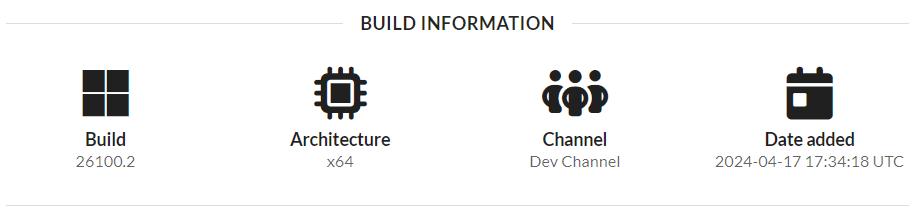
The 26100.2 build that popped up on uupdump today - is that part of the Canary/Dev channel or something else?
 

My Computer My Computer

At a glance

Windows 11
OS
Windows 11
Computer type
PC/Desktop
Manufacturer/Model
VM VirtualBox
The 26100.2 build that popped up on uupdump today - is that part of the Canary/Dev channel or something else?
Interesting, it doesn't appear in Windows Update if you check for updates. According to UUPdump it's a Dev build.

1713392368885.png

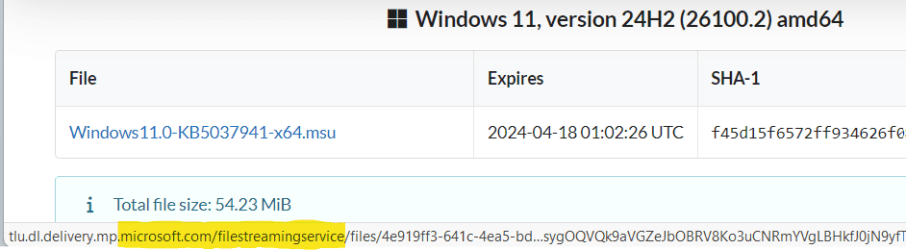
if you search for updates from that UUPdump page there's a standalone CU installer Windows11.0-KB5037941-x64.msu....


...and it does indeed update 26100.1 to 26100.2.


1713392555671.png 1713392576155.png

So maybe we'll see it tomorrow in Windows Update?
 

My Computers My Computers

  • At a glance

    Windows 11 HomeAMD Athlon Silver 3050U8GBRadeon Graphics
    OS
    Windows 11 Home
    Computer type
    Laptop
    Manufacturer/Model
    Acer Aspire 3 A315-23-R9VY
    CPU
    AMD Athlon Silver 3050U
    Memory
    8GB
    Graphics Card(s)
    Radeon Graphics
    Monitor(s) Displays
    laptop screen
    Screen Resolution
    1366x768 native resolution, up to 2560x1440 with Radeon Virtual Super Resolution
    Hard Drives
    1TB Samsung EVO 870 SSD (from April 2026: 250GB EVO 850)
    Internet Speed
    150 Mbps
    Browser
    Edge, Firefox
    Antivirus
    Defender
    Other Info
    UPDATE - 11 April 2026: due to lid hinges starting to break up this laptop has been retired from active duty. The OS with all software and files has been migrated to my System Seven in 'Other systems' to carry on as my general purpose 'main machine'.

    I've now clean installed 25H2 and used Garlin's scripts to update Secure Boot to CA 2023 and revoke the PCA 2011 certificates. It's new role is to test secure boot issues.

    Info for 2021-2026:
    fully 'Windows 11 ready' laptop. Windows 10 C: partition migrated from my old unsupported 'main machine' then upgraded to 11. A test migration ran Insider builds for 2 months. When 11 was released on 5th October 2021 it was re-imaged back to 10 and was offered the upgrade in Windows Update on 20th October. Windows Update offered the 22H2 Feature Update on 20th September 2022. It got the 23H2 Feature Update on 4th November 2023 through Windows Update, 24H2 on 3rd October 2024 through Windows Update by setting the Target Release Version for 24H2, and 25H2 on 30th September 2025 through Windows Update by setting the Target Release Version for 25H2.
  • At a glance

    Windows 11 ProIntel® Core™ i5-520M8GB(integrated graphics) Intel HD Graphics
    Operating System
    Windows 11 Pro
    Computer type
    Laptop
    Manufacturer/Model
    Dell Latitude E4310
    CPU
    Intel® Core™ i5-520M
    Motherboard
    0T6M8G
    Memory
    8GB
    Graphics card(s)
    (integrated graphics) Intel HD Graphics
    Screen Resolution
    1366x768
    Hard Drives
    500GB Crucial MX500 SSD
    Browser
    Firefox, Edge
    Antivirus
    Defender
    Other Info
    unsupported machine: Legacy bios, MBR, TPM 1.2, upgraded from W10 to W11 using W10/W11 hybrid install media workaround.

    In-place upgrade to 22H2 using ISO and a workaround.
    Feature Update to 23H2 by manually installing the Enablement Package.
    In-place upgrade to 24H2 using hybrid 23H2/24H2 install media.
    Upgraded to 25H2 by Enablement Package.

    Also running Insider Dev, and Canary builds and Windows 10 as native boot .vhdx.
  • My SYSTEM THREE is a Dell Latitude 5410, i7-10610U, 32GB RAM, 512GB NVMe ssd, supported device running Windows 11 Pro.

    My SYSTEM FOUR was a 2-in-1 convertible Lenovo Yoga 11e (1st gen) type 20DA, Celeron N2930, 8GB RAM, 256GB ssd. Unsupported device. This has now been sold. It has been replaced by my System Eight.

    My SYSTEM FIVE is a Dell Latitude 3190 2-in-1, Pentium Silver N5030, 8GB RAM, 1TB NVMe ssd, supported device running Windows 11 Pro, plus Insider Beta, Dev, and Canary builds (and a few others) as a native boot .vhdx.

    My SYSTEM SIX is a Dell Latitude 5550, Core Ultra 7 165H, 64GB RAM, 1TB NVMe SSD, supported device, Windows 11 Pro, Hyper-V host machine. Updated to 25H2 on 30th September 2025.

    My SYSTEM SEVEN is a Lenovo Thinkpad T580, 1920x1080 touchscreen, Intel Core i7-8650U, 16GB RAM, 512GB NVMe SSD + 2nd 512GB NVMe SSD, a supported device for Windows 11. This is my current general purpose 'main machine'. The installed Windows 11 Home from my System One has been migrated to this machine. As its new home has an existing digital licence for Pro I've been able to upgrade the migrated OS from Home to Pro.

    My SYSTEM EIGHT is a 2-in-1 convertible Lenovo Yoga 11e (5th gen) type 20LN, Celeron N4120, 8GB RAM, 512GB NVMe ssd, a supported device for Windows 11. Currently running Windows 11 Pro, plus Insider Dev, Beta, and Canary builds as native boot vhdx.
So maybe we'll see it tomorrow in Windows Update?

Yeah we'll see.

I did a test where I did an in-place upgrade from a fresh install of Windows 10 22H2, and it didn't complain that flighting was not enabled like most Canary/Dev insider builds usually do.

I know that there has been a lot of talk about an early 24H2 build being released to OEMs to start putting on computers. I'm just wondering if this is it. I guess I'll keep it going in it's own VM, and see if it gets normal updates going forward, etc.
 

My Computer My Computer

At a glance

Windows 11
OS
Windows 11
Computer type
PC/Desktop
Manufacturer/Model
VM VirtualBox
Interesting, it doesn't appear in Windows Update if you check for updates. According to UUPdump it's a Dev build.


So maybe we'll see it tomorrow in Windows Update?
UUPDUMP shows 26100.2 for both Dev and Canary.

1713394091461.png
 
Last edited:

My Computer My Computer

At a glance

Windows 11 Pro 25H2Intel I9-9900K64GBNVIDIA RTX 2060
OS
Windows 11 Pro 25H2
Computer type
PC/Desktop
Manufacturer/Model
Dell XPS 8930
CPU
Intel I9-9900K
Memory
64GB
Graphics Card(s)
NVIDIA RTX 2060
Sound Card
NVIDIA High Definition Audio
Monitor(s) Displays
4k Samsung
Screen Resolution
3840 x 2160
Hard Drives
512GB NVMe, ADATA SU 800, 2TB HDD
The update has broken 64-bit .NET support in some ways, as app debugging when done via Visual Studio, is not working as intended. The Windows Event Viewer shows an Event 1000 Application Error message.

26100.2 fixed this issue?
 

My Computer My Computer

At a glance

Windows 11, version 25H2 (26200)AMD Ryzen 9 9950X 16-Core ProcessorDDR5-6000 (CL36) 64.0 GBNVIDIA GeForce RTX 4090
OS
Windows 11, version 25H2 (26200)
Computer type
PC/Desktop
CPU
AMD Ryzen 9 9950X 16-Core Processor
Motherboard
ASRock B650M PG Riptide
Memory
DDR5-6000 (CL36) 64.0 GB
Graphics Card(s)
NVIDIA GeForce RTX 4090
PSU
1200W
Case
Phanteks Enthoo Pro 2
Cooling
Noctua NH-D12L
I just installed the update manually using the kb5037941 .msu downloaded from deskmodder.

1713397615111.png

1713398220209.png

Edition Windows 11 Pro
Version 24H2
Installed on ‎4/‎3/‎2024
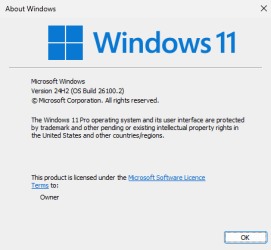
OS build 26100.2
Experience Windows Feature Experience Pack 1000.26100.1.0

I will try the uupdump ISO, but recently updates with ISO created problems on MS Store updates. See post #84 for a sample of the problems.

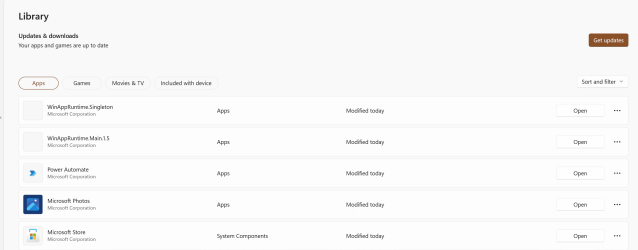
No problems with the Store after applying the KB5037941. 🤷‍♂️
1713397911470.png
 

My Computer My Computer

At a glance

Windows 11 Pro 25H2Intel I9-9900K64GBNVIDIA RTX 2060
OS
Windows 11 Pro 25H2
Computer type
PC/Desktop
Manufacturer/Model
Dell XPS 8930
CPU
Intel I9-9900K
Memory
64GB
Graphics Card(s)
NVIDIA RTX 2060
Sound Card
NVIDIA High Definition Audio
Monitor(s) Displays
4k Samsung
Screen Resolution
3840 x 2160
Hard Drives
512GB NVMe, ADATA SU 800, 2TB HDD
I just installed the update manually using the kb5037941 .msu downloaded from deskmodder......
.....I will try the uupdump ISO, but recently updates with ISO created problems on MS Store updates.
The KB5037941 .msu I used for my test was the one from the UUPdump link at the end of my post #163, so that was a direct download from MS. No obvious problems with that one either.

1713400829211.png
 
Last edited:

My Computers My Computers

  • At a glance

    Windows 11 HomeAMD Athlon Silver 3050U8GBRadeon Graphics
    OS
    Windows 11 Home
    Computer type
    Laptop
    Manufacturer/Model
    Acer Aspire 3 A315-23-R9VY
    CPU
    AMD Athlon Silver 3050U
    Memory
    8GB
    Graphics Card(s)
    Radeon Graphics
    Monitor(s) Displays
    laptop screen
    Screen Resolution
    1366x768 native resolution, up to 2560x1440 with Radeon Virtual Super Resolution
    Hard Drives
    1TB Samsung EVO 870 SSD (from April 2026: 250GB EVO 850)
    Internet Speed
    150 Mbps
    Browser
    Edge, Firefox
    Antivirus
    Defender
    Other Info
    UPDATE - 11 April 2026: due to lid hinges starting to break up this laptop has been retired from active duty. The OS with all software and files has been migrated to my System Seven in 'Other systems' to carry on as my general purpose 'main machine'.

    I've now clean installed 25H2 and used Garlin's scripts to update Secure Boot to CA 2023 and revoke the PCA 2011 certificates. It's new role is to test secure boot issues.

    Info for 2021-2026:
    fully 'Windows 11 ready' laptop. Windows 10 C: partition migrated from my old unsupported 'main machine' then upgraded to 11. A test migration ran Insider builds for 2 months. When 11 was released on 5th October 2021 it was re-imaged back to 10 and was offered the upgrade in Windows Update on 20th October. Windows Update offered the 22H2 Feature Update on 20th September 2022. It got the 23H2 Feature Update on 4th November 2023 through Windows Update, 24H2 on 3rd October 2024 through Windows Update by setting the Target Release Version for 24H2, and 25H2 on 30th September 2025 through Windows Update by setting the Target Release Version for 25H2.
  • At a glance

    Windows 11 ProIntel® Core™ i5-520M8GB(integrated graphics) Intel HD Graphics
    Operating System
    Windows 11 Pro
    Computer type
    Laptop
    Manufacturer/Model
    Dell Latitude E4310
    CPU
    Intel® Core™ i5-520M
    Motherboard
    0T6M8G
    Memory
    8GB
    Graphics card(s)
    (integrated graphics) Intel HD Graphics
    Screen Resolution
    1366x768
    Hard Drives
    500GB Crucial MX500 SSD
    Browser
    Firefox, Edge
    Antivirus
    Defender
    Other Info
    unsupported machine: Legacy bios, MBR, TPM 1.2, upgraded from W10 to W11 using W10/W11 hybrid install media workaround.

    In-place upgrade to 22H2 using ISO and a workaround.
    Feature Update to 23H2 by manually installing the Enablement Package.
    In-place upgrade to 24H2 using hybrid 23H2/24H2 install media.
    Upgraded to 25H2 by Enablement Package.

    Also running Insider Dev, and Canary builds and Windows 10 as native boot .vhdx.
  • My SYSTEM THREE is a Dell Latitude 5410, i7-10610U, 32GB RAM, 512GB NVMe ssd, supported device running Windows 11 Pro.

    My SYSTEM FOUR was a 2-in-1 convertible Lenovo Yoga 11e (1st gen) type 20DA, Celeron N2930, 8GB RAM, 256GB ssd. Unsupported device. This has now been sold. It has been replaced by my System Eight.

    My SYSTEM FIVE is a Dell Latitude 3190 2-in-1, Pentium Silver N5030, 8GB RAM, 1TB NVMe ssd, supported device running Windows 11 Pro, plus Insider Beta, Dev, and Canary builds (and a few others) as a native boot .vhdx.

    My SYSTEM SIX is a Dell Latitude 5550, Core Ultra 7 165H, 64GB RAM, 1TB NVMe SSD, supported device, Windows 11 Pro, Hyper-V host machine. Updated to 25H2 on 30th September 2025.

    My SYSTEM SEVEN is a Lenovo Thinkpad T580, 1920x1080 touchscreen, Intel Core i7-8650U, 16GB RAM, 512GB NVMe SSD + 2nd 512GB NVMe SSD, a supported device for Windows 11. This is my current general purpose 'main machine'. The installed Windows 11 Home from my System One has been migrated to this machine. As its new home has an existing digital licence for Pro I've been able to upgrade the migrated OS from Home to Pro.

    My SYSTEM EIGHT is a 2-in-1 convertible Lenovo Yoga 11e (5th gen) type 20LN, Celeron N4120, 8GB RAM, 512GB NVMe ssd, a supported device for Windows 11. Currently running Windows 11 Pro, plus Insider Dev, Beta, and Canary builds as native boot vhdx.
The KB5037941 .msu I used for my test was the one from the UUPdump link at the end of my post #163, so that was a direct download from MS. No obvious problems with that one either.
The problem with the MS Store updates only happens after doing the update with an ISO.


Last edited:

My Computer My Computer

At a glance

Windows 11 Pro 25H2Intel I9-9900K64GBNVIDIA RTX 2060
OS
Windows 11 Pro 25H2
Computer type
PC/Desktop
Manufacturer/Model
Dell XPS 8930
CPU
Intel I9-9900K
Memory
64GB
Graphics Card(s)
NVIDIA RTX 2060
Sound Card
NVIDIA High Definition Audio
Monitor(s) Displays
4k Samsung
Screen Resolution
3840 x 2160
Hard Drives
512GB NVMe, ADATA SU 800, 2TB HDD
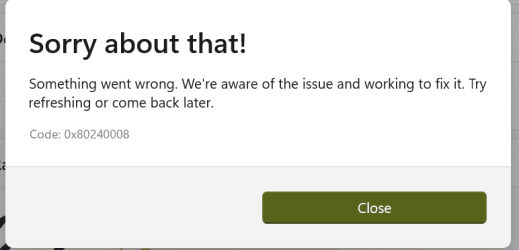
I tried an update with ISO 26100.2 from 26100.1 in Dev channel. After the update I got this error on MS Store update.
Retry did not help. 🤷‍♂️

1713403502751.png
1713403567830.png

Fixed the problem by reinstalling an older version and then let the store update again to the latest level.

1713403976956.png

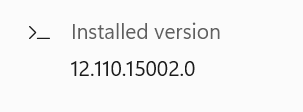
MS Store then updated to this version.
1713404038577.png
 
Last edited:

My Computer My Computer

At a glance

Windows 11 Pro 25H2Intel I9-9900K64GBNVIDIA RTX 2060
OS
Windows 11 Pro 25H2
Computer type
PC/Desktop
Manufacturer/Model
Dell XPS 8930
CPU
Intel I9-9900K
Memory
64GB
Graphics Card(s)
NVIDIA RTX 2060
Sound Card
NVIDIA High Definition Audio
Monitor(s) Displays
4k Samsung
Screen Resolution
3840 x 2160
Hard Drives
512GB NVMe, ADATA SU 800, 2TB HDD
I didn't get the update 26100.2 from WU when changing channel to Dev.
 

My Computer My Computer

At a glance

26200.8037i5-11400F32GBGeforce GT-1030
OS
26200.8037
Computer type
PC/Desktop
CPU
i5-11400F
Motherboard
Gigabyte
Memory
32GB
Graphics Card(s)
Geforce GT-1030
Keyboard
Logitech K400
Mouse
Logitech M720
Internet Speed
600 Mb
Browser
Edge

My Computers My Computers

  • At a glance

    Win 11 Pro (25H2 RP)Intel(R) Core(TM) i5-9300H CPU @ 2.40GHz 2.40...32GBNvidia GeForce GTX 1650, Intel UHD 630
    OS
    Win 11 Pro (25H2 RP)
    Computer type
    Laptop
    Manufacturer/Model
    Acer AN515-54
    CPU
    Intel(R) Core(TM) i5-9300H CPU @ 2.40GHz 2.40 GHz
    Memory
    32GB
    Graphics Card(s)
    Nvidia GeForce GTX 1650, Intel UHD 630
    Monitor(s) Displays
    Acer CB272D
    Screen Resolution
    1920x1080
    Hard Drives
    256GB and 1T SSD
    Internet Speed
    500MB
    Browser
    Edge (Stable)
    Antivirus
    Microsoft Defender
  • At a glance

    Win 11 Pro (RP)Intel(R) Core(TM) Ultra 9 275HX (2.70 GHz)32GB DDR5-5600NVIDIA® GeForce RTX™ 5060 8GB
    Operating System
    Win 11 Pro (RP)
    Computer type
    Laptop
    Manufacturer/Model
    Lenovo Legion 5 16IAX10 - Type 83NX
    CPU
    Intel(R) Core(TM) Ultra 9 275HX (2.70 GHz)
    Memory
    32GB DDR5-5600
    Graphics card(s)
    NVIDIA® GeForce RTX™ 5060 8GB
    Monitor(s) Displays
    Acer CB272D
    Screen Resolution
    1920x1080 75Hz
    Hard Drives
    WD Green SN3000 (2TB)
    Samsung Portable T5 (2TB)
    Keyboard
    Logi MX Keys
    Mouse
    Logi MX Anywhere 3
    Internet Speed
    500MB
    Browser
    Edge
    Antivirus
    MS Defender
Last edited:

My Computer My Computer

At a glance

26200.8037i5-11400F32GBGeforce GT-1030
OS
26200.8037
Computer type
PC/Desktop
CPU
i5-11400F
Motherboard
Gigabyte
Memory
32GB
Graphics Card(s)
Geforce GT-1030
Keyboard
Logitech K400
Mouse
Logitech M720
Internet Speed
600 Mb
Browser
Edge
New build. It best be exciting, or I will free up my hard disk and install Ubuntu - assuming they figure out their new install program because they unwisely gave up Calamares, which Lubutn and Kubuntu did not.
 

My Computer My Computer

At a glance

Fedora Silverblue Rawhide Debian 13 Ubuntu 25...AMD Ryzen 7 7800X3D 8-Core64GBNvidia
OS
Fedora Silverblue Rawhide Debian 13 Ubuntu 25.10,
Computer type
PC/Desktop
Manufacturer/Model
HomeBrew
CPU
AMD Ryzen 7 7800X3D 8-Core
Motherboard
Gigabyte
Memory
64GB
Graphics Card(s)
Nvidia
Monitor(s) Displays
Dell
Hard Drives
3 ssd 2 spinners configured as raid 0
Keyboard
Eluktronics
Mouse
Eluktronics
Browser
Firefox and Chromium
Other Info
Gnome 46
If you try uninstall it, the Microsoft Compatibility Assistant will let you know it doesn't work with 24H2 and directs you to get updated software from the third party developer. The dishonesty is compounded by the fact the issue is really Microsoft's fault!

There is nothing wrong with microsoft blocking a specific version of a software that has no guaranteed compatibiilty (and some confirmed issues) with the OS and nobody is at fault on either end of the situation, regardless of your experience there are issues present with the current releases of explorer patcher and startallback that requires updates from those softwares vendor which has been handled with a pre-emptive block. Once these issues are resolved and an updated version is available the OS will successfully upgrade without problem.

The blocklist is not there to prevent you using your desired applications, its there to prevent you getting into the state where you can't correctly interact with the system to remove or upgrade out of the problem,

StartAllBack uses undocumented or deprecated interfaces that routinely can, do and expectedly break, Same as ExplorerPatcher.

Notice the lack of Start11 on the blocklist
Lots more bug fixes. The RTM build won't appear until September or October.

This is the RTM build, release to manufacturer does not suggest Release to populace ready, it is a basis for OEM's to begin readying devices,

Things are not as they were 20 years ago where the minor build number was retained across the service life of the OS, to be bumped by Service Pack only. Under the current versioning scheme, Windows 7 would have gone RTM with 7600.1 and started servicing period at 16385, rather than launching to RTM and maintaining 7600.16385 up till SP1's release.
 

My Computer My Computer

At a glance

Windows
OS
Windows
Today new canary build ?
 

My Computer My Computer

At a glance

Win11Pro Dev 25H2 26220.6972
OS
Win11Pro Dev 25H2 26220.6972
Computer type
PC/Desktop
Screen Resolution
4k
Browser
Microsoft Edge Beta
Antivirus
Eset Smart Security Premium

My Computers My Computers

  • At a glance

    Windows 11 Pro 25H2Intel Core i7-10700K16GB (8GB PC4-19200 DDR4 SDRAM x2)NVIDIA GeForce GTX 1050 TI
    OS
    Windows 11 Pro 25H2
    Computer type
    PC/Desktop
    Manufacturer/Model
    PowerSpec B746
    CPU
    Intel Core i7-10700K
    Motherboard
    ASRock Z490 Phantom Gaming 4/ax
    Memory
    16GB (8GB PC4-19200 DDR4 SDRAM x2)
    Graphics Card(s)
    NVIDIA GeForce GTX 1050 TI
    Sound Card
    Realtek Audio
    Monitor(s) Displays
    #1. LG ULTRAWIDE 34" #2. AOC Q32G2WG3 32"
    Screen Resolution
    #1. 3440 X 1440 #2. 1920 x 1080
    Hard Drives
    NVMe WDC WDS100T2B0C-00PXH0 1TB
    Samsung SSD 860 EVO 1TB
    PSU
    750 Watts (62.5A)
    Case
    PowerSpec/Lian Li ATX 205
    Keyboard
    Logitech K270
    Mouse
    Logitech M185
    Browser
    Microsoft Edge and Firefox
    Antivirus
    Webroot SecureAnywhere CE 26.1
  • At a glance

    Windows 11 Canary ChannelIntel Core i5-8400 CPU @ 2.80GHz16 MB DDR 4-2666
    Operating System
    Windows 11 Canary Channel
    Computer type
    PC/Desktop
    Manufacturer/Model
    PowerSpec G156
    CPU
    Intel Core i5-8400 CPU @ 2.80GHz
    Motherboard
    AsusTeK Prime B360M-A
    Memory
    16 MB DDR 4-2666
    Monitor(s) Displays
    23" Speptre HDMI 75Hz
    Screen Resolution
    1920x1080
    Hard Drives
    Samsung 970 EVO 500GB NVMe
    Keyboard
    Logitek K270
    Mouse
    Logitek M185
    Browser
    Firefox, Edge and Edge Canary
    Antivirus
    Windows Defender
I updated to 24H2 26100.2 through the deskmodder.de KB5037941 Windows Update msu.

Rebooted and no feature changes for this build.
 

My Computers My Computers

  • At a glance

    Windows 11 Education For 25H2Intel® Core i7 5500u8 GBIntel HD Family Graphics 5500 AMD Firepro 4150M
    OS
    Windows 11 Education For 25H2
    Computer type
    Laptop
    Manufacturer/Model
    HP ZBook G2
    CPU
    Intel® Core i7 5500u
    Motherboard
    HP
    Memory
    8 GB
    Graphics Card(s)
    Intel HD Family Graphics 5500 AMD Firepro 4150M
    Sound Card
    Realtek High Audio
    Hard Drives
    1 TB SSD
    Mouse
    HP USB Mouse
    Antivirus
    Windows Defender
  • At a glance

    Windows 11 Pro For Workstations 25H2Xeon 1535m v632 GBAMD Quadro Pro 4100
    Operating System
    Windows 11 Pro For Workstations 25H2
    Computer type
    Laptop
    Manufacturer/Model
    HP Zbook G4
    CPU
    Xeon 1535m v6
    Motherboard
    HP
    Memory
    32 GB
    Graphics card(s)
    AMD Quadro Pro 4100
    Sound Card
    Bang and Olufson Audio
    Hard Drives
    1TB SSD
    Mouse
    HP USB Mouse
    Antivirus
    Windows Defender
If Insiders want evaluation builds to return, being a guinea testing pig for Microsoft is worth it.

I'm happy to remain on my current build and will wait to see what the fall brings in store.
 

My Computers My Computers

  • At a glance

    Windows 11 Education For 25H2Intel® Core i7 5500u8 GBIntel HD Family Graphics 5500 AMD Firepro 4150M
    OS
    Windows 11 Education For 25H2
    Computer type
    Laptop
    Manufacturer/Model
    HP ZBook G2
    CPU
    Intel® Core i7 5500u
    Motherboard
    HP
    Memory
    8 GB
    Graphics Card(s)
    Intel HD Family Graphics 5500 AMD Firepro 4150M
    Sound Card
    Realtek High Audio
    Hard Drives
    1 TB SSD
    Mouse
    HP USB Mouse
    Antivirus
    Windows Defender
  • At a glance

    Windows 11 Pro For Workstations 25H2Xeon 1535m v632 GBAMD Quadro Pro 4100
    Operating System
    Windows 11 Pro For Workstations 25H2
    Computer type
    Laptop
    Manufacturer/Model
    HP Zbook G4
    CPU
    Xeon 1535m v6
    Motherboard
    HP
    Memory
    32 GB
    Graphics card(s)
    AMD Quadro Pro 4100
    Sound Card
    Bang and Olufson Audio
    Hard Drives
    1TB SSD
    Mouse
    HP USB Mouse
    Antivirus
    Windows Defender
I don't feel like being a guinea testing pig for Microsoft, more like using MS to satisfy my curiosity and see what's coming up. Instead of RTM or Beta for instance I always go to most advanced insider. It's my secondary OS in dual boot with actual public version as default. No problem even if there's a problem with those builds. So as much as they are using me, I use them as well.
 

My Computer My Computer

At a glance

W11 Pro and Insider DevAMD Ryzen 9 7900x2x16GB Kingston 6000MHz, Cl 32 @ 6200MHz Cl30Gigabyte Rx 6600XT Gaming OC 8G Pro
OS
W11 Pro and Insider Dev
Computer type
PC/Desktop
Manufacturer/Model
Home brewed
CPU
AMD Ryzen 9 7900x
Motherboard
ASROCK b650 PRO RS
Memory
2x16GB Kingston 6000MHz, Cl 32 @ 6200MHz Cl30
Graphics Card(s)
Gigabyte Rx 6600XT Gaming OC 8G Pro
Sound Card
MB, Realtek Ac1220p
Monitor(s) Displays
3 x 27"
Screen Resolution
1080p
Hard Drives
Kingston KC3000. 1TBSamsung 970 evo Plus 500GB, Crucial P1 NVMe 1TB, Lexar NVMe 2 TB, Silicon Power M.2 SATA 500GB
PSU
Seasonic 750W
Case
Custom Raidmax
Cooling
Arctic Liquid Freezer III 360mm
Internet Speed
20/19 mbps

Latest Support Threads

Back
Top Bottom