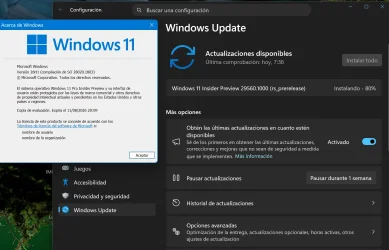
UPDATE 4/10:
 www.elevenforum.com
Hello Windows Insiders, today we are releasing Windows 11 Insider Preview Build 28020.1803 to the Canary Channel. (KB 5083824)
 www.elevenforum.com
Windows Insider Program Team

 blogs.windows.com
Check Windows Updates
UUP Dump:
64-bit ISO download:

ARM64 ISO download:
 www.elevenforum.com
KB5083633 Windows 11 Insider Canary build 28020.1812 (26H1) - April 10
Windows Insider Blog: Hello Windows Insiders, today we are releasing Windows 11 Insider Preview Build 28020.1812 to the Canary Channel. (KB 5083633) https://www.elevenforum.com/t/enable-or-disable-get-latest-updates-as-soon-as-available-in-windows-11.13821/ What’s new in Canary Build...
www.elevenforum.com
Windows Insider Blog:
Hello Windows Insiders, today we are releasing Windows 11 Insider Preview Build 28020.1803 to the Canary Channel. (KB 5083824)
Enable or Disable Get Latest Updates as soon as available in Windows 11
This tutorial will show you how to turn on or off "Get the latest updates as soon as they are available" in Windows 11. Starting with Windows 11 build 22621.1635, Microsoft added a new "Get the latest updates as soon as they are available" toggle under Settings > Windows Update. When you turn...
www.elevenforum.com
What’s new in Canary Build 28020.1803
Changes and Improvements gradually being rolled out with toggle on*
- This update includes a small set of general improvements and fixes that improve the overall experience for Insiders running this build on their PCs.
[Input]
- Pen settings: we have made refinements to the Pen settings page including small changes to the options for the pen tail button. A new option, “Same as Copilot key”, enables the pen tail button to launch the same app as the Copilot key. Feedback: Share your thoughts in Feedback Hub (WIN + F) under Devices and Drivers > Bluetooth – Keyboards, Mice, and Pens.

Change what Pen Shortcut Button Does in Windows 11
This tutorial will show you how to change what your pen shortcut button does when you single-click, double-click, or press and hold the shortcut button for your account in Windows 11. You can pair a pen via Bluetooth to connect the pen with your Windows 11 PC and use with the pen menu. You can...
www.elevenforum.com
- Improved reliability of configuring fluid dictation option in voice typing (Windows key plus H) settings.

Enable or Disable Fluid Dictation in Voice Typing on Windows 11
This tutorial will show you how to turn on or off the fluid dictation feature in voice typing for your account on Windows 11 Copilot+ PCs. Voice typing allows you to enter text on your PC by speaking. You can use voice typing commands to manually insert punctuation marks. Starting with...
www.elevenforum.com
[Settings]
- The Settings Developer Mode dialog is updating to be visually consistent with the rest of Windows 11 dialogs.

Enable or Disable Developer Mode in Windows 11
This tutorial will show you how to enable or disable Developer Mode in Windows 11. If you are using your computer for ordinary day-to-day activities such as games, web browsing, email or Office apps, you do not need to activate Developer Mode and in fact, you shouldn't activate it. However, if...
www.elevenforum.com
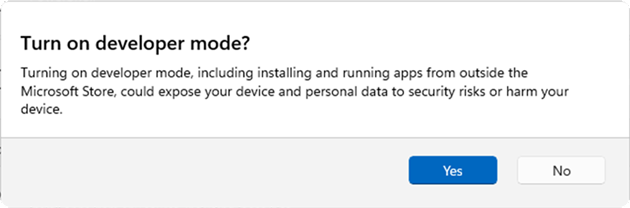
Updated Settings Developer Mode dialog.
[Other]
- Removed extraneous unexpected error from sfc /scannow.
Reminders for Windows Insiders in the Canary Channel
- These builds can be unstable and may be released with limited documentation. Join Windows Insider – Get early access to Windows 11 features & updates
- Many features in the Canary Channel are rolled out using Control Feature Rollout technology, starting with a subset of Insiders and ramping up over time as we monitor feedback to see how they land before pushing them out to everyone in this channel.
- The desktop watermark shown at the lower right corner of the desktop is normal for Windows Insider pre-release builds.
- Some features may show up in the Dev and Beta Channels first before showing up in the Canary Channel.
- For Windows Insiders who want to be the first to get features gradually rolled out to you, you can turn ON the toggle to get the latest updates as they are available via Settings > Windows Update*. Over time, we will increase the rollouts of features to everyone with the toggle turned on. Should you keep this toggle off, new features will gradually be rolled out to your PC over time once they are ready.
- Some features in active development we preview with Windows Insiders may not be fully localized and localization will happen over time as features are finalized. As you see issues with localization in your language, please report those issues to us via Feedback Hub.
- To get off the Canary Channel, a clean install of Windows 11 will be required. As a reminder – Insiders can’t switch to a channel that is receiving builds with lower build numbers without doing a clean installation of Windows 11 due to technical setup requirements.
- Check out Flight Hub for a complete look at what build is in which Insider channel.
Windows Insider Program Team
Source:
Announcing Windows 11 Insider Preview Build 28020.1803 (Canary Channel)
Hello Windows Insiders, today we are releasing Windows 11 Insider Preview Build 28020.1803 to the Canary Channel. (KB 5083824) What’s new in Canary Build 28020.1803 Changes and Improvements g
blogs.windows.com
Check Windows Updates
UUP Dump:
64-bit ISO download:
Select language for Windows 11 Insider Preview Feature Update (28020.1803) amd64
Select language for Windows 11 Insider Preview Feature Update (28020.1803) amd64 on UUP dump. UUP dump lets you download Unified Update Platform files, like Windows Insider updates, directly from Windows Update.
uupdump.net
ARM64 ISO download:
Select language for Windows 11 Insider Preview Feature Update (28020.1803) arm64
Select language for Windows 11 Insider Preview Feature Update (28020.1803) arm64 on UUP dump. UUP dump lets you download Unified Update Platform files, like Windows Insider updates, directly from Windows Update.
uupdump.net
UUP Dump - Download Windows Insider ISO
UUP Dump is the most practical and easy way to get ISO images of any Insider Windows 10 or Windows 11 version, as soon as Microsoft has released a new build. UUP Dump creates a download configuration file according to your choices, downloads necessary files directly from Microsoft servers, and...
www.elevenforum.com
Last edited: