Insider Windows 11 Insider Canary build 27764.1000 - Dec. 11


UPDATE 1/03:


 Windows Blogs:

Hello Windows Insiders, today we are releasing Windows 11 Insider Preview Build 27764 to the Canary Channel.

We are also not planning to release SDKs for 27xxx series builds for the time being.

Changes and Improvements

[Start menu]

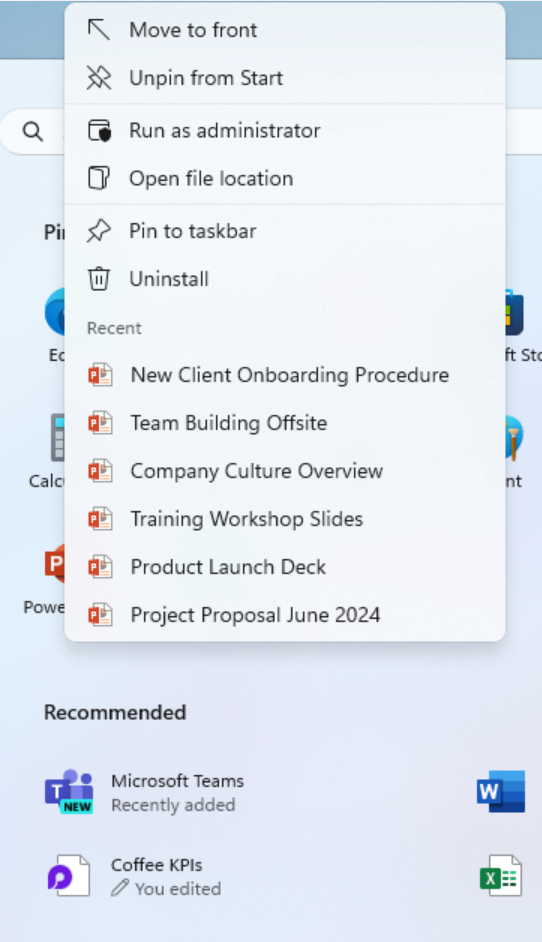
  • When right-clicking on apps pinned to the Start menu, jump lists will be shown for apps that have them such as PowerPoint.


    Jump lists will now be shown when right-clicking on apps pinned to the Start menu such as PowerPoint that have jump lists.
    Jump lists will now be shown when right-clicking on apps pinned to the Start menu such as PowerPoint that have jump lists.

[Dynamic Lighting]

  • When no compatible devices are attached, the Dynamic Lighting settings page will now show a placeholder message and Brightness and Effects controls are disabled.
  • On the Dynamic Lighting settings page, we have added Forward, Backward, Outward and Inward direction options to the Wave effect, and added the Forward direction option to the Gradient effect.

[Input]

  • We are beginning to roll out a change where we now hide the IME toolbar when apps are in full screen mode for those who have the IME toolbar enabled and type in Chinese or Japanese.

[Narrator]

  • We have added new functionalities to Narrator scan mode. Skip past links (N’) allows you to navigate to the text after a link. This is most helpful when navigating through long emails, news articles, and wiki pages. Jump to lists (L’) allows you to quickly access a list on a web page or a document. To try these new features, you need to turn on Narrator first (Win key + Ctrl + Enter), then turn scan mode ON by pressing Caps Lock + Spacebar and finally use the new shortcuts – ‘N’ and ‘L’. Please note that scan mode is ‘ON’ by default on most web pages (like news articles, wiki page, etc.).

[Speech in Windows]

  • We have improved our speech-to-text and text-to-speech experience on Windows. Users of Narrator, voice access, live captions, live translations, and voice typing might see a message asking them to update their language files manually. The language files will be released separately through Microsoft Store.

Fixes

[General]

  • Fixed an issue causing some Insiders to see a bugcheck with error PAGE_FAULT_IN_NONPAGED_AREA while using their PC starting with Build 27754.

[File Explorer]

  • We did some work to help address an issue where File Explorer might hang when browsing a folder with lots of media in it.

[Taskbar & System Tray]

  • Fixed an issue on secondary monitors for left aligned taskbar users, where the widgets text in the taskbar might overlap the date and time.

[Input]

  • Fixed an issue where if pointer trails were enabled, the mouse cursor may become invisible with a black box behind it.

[Task Manager]

  • Fixed an issue where some HDDs were being incorrectly listed as SSD on the Performance page.

[Display]

  • Fixed an issue which could result in lag and screen tearing on secondary monitors with full screen windows.

[Other]

  • Fixed an underlying issue which could lead to Excel sometimes hanging on launch when opening certain files.

Known issues

[General]

  • [IMPORTANT NOTE FOR COPILOT+ PCs] If you are joining the Canary Channel on a new Copilot+ PC from the Dev Channel, Release Preview Channel or retail, you will lose Windows Hello pin and biometrics to sign into your PC with error 0xd0000225 and error message “Something went wrong, and your PIN isn’t available”. You should be able to re-create your PIN by clicking “Set up my PIN”.
  • We’re investigating reports that some Insiders are still experiencing rollbacks (with error code 0xc190010) when attempting to install the latest Canary builds.
  • We’re working on the fix for an underlying issue causing accent colored window borders to not be not displayed when enabled, shadows around windows not displaying when enabled, and window launching (and other) animations to show even though the setting to show animations is turned off.

Reminders for Windows Insiders in the Canary Channel

  • The builds we release to the Canary Channel represent the latest platform changes early in the development cycle and should not be seen as matched to any specific release of Windows and features and experiences included in these builds may never get released as we try out different concepts and get feedback. Features may change over time, be removed, or replaced and never get released beyond Windows Insiders. Some of these features and experiences could show up in future Windows releases when they’re ready.
  • Many features in the Canary Channel are rolled out using Control Feature Rollout technology, starting with a subset of Insiders and ramping up over time as we monitor feedback to see how they land before pushing them out to everyone in this channel.
  • Some features may show up in the Dev and Beta Channels first before showing up in the Canary Channel.
  • Some features in active development we preview with Windows Insiders may not be fully localized and localization will happen over time as features are finalized. As you see issues with localization in your language, please report those issues to us via Feedback Hub.
  • To get off the Canary Channel, a clean install of Windows 11 will be required. As a reminder – Insiders can’t switch to a channel that is receiving builds with lower build numbers without doing a clean installation of Windows 11 due to technical setup requirements.
  • The desktop watermark shown at the lower right corner of the desktop is normal for these pre-release builds.
  • Check out Flight Hub for a complete look at what build is in which Insider channel.
Thanks,
Amanda & Brandon


 Source:


Check Windows Updates


UUP Dump:

64-bit ISO download:

ARM64 ISO download:

 
Last edited:

This looks pretty nasty.

Too bad this workaround showed up a little late for me.

Time to get out of insiders for me.
 

My Computers My Computers

  • At a glance

    Win 11 ProAMD Ryzen™ 7 7730U24GB Dual-Channel DDR4 @ 1596MHz (22-22-22-52)512MB ATI AMD Radeon Graphics (ASUStek Comput...
    OS
    Win 11 Pro
    Computer type
    Laptop
    Manufacturer/Model
    ASUS Vivobook
    CPU
    AMD Ryzen™ 7 7730U
    Motherboard
    M1605YA
    Memory
    24GB Dual-Channel DDR4 @ 1596MHz (22-22-22-52)
    Graphics Card(s)
    512MB ATI AMD Radeon Graphics (ASUStek Computer Inc)
    Monitor(s) Displays
    Generic PnP Monitor (1920x1200@60Hz) - P1 PLUS (1920x1080@59Hz)
    Screen Resolution
    1920 X 1200
    Hard Drives
    953GB Western Digital WD
    PSU
    45 Watts
    Mouse
    Lenovo Bluetooth.
    Internet Speed
    500 Mbps
    Browser
    Edge
    Antivirus
    Defender
  • At a glance

    Windows 11AMD Ryzen 7 5800H / 3.2 GHz32 GB DDR4 SDRAM 3200 MHzNVIDIA GeForce RTX 3060 6 GB GDDR6 SDRAM
    Operating System
    Windows 11
    Computer type
    Laptop
    Manufacturer/Model
    ACER NITRO
    CPU
    AMD Ryzen 7 5800H / 3.2 GHz
    Motherboard
    CZ Scala_CAS (FP6)
    Memory
    32 GB DDR4 SDRAM 3200 MHz
    Graphics card(s)
    NVIDIA GeForce RTX 3060 6 GB GDDR6 SDRAM
    Sound Card
    Realtek Audio. NVIDIA High Definition Audio
    Monitor(s) Displays
    15.6" LED backlight 1920 x 1080 (Full HD) 144 Hz
    Screen Resolution
    1920 x 1080 (Full HD)
    Hard Drives
    Samsung 970 Evo Plus 2TB NVMe M.2
    PSU
    180 Watt, 19.5 V
    Mouse
    Lenovo Bluetooth
    Internet Speed
    500 Mbps
    Browser
    Edge
    Antivirus
    Defender
Canary build working OK here so far on a VM -- no issues yet - easy install too from UUPDUMP as I did a clean install. Snipping tool also working properly. No Audio / Video issues even as a VM.

Screenshot 2024-12-17 103208.webp

cheers
jimbo
 

My Computer My Computer

At a glance

Windows XP,11 Linux Fedora Rawhide pre-releas...2 X Intel i7
OS
Windows XP,11 Linux Fedora Rawhide pre-release 45
Computer type
PC/Desktop
CPU
2 X Intel i7
Screen Resolution
4KUHD X 2
@jimbo45 and others - when you run Canary on a VM - how many virtual processors do you give it? Is there a rule of thumb like on a i8750H? This is running under a Windows Beta Hyper-V.
 

My Computer My Computer

At a glance

WindowsXP/7/8/8.1/10/11,Linux,Android,FreeBSD...Intel® Core™ i7-8750H 8th Gen 2.2Ghz up to 4....64GB using 2x32GB CL16 Mushkin redLine modulesIntel UHD 630 & NVIDIA GeForce GTX 1050 Ti wi...
OS
WindowsXP/7/8/8.1/10/11,Linux,Android,FreeBSD Unix
Computer type
Laptop
Manufacturer/Model
Dell XPS 15 9570
CPU
Intel® Core™ i7-8750H 8th Gen 2.2Ghz up to 4.1Ghz
Motherboard
Dell XPS 15 9570
Memory
64GB using 2x32GB CL16 Mushkin redLine modules
Graphics Card(s)
Intel UHD 630 & NVIDIA GeForce GTX 1050 Ti with 4GB DDR5
Sound Card
Realtek ALC3266-CG
Monitor(s) Displays
15.6" 4K Touch UltraHD 3840x2160 made by Sharp
Screen Resolution
3840x2160 4K UltraHD
Hard Drives
Samsung MZ-V9P4T0B/AM 990 PRO 4TB PCIe®4.0 NVMe™ M.2 SSD was Toshiba KXG60ZNV1T02 NVMe 1TB SSD
PSU
Dell XPS 15 9570
Case
Dell XPS 15 9570
Cooling
Stock
Keyboard
Stock
Mouse
SwitftPoint ProPoint
Internet Speed
Comcast/XFinity 1.44Gbps/42.5Mbps
Browser
Microsoft EDGE (Chromium based) & Google Chrome
Antivirus
Windows Defender that came with Windows
@jimbo45 and others - when you run Canary on a VM - how many virtual processors do you give it? Is there a rule of thumb like on a i8750H? This is running under a Windows Beta Hyper-V.
Not really - trade off - not enough VM may run slow. Too many Host may run slow.

I always just give the maximum I can but theoretically I can reduce it if any Host issues (very rare).

It all depends on speed of CPU, how much RAM VM can have etc.
 

My Computer My Computer

At a glance

Windows 11 Pro + Win11 Canary VM.I9 13th gen i9-13900H 2.60 GHZ16 GB solderedIntegrated Intel Iris XE
OS
Windows 11 Pro + Win11 Canary VM.
Computer type
Laptop
Manufacturer/Model
ASUS Zenbook 14
CPU
I9 13th gen i9-13900H 2.60 GHZ
Motherboard
Yep, Laptop has one.
Memory
16 GB soldered
Graphics Card(s)
Integrated Intel Iris XE
Sound Card
Realtek built in
Monitor(s) Displays
laptop OLED screen
Screen Resolution
2880x1800 touchscreen
Hard Drives
1 TB NVME SSD (only weakness is only one slot)
PSU
Internal + 65W thunderbolt USB4 charger
Case
Yep, got one
Cooling
Stella Artois (UK pint cans - 568 ml) - extra cost.
Keyboard
Built in UK keybd
Mouse
Bluetooth , wireless dongled, wired
Internet Speed
900 mbs (ethernet), wifi 6 typical 350-450 mb/s both up and down
Browser
Edge
Antivirus
Defender
Other Info
TPM 2.0, 2xUSB4 thunderbolt, 1xUsb3 (usb a), 1xUsb-c, hdmi out, 3.5 mm audio out/in combo, ASUS backlit trackpad (inc. switchable number pad)

Macrium Reflect Home V8
Office 365 Family (6 users each 1TB onedrive space)
Hyper-V (a vm runs almost as fast as my older laptop)
@jimbo45 and others - when you run Canary on a VM - how many virtual processors do you give it? Is there a rule of thumb like on a i8750H? This is running under a Windows Beta Hyper-V.
Hey @Almightly1,

I have the same processor on which I run VMs. As stated above there are many factors to consider.
If I am only running one VM on the host, I give it 50% (so 6 logicals (3 cores * 2) if Windows.
If it's Linux it runs well with 4 logicals.
I also try not to run too many processes on the host while running a VM.
 

My Computers My Computers

  • At a glance

    All Branches but ReleaseAMD Ryzen 7 7735HS 3200-4500 Mhz 8 cores x 232 GB DDR5Radeon Graphic / NVIDIA GeForce RTX 4060 8 GB...
    OS
    All Branches but Release
    Computer type
    Laptop
    Manufacturer/Model
    Acer Nitro ANV15-51
    CPU
    AMD Ryzen 7 7735HS 3200-4500 Mhz 8 cores x 2
    Motherboard
    Sportage_RBH
    Memory
    32 GB DDR5
    Graphics Card(s)
    Radeon Graphic / NVIDIA GeForce RTX 4060 8 GB GDDR6
    Sound Card
    AMD/Realtek(R) Audio
    Monitor(s) Displays
    Integrated Monitor (15.3"vis)
    Screen Resolution
    FHD 1920X1080 16:9 144Hz
    Hard Drives
    KINGSTON OM8SEP4512Q-AA 1TB
    Western Digital 256GB
    PSU
    19V DC 6.32 A 120 W
    Cooling
    Dual Fans
    Mouse
    MS Bluetooth
    Internet Speed
    Fiber 1GB Cox -us & 1GB Orange-fr
    Browser
    Edge Canary- Firefox Nightly-Chrome Dev-Chrome Dev
    Antivirus
    Windows Defender
  • At a glance

    Windows 11 BetaAMD A9-94208 GB of DDR4AMD Radeon R5
    Operating System
    Windows 11 Beta
    Computer type
    Laptop
    Manufacturer/Model
    Asus X751BP
    CPU
    AMD A9-9420
    Memory
    8 GB of DDR4
    Graphics card(s)
    AMD Radeon R5
    Screen Resolution
    1600x900
    Hard Drives
    Seagate 1 TB
Thanks @cereberus and @OAT - I have 32GB of RAM, probably will be 64GB in the near future. I have mines set to 2 and without running anything else besides what Windows installs, it seems very slow whenever there is a new build that comes out. The only thing I run is either Windows Update, Microsoft Store or EDGE and for all of those, it's just to update Windows, apps and EDGE itself.
 

My Computer My Computer

At a glance

WindowsXP/7/8/8.1/10/11,Linux,Android,FreeBSD...Intel® Core™ i7-8750H 8th Gen 2.2Ghz up to 4....64GB using 2x32GB CL16 Mushkin redLine modulesIntel UHD 630 & NVIDIA GeForce GTX 1050 Ti wi...
OS
WindowsXP/7/8/8.1/10/11,Linux,Android,FreeBSD Unix
Computer type
Laptop
Manufacturer/Model
Dell XPS 15 9570
CPU
Intel® Core™ i7-8750H 8th Gen 2.2Ghz up to 4.1Ghz
Motherboard
Dell XPS 15 9570
Memory
64GB using 2x32GB CL16 Mushkin redLine modules
Graphics Card(s)
Intel UHD 630 & NVIDIA GeForce GTX 1050 Ti with 4GB DDR5
Sound Card
Realtek ALC3266-CG
Monitor(s) Displays
15.6" 4K Touch UltraHD 3840x2160 made by Sharp
Screen Resolution
3840x2160 4K UltraHD
Hard Drives
Samsung MZ-V9P4T0B/AM 990 PRO 4TB PCIe®4.0 NVMe™ M.2 SSD was Toshiba KXG60ZNV1T02 NVMe 1TB SSD
PSU
Dell XPS 15 9570
Case
Dell XPS 15 9570
Cooling
Stock
Keyboard
Stock
Mouse
SwitftPoint ProPoint
Internet Speed
Comcast/XFinity 1.44Gbps/42.5Mbps
Browser
Microsoft EDGE (Chromium based) & Google Chrome
Antivirus
Windows Defender that came with Windows
Thanks @cereberus and @OAT - I have 32GB of RAM, probably will be 64GB in the near future. I have mines set to 2 and without running anything else besides what Windows installs, it seems very slow whenever there is a new build that comes out. The only thing I run is either Windows Update, Microsoft Store or EDGE and for all of those, it's just to
update Windows, apps and EDGE itself.
I never use less than 4.
 

My Computer My Computer

At a glance

Windows 11 Pro + Win11 Canary VM.I9 13th gen i9-13900H 2.60 GHZ16 GB solderedIntegrated Intel Iris XE
OS
Windows 11 Pro + Win11 Canary VM.
Computer type
Laptop
Manufacturer/Model
ASUS Zenbook 14
CPU
I9 13th gen i9-13900H 2.60 GHZ
Motherboard
Yep, Laptop has one.
Memory
16 GB soldered
Graphics Card(s)
Integrated Intel Iris XE
Sound Card
Realtek built in
Monitor(s) Displays
laptop OLED screen
Screen Resolution
2880x1800 touchscreen
Hard Drives
1 TB NVME SSD (only weakness is only one slot)
PSU
Internal + 65W thunderbolt USB4 charger
Case
Yep, got one
Cooling
Stella Artois (UK pint cans - 568 ml) - extra cost.
Keyboard
Built in UK keybd
Mouse
Bluetooth , wireless dongled, wired
Internet Speed
900 mbs (ethernet), wifi 6 typical 350-450 mb/s both up and down
Browser
Edge
Antivirus
Defender
Other Info
TPM 2.0, 2xUSB4 thunderbolt, 1xUsb3 (usb a), 1xUsb-c, hdmi out, 3.5 mm audio out/in combo, ASUS backlit trackpad (inc. switchable number pad)

Macrium Reflect Home V8
Office 365 Family (6 users each 1TB onedrive space)
Hyper-V (a vm runs almost as fast as my older laptop)
@cereberus - How many cores is your processor? Am I correct a virtual processor is basically 1 core?
 

My Computer My Computer

At a glance

WindowsXP/7/8/8.1/10/11,Linux,Android,FreeBSD...Intel® Core™ i7-8750H 8th Gen 2.2Ghz up to 4....64GB using 2x32GB CL16 Mushkin redLine modulesIntel UHD 630 & NVIDIA GeForce GTX 1050 Ti wi...
OS
WindowsXP/7/8/8.1/10/11,Linux,Android,FreeBSD Unix
Computer type
Laptop
Manufacturer/Model
Dell XPS 15 9570
CPU
Intel® Core™ i7-8750H 8th Gen 2.2Ghz up to 4.1Ghz
Motherboard
Dell XPS 15 9570
Memory
64GB using 2x32GB CL16 Mushkin redLine modules
Graphics Card(s)
Intel UHD 630 & NVIDIA GeForce GTX 1050 Ti with 4GB DDR5
Sound Card
Realtek ALC3266-CG
Monitor(s) Displays
15.6" 4K Touch UltraHD 3840x2160 made by Sharp
Screen Resolution
3840x2160 4K UltraHD
Hard Drives
Samsung MZ-V9P4T0B/AM 990 PRO 4TB PCIe®4.0 NVMe™ M.2 SSD was Toshiba KXG60ZNV1T02 NVMe 1TB SSD
PSU
Dell XPS 15 9570
Case
Dell XPS 15 9570
Cooling
Stock
Keyboard
Stock
Mouse
SwitftPoint ProPoint
Internet Speed
Comcast/XFinity 1.44Gbps/42.5Mbps
Browser
Microsoft EDGE (Chromium based) & Google Chrome
Antivirus
Windows Defender that came with Windows
@Almighty1

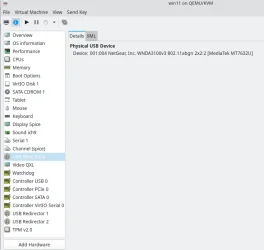
Host running on a small minipc --hardware as per screenshot --

Screenshot_20241218_091251.webp


VM -- Windows 11 IOT Enterprise pro Canary -- 8GB RAM, 4v CPU's 1GPU, 1 very fast USB->Wifi link -- plenty of spare USB ports on the miniPC !!! --using also emulated TPM

Using the wifi USB device saves a lot of meddling around with networks and network bridging -- also makes the VM accessible from host, LAN,remote TV etc etc. Performance is fine especially if using VIRTIO for disk I/O and all on a decent nvme type device.

Screenshot_20241218_091930.webp


cheers
jimbo
 

My Computer My Computer

At a glance

Windows XP,11 Linux Fedora Rawhide pre-releas...2 X Intel i7
OS
Windows XP,11 Linux Fedora Rawhide pre-release 45
Computer type
PC/Desktop
CPU
2 X Intel i7
Screen Resolution
4KUHD X 2
@cereberus - How many cores is your processor? Am I correct a virtual processor is basically 1 core?
Well bit more complicated. I have an i9 and that has P (powerful) cores plus E ((low) energy) cores.

The P cores do power crunching e.g. running apps needing a lot of cpu power, but the E cores do low energy background activities e.g. running services etc.

When running on host, Windows takes care of it all for you

When running a Hyper-V vm, it does not seem to differentiate and I do not know how it works. I just increase the number of virtual processors (8 ok, 9 not ok) until it complains number is beyond limit of virtual processors per NUMA mode (8) and then set it to 8.

As I have 14 actual cores (6P, 8E), I cannot say how Hyper-V allocates these as virtual processors. I believe a hyper-V vm just allocates maximum of 8 virtual processors and the actual underlying hypervisor chooses P, E cores as required.

There are lots of websites (allegedly) explaining such stuff but tbh, it just goes over my head really.

So my strategy is simply to maximise number of cores and pare back if needed.

As I seem to have more cores than Hyper-V can use, I never seen to get Host issues.

In the end, I think it comes down to trial and error to find an optimum number of cores to select.

This is a good article


My Computer My Computer

At a glance

Windows 11 Pro + Win11 Canary VM.I9 13th gen i9-13900H 2.60 GHZ16 GB solderedIntegrated Intel Iris XE
OS
Windows 11 Pro + Win11 Canary VM.
Computer type
Laptop
Manufacturer/Model
ASUS Zenbook 14
CPU
I9 13th gen i9-13900H 2.60 GHZ
Motherboard
Yep, Laptop has one.
Memory
16 GB soldered
Graphics Card(s)
Integrated Intel Iris XE
Sound Card
Realtek built in
Monitor(s) Displays
laptop OLED screen
Screen Resolution
2880x1800 touchscreen
Hard Drives
1 TB NVME SSD (only weakness is only one slot)
PSU
Internal + 65W thunderbolt USB4 charger
Case
Yep, got one
Cooling
Stella Artois (UK pint cans - 568 ml) - extra cost.
Keyboard
Built in UK keybd
Mouse
Bluetooth , wireless dongled, wired
Internet Speed
900 mbs (ethernet), wifi 6 typical 350-450 mb/s both up and down
Browser
Edge
Antivirus
Defender
Other Info
TPM 2.0, 2xUSB4 thunderbolt, 1xUsb3 (usb a), 1xUsb-c, hdmi out, 3.5 mm audio out/in combo, ASUS backlit trackpad (inc. switchable number pad)

Macrium Reflect Home V8
Office 365 Family (6 users each 1TB onedrive space)
Hyper-V (a vm runs almost as fast as my older laptop)
Can we hope have a new update tonight or in the next few days?

I think there will be a two-week break for the Christmas holidays
 

My Computer My Computer

At a glance

Windows 11 Insider Experimental (26H2) ChannelIntel Core i5-13600K32 Go DDR4ASUS Dual GeForce RTX 4060 Ti OC Edition 8GB
OS
Windows 11 Insider Experimental (26H2) Channel
Computer type
PC/Desktop
Manufacturer/Model
Made
CPU
Intel Core i5-13600K
Motherboard
ASUS PRIME B760-PLUS D4
Memory
32 Go DDR4
Graphics Card(s)
ASUS Dual GeForce RTX 4060 Ti OC Edition 8GB
Monitor(s) Displays
ViewSonic 1080p
Screen Resolution
1080p
Hard Drives
2 NVMe + SSD Intern + 1 HHD Interne + 4 HDD extern
Keyboard
Roccat Swamm
Internet Speed
Fibre
Browser
Microsoft Edge
Antivirus
Windows Defender
Can we hope have a new update tonight or in the next few days?

I think there will be a two-week break for the Christmas holidays
Too many builds
Too little new features.
 

My Computer My Computer

At a glance

26200.8037i5-11400F32GBGeforce GT-1030
OS
26200.8037
Computer type
PC/Desktop
CPU
i5-11400F
Motherboard
Gigabyte
Memory
32GB
Graphics Card(s)
Geforce GT-1030
Keyboard
Logitech K400
Mouse
Logitech M720
Internet Speed
600 Mb
Browser
Edge
Too many builds
Too little new features.
Maybe we can, next year, have the possibility to test and construct Windows 12 with futures builds
 

My Computer My Computer

At a glance

Windows 11 Insider Experimental (26H2) ChannelIntel Core i5-13600K32 Go DDR4ASUS Dual GeForce RTX 4060 Ti OC Edition 8GB
OS
Windows 11 Insider Experimental (26H2) Channel
Computer type
PC/Desktop
Manufacturer/Model
Made
CPU
Intel Core i5-13600K
Motherboard
ASUS PRIME B760-PLUS D4
Memory
32 Go DDR4
Graphics Card(s)
ASUS Dual GeForce RTX 4060 Ti OC Edition 8GB
Monitor(s) Displays
ViewSonic 1080p
Screen Resolution
1080p
Hard Drives
2 NVMe + SSD Intern + 1 HHD Interne + 4 HDD extern
Keyboard
Roccat Swamm
Internet Speed
Fibre
Browser
Microsoft Edge
Antivirus
Windows Defender
Maybe we can, next year, have the possibility to test and construct Windows 12 with futures builds
Pretty sure Windows 12 as a simple successor to W11 will not appear next year.

When it arrives it will be an Artificial Idiot OS and you will become part of the Borg Collective.
 

My Computer My Computer

At a glance

Windows 11 Pro + Win11 Canary VM.I9 13th gen i9-13900H 2.60 GHZ16 GB solderedIntegrated Intel Iris XE
OS
Windows 11 Pro + Win11 Canary VM.
Computer type
Laptop
Manufacturer/Model
ASUS Zenbook 14
CPU
I9 13th gen i9-13900H 2.60 GHZ
Motherboard
Yep, Laptop has one.
Memory
16 GB soldered
Graphics Card(s)
Integrated Intel Iris XE
Sound Card
Realtek built in
Monitor(s) Displays
laptop OLED screen
Screen Resolution
2880x1800 touchscreen
Hard Drives
1 TB NVME SSD (only weakness is only one slot)
PSU
Internal + 65W thunderbolt USB4 charger
Case
Yep, got one
Cooling
Stella Artois (UK pint cans - 568 ml) - extra cost.
Keyboard
Built in UK keybd
Mouse
Bluetooth , wireless dongled, wired
Internet Speed
900 mbs (ethernet), wifi 6 typical 350-450 mb/s both up and down
Browser
Edge
Antivirus
Defender
Other Info
TPM 2.0, 2xUSB4 thunderbolt, 1xUsb3 (usb a), 1xUsb-c, hdmi out, 3.5 mm audio out/in combo, ASUS backlit trackpad (inc. switchable number pad)

Macrium Reflect Home V8
Office 365 Family (6 users each 1TB onedrive space)
Hyper-V (a vm runs almost as fast as my older laptop)
The best feature for me is to make reminder from the Taskbar calendar. It was in Windows 10. Here it is :
 

Attachments

  • noname.webp
    noname.webp
    21 KB · Views: 2

My Computer My Computer

At a glance

26200.8037i5-11400F32GBGeforce GT-1030
OS
26200.8037
Computer type
PC/Desktop
CPU
i5-11400F
Motherboard
Gigabyte
Memory
32GB
Graphics Card(s)
Geforce GT-1030
Keyboard
Logitech K400
Mouse
Logitech M720
Internet Speed
600 Mb
Browser
Edge
Well bit more complicated. I have an i9 and that has P (powerful) cores plus E ((low) energy) cores.

The P cores do power crunching e.g. running apps needing a lot of cpu power, but the E cores do low energy background activities e.g. running services etc.

When running on host, Windows takes care of it all for you

When running a Hyper-V vm, it does not seem to differentiate and I do not know how it works. I just increase the number of virtual processors (8 ok, 9 not ok) until it complains number is beyond limit of virtual processors per NUMA mode (8) and then set it to 8.

As I have 14 actual cores (6P, 8E), I cannot say how Hyper-V allocates these as virtual processors. I believe a hyper-V vm just allocates maximum of 8 virtual processors and the actual underlying hypervisor chooses P, E cores as required.

There are lots of websites (allegedly) explaining such stuff but tbh, it just goes over my head really.

So my strategy is simply to maximise number of cores and pare back if needed.

As I seem to have more cores than Hyper-V can use, I never seen to get Host issues.

In the end, I think it comes down to trial and error to find an optimum number of cores to select.

This is a good article


Thanks for that as that is one of my future questions when I actually have something that actually has both P and E cores. What would actually happen on a Hyper-V that has a CPU with only P cores like 8 cores as a example, would it make the host slow if one gave it 8 virtual processors? The only reason for the 2 cores is because I think all the guides seem to say to use 2 to start but never said how to determine the best # of cores to use for best performance without slowing the host side. Will read the article but it seems like the virtual processor isn't really processors but more threads or processes for the Hyper-V itself.

Thanks as well @jimbo45!
 

My Computer My Computer

At a glance

WindowsXP/7/8/8.1/10/11,Linux,Android,FreeBSD...Intel® Core™ i7-8750H 8th Gen 2.2Ghz up to 4....64GB using 2x32GB CL16 Mushkin redLine modulesIntel UHD 630 & NVIDIA GeForce GTX 1050 Ti wi...
OS
WindowsXP/7/8/8.1/10/11,Linux,Android,FreeBSD Unix
Computer type
Laptop
Manufacturer/Model
Dell XPS 15 9570
CPU
Intel® Core™ i7-8750H 8th Gen 2.2Ghz up to 4.1Ghz
Motherboard
Dell XPS 15 9570
Memory
64GB using 2x32GB CL16 Mushkin redLine modules
Graphics Card(s)
Intel UHD 630 & NVIDIA GeForce GTX 1050 Ti with 4GB DDR5
Sound Card
Realtek ALC3266-CG
Monitor(s) Displays
15.6" 4K Touch UltraHD 3840x2160 made by Sharp
Screen Resolution
3840x2160 4K UltraHD
Hard Drives
Samsung MZ-V9P4T0B/AM 990 PRO 4TB PCIe®4.0 NVMe™ M.2 SSD was Toshiba KXG60ZNV1T02 NVMe 1TB SSD
PSU
Dell XPS 15 9570
Case
Dell XPS 15 9570
Cooling
Stock
Keyboard
Stock
Mouse
SwitftPoint ProPoint
Internet Speed
Comcast/XFinity 1.44Gbps/42.5Mbps
Browser
Microsoft EDGE (Chromium based) & Google Chrome
Antivirus
Windows Defender that came with Windows
Why the Dev channel have more updates that give more features than us ?
 

My Computer My Computer

At a glance

Windows 11 Insider Experimental (26H2) ChannelIntel Core i5-13600K32 Go DDR4ASUS Dual GeForce RTX 4060 Ti OC Edition 8GB
OS
Windows 11 Insider Experimental (26H2) Channel
Computer type
PC/Desktop
Manufacturer/Model
Made
CPU
Intel Core i5-13600K
Motherboard
ASUS PRIME B760-PLUS D4
Memory
32 Go DDR4
Graphics Card(s)
ASUS Dual GeForce RTX 4060 Ti OC Edition 8GB
Monitor(s) Displays
ViewSonic 1080p
Screen Resolution
1080p
Hard Drives
2 NVMe + SSD Intern + 1 HHD Interne + 4 HDD extern
Keyboard
Roccat Swamm
Internet Speed
Fibre
Browser
Microsoft Edge
Antivirus
Windows Defender

My Computers My Computers

  • At a glance

    Windows 11 Pro for WorkstationsIntel i7-8700K 5 GHz64 GB (4x16GB) G.SKILL TridentZ RGB DDR4 3600...ASUS ROG-STRIX-GTX1080TI-O11G-GAMING (11GB GD...
    OS
    Windows 11 Pro for Workstations
    Computer type
    PC/Desktop
    Manufacturer/Model
    Custom self build
    CPU
    Intel i7-8700K 5 GHz
    Motherboard
    ASUS ROG Maximus XI Formula Z390
    Memory
    64 GB (4x16GB) G.SKILL TridentZ RGB DDR4 3600 MHz (F4-3600C18D-32GTZR)
    Graphics Card(s)
    ASUS ROG-STRIX-GTX1080TI-O11G-GAMING (11GB GDDR5X)
    Sound Card
    Integrated Digital Audio (S/PDIF)
    Monitor(s) Displays
    2 x Samsung Odyssey G75 27"
    Screen Resolution
    2560x1440
    Hard Drives
    1TB Samsung 990 PRO M.2,
    4TB Samsung 990 PRO M.2,
    TerraMaster F8 SSD Plus NAS
    PSU
    Seasonic Prime Titanium 850W
    Case
    Thermaltake Core P3 wall mounted
    Cooling
    Corsair Hydro H115i
    Keyboard
    Amazon Basics Wired Full Keyboard MD005
    Mouse
    Logitech MX Master 4
    Internet Speed
    2 Gbps Download and 100 Mbps Upload
    Browser
    Chrome and Edge
    Antivirus
    Microsoft Defender
    Other Info
    Logitech Z625 speaker system,
    Logitech BRIO 4K Pro webcam,
    HP Color LaserJet Pro MFP M477fdn,
    CyberPower CP1500PFCLCD
    Galaxy S23 Plus phone
  • At a glance

    Windows 11 ProSnapdragon X Elite (12 core) 3.42 GHz16 GB LPDDR5x-7467 MHz
    Operating System
    Windows 11 Pro
    Computer type
    Laptop
    Manufacturer/Model
    Surface Laptop 7 Copilot+ PC
    CPU
    Snapdragon X Elite (12 core) 3.42 GHz
    Memory
    16 GB LPDDR5x-7467 MHz
    Monitor(s) Displays
    15" HDR
    Screen Resolution
    2496 x 1664
    Hard Drives
    1 TB SSD
    Internet Speed
    Wi-Fi 7 and Bluetooth 5.4
    Browser
    Chrome and Edge
    Antivirus
    Microsoft Defender
For second time, both of my computers have crashed upon rebooting following canary install. Both computers have been running canary since its inception but it appears I’ll have to remove canary partition from both computers based on these last two crashed installs. Now I’ll have to spend hours getting my computers up and running again as I did last week. Seems like something happens when second part of update fails to release boot back to system, keeping it for canary use only. Then boot record gets corrupted .
I saw this is posted by other people, but there is this issue (in the end, very quickly fixed):
ADDED 12/16] After installing Build 27764, some Windows Insiders are reporting hitting the issue that previously impacted the Dev Channel where an “Your organization used App Control for Business to block this app” dialog is shown when attempting to use or install certain third-party apps on your PC due to an incorrect policy being enforced. This forum post provides a workaround to correct this issue.
In fact, some policies are added to the EFI partition... and I'm thinking it may happen when you have some dual boot (like I have Windows 11 and Windows Server on the same machine); others had no issue, but no dual boot. Also, the one with this issue is "controlled by my organization," where I am one... Not the organization I work for...

In your case, maybe this happened, and you're out of space? but you can rebuild and repair all that without reinstalling... I could reach the boot menu (so, no need for a USB key with storage drivers and having to use my BitLocker recovery key).

I understand the frustration. Since October 2014, with the first Win 10 Insider build, I had to do a few rollbacks; sometimes a build would not finish installing and rolled back itself, or other times it usually involved Nvidia drivers, or at least there was no video output, so the same issue happened after a second install. In recovery, I deleted the drivers... that's it. Another time, I could not get new builds anymore. I did all I could, but I had to reinstall Windows, and I'm not at all used to doing that anymore. I did not forget, but with OneDrive and Winget and other package managers—and the list of "packages" saved by WingetUI—my app configs were saved on OneDrive too. And all the settings are synced with my MS account... It is very easy and quick to reinstall...
But with 2 PCs in parallel, not the same for 10 years, I maybe did around 500 upgrades... a handful caused some minor issues... so 2 PCs crashing is a statistical anomaly... Hope you'll manage to fix this !
 

My Computer My Computer

At a glance

Windows 11 Pro Canary and Server 2025 and others
OS
Windows 11 Pro Canary and Server 2025 and others
Computer type
PC/Desktop
Manufacturer/Model
Custom desktop, and Dell XPS
I saw this is posted by other people, but there is this issue (in the end, very quickly fixed):

In fact, some policies are added to the EFI partition... and I'm thinking it may happen when you have some dual boot (like I have Windows 11 and Windows Server on the same machine); others had no issue, but no dual boot. Also, the one with this issue is "controlled by my organization," where I am one... Not the organization I work for...

In your case, maybe this happened, and you're out of space? but you can rebuild and repair all that without reinstalling... I could reach the boot menu (so, no need for a USB key with storage drivers and having to use my BitLocker recovery key).

I understand the frustration. Since October 2014, with the first Win 10 Insider build, I had to do a few rollbacks; sometimes a build would not finish installing and rolled back itself, or other times it usually involved Nvidia drivers, or at least there was no video output, so the same issue happened after a second install. In recovery, I deleted the drivers... that's it. Another time, I could not get new builds anymore. I did all I could, but I had to reinstall Windows, and I'm not at all used to doing that anymore. I did not forget, but with OneDrive and Winget and other package managers—and the list of "packages" saved by WingetUI—my app configs were saved on OneDrive too. And all the settings are synced with my MS account... It is very easy and quick to reinstall...
But with 2 PCs in parallel, not the same for 10 years, I maybe did around 500 upgrades... a handful caused some minor issues... so 2 PCs crashing is a statistical anomaly... Hope you'll manage to fix this !

I have 2 machines, with Canary, one is Dual Boot and the other is Multi Boot with 3 systems. All windows 11 Pro Insider Builds. On one of the 2 machines had this problem while on the other I did not. 🤷‍♂️
See this MS post below for a workaround:
 

My Computer My Computer

At a glance

Windows 11 Pro 25H2Intel I9-9900K64GBNVIDIA RTX 2060
OS
Windows 11 Pro 25H2
Computer type
PC/Desktop
Manufacturer/Model
Dell XPS 8930
CPU
Intel I9-9900K
Memory
64GB
Graphics Card(s)
NVIDIA RTX 2060
Sound Card
NVIDIA High Definition Audio
Monitor(s) Displays
4k Samsung
Screen Resolution
3840 x 2160
Hard Drives
512GB NVMe, ADATA SU 800, 2TB HDD

Latest Support Threads

Back
Top Bottom