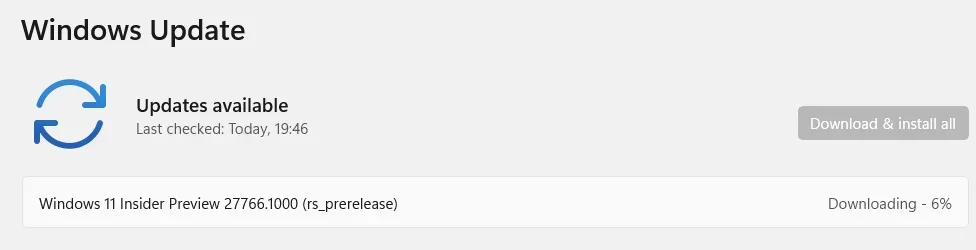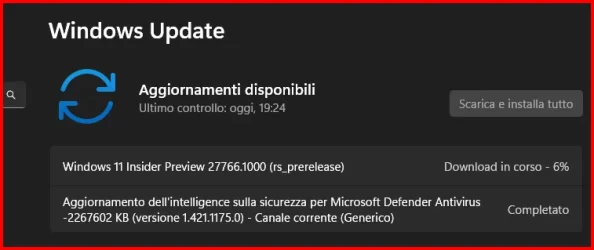
Insider Windows 11 Insider Canary build 27766.1000 - Jan. 3


UPDATE 1/09:


 Windows Blogs:

Hello Windows Insiders, today we are releasing Windows 11 Insider Preview Build 27766 to the Canary Channel.

We are also not planning to release SDKs for 27xxx series builds for the time being.

Changes and Improvements​

[General]​

  • This update includes a small set of general improvements and fixes that improve the overall experience for Insiders running this build on their PCs.

Fixes​

[General]​

  • We fixed the issue where if you roll back from Build 27764 to an earlier build (including if the upgrade failed), you would see an “Your organization used App Control for Business to block this app” dialog when attempting to use or install certain third-party apps on your PC due to an incorrect policy being enforced.
  • As of the latest Insider Preview builds in the Canary Channel, the main issues causing Insiders to experience an increase in rollbacks (with error code 0xc190010) when attempting to upgrade have been addressed. As a reminder, 0xc190010 is a generic error code that has multiple root causes, so if you’re continuing to experience issues, please file feedback (WIN + F) to investigate.

[Taskbar & System Tray]​

  • Fixed an underlying issue which was causing some Insiders in Canary to experience frequent explorer.exe crashes after they clean installed or reset their PC.

Known issues​

[General]​

  • [IMPORTANT NOTE FOR COPILOT+ PCs] If you are joining the Canary Channel on a new Copilot+ PC from the Dev Channel, Release Preview Channel or retail, you will lose Windows Hello pin and biometrics to sign into your PC with error 0xd0000225 and error message “Something went wrong, and your PIN isn’t available”. You should be able to re-create your PIN by clicking “Set up my PIN”.
  • We’re working on the fix for an underlying issue causing accent colored window borders to not be not displayed when enabled, shadows around windows not displaying when enabled, and window launching (and other) animations to show even though the setting to show animations is turned off.

Reminders for Windows Insiders in the Canary Channel​

  • The builds we release to the Canary Channel represent the latest platform changes early in the development cycle and should not be seen as matched to any specific release of Windows and features and experiences included in these builds may never get released as we try out different concepts and get feedback. Features may change over time, be removed, or replaced and never get released beyond Windows Insiders. Some of these features and experiences could show up in future Windows releases when they’re ready.
  • Many features in the Canary Channel are rolled out using Control Feature Rollout technology, starting with a subset of Insiders and ramping up over time as we monitor feedback to see how they land before pushing them out to everyone in this channel.
  • Some features may show up in the Dev and Beta Channels first before showing up in the Canary Channel.
  • Some features in active development we preview with Windows Insiders may not be fully localized and localization will happen over time as features are finalized. As you see issues with localization in your language, please report those issues to us via Feedback Hub.
  • To get off the Canary Channel, a clean install of Windows 11 will be required. As a reminder – Insiders can’t switch to a channel that is receiving builds with lower build numbers without doing a clean installation of Windows 11 due to technical setup requirements.
  • The desktop watermark shown at the lower right corner of the desktop is normal for these pre-release builds.
  • Check out Flight Hub for a complete look at what build is in which Insider channel.
Thanks,
Amanda & Brandon


 Source:


Check Windows Updates


UUP Dump:

64-bit ISO download:

ARM64 ISO download:

 
Last edited:
Downloading it...
1735930078913.webp
 

My Computers My Computers

  • At a glance

    Windows 10 Pro, Windows 11 DevIntel I3 1010016 GB DDR4 CrucialIntel on chip
    OS
    Windows 10 Pro, Windows 11 Dev
    Computer type
    PC/Desktop
    Manufacturer/Model
    Homebuilt
    CPU
    Intel I3 10100
    Motherboard
    ASUS B460M
    Memory
    16 GB DDR4 Crucial
    Graphics Card(s)
    Intel on chip
    Sound Card
    Realtek onboard
    Monitor(s) Displays
    ASUS 24, LG 24
    Screen Resolution
    Full HD x 2
    Hard Drives
    kingston A2000 NVMe PCIe 500 GB
    PSU
    LC Power 650W
    Case
    Noname
    Cooling
    Air 2x 120mm
    Keyboard
    Cherry G-81
    Mouse
    Logitech M500
    Internet Speed
    100/20
    Browser
    Firefox, Vivaldi
    Antivirus
    MS Defender
  • At a glance

    Windows 10 HomeRyzen 7 4700u8 GB DDR4AMD Vega
    Operating System
    Windows 10 Home
    Computer type
    Laptop
    Manufacturer/Model
    ASUS/Vivobook Flip 14
    CPU
    Ryzen 7 4700u
    Memory
    8 GB DDR4
    Graphics card(s)
    AMD Vega
    Sound Card
    Realtek onboard
    Monitor(s) Displays
    14"
    Screen Resolution
    FullHD
    Hard Drives
    512 Samsung NVMe PCIe
    PSU
    -
    Case
    Laptop
    Mouse
    Touchpad, Touchscreen
    Internet Speed
    100/20
    Browser
    Firefox, Vivaldi
    Antivirus
    MS Defender
27766.webp
 

My Computers My Computers

  • At a glance

    Windows 11 Pro for WorkstationsIntel i7-8700K 5 GHz64 GB (4x16GB) G.SKILL TridentZ RGB DDR4 3600...ASUS ROG-STRIX-GTX1080TI-O11G-GAMING (11GB GD...
    OS
    Windows 11 Pro for Workstations
    Computer type
    PC/Desktop
    Manufacturer/Model
    Custom self build
    CPU
    Intel i7-8700K 5 GHz
    Motherboard
    ASUS ROG Maximus XI Formula Z390
    Memory
    64 GB (4x16GB) G.SKILL TridentZ RGB DDR4 3600 MHz (F4-3600C18D-32GTZR)
    Graphics Card(s)
    ASUS ROG-STRIX-GTX1080TI-O11G-GAMING (11GB GDDR5X)
    Sound Card
    Integrated Digital Audio (S/PDIF)
    Monitor(s) Displays
    2 x Samsung Odyssey G75 27"
    Screen Resolution
    2560x1440
    Hard Drives
    1TB Samsung 990 PRO M.2,
    4TB Samsung 990 PRO M.2,
    TerraMaster F8 SSD Plus NAS
    PSU
    Seasonic Prime Titanium 850W
    Case
    Thermaltake Core P3 wall mounted
    Cooling
    Corsair Hydro H115i
    Keyboard
    Amazon Basics Wired Full Keyboard MD005
    Mouse
    Logitech MX Master 4
    Internet Speed
    2 Gbps Download and 100 Mbps Upload
    Browser
    Chrome and Edge
    Antivirus
    Microsoft Defender
    Other Info
    Logitech Z625 speaker system,
    Logitech BRIO 4K Pro webcam,
    HP Color LaserJet Pro MFP M477fdn,
    CyberPower CP1500PFCLCD
    Galaxy S23 Plus phone
  • At a glance

    Windows 11 ProSnapdragon X Elite (12 core) 3.42 GHz16 GB LPDDR5x-7467 MHz
    Operating System
    Windows 11 Pro
    Computer type
    Laptop
    Manufacturer/Model
    Surface Laptop 7 Copilot+ PC
    CPU
    Snapdragon X Elite (12 core) 3.42 GHz
    Memory
    16 GB LPDDR5x-7467 MHz
    Monitor(s) Displays
    15" HDR
    Screen Resolution
    2496 x 1664
    Hard Drives
    1 TB SSD
    Internet Speed
    Wi-Fi 7 and Bluetooth 5.4
    Browser
    Chrome and Edge
    Antivirus
    Microsoft Defender
1735930617721.webp
 

My Computer My Computer

At a glance

Windows 11 Pro Insider Preview DevAMD Ryzen™ 5 5600G with Radeon Graphics 3.90 GHz16,0 GBNVIDIA GeForce GT 720, NVIDIA compatible
OS
Windows 11 Pro Insider Preview Dev
Computer type
PC/Desktop
Manufacturer/Model
To be filled by O.E.M.
CPU
AMD Ryzen™ 5 5600G with Radeon Graphics 3.90 GHz
Motherboard
MSI B450 GAMING PLUS MAX
Memory
16,0 GB
Graphics Card(s)
NVIDIA GeForce GT 720, NVIDIA compatible
Sound Card
NVIDIA High Definition Audio
Monitor(s) Displays
BenQ GW2270 Color Profile.D6500
Screen Resolution
1920 x 1080
Hard Drives
Samsung SSD 850 EVO 250GB + CT1000BX500SSD1 + ST2000DM006-2DM164 + WDC WD5000AAKS-07TMA0 +WDC WD10EARX-00N0YB0
PSU
EVGA 600 W2, 80+ WHITE 600W, 3 Year Warranty, Power Supply 100-W2-0600-K2 (EU)
Case
RAIJINTEK Agos - mid tower - ATX
Cooling
Cooler Master Hyper 212 Evo heatsink + Fans: 2 front+1 back+1 up
Keyboard
Logitech Internet 350 Keyboard
Mouse
Logitech MX Revolution
Internet Speed
Download 159.29 Mbps - Upload 80.14 Mbps
Browser
Google Crome Dev
Antivirus
Microsoft Windows Security
Downloading Now...
 

My Computer My Computer

At a glance

Windows 11 Pro Experimental (Future Platforms)16GB DDR3 1600MhzSapphire Amd Radeon RX 550 4GB GDDR5
OS
Windows 11 Pro Experimental (Future Platforms)
Computer type
PC/Desktop
Memory
16GB DDR3 1600Mhz
Graphics Card(s)
Sapphire Amd Radeon RX 550 4GB GDDR5
Browser
Opera/Brave/Microsoft Edge Beta/Mozilla Firefox
Antivirus
Norton 360
First update of the Year 2025
 

My Computer My Computer

At a glance

Windows 11 Insider Experimental (26H2) ChannelIntel Core i5-13600K32 Go DDR4ASUS Dual GeForce RTX 4060 Ti OC Edition 8GB
OS
Windows 11 Insider Experimental (26H2) Channel
Computer type
PC/Desktop
Manufacturer/Model
Made
CPU
Intel Core i5-13600K
Motherboard
ASUS PRIME B760-PLUS D4
Memory
32 Go DDR4
Graphics Card(s)
ASUS Dual GeForce RTX 4060 Ti OC Edition 8GB
Monitor(s) Displays
ViewSonic 1080p
Screen Resolution
1080p
Hard Drives
2 NVMe + SSD Intern + 1 HHD Interne + 4 HDD extern
Keyboard
Roccat Swamm
Internet Speed
Fibre
Browser
Microsoft Edge
Antivirus
Windows Defender

My Computers My Computers

  • At a glance

    Windows 11 Pro for WorkstationsIntel i7-8700K 5 GHz64 GB (4x16GB) G.SKILL TridentZ RGB DDR4 3600...ASUS ROG-STRIX-GTX1080TI-O11G-GAMING (11GB GD...
    OS
    Windows 11 Pro for Workstations
    Computer type
    PC/Desktop
    Manufacturer/Model
    Custom self build
    CPU
    Intel i7-8700K 5 GHz
    Motherboard
    ASUS ROG Maximus XI Formula Z390
    Memory
    64 GB (4x16GB) G.SKILL TridentZ RGB DDR4 3600 MHz (F4-3600C18D-32GTZR)
    Graphics Card(s)
    ASUS ROG-STRIX-GTX1080TI-O11G-GAMING (11GB GDDR5X)
    Sound Card
    Integrated Digital Audio (S/PDIF)
    Monitor(s) Displays
    2 x Samsung Odyssey G75 27"
    Screen Resolution
    2560x1440
    Hard Drives
    1TB Samsung 990 PRO M.2,
    4TB Samsung 990 PRO M.2,
    TerraMaster F8 SSD Plus NAS
    PSU
    Seasonic Prime Titanium 850W
    Case
    Thermaltake Core P3 wall mounted
    Cooling
    Corsair Hydro H115i
    Keyboard
    Amazon Basics Wired Full Keyboard MD005
    Mouse
    Logitech MX Master 4
    Internet Speed
    2 Gbps Download and 100 Mbps Upload
    Browser
    Chrome and Edge
    Antivirus
    Microsoft Defender
    Other Info
    Logitech Z625 speaker system,
    Logitech BRIO 4K Pro webcam,
    HP Color LaserJet Pro MFP M477fdn,
    CyberPower CP1500PFCLCD
    Galaxy S23 Plus phone
  • At a glance

    Windows 11 ProSnapdragon X Elite (12 core) 3.42 GHz16 GB LPDDR5x-7467 MHz
    Operating System
    Windows 11 Pro
    Computer type
    Laptop
    Manufacturer/Model
    Surface Laptop 7 Copilot+ PC
    CPU
    Snapdragon X Elite (12 core) 3.42 GHz
    Memory
    16 GB LPDDR5x-7467 MHz
    Monitor(s) Displays
    15" HDR
    Screen Resolution
    2496 x 1664
    Hard Drives
    1 TB SSD
    Internet Speed
    Wi-Fi 7 and Bluetooth 5.4
    Browser
    Chrome and Edge
    Antivirus
    Microsoft Defender
We are also not planning to release SDKs for 27xxx series builds for the time being.
Cuz you couldn't figure out how to fix the upwards projecting See more menu!?!?!? 🤷‍♂️
 

My Computers My Computers

  • At a glance

    Windows 11 Pro
    OS
    Windows 11 Pro
    Computer type
    PC/Desktop
    Manufacturer/Model
    ASUS ROG Strix
  • At a glance

    Windows 11 Pro
    Operating System
    Windows 11 Pro
    Computer type
    Laptop
    Manufacturer/Model
    ASUS VivoBook
  • ASUS VivoBook 'Lite' ~ Windows 11 Home
Okay @Brink , if this Build sucks...

giff.gif :zany:

8708.webp​
 

My Computers My Computers

  • At a glance

    Windows 11 Pro
    OS
    Windows 11 Pro
    Computer type
    PC/Desktop
    Manufacturer/Model
    ASUS ROG Strix
  • At a glance

    Windows 11 Pro
    Operating System
    Windows 11 Pro
    Computer type
    Laptop
    Manufacturer/Model
    ASUS VivoBook
  • ASUS VivoBook 'Lite' ~ Windows 11 Home
1735942867566.webp
 

My Computer My Computer

At a glance

Windows 11 Pro Insider Preview DevAMD Ryzen™ 5 5600G with Radeon Graphics 3.90 GHz16,0 GBNVIDIA GeForce GT 720, NVIDIA compatible
OS
Windows 11 Pro Insider Preview Dev
Computer type
PC/Desktop
Manufacturer/Model
To be filled by O.E.M.
CPU
AMD Ryzen™ 5 5600G with Radeon Graphics 3.90 GHz
Motherboard
MSI B450 GAMING PLUS MAX
Memory
16,0 GB
Graphics Card(s)
NVIDIA GeForce GT 720, NVIDIA compatible
Sound Card
NVIDIA High Definition Audio
Monitor(s) Displays
BenQ GW2270 Color Profile.D6500
Screen Resolution
1920 x 1080
Hard Drives
Samsung SSD 850 EVO 250GB + CT1000BX500SSD1 + ST2000DM006-2DM164 + WDC WD5000AAKS-07TMA0 +WDC WD10EARX-00N0YB0
PSU
EVGA 600 W2, 80+ WHITE 600W, 3 Year Warranty, Power Supply 100-W2-0600-K2 (EU)
Case
RAIJINTEK Agos - mid tower - ATX
Cooling
Cooler Master Hyper 212 Evo heatsink + Fans: 2 front+1 back+1 up
Keyboard
Logitech Internet 350 Keyboard
Mouse
Logitech MX Revolution
Internet Speed
Download 159.29 Mbps - Upload 80.14 Mbps
Browser
Google Crome Dev
Antivirus
Microsoft Windows Security
So bored with this new build already, I decided to see how many words I could make from "canary".
can
cry
nary
ran
car
nay
cyan
any
yarn
cran (great word).
 

My Computer My Computer

At a glance

Windows 11 Pro + Win11 Canary VM.I9 13th gen i9-13900H 2.60 GHZ16 GB solderedIntegrated Intel Iris XE
OS
Windows 11 Pro + Win11 Canary VM.
Computer type
Laptop
Manufacturer/Model
ASUS Zenbook 14
CPU
I9 13th gen i9-13900H 2.60 GHZ
Motherboard
Yep, Laptop has one.
Memory
16 GB soldered
Graphics Card(s)
Integrated Intel Iris XE
Sound Card
Realtek built in
Monitor(s) Displays
laptop OLED screen
Screen Resolution
2880x1800 touchscreen
Hard Drives
1 TB NVME SSD (only weakness is only one slot)
PSU
Internal + 65W thunderbolt USB4 charger
Case
Yep, got one
Cooling
Stella Artois (UK pint cans - 568 ml) - extra cost.
Keyboard
Built in UK keybd
Mouse
Bluetooth , wireless dongled, wired
Internet Speed
900 mbs (ethernet), wifi 6 typical 350-450 mb/s both up and down
Browser
Edge
Antivirus
Defender
Other Info
TPM 2.0, 2xUSB4 thunderbolt, 1xUsb3 (usb a), 1xUsb-c, hdmi out, 3.5 mm audio out/in combo, ASUS backlit trackpad (inc. switchable number pad)

Macrium Reflect Home V8
Office 365 Family (6 users each 1TB onedrive space)
Hyper-V (a vm runs almost as fast as my older laptop)
... fix the upwards projecting See more menu!
It is fixed......, sort of...,
as long as Explorer is on a 100% DPI monitor, even if the others are a different DPI...

8717.webp
 

My Computers My Computers

  • At a glance

    Windows 11 Pro
    OS
    Windows 11 Pro
    Computer type
    PC/Desktop
    Manufacturer/Model
    ASUS ROG Strix
  • At a glance

    Windows 11 Pro
    Operating System
    Windows 11 Pro
    Computer type
    Laptop
    Manufacturer/Model
    ASUS VivoBook
  • ASUS VivoBook 'Lite' ~ Windows 11 Home
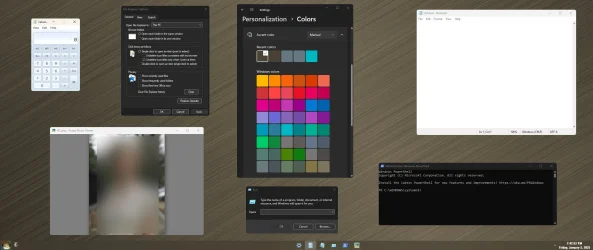
So bored with this new build already...
Barely anything to get excited about! :nope:

And..., every window is either a dismal black or pukey off-white..., why do they even bother with Accent Color!?!?!? 🤷‍♂️

8711.webp
 

My Computers My Computers

  • At a glance

    Windows 11 Pro
    OS
    Windows 11 Pro
    Computer type
    PC/Desktop
    Manufacturer/Model
    ASUS ROG Strix
  • At a glance

    Windows 11 Pro
    Operating System
    Windows 11 Pro
    Computer type
    Laptop
    Manufacturer/Model
    ASUS VivoBook
  • ASUS VivoBook 'Lite' ~ Windows 11 Home
I will say this: performance is great..., but, nothing mind blowing feature wise, and everything looks like crap!!!
I'm going back, lest I b*tch and complain about it all weekend!!! 🤷‍♂️

8718.webp
 

My Computers My Computers

  • At a glance

    Windows 11 Pro
    OS
    Windows 11 Pro
    Computer type
    PC/Desktop
    Manufacturer/Model
    ASUS ROG Strix
  • At a glance

    Windows 11 Pro
    Operating System
    Windows 11 Pro
    Computer type
    Laptop
    Manufacturer/Model
    ASUS VivoBook
  • ASUS VivoBook 'Lite' ~ Windows 11 Home
Not clear how they fixed this.
What am I missing?

Fixes​

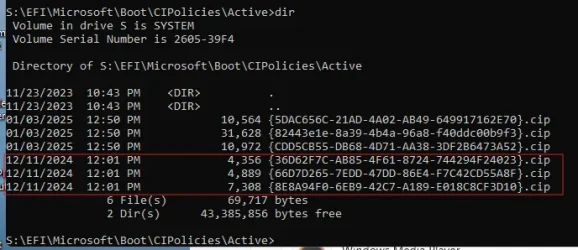
  • We fixed the issue where if you roll back from Build 27764 to an earlier build (including if the upgrade failed), you would see an “Your organization used App Control for Business to block this app” dialog when attempting to use or install certain third-party apps on your PC due to an incorrect policy being enforced.

1735966380181.webp
I still see the cipolicies files that were installed by 27764 unless they were manually deleted previously as suggested by Brandon LeBlanc1 in his original post.

  1. Open Command Prompt with administrator privileges.
  2. Type and hit enter: mountvol s: /s
  3. Type and hit enter: del S:\EFI\Microsoft\Boot\cipolicies\active\{8E8A94F0-6EB9-42C7-A189-E018C8CF3D10}.cip
  4. Type and hit enter: del S:\EFI\Microsoft\Boot\cipolicies\active\{36D62F7C-AB85-4F61-8724-744294F24023}.cip
  5. Type and hit enter: del S:\EFI\Microsoft\Boot\cipolicies\active\{66D7D265-7EDD-47DD-86E4-F7C42CD55A8F}.cip
  6. Then reboot your PC.

 
Last edited:

My Computer My Computer

At a glance

Windows 11 Pro 25H2Intel I9-9900K64GBNVIDIA RTX 2060
OS
Windows 11 Pro 25H2
Computer type
PC/Desktop
Manufacturer/Model
Dell XPS 8930
CPU
Intel I9-9900K
Memory
64GB
Graphics Card(s)
NVIDIA RTX 2060
Sound Card
NVIDIA High Definition Audio
Monitor(s) Displays
4k Samsung
Screen Resolution
3840 x 2160
Hard Drives
512GB NVMe, ADATA SU 800, 2TB HDD
So far I've only had one minor problem. I used UUP Dump to update and after the update was installed Windows Update wanted to keep trying to download it. Usually all I have to do is turn off Updates, restart the computer and turn Updates back on. I tried Holding the shift key while clicking on restart, holding the shift key while hitting restart on the login screen and turning the computer off and back on again. I gave in and decided to let Windows Update install it again. After a few minutes Windows Update gave me a error and asked if I wanted to retry. I hit the option to retry and now it says my computer is up to date like it is supposed too.
 

My Computers My Computers

  • At a glance

    Windows 11 Pro 25H2Intel Core i7-10700K16GB (8GB PC4-19200 DDR4 SDRAM x2)NVIDIA GeForce GTX 1050 TI
    OS
    Windows 11 Pro 25H2
    Computer type
    PC/Desktop
    Manufacturer/Model
    PowerSpec B746
    CPU
    Intel Core i7-10700K
    Motherboard
    ASRock Z490 Phantom Gaming 4/ax
    Memory
    16GB (8GB PC4-19200 DDR4 SDRAM x2)
    Graphics Card(s)
    NVIDIA GeForce GTX 1050 TI
    Sound Card
    Realtek Audio
    Monitor(s) Displays
    #1. LG ULTRAWIDE 34" #2. AOC Q32G2WG3 32"
    Screen Resolution
    #1. 3440 X 1440 #2. 1920 x 1080
    Hard Drives
    NVMe WDC WDS100T2B0C-00PXH0 1TB
    Samsung SSD 860 EVO 1TB
    PSU
    750 Watts (62.5A)
    Case
    PowerSpec/Lian Li ATX 205
    Keyboard
    Logitech K270
    Mouse
    Logitech M185
    Browser
    Microsoft Edge and Firefox
    Antivirus
    Webroot SecureAnywhere CE 26.1
  • At a glance

    Windows 11 Canary ChannelIntel Core i5-8400 CPU @ 2.80GHz16 MB DDR 4-2666
    Operating System
    Windows 11 Canary Channel
    Computer type
    PC/Desktop
    Manufacturer/Model
    PowerSpec G156
    CPU
    Intel Core i5-8400 CPU @ 2.80GHz
    Motherboard
    AsusTeK Prime B360M-A
    Memory
    16 MB DDR 4-2666
    Monitor(s) Displays
    23" Speptre HDMI 75Hz
    Screen Resolution
    1920x1080
    Hard Drives
    Samsung 970 EVO 500GB NVMe
    Keyboard
    Logitek K270
    Mouse
    Logitek M185
    Browser
    Firefox, Edge and Edge Canary
    Antivirus
    Windows Defender
So far I've only had one minor problem. I used UUP Dump to update and after the update was installed Windows Update wanted to keep trying to download it. Usually all I have to do is turn off Updates, restart the computer and turn Updates back on. I tried Holding the shift key while clicking on restart, holding the shift key while hitting restart on the login screen and turning the computer off and back on again. I gave in and decided to let Windows Update install it again. After a few minutes Windows Update gave me a error and asked if I wanted to retry. I hit the option to retry and now it says my computer is up to date like it is supposed too.
That is the usual behavior when you update with ISO.
W.U. tries to download and install again and eventually gives an error, after hitting "Retry all" it checks again and shows up to date and clean. 😂👍
 

My Computer My Computer

At a glance

Windows 11 Pro 25H2Intel I9-9900K64GBNVIDIA RTX 2060
OS
Windows 11 Pro 25H2
Computer type
PC/Desktop
Manufacturer/Model
Dell XPS 8930
CPU
Intel I9-9900K
Memory
64GB
Graphics Card(s)
NVIDIA RTX 2060
Sound Card
NVIDIA High Definition Audio
Monitor(s) Displays
4k Samsung
Screen Resolution
3840 x 2160
Hard Drives
512GB NVMe, ADATA SU 800, 2TB HDD
That is the usual behavior when you update with ISO.
W.U. tries to download and install again and eventually gives an error, after hitting "Retry all" it checks again and shows up to date and clean. 😂👍
Usually turning off updates and doing a doing a restart works for me. This is the first time it didn't work. When I upgrade desktop #2 I'm going to try Windows Update and see how many tries it takes.
 

My Computers My Computers

  • At a glance

    Windows 11 Pro 25H2Intel Core i7-10700K16GB (8GB PC4-19200 DDR4 SDRAM x2)NVIDIA GeForce GTX 1050 TI
    OS
    Windows 11 Pro 25H2
    Computer type
    PC/Desktop
    Manufacturer/Model
    PowerSpec B746
    CPU
    Intel Core i7-10700K
    Motherboard
    ASRock Z490 Phantom Gaming 4/ax
    Memory
    16GB (8GB PC4-19200 DDR4 SDRAM x2)
    Graphics Card(s)
    NVIDIA GeForce GTX 1050 TI
    Sound Card
    Realtek Audio
    Monitor(s) Displays
    #1. LG ULTRAWIDE 34" #2. AOC Q32G2WG3 32"
    Screen Resolution
    #1. 3440 X 1440 #2. 1920 x 1080
    Hard Drives
    NVMe WDC WDS100T2B0C-00PXH0 1TB
    Samsung SSD 860 EVO 1TB
    PSU
    750 Watts (62.5A)
    Case
    PowerSpec/Lian Li ATX 205
    Keyboard
    Logitech K270
    Mouse
    Logitech M185
    Browser
    Microsoft Edge and Firefox
    Antivirus
    Webroot SecureAnywhere CE 26.1
  • At a glance

    Windows 11 Canary ChannelIntel Core i5-8400 CPU @ 2.80GHz16 MB DDR 4-2666
    Operating System
    Windows 11 Canary Channel
    Computer type
    PC/Desktop
    Manufacturer/Model
    PowerSpec G156
    CPU
    Intel Core i5-8400 CPU @ 2.80GHz
    Motherboard
    AsusTeK Prime B360M-A
    Memory
    16 MB DDR 4-2666
    Monitor(s) Displays
    23" Speptre HDMI 75Hz
    Screen Resolution
    1920x1080
    Hard Drives
    Samsung 970 EVO 500GB NVMe
    Keyboard
    Logitek K270
    Mouse
    Logitek M185
    Browser
    Firefox, Edge and Edge Canary
    Antivirus
    Windows Defender
Usually turning off updates and doing a doing a restart works for me. This is the first time it didn't work. When I upgrade desktop #2 I'm going to try Windows Update and see how many tries it takes.
I often update a few machines with ISO and always goes through the same W.U. routine. 😉
 

My Computer My Computer

At a glance

Windows 11 Pro 25H2Intel I9-9900K64GBNVIDIA RTX 2060
OS
Windows 11 Pro 25H2
Computer type
PC/Desktop
Manufacturer/Model
Dell XPS 8930
CPU
Intel I9-9900K
Memory
64GB
Graphics Card(s)
NVIDIA RTX 2060
Sound Card
NVIDIA High Definition Audio
Monitor(s) Displays
4k Samsung
Screen Resolution
3840 x 2160
Hard Drives
512GB NVMe, ADATA SU 800, 2TB HDD
My WU to this build went smooth, slow but smooth.
After I ran disk cleanup & a PC restart I got a MS Bing screen I haven't seen before.
I took a couple of screenshots (1 attached, the other of the Pragser Wildsee) & X out of this distraction.

Win11 b27766.1000_ 2daAfterRestart.webp
 

My Computers My Computers

  • At a glance

    Windows 11 Proi7-12900K @ 3.2 GHz2/16 GB Critical DDR5GeForce RTX 3060 Ti
    OS
    Windows 11 Pro
    Computer type
    PC/Desktop
    Manufacturer/Model
    Self made in 2023
    CPU
    i7-12900K @ 3.2 GHz
    Motherboard
    ASUS ROG Maximus Z790 APEX
    Memory
    2/16 GB Critical DDR5
    Graphics Card(s)
    GeForce RTX 3060 Ti
    Sound Card
    On board sound
    Monitor(s) Displays
    27 inch LED
    Hard Drives
    1 TB Samsung SSD w/ 3 partitions
    250 GB Samsung SSD for WSE 2016 BU OS
    1 TB Samsung SSD (Storage)
    PSU
    RM850x SHIFT 80 PLUS Gold Fully Modular
    Case
    Fractal Design Define 7 Compact - Mid Tower
    Browser
    EDGE
  • At a glance

    Windows 11 Pro x2Core i5-1135G716GB M.2 2280 NVMe SSDIntegrated - Intel Iris Xe Graphics
    Operating System
    Windows 11 Pro x2
    Computer type
    Laptop
    Manufacturer/Model
    LG gram 15, 15.6" Laptop
    CPU
    Core i5-1135G7
    Motherboard
    LG
    Memory
    16GB M.2 2280 NVMe SSD
    Graphics card(s)
    Integrated - Intel Iris Xe Graphics
    Sound Card
    Onboard sound
    Monitor(s) Displays
    15.6" IPS Display
    Screen Resolution
    Full HD 1920 x 1080
    Hard Drives
    512 GB
    Browser
    EDGE

Latest Support Threads

Back
Top Bottom