UPDATE 7/11:
 www.elevenforum.com
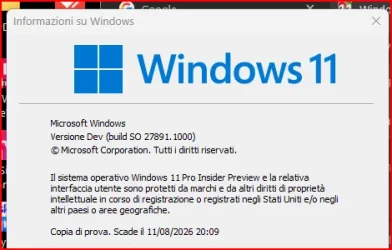
Hello Windows Insiders, today we are releasing Windows 11 Insider Preview Build 27891 to the Canary Channel. We also have a Microsoft Store update rolling out to Insiders in the Canary and Dev Channels (details below).
We are also not planning to release SDKs for 27xxx series builds for the time being.
Windows 11 Insider Canary build 27898.1000 released - July 11
Windows Blogs: Source: Check Windows Updates UUP Dump: 64-bit ISO download: https://uupdump.net/selectlang.php?id=aba75efc-1d03-41a3-956c-3b4b61b941b0 ARM64 ISO download: https://uupdump.net/selectlang.php?id=fedddda9-83ef-48e0-a36e-5e8dca0613a3...
www.elevenforum.com
Windows Blogs:
Hello Windows Insiders, today we are releasing Windows 11 Insider Preview Build 27891 to the Canary Channel. We also have a Microsoft Store update rolling out to Insiders in the Canary and Dev Channels (details below).
We are also not planning to release SDKs for 27xxx series builds for the time being.
Changes and Improvements
[Other]
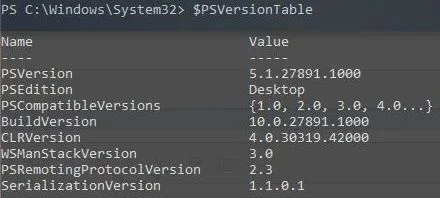
- Windows PowerShell 2.0 is deprecated and in the most current Insider Preview builds flighted to the Canary Channel, is removed. More information will be shared in the coming months on the removal of Windows PowerShell 2.0 in an upcoming update for Windows 11.
Fixes
[General]
- We fixed the issue causing the “Reset this PC” option under Settings > System > Recovery to not work after upgrading the last few Canary Channel builds.
- Fixed the underlying issue which was causing the taskbar to unexpectedly not showing acrylic material after upgrading to the latest Canary builds. This also impacted a few other scenarios, leading to unexpected black or white in some UI.
- Fixed an underlying issue believed to be the cause of some Insiders seeing Windows update downloads to get stuck at 2% recently.
- Fixed a few more languages including Vietnamese and Arabic that were still having issues with certain characters not rendering correctly for Insiders after the latest builds, causing nonsense to display in places like Task Manager and more. This impacted characters outside of A-Z.
[File Explorer]
- Fixed an issue where if you opened the “…” menu in the File Explorer address bar to show the full list of folders for the current path, the dropdown might be cut off and the bottom of it inaccessible.
[Settings]
- Fixed an issue in the previous build which could cause Settings to crash when opening microphone properties under Settings > System > Sound.
- Fixed an underlying issue related to Bluetooth which could cause Settings or Quick Settings to crash on launch for some people.
[Windowing]
- Fixed an issue which was causing the window minimizing animation to not display correctly in the previous flight.
[Task Manager]
- Fixed an issue where the CPU graphs in the Performance page were still using the old CPU utility calculations.
- Fixed an issue where after adding the new CPU Utility column, you might notice that System Idle Process always showed as 0.
Last edited: