UPDATE 7/17:

 www.elevenforum.com
Hello Windows Insiders, today we are releasing Windows 11 Insider Preview Build 27898 to the Canary Channel.
We are also not planning to release SDKs for 27xxx series builds for the time being.
 www.elevenforum.com

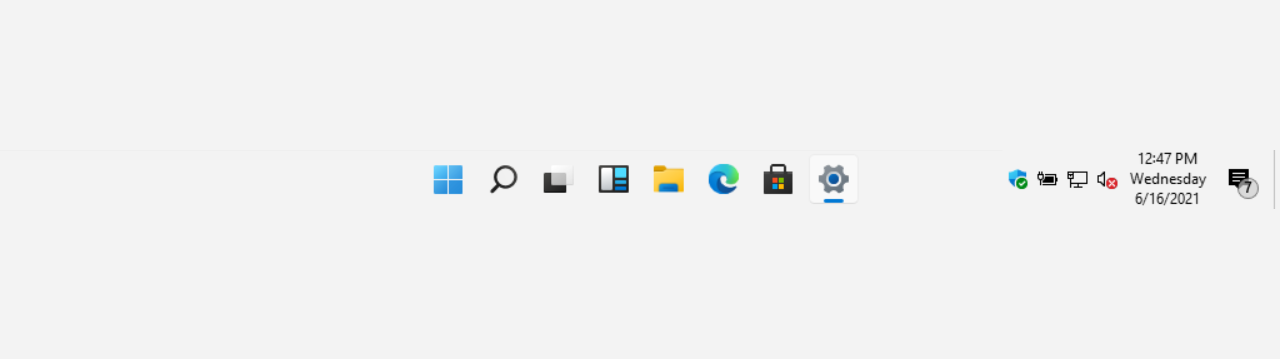
The taskbar with small taskbar icons with setting highlighted in a red box.
We understand that everyone has their own preferences, so we’ve included settings to tailor this feature to your liking. You can choose when Windows will show smaller taskbar buttons:
As always, we value your feedback, so let us know what you think!
FEEDBACK: Please file feedback in Feedback Hub (WIN + F) under Desktop Environment > Taskbar.
FEEDBACK: Please file feedback in Feedback Hub (WIN + F) under Recovery and Uninstall > Quick Machine Recovery.
 www.elevenforum.com
 www.elevenforum.com
You can add your own words to the dictionary in voice access in a few ways:
 www.elevenforum.com
How to enable/disable Screen Curtain:
Amanda & Brandon

 blogs.windows.com
Check Windows Updates
UUP Dump:
64-bit ISO download:

ARM64 ISO download:
 www.elevenforum.com
Windows 11 Insider Canary build 27902.1000 released - July 17
Windows Blogs: Hello Windows Insiders, today we are releasing Windows 11 Insider Preview Build 27902 to the Canary Channel. We are releasing ISOs for this build – they can be downloaded here. We are also not planning to release SDKs for 27xxx series builds for the time being. Changes and...
www.elevenforum.com
Windows Blogs:
Hello Windows Insiders, today we are releasing Windows 11 Insider Preview Build 27898 to the Canary Channel.
We are also not planning to release SDKs for 27xxx series builds for the time being.
What’s new in Build 27898
Taskbar icon scaling
We are starting to roll out taskbar icon scaling to Windows Insiders in the Canary Channel – an improvement to the Windows taskbar that ensures that you have quick access to more of your favorite apps, even when your taskbar is full. With taskbar icon scaling, when your taskbar starts to get crowded with pinned or open apps, the icons will automatically scale down to a smaller size. This means you can keep more apps visible and accessible without the need to dive into a secondary menu. It’s all about making your workflow smoother and more efficient.
Change Size of Taskbar Icons in Windows 11
This tutorial will show you how to change when to show small icons on the taskbar for your account, all users, or specific users in Windows 11. Starting with Windows 11 build 26100.4484 (24H2), build 28120.2387 (Experimental 26H1), build 26220.9022 (Beta 25H2), and build 28020.2623 (Beta 26H1)...
www.elevenforum.com

The taskbar with small taskbar icons with setting highlighted in a red box.
We understand that everyone has their own preferences, so we’ve included settings to tailor this feature to your liking. You can choose when Windows will show smaller taskbar buttons:
- When taskbar is full: By default, taskbar icons will automatically turn smaller when the taskbar is full. This helps you maintain access to more apps without any extra effort.
- Never: For users who prefer their icons to remain the same size as before, regardless of how many apps are open, there’s an option to prevent the icons from scaling down.
- Always: If you love the look of smaller icons and want them to stay that way all the time, you can set your taskbar icons to always be small.
As always, we value your feedback, so let us know what you think!
FEEDBACK: Please file feedback in Feedback Hub (WIN + F) under Desktop Environment > Taskbar.
Introducing quick machine recovery
Quick machine recovery, a feature introduced as part of the Windows Resiliency Initiative at Ignite 2024 – is available for Windows Insiders in the Canary Channel. When enabled, it automatically detects and fixes widespread issues on Windows 11 devices using the Windows Recovery Environment (WinRE). This reduces downtime and avoids the need for manual fixes. If a device experiences a widespread boot issue, it enters WinRE, connects to the internet, and Microsoft can deliver a targeted fix through Windows Update. IT admins can enable or customize this experience for their organization through the Intune Settings Catalog UI using the RemoteRemediationCSP. There is also a dedicated quick machine recovery settings page available under System > Recovery > Quick machine recovery. Today, it’s enabled by default for home users.FEEDBACK: Please file feedback in Feedback Hub (WIN + F) under Recovery and Uninstall > Quick Machine Recovery.
Enable or Disable Quick Machine Recovery in Windows 11
This tutorial will show you how to enable or disable Quick Machine Recovery in Windows 11. Quick machine recovery (QMR) is a feature that enables the recovery of Windows devices when they encounter critical errors that prevent them from booting. QMR automatically detects, diagnoses, and...
www.elevenforum.com
Add custom words to the dictionary in voice access
We are introducing the ability for you to add your own words to the dictionary in voice access. Adding your own words, including difficult to pronounce words, to the dictionary in voice access will help improve dictation accuracy. It increases the probability of recognizing these words more accurately by creating a bias that helps voice access become more context aware and proactively understanding your specific vocabulary. The feature will be available in all the currently supported voice access languages i.e. English, French, German, Spanish and Chinese.
Add Word to Dictionary in Voice Access in Windows 11
This tutorial will show you how to add your own custom words to the dictionary in Voice Access for your account in Windows 11. Voice Access in Windows 11 enables everyone, including people with mobility disabilities, to control their PC and author text using their voice. Starting with Windows...
www.elevenforum.com
You can add your own words to the dictionary in voice access in a few ways:
- After spelling a word using “Spell that”command or making a correction using “Correct that”
- Anywherewhen you want to manually add a word by using “Add to Vocabulary”
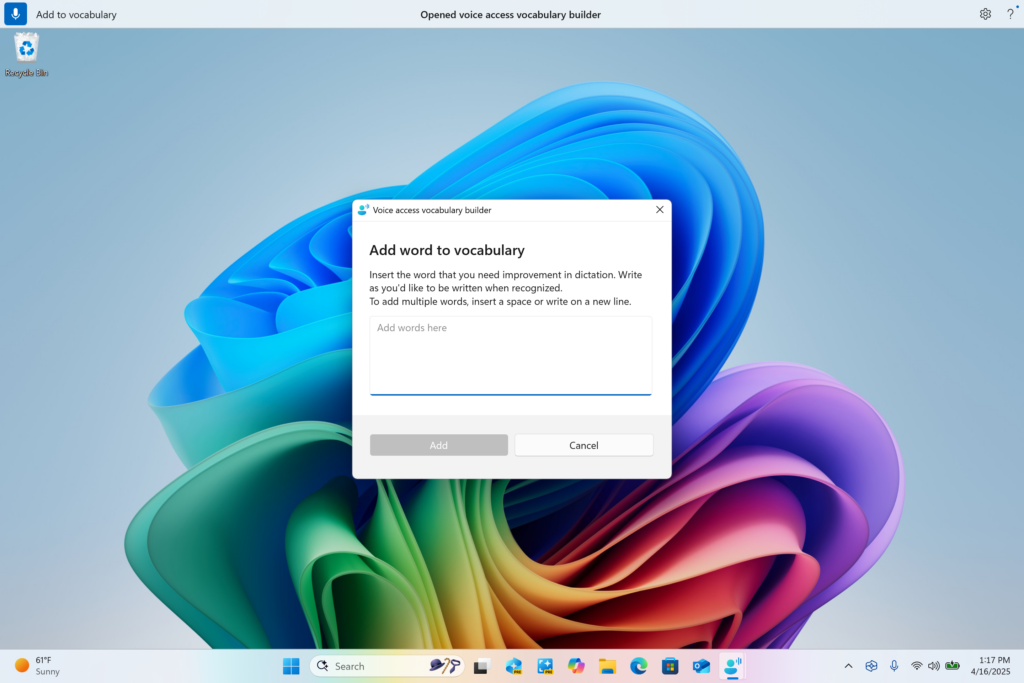
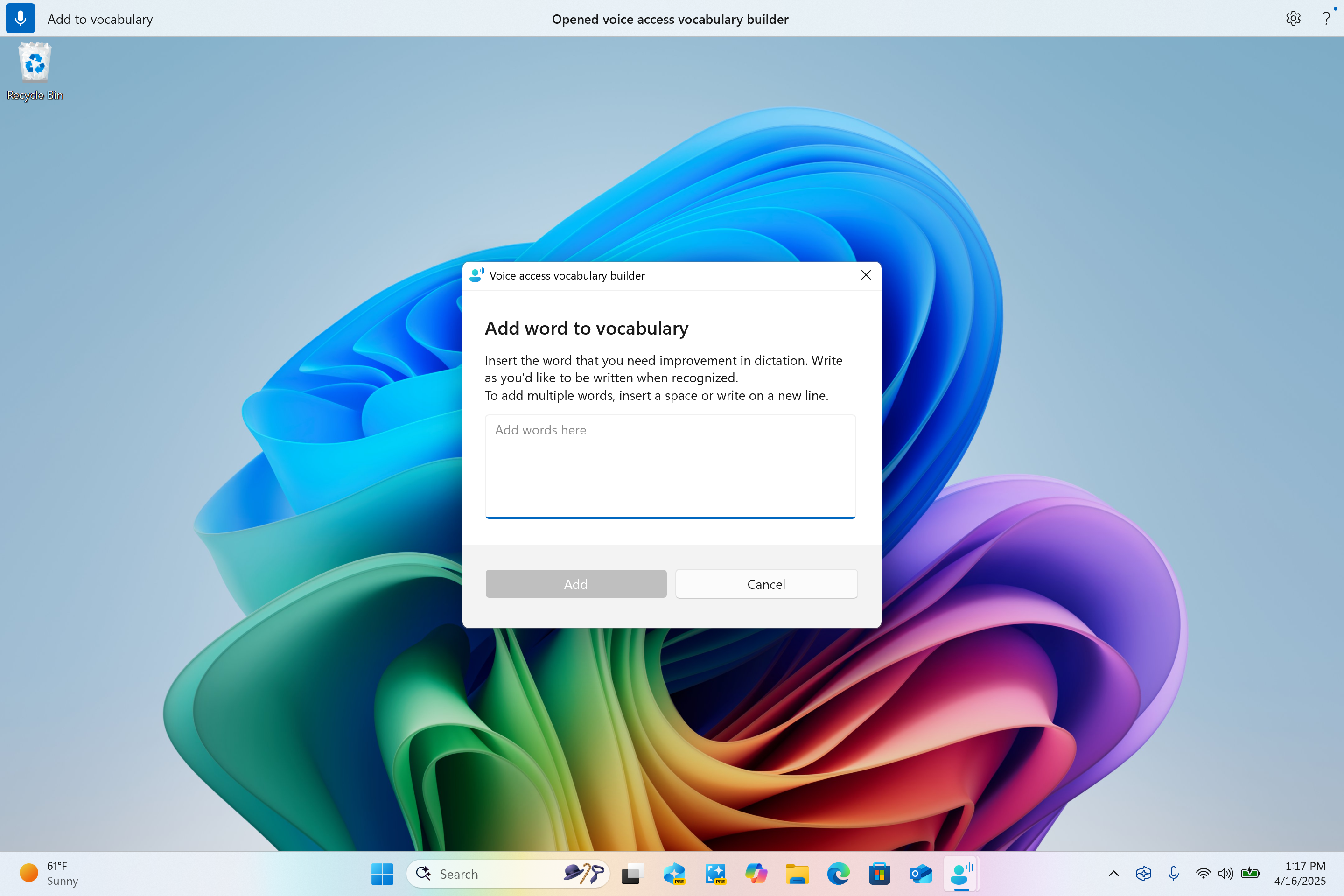
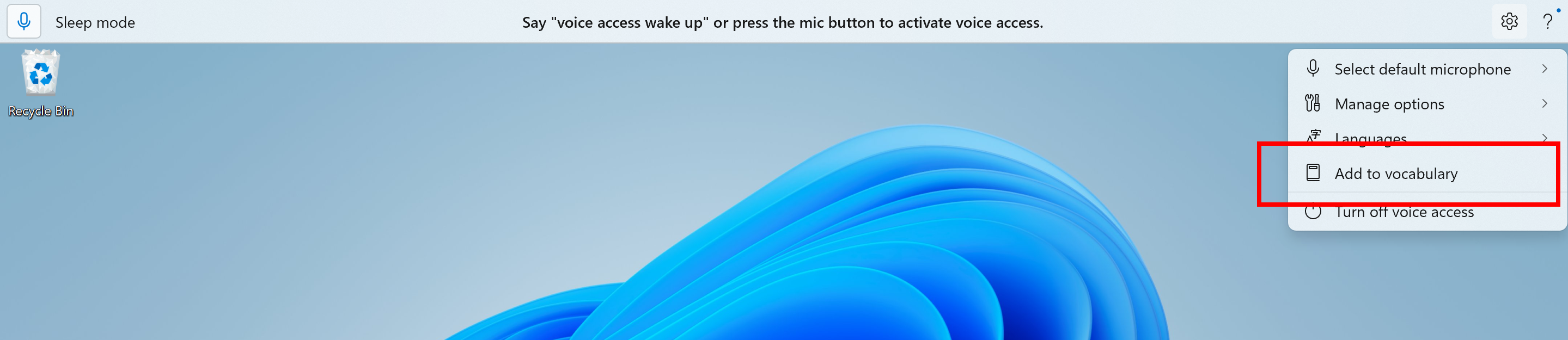
Voice access vocabulary builder dialog for adding your own words to the dictionary. - Directly through the settings menu in voice access.

Add to vocabulary option in voice access settings menu highlighted in a red box.
Screen Curtain in Narrator
The Screen Curtain feature in Narrator is designed to enhance privacy and focus for users who rely on screen reading. When activated, Screen Curtain completely blacks out the display, ensuring that only the user hears what’s on the screen through Narrator, while the visual content remains hidden from view. This is especially useful in public spaces or shared environments, allowing users to read and work with sensitive information without revealing it to others nearby.
Enable or Disable Screen Curtain in Narrator in Windows 11
This tutorial will show you how to enable or disable the Screen Curtain feature in Narrator for your account in Windows 11. Narrator is a screen reader included with Windows 11 that describes what's on your screen. Narrator lets you use your PC without a mouse to complete common tasks if...
www.elevenforum.com
How to enable/disable Screen Curtain:
- Turn On Narrator using Ctrl + Win + Enter.
- Press Caps + Ctrl + C to enable Screen Curtain.
- Try using Narrator, while your Screen Curtain is turned on.
- Press Caps + Ctrl + C to disable Screen Curtain.
Changes and Improvements
[General]
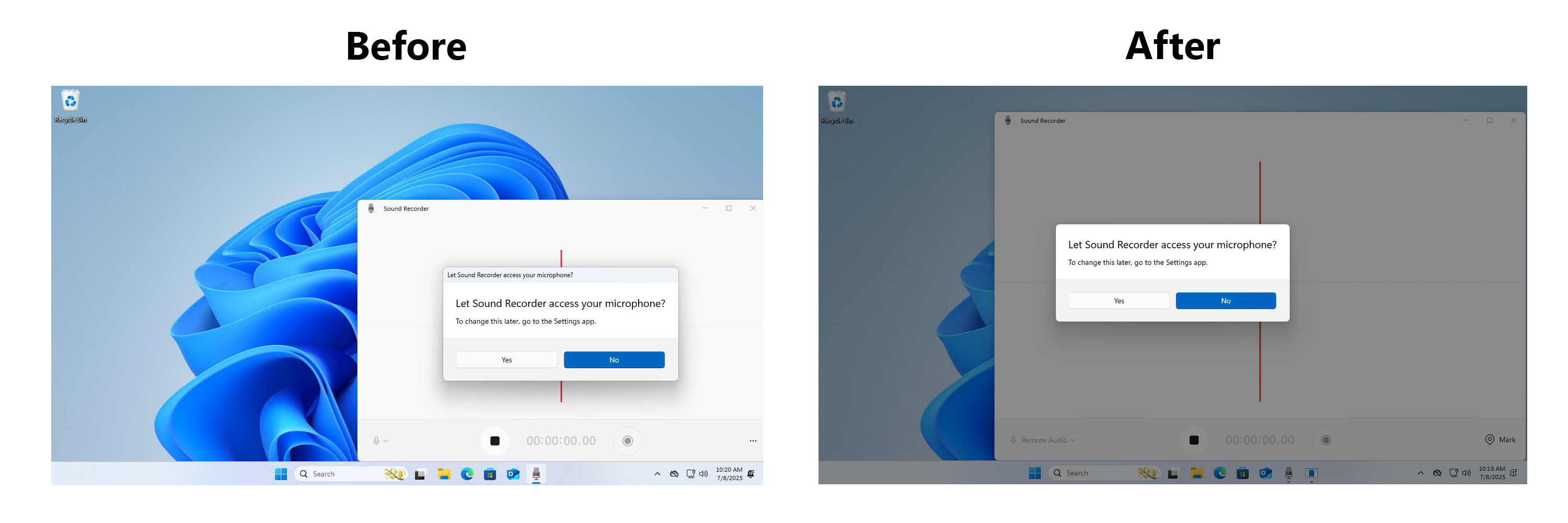
- We’re updating the design of the privacy dialogs for app permissions. When an app requests permission to access location, camera, mic, etc., it is now a system modal dialog. When one of these dialogs appears from an app requesting permission, the screen will slightly darken now, and the privacy dialog will take focus in center screen.

Before and after of design change for privacy dialogs. - We are rolling out a change where Microsoft Entra ID authentication requests will be rendered using WebView2 instead of WebView1.
[Taskbar & System Tray]
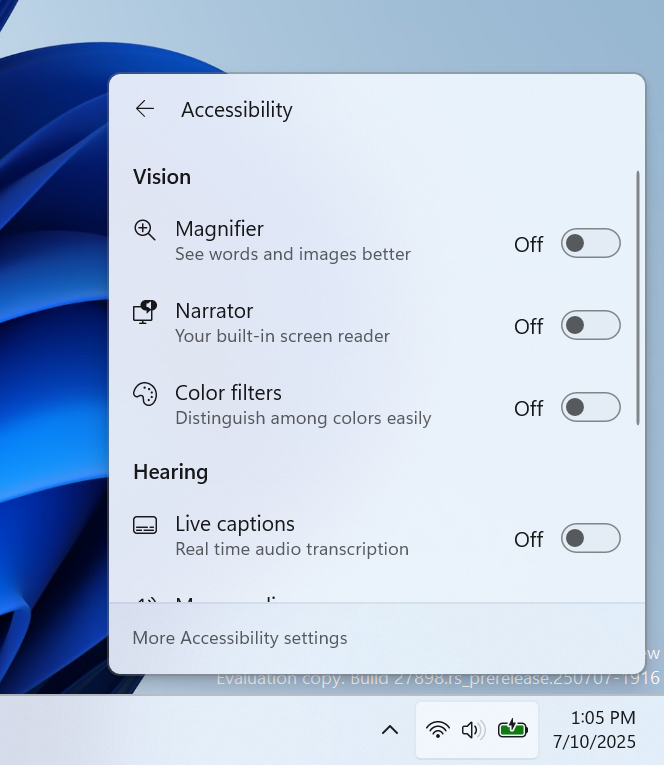
- In addition to the new grouping of the Accessibility flyout in quick settings, we are adding text descriptions for the assistive technologies like Narrator, Voice access, etc. for easy identification and learning by the users.
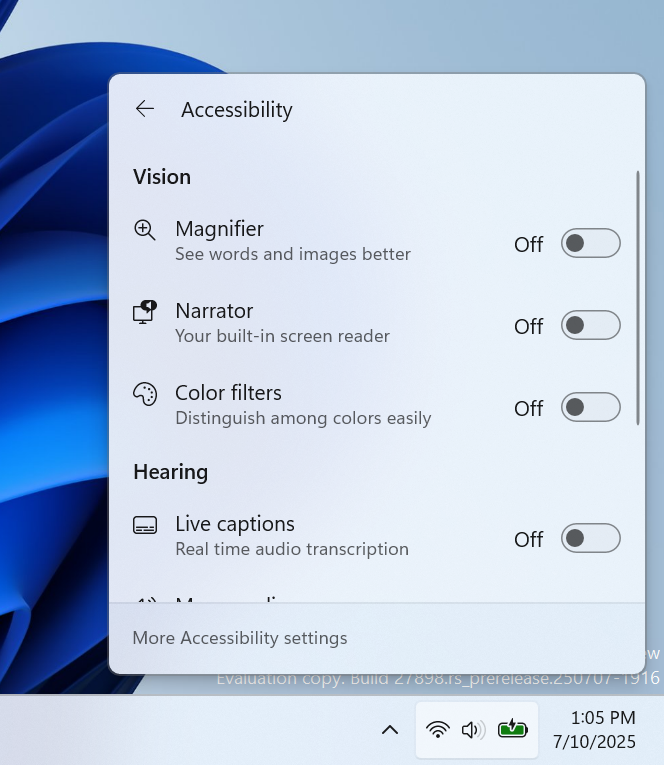
Accessibility flyout via quick setting showing text descriptions for assistive technologies like Narrator, Voice access, etc. - Admins can now allow users to unpin specific pinned apps, ensuring they are not pinned again during the next policy refresh cycle. To enable this feature, use the new PinGeneration option. Learn more about configuring pinned apps on the taskbar.
[File Explorer]
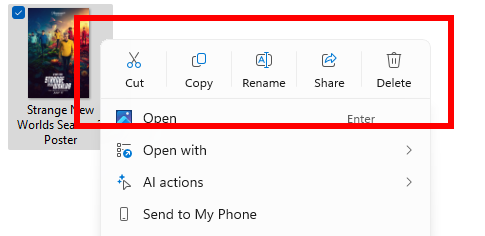
- We have added dividers to the top-level icons that show at the top (or bottom) of the File Explorer context menu.
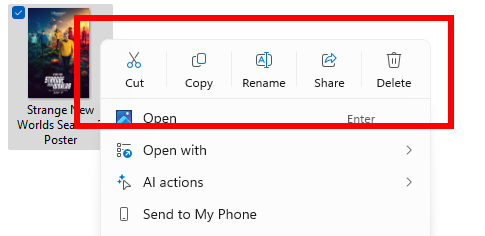
Dividers between top-level icons in the File Explorer context menu.
[Energy Saver]
- We are beginning to preview adaptive energy saver. Adaptive energy saver is an opt-in feature that automatically enables and disables energy saver, without changing screen brightness, based on the power state of the device and the current system load. This will only be available on devices with a battery. As we try this experience out in the Canary Channel, some Insiders may see this experience get enabled – you can manage your energy saver settings under Settings > System > Power & battery.

Turn On or Off Energy Saver in Windows 11
This tutorial will show you how to turn on or off energy saver for all users in Windows 11. Energy Saver replaces battery saver and exists on Windows 11 24H2 and later versions. It significantly extends battery life and reduces energy consumption by automatically managing power usage across...
www.elevenforum.com

Energy saver setting with new dropdown menu for choosing adaptive energy saver.

[Windows Share]
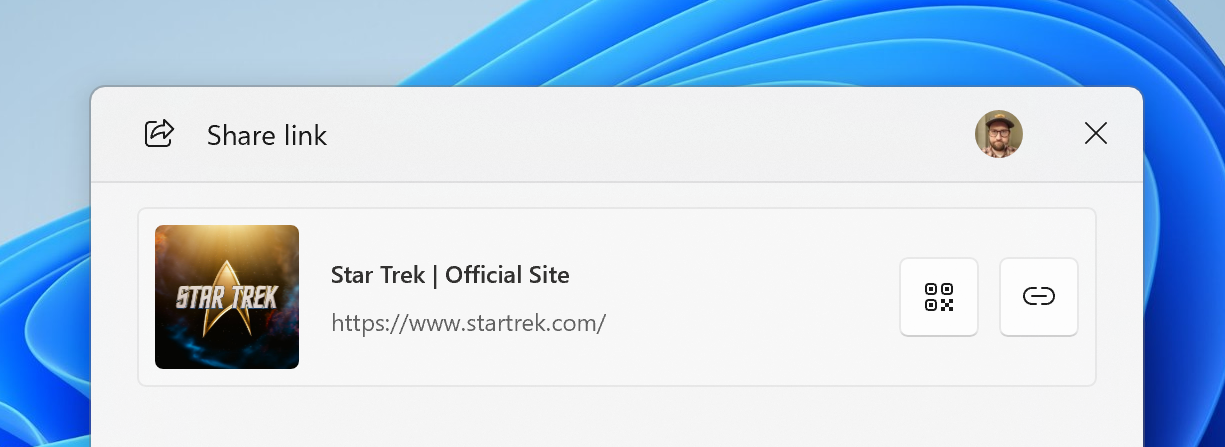
- When you share links or web content using the Windows share window, you will see a visual preview for that content.

Share Link with App, Email, or Nearby Device in Microsoft Edge
This tutorial will show you how to share a website URL link in Microsoft Edge with an app, email, or nearby device in Windows 10 and Windows 11. The Microsoft Edge web browser is based on Chromium and was released on January 15, 2020. It is compatible with all supported versions of Windows, and...
www.elevenforum.com
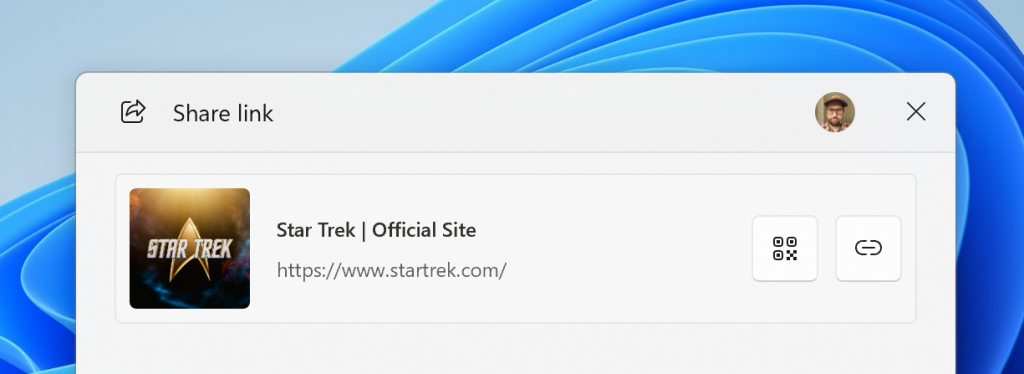
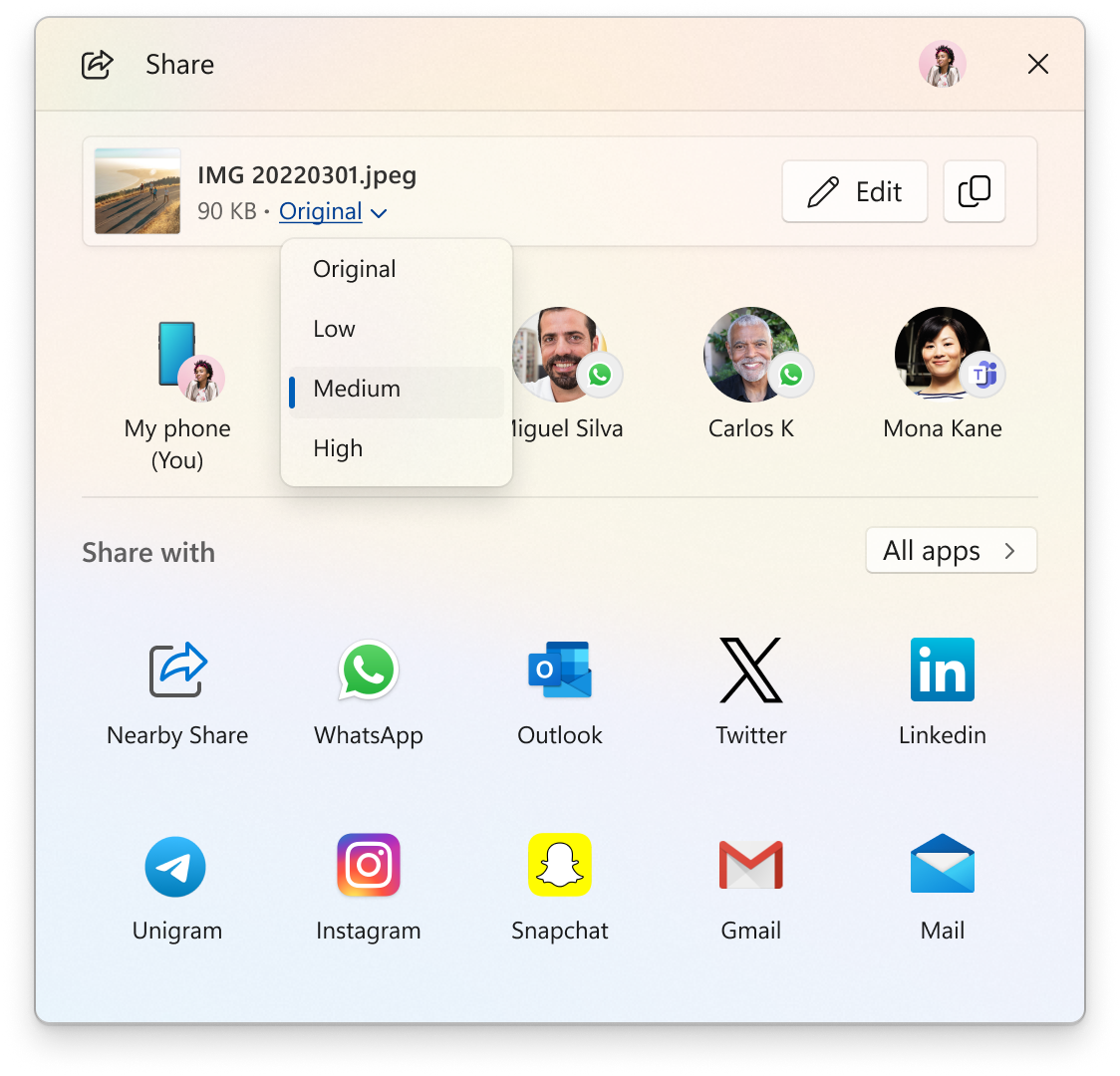
Visual preview of links and web content in the Windows share window. - In the Windows share window, as part of the ability to quickly edit and enhance images while sharing, we have adjusted the UI so that now you can now select their compression scale from High, Medium, or Low Quality, instead of choosing from an entire scale ranging from 0-100.

Change Compression Scale of Image when Sharing in Windows 11
This tutorial will show you how to change the compression scale for image quality when you share the file in Windows 11. You can use Windows Share in Windows 11 to share a file with an app, email contact, mobile device (phone), or nearby device. Starting with Windows 11 build 26100.4484...
www.elevenforum.com
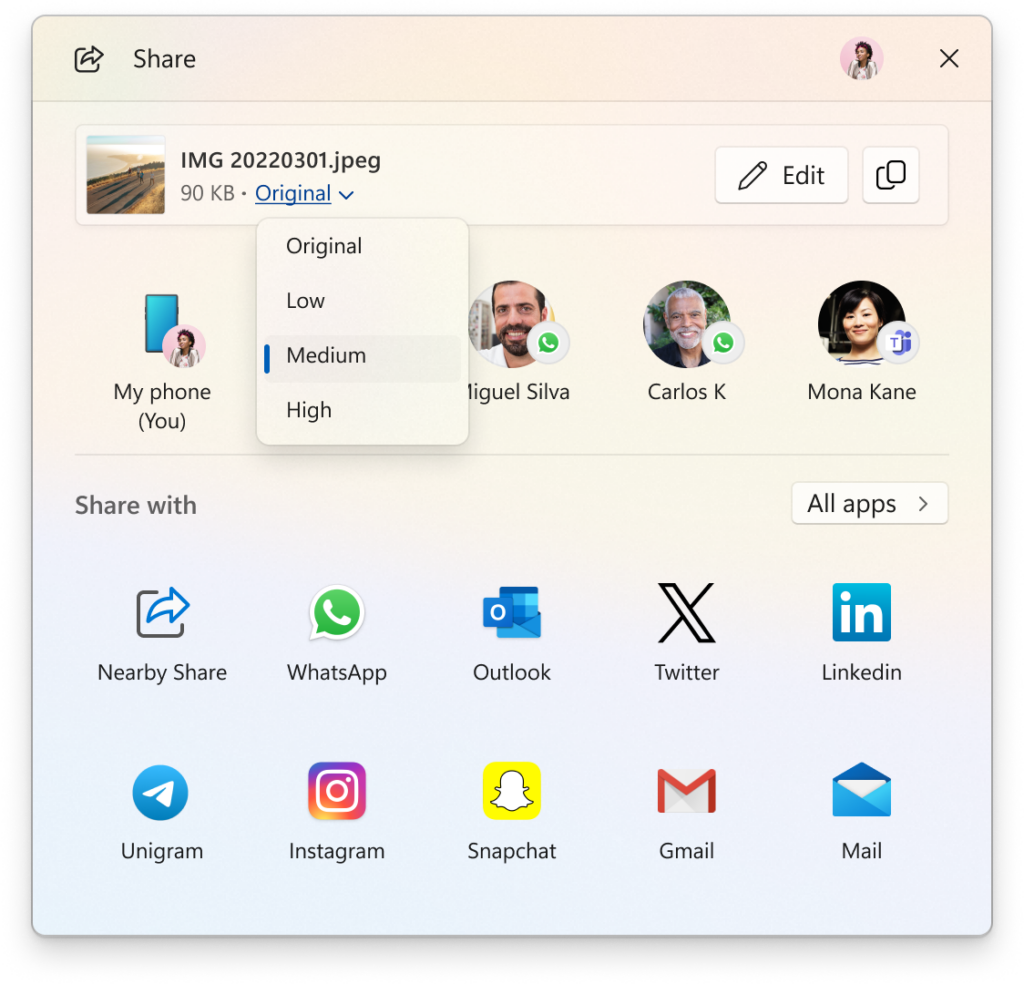
New drop-down menu for compression scale of high, medium, or low when sharing images in the Windows share window.
[Voice access]
- We are introducing Chinese and Japanese support for voice access. You can now use Voice access to navigate, dictate, and interact with Windows using voice commands in Simplified Chinese, Traditional Chinese, and Japanese. Japanese support is still a work-in-progress and may have some issues.
[Snipping Tool]
- With this build, we’re making it easier to jump directly into text extractor in Snipping Tool via Win + Shift + T. You can learn more about using text extractor here.

Copy Text on Screen using Text Extractor in Snipping Tool app in Windows 11
This tutorial will show you how to copy any text on your screen to the clipboard using the Text Extractor feature in the Snipping Tool app in Windows 11. Starting with Snipping Tool (version 11.2503.27.0) for Windows Insiders in the Canary, Dev, and Release Preview (11.2503.29.0) Channels...
www.elevenforum.com
[Settings]
- We have added the country or region selected during device setup under Settings > Time & language > Language & region.

Change Country or Region Geographic Location (GeoID) in Windows 11
This tutorial will show you how to change your country or region for your account in Windows 11. The country or region home location in Windows, referred to as geographic location (GeoID), indicates the country or region you are in. Windows 11, Microsoft Store, and apps might use your country...
www.elevenforum.com
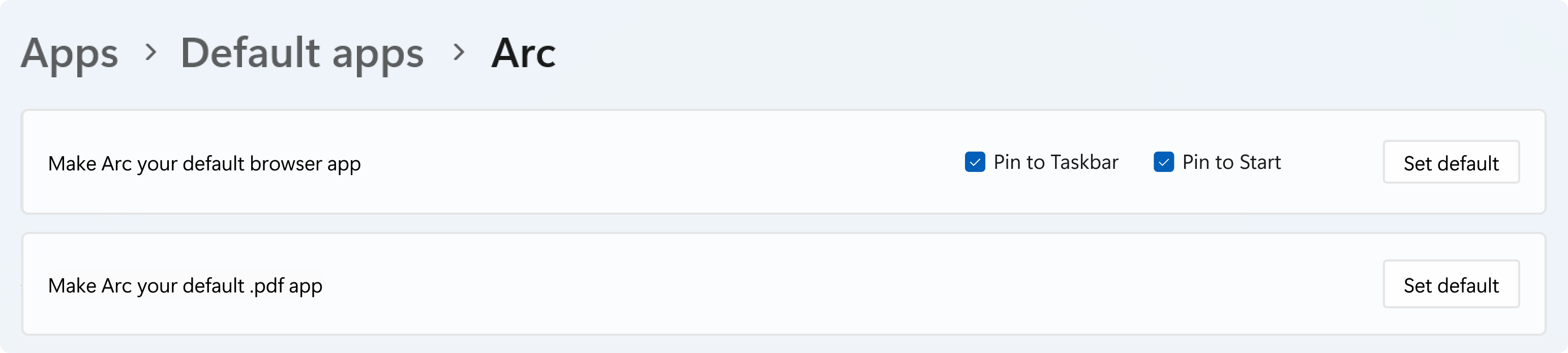
- For Add new link/file types of ‘Set Default’ button, we have added additional types for the “Set Default” button. You can now set more types.
- For one-click button of PDF for browser sets, we have added a new button for making your default browser also the default app for PDF files.
- The new default browser will be pinned to the Taskbar and Start menu unless you choose not to pin it by clearing the checkboxes.

Browser default settings page showing new set default button for PDF files and pinning to Start and Taskbar.
Fixes
[File Explorer]
- We’ve done some more work to improve the performance of extracting archive files – this will particularly help in the case of copy pasting large numbers of files out of large 7z or .rar archives.
[Input]
- Fixed an issue where typing Japanese with the touch keyboard might stop working after switching to typing with an English keyboard and back.
[Settings]
- Fixed an issue which could cause Settings to crash when changing mouse cursor.
- Fixed an underlying issue which could lead to the Settings window hanging and no longer responding to input or resizing unless you closed and reopened it.
[Other]
- Fixed an underlying issue in the previous flight which could lead to Math.Pow() not outputting the correct result, which could lead to unexpected behavior in apps and games.
- Adjusted the error text if a Windows Update fails due to the system reserved partition not having enough free space, to make it clearer that that’s the issue.
Known issues
[General]
- [IMPORTANT NOTE FOR COPILOT+ PCs] If you are joining the Canary Channel on a new Copilot+ PC from the Dev Channel, Beta Channel, Release Preview Channel or retail, you will lose Windows Hello pin and biometrics to sign into your PC with error 0xd0000225 and error message “Something went wrong, and your PIN isn’t available”. You should be able to re-create your PIN by clicking “Set up my PIN”.
- [ADDED] This week’s Canary Channel flight comes with a delightful blast from the past and will play the Windows Vista boot sound instead of the Windows 11 boot sound. The fix should be coming in a future Canary Channel flight soon.

Enable or Disable Startup Sound in Windows 11
This tutorial will show you how to enable or disable playing the Windows startup sound for all users in Windows 11. The startup sound was disabled by default in Windows 10. The startup sound for Windows 11 has returned in which you will hear when your PC boots up to the Lock screen and is...
www.elevenforum.com
[File Explorer]
- [NEW] There’s an issue in this build where File Explorer may fail to persist any view changes. This also impacts desktop icons, which may unexpectedly move or change size back to default.
[Settings]
- We’re investigating an issue in this build which could cause Settings to crash when interacting with the options under Settings > System > Power & Battery.
[Remote Desktop]
- You may see extreme graphical distortion and rendering issues using remote desktop on Arm64 PCs in this build.
Reminders for Windows Insiders in the Canary Channel
- The builds we release to the Canary Channel represent the latest platform changes early in the development cycle and should not be seen as matched to any specific release of Windows and features and experiences included in these builds may never get released as we try out different concepts and get feedback. Features may change over time, be removed, or replaced and never get released beyond Windows Insiders. Some of these features and experiences could show up in future Windows releases when they’re ready.
- Many features in the Canary Channel are rolled out using Control Feature Rollout technology, starting with a subset of Insiders and ramping up over time as we monitor feedback to see how they land before pushing them out to everyone in this channel.
- Some features may show up in the Dev and Beta Channels first before showing up in the Canary Channel.
- Some features in active development we preview with Windows Insiders may not be fully localized and localization will happen over time as features are finalized. As you see issues with localization in your language, please report those issues to us via Feedback Hub.
- To get off the Canary Channel, a clean install of Windows 11 will be required. As a reminder – Insiders can’t switch to a channel that is receiving builds with lower build numbers without doing a clean installation of Windows 11 due to technical setup requirements.
- The desktop watermark shown at the lower right corner of the desktop is normal for these pre-release builds.
- Check out Flight Hub for a complete look at what build is in which Insider channel.
Amanda & Brandon
Source:
Announcing Windows 11 Insider Preview Build 27898 (Canary Channel)
Hello Windows Insiders, today we are releasing Windows 11 Insider Preview Build 27898 to the Canary Channel. We are also not planning to release SDKs for 27xxx series builds for the time being. What’s
blogs.windows.com
Check Windows Updates
UUP Dump:
64-bit ISO download:
Select language for Windows 11 Insider Preview 27898.1000 (rs_prerelease) amd64
Select language for Windows 11 Insider Preview 27898.1000 (rs_prerelease) amd64 on UUP dump. UUP dump lets you download Unified Update Platform files, like Windows Insider updates, directly from Windows Update.
uupdump.net
ARM64 ISO download:
Select language for Windows 11 Insider Preview 27898.1000 (rs_prerelease) arm64
Select language for Windows 11 Insider Preview 27898.1000 (rs_prerelease) arm64 on UUP dump. UUP dump lets you download Unified Update Platform files, like Windows Insider updates, directly from Windows Update.
uupdump.net
UUP Dump - Download Windows Insider ISO
UUP Dump is the most practical and easy way to get ISO images of any Insider Windows 10 or Windows 11 version, as soon as Microsoft has released a new build. UUP Dump creates a download configuration file according to your choices, downloads necessary files directly from Microsoft servers, and...
www.elevenforum.com
Last edited:


 "
"