UPDATE 3/20:
 www.elevenforum.com
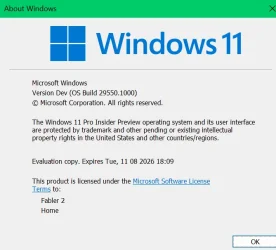
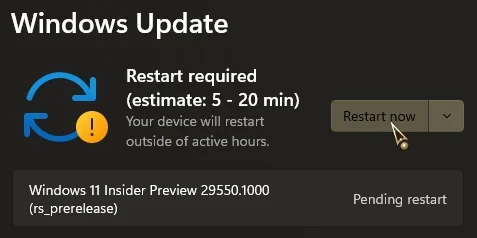
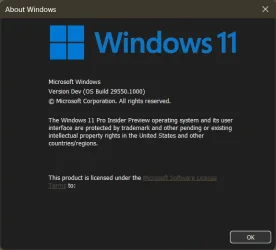
Hello Windows Insiders, today we’re releasing Windows Insider Preview Build 29550.1000 to the Windows 11 Insider Canary Channel on the optional 29500 build series.
Insiders can take an optional update under Settings > Windows Update > Advanced options > Optional updates which will move your device from the 28000 build series to a new active development 29500 build series. Please note, because of the focus on platform development for this path, you may notice a temporary loss in some features that you have today. These features will return to this new active development build.
 www.elevenforum.com
Windows Insider Program Team

 blogs.windows.com
Check Windows Updates
UUP Dump:
64-bit ISO download:

ARM64 ISO download:
 www.elevenforum.com
Windows 11 Insider Canary build 29553.1000 - March 20
Windows Insider Blog: Source: https://blogs.windows.com/windows-insider/2026/03/20/announcing-windows-11-insider-preview-build-for-canary-channel-29553-1000/ Check Windows Updates UUP Dump: 64-bit ISO download: https://uupdump.net/selectlang.php?id=ad7080e3-5f4a-43b3-afea-65450cf1cd34...
www.elevenforum.com
Windows Insider Blog:
Hello Windows Insiders, today we’re releasing Windows Insider Preview Build 29550.1000 to the Windows 11 Insider Canary Channel on the optional 29500 build series.
Insiders can take an optional update under Settings > Windows Update > Advanced options > Optional updates which will move your device from the 28000 build series to a new active development 29500 build series. Please note, because of the focus on platform development for this path, you may notice a temporary loss in some features that you have today. These features will return to this new active development build.
Enable or Disable Get Latest Updates as soon as available in Windows 11
This tutorial will show you how to turn on or off "Get the latest updates as soon as they are available" in Windows 11. Starting with Windows 11 build 22621.1635, Microsoft added a new "Get the latest updates as soon as they are available" toggle under Settings > Windows Update. When you turn...
www.elevenforum.com
What’s new in Canary Build 29550.1000
Changes and Improvements gradually being rolled out with toggle on*
- This update includes platform changes in moving to a new active development build.
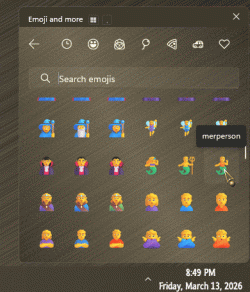
[Emoji]
- The Emoji 16.0 release introduces a small thoughtfully curated set of new emojis, one from each major category. Each emoji carries timeless symbolism and practical versatility. These new emojis now appear in the emoji panel.

Open Emoji Panel in Windows 11
This tutorial will show you how to open the Emoji Panel in Windows 11. An emoji is a pictogram, logogram, ideogram or smiley embedded in text. Windows 11 includes 3D Fluent emoji you can use from the Emoji Panel. Starting with Windows 11 build 22631.3810, Microsoft is adding support for Emoji...
www.elevenforum.com
[Camera Settings]
- You can control pan and tilt for supported cameras in the Settings app. The controls appear under Settings> Bluetooth & devices > Cameras, in the “Basic settings” section for your selected camera.

Change Default Camera Settings and Studio Effects in Windows 11
This tutorial will show you how to change or reset the default brightness, contrast, and other available image settings and Studio Effects for a camera in Windows 11. Having a camera as part of your Windows device or system lets you make Skype video calls, take pictures, etc. Many apps and...
www.elevenforum.com
[Power]
- Changes to global power settings (for example, Display, Sleep, Hibernate timeouts, Power/Sleep button, and lid close actions) from Settings are now applied to all power plans. This should help improve persistence of chosen settings.

Change Screen Timeout to Turn Off Display After in Windows 11
This tutorial will show you how to specify how long your PC is inactive before your display turns off automatically in Windows 11. You can specify a screen timeout for how long the PC sits inactive without user activity before all connected displays automatically turn off. When your display...
www.elevenforum.com

Change When to Put Computer to Sleep Timeout in Windows 11
This tutorial will show you how to change how long after your computer is inactive (idle) before automatically put to sleep in Windows 11. Sleep uses very little power, your PC starts up faster, and you’re instantly back to where you left off. You don’t have to worry that you'll lose your work...
www.elevenforum.com

Change Computer Hibernate after Idle Timeout in Windows 11
This tutorial will show you how to change how long after your computer is inactive (idle) before automatically enters hibernation in Windows 11. Hibernate was designed for laptops and might not be available for all PCs. (For example, PCs with Modern Standby may not have the hibernate option.)...
www.elevenforum.com

Change Power Button Action in Windows 11
This tutorial will show you how to change the default action to take when pressing the power button in Windows 10 and Windows 11. The power button action setting lets users specify the default action to take when the system hardware power button on the PC is pressed. Users can specify one of...
www.elevenforum.com

Change Sleep Button Action in Windows 11
This tutorial will show you how to change the default action to take when pressing the sleep button in Windows 10 and Windows 11. The sleep button action setting lets users specify the default action to take when the system hardware sleep button (if available) on the PC is pressed. Users can...
www.elevenforum.com
Change Lid Close Action in Windows 11
This tutorial will show you how to change the default action to take when closing the lid of your laptop in Windows 10 and Windows 11. The lid switch close action specifies the action to take when the system lid is closed. Users can specify one of the following actions to take: Do Nothing =...
www.elevenforum.com
[File Explorer]
- You can now use voice typing (Windows key plus H) when renaming files in File Explorer.

Rename File in Windows 11
This tutorial will show you different ways to rename a file to what you want in Window 11. A file name can't contain any of the following characters: \ / : * ? " < > | If you rename more than one file at the same time, the name of each file will be the same and numbered in order like: new file...
www.elevenforum.com
[Settings]
- Improved performance of loading Settings Home.
- Improved Settings reliability when navigating to Privacy & Security.
- Improved reliability of updating necessary components when prompted under System > Advanced > File Explorer.
- Improved reliability of configuring custom tools in Bluetooth & Devices > Wheel.
[Nearby Sharing]
- Improved the reliability of sending larger files using nearby sharing.

Share Files with Nearby Devices in Windows 11
This tutorial will show you how to share files with nearby devices using Nearby Sharing in Windows 11. Windows Share in Windows 11 allows you to share file(s) using Nearby Sharing. Nearby sharing in Windows lets you share documents, photos, links to websites, and more with nearby devices by...
www.elevenforum.com
[Other]
- Improved reliability of running sfc/scannow.
Use System File Checker (SFC) to Repair System Files in Windows 11
This tutorial will show you how to run the System File Checker (SFC) tool to repair missing, corrupted, and modified system files in Windows 10 and Windows 11. System File Checker (SFC) is a tool built into Windows that will check for system file corruption. The SFC /SCANNOW command scans and...
www.elevenforum.com
Reminders for Windows Insiders in the Canary Channel
- These builds can be unstable and may be released with limited documentation. Join Windows Insider – Get early access to Windows 11 features & updates
- The builds we release to the Canary Channel represent the latest platform changes early in the development cycle and should not be seen as matched to any specific release of Windows. Features and experiences included in these builds may never get released as we try out different concepts and get feedback. Features may change over time, be removed, or replaced and never get released beyond Windows Insiders. Some of these features and experiences could show up in future Windows releases when they’re ready.
- Many features in the Canary Channel are rolled out using Control Feature Rollout technology, starting with a subset of Insiders and ramping up over time as we monitor feedback to see how they land before pushing them out to everyone in this channel.
- The desktop watermark shown at the lower right corner of the desktop is normal for Windows Insider pre-release builds.
- Some features may show up in the Dev and Beta Channels first before showing up in the Canary Channel.
- Some features in active development we preview with Windows Insiders may not be fully localized and localization will happen over time as features are finalized. As you see issues with localization in your language, please report those issues to us via Feedback Hub.
- To get off the Canary Channel, a clean install of Windows 11 will be required.
- Check out Flight Hub for a complete look at what build is in which Insider channel.
Windows Insider Program Team
Source:
Announcing Windows 11 Insider Preview Build for Canary Channel 29550.1000
Hello Windows Insiders, today we’re releasing Windows Insider Preview Build 29550.1000 to the Windows 11 Insider Canary Channel on the optional 29500 build series. What’s new in Canary Build 29550.1000 Change
blogs.windows.com
Check Windows Updates
UUP Dump:
64-bit ISO download:
Select language for Windows 11 Insider Preview 29550.1000 (rs_prerelease) amd64
Select language for Windows 11 Insider Preview 29550.1000 (rs_prerelease) amd64 on UUP dump. UUP dump lets you download Unified Update Platform files, like Windows Insider updates, directly from Windows Update.
uupdump.net
ARM64 ISO download:
Select language for Windows 11 Insider Preview 29550.1000 (rs_prerelease) arm64
Select language for Windows 11 Insider Preview 29550.1000 (rs_prerelease) arm64 on UUP dump. UUP dump lets you download Unified Update Platform files, like Windows Insider updates, directly from Windows Update.
uupdump.net
UUP Dump - Download Windows Insider ISO
UUP Dump is the most practical and easy way to get ISO images of any Insider Windows 10 or Windows 11 version, as soon as Microsoft has released a new build. UUP Dump creates a download configuration file according to your choices, downloads necessary files directly from Microsoft servers, and...
www.elevenforum.com
Last edited: