Insider Windows 11 Insider Experimental (Future Platforms) build 29595.1000 - May 22


UPDATE 5/29:


 Windows Insider Blog:

As a reminder, these release notes apply to those who are in the Canary 29500 Series Channel. As we begin the transition to the updated Windows Insider Program, all new build release notes will be labeled under the new channel names, even though Insiders in the Canary 29500 Series Channel may not yet find themselves having transitioned to Experimental (Future Platforms). See the Windows Insider Blog for more details.


Changes and improvements gradually being rolled out

  • This update includes platform changes in moving to a new active development build.

Reminder for Windows Insiders in the Canary 29500 Series Channel (soon transitioning to Experimental (Future Platforms))

  • These builds can be unstable and may be released with limited documentation.
  • The builds we release to the Canary 29500 Series Channel represent the latest platform changes early in the development cycle and should not be seen as matched to any specific release of Windows. Features and experiences included in these builds might never get released as we try out different concepts and get feedback. Features might change over time, be removed, or replaced, and never get released beyond Windows Insiders. Some of these features and experiences could show up in future Windows releases when they are ready.
  • Many features in the Canary 29500 Series Channel are rolled out using Controlled Feature Rollout technology, starting with a subset of Insiders and ramping up over time as we monitor feedback to see how they land before pushing them out to everyone in this channel.
  • The desktop watermark shown at the lower right corner of the desktop is normal for Windows Insider pre-release builds.
  • For Windows Insiders who want to be the first to get features gradually rolled out to you, you can turn on the toggle to get the latest updates as they are available via Settings > Windows Update. Over time, we will increase the rollouts of features to everyone with the toggle turned on. Should you keep this toggle off, new features will gradually be rolled out to your PC over time once they are ready.
  • Some features in active development we preview with Windows Insiders might not be fully localized and localization will happen over time as features are finalized. As you see issues with localization in your language, please report those issues to us via Feedback Hub.


 Source:


Check Windows Updates


ISO from Microsoft:



UUP Dump:

64-bit ISO download:

ARM64 ISO download:

 
Last edited:

@Brink
I am not getting this build yet.
Switching to Dev for now. Dev & Beta done.

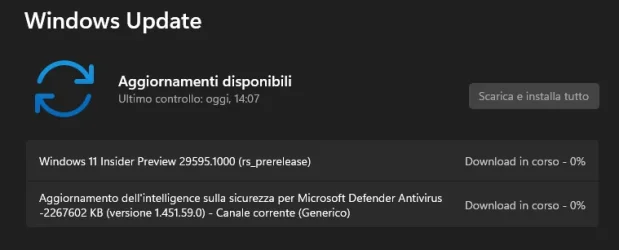
29595 not in WU, switching to UUP.
UUP install completed.
 
Last edited:

My Computers

System One System Two

  • OS
    All Branches but Release
    Computer type
    Laptop
    Manufacturer/Model
    Acer Nitro ANV15-51
    CPU
    AMD Ryzen 7 7735HS 3200-4500 Mhz 8 cores x 2
    Motherboard
    Sportage_RBH
    Memory
    32 GB DDR5
    Graphics Card(s)
    Radeon Graphic / NVIDIA GeForce RTX 4060 8 GB GDDR6
    Sound Card
    AMD/Realtek(R) Audio
    Monitor(s) Displays
    Integrated Monitor (15.3"vis)
    Screen Resolution
    FHD 1920X1080 16:9 144Hz
    Hard Drives
    KINGSTON OM8SEP4512Q-AA 1TB
    Western Digital 256GB
    PSU
    19V DC 6.32 A 120 W
    Cooling
    Dual Fans
    Mouse
    MS Bluetooth
    Internet Speed
    Fiber 1GB Cox -us & 1GB Orange-fr
    Browser
    Edge Canary- Firefox Nightly-Chrome Dev-Chrome Dev
    Antivirus
    Windows Defender
  • Operating System
    Windows 11 Beta
    Computer type
    Laptop
    Manufacturer/Model
    Asus X751BP
    CPU
    AMD A9-9420
    Memory
    8 GB of DDR4
    Graphics card(s)
    AMD Radeon R5
    Screen Resolution
    1600x900
    Hard Drives
    Seagate 1 TB
Got Canary 29xxx running on a VMWare VM. Updated it via WU, download was quick, install took a while. Lot of under the hood changes no new features worth noting.
 
Last edited:

My Computers

System One System Two

  • OS
    Windows 11 Pro 25H2
    Computer type
    PC/Desktop
    Manufacturer/Model
    Homebuilt
    CPU
    Intel Core i9 13900K
    Motherboard
    Asus ProArt Z790 Creator WiFi - Bios 3107
    Memory
    Corsair Dominator Platinum 64gb 5600MT/s DDR5 Dual Channel
    Graphics Card(s)
    Sapphire NITRO+ AMD Radeon RX 7900 XTX Vapor-X 24GB
    Sound Card
    External DAC: Cambridge Audio DACMagic200M - Headphone Amp: Topping L50
    Monitor(s) Displays
    Panasonic MX950 Mini LED 55" TV 120hz
    Screen Resolution
    3840 x 2160 120hz
    Hard Drives
    Samsung 980 Pro 2TB (OS)
    Samsung 980 Pro 1TB (Files)
    Lexar NZ790 4TB
    LaCie d2 Professional 6TB external - USB 3.1
    Seagate Expansion 16TB external - USB 3.2
    Seagate One Touch 18TB external HD - USB 3.0
    PSU
    Corsair RM1200x Shift
    Case
    Corsair RGB Smart Case 5000x (white)
    Cooling
    Corsair iCue H150i Elite Capellix XT
    Keyboard
    Incase Ergonomic USB (Microsoft clone)
    Mouse
    Logitech MX Master 3S
    Internet Speed
    Fibre 900/500 Mbps
    Browser
    Microsoft Edge Chromium
    Antivirus
    Bitdefender Total Security
    Other Info
    AMD Radeon Software & Drivers 26.1.1
    Hasleo Backup Suite
    Dashlane password manager
    Kensington Verimark fingerprint reader
    Logitech Brio 4K webcam
    Orico 10-port powered USB 3.0 hub
  • Operating System
    Windows 11 Pro 25H2
    Computer type
    Laptop
    Manufacturer/Model
    Asus Vivobook X1605VA
    CPU
    Intel® Core™ i9-13900H
    Motherboard
    Asus X1605VA bios 309
    Memory
    32GB DDR4-3200 Dual channel
    Graphics card(s)
    *Intel Iris Xᵉ Graphics G7
    Sound Card
    Realtek | Intel SST Bluetooth & USB
    Monitor(s) Displays
    16.0-inch, WUXGA 16:10 aspect ratio, IPS-level Panel
    Screen Resolution
    1920 x 1200 60hz
    Hard Drives
    512GB M.2 NVMe™ PCIe® 3.0 SSD
    Mouse
    Logitech MX Ergo Trackball
    Antivirus
    Bitdefender Total Security
    Other Info
    720p Webcam
    WiFi & USB to ethernet
Green Screen on first reboot then rebooted again and continued to install correctly.

Snipaste_2026-05-22_20-55-05.webp
 

My Computers

System One System Two

  • OS
    Win 11 Pro
    Computer type
    Laptop
    Manufacturer/Model
    ASUS Vivobook
    CPU
    AMD Ryzen™ 7 7730U
    Motherboard
    M1605YA
    Memory
    24GB Dual-Channel DDR4 @ 1596MHz (22-22-22-52)
    Graphics Card(s)
    512MB ATI AMD Radeon Graphics (ASUStek Computer Inc)
    Monitor(s) Displays
    Generic PnP Monitor (1920x1200@60Hz) - P1 PLUS (1920x1080@59Hz)
    Screen Resolution
    1920 X 1200
    Hard Drives
    953GB Western Digital WD
    PSU
    45 Watts
    Mouse
    Lenovo Bluetooth.
    Internet Speed
    500 Mbps
    Browser
    Edge
    Antivirus
    Defender
  • Operating System
    Windows 11
    Computer type
    Laptop
    Manufacturer/Model
    ACER NITRO
    CPU
    AMD Ryzen 7 5800H / 3.2 GHz
    Motherboard
    CZ Scala_CAS (FP6)
    Memory
    32 GB DDR4 SDRAM 3200 MHz
    Graphics card(s)
    NVIDIA GeForce RTX 3060 6 GB GDDR6 SDRAM
    Sound Card
    Realtek Audio. NVIDIA High Definition Audio
    Monitor(s) Displays
    15.6" LED backlight 1920 x 1080 (Full HD) 144 Hz
    Screen Resolution
    1920 x 1080 (Full HD)
    Hard Drives
    Samsung 970 Evo Plus 2TB NVMe M.2
    PSU
    180 Watt, 19.5 V
    Mouse
    Lenovo Bluetooth
    Internet Speed
    500 Mbps
    Browser
    Edge
    Antivirus
    Defender
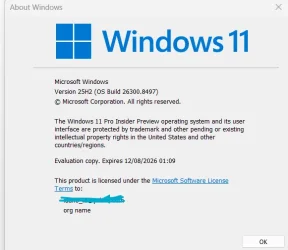
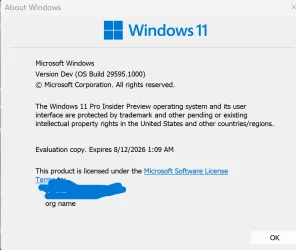
Updated one machine.

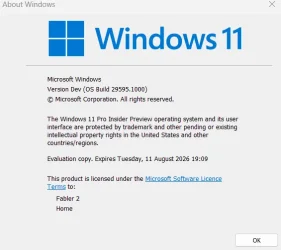
Edition Windows 11 Pro Insider Preview
Version Dev
Installed on ‎5/‎22/‎2026
Evaluation expires on ‎8/‎11/‎2026 11:09 AM
OS build 29595.1000
Experience Windows Feature Experience Pack 1000.26100.348.0
 

My Computer

System One

  • OS
    Windows 11 Pro 25H2
    Computer type
    PC/Desktop
    Manufacturer/Model
    Dell XPS 8930
    CPU
    Intel I9-9900K
    Memory
    64GB
    Graphics Card(s)
    NVIDIA RTX 2060
    Sound Card
    NVIDIA High Definition Audio
    Monitor(s) Displays
    4k Samsung
    Screen Resolution
    3840 x 2160
    Hard Drives
    512GB NVMe, ADATA SU 800, 2TB HDD
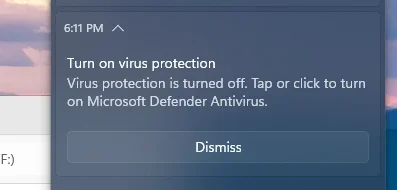
Still getting the message to turn on defender even if it is already up and running.

1779498823905.webp
 
Last edited:

My Computer

System One

  • OS
    Windows 11 Pro 25H2
    Computer type
    PC/Desktop
    Manufacturer/Model
    Dell XPS 8930
    CPU
    Intel I9-9900K
    Memory
    64GB
    Graphics Card(s)
    NVIDIA RTX 2060
    Sound Card
    NVIDIA High Definition Audio
    Monitor(s) Displays
    4k Samsung
    Screen Resolution
    3840 x 2160
    Hard Drives
    512GB NVMe, ADATA SU 800, 2TB HDD
1779491655324.webp

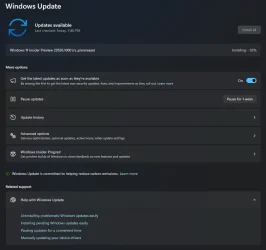
It took me a little while but I've gotten the build too!
EDIT: Installed! All good.
 
Last edited:

My Computer

System One

  • OS
    Windows 11 RP 26200
    Computer type
    PC/Desktop
    Manufacturer/Model
    N/A
    CPU
    AMD Ryzen 5 5600
    Motherboard
    ASUS B450M-GAMING/BR
    Memory
    2x16GB DDR4-3200 CL16
    Graphics Card(s)
    MSI RTX 3060 12GB
    Sound Card
    Realtek HDA
    Monitor(s) Displays
    AW2724DM, LG 24MK400
    Screen Resolution
    2560x1440 + 1920x1080
    Hard Drives
    2x Kingston A400 960GB
    SanDisk SSDNow 480GB
    Western Digital SN750 500GB
    PSU
    Corsair CX750M
    Case
    Corsair 4000D
    Cooling
    2x 120mm
    Keyboard
    Sharkoon PureWriter TKL
    Mouse
    Logitech G305
    Internet Speed
    500/500 (FTTH)
    Browser
    Vivaldi
    Antivirus
    Windows Defender
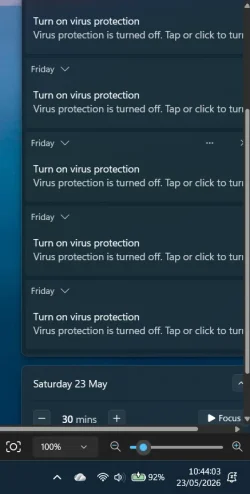
Still getting the message to turn on defender even if it is already up and running.

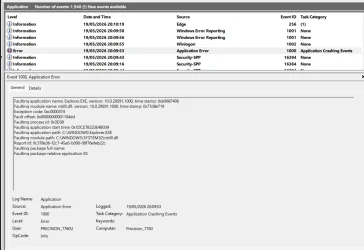
You would think at this stage that something like this would have been fixed. I also have a random and infrequent explorer.exe crash. The taskbar disappears momentarily and then comes back. Event viewer logs the fault and a report is automatically sent. That also triggers this Defender warning as it appears a few moments later.

Screenshot 2026-05-23 104408.webp

Screenshot 2026-05-23 105144.webp
 

My Computer

System One

  • OS
    W11 Pro x64 ongoing Canary 29500 latest builds
    Computer type
    Laptop
    Manufacturer/Model
    Dell 7760 Mobile Precision 17"
    CPU
    Intel i5
    Motherboard
    Unknown
    Memory
    8Gb
    Graphics Card(s)
    Intel HD Graphics
    Sound Card
    Realtek
    Monitor(s) Displays
    Internal
    Hard Drives
    2 x 256Gb SSD
    PSU
    Dell 240 watt
    Mouse
    Dell Premier Bluetooth
    Internet Speed
    50Mbps
    Browser
    Edge
    Antivirus
    Default Microsoft Security
1779538144051.webp
 

My Computer

System One

  • OS
    Windows 11 Pro Insider Preview Dev
    Computer type
    PC/Desktop
    Manufacturer/Model
    To be filled by O.E.M.
    CPU
    AMD Ryzen™ 5 5600G with Radeon Graphics 3.90 GHz
    Motherboard
    MSI B450 GAMING PLUS MAX
    Memory
    16,0 GB
    Graphics Card(s)
    NVIDIA GeForce GT 720, NVIDIA compatible
    Sound Card
    NVIDIA High Definition Audio
    Monitor(s) Displays
    BenQ GW2270 Color Profile.D6500
    Screen Resolution
    1920 x 1080
    Hard Drives
    Samsung SSD 850 EVO 250GB + CT1000BX500SSD1 + ST2000DM006-2DM164 + WDC WD5000AAKS-07TMA0 +WDC WD10EARX-00N0YB0
    PSU
    EVGA 600 W2, 80+ WHITE 600W, 3 Year Warranty, Power Supply 100-W2-0600-K2 (EU)
    Case
    RAIJINTEK Agos - mid tower - ATX
    Cooling
    Cooler Master Hyper 212 Evo heatsink + Fans: 2 front+1 back+1 up
    Keyboard
    Logitech Internet 350 Keyboard
    Mouse
    Logitech MX Revolution
    Internet Speed
    Download 159.29 Mbps - Upload 80.14 Mbps
    Browser
    Google Crome Dev
    Antivirus
    Microsoft Windows Security
Up date Laptop by it's self because i don't know when it happen

:-):-)

Screenshot 2026-05-23 202249.webp
 
Last edited:

My Computers

System One System Two

  • OS
    Windows 11 Pro Insider OS Build 29599.1000
    Computer type
    PC/Desktop
    Manufacturer/Model
    Build Aswin😂😂👍
    CPU
    i9-9900 8C/16T Coffee Lake
    Motherboard
    MSI-B360 Gaming Pro Carbon-ATX(update bios 2D2(2021) to 2D0 (2022)
    Memory
    (2 x 8 GB) 16 GB DDR-4 @3000 Mhz Patriot Viper
    Graphics Card(s)
    Nvidea RTX-2080 Ti 11 GB asus
    Sound Card
    Speaker(Realtek audio)(standby) and Lg Speaker build in
    Monitor(s) Displays
    Monitors LG TV 43 inch 43NANO75TPA,(4K,60 Hz,WCG,HLG,HDR10+): Hdmi 2.0b x3
    Screen Resolution
    Desktop mode 4096 x 2160/60 Hz Active Signal Mode 4096 x 2160/60 Hz,HDR Enable: Destop Mode 4096x2160/60Hz Active Signal Mode 4096 x2160/60 Hz
    Hard Drives
    1.M2.Nvme SSD Gen 3 x4,1 TB KYO Utimate K350 (OS) with heat sink 2.M2.Nvme SSD gen 3 x 4-512 GB KYO ULTIMATE K350 with heat Sink 3. SSD SATA 500 GB WD 4.SSD SATA120 GB Kingston....5. HDD 1TB Seagate
    PSU
    850 w full modular 80 gold gamemax
    Case
    Aigo DarkFlash phantom ATX(with 8 RGB Fans(4 Front+ 2 Rear (exhaust)+ 2 bottom side) DR 12) Tempered glass -Full Tower.
    Cooling
    AIO gamemax(CPU liquid cooler) L240 RGB-Top side(exhaust)
    Keyboard
    Logitech
    Mouse
    logitech
    Internet Speed
    Cable LAN CAT 6 E(25 meters) ,TP-link switch adapter 5 ports 1000/1000 Mbps Download 141 Mbps Upload 141 Mbps, Intel® I219-V Gigabit LAN controller
    Browser
    edge stable
    Antivirus
    MS defender A/V
    Other Info
    This PC on second floor, GPON ONT (optic network terminal ISP term) on ist floor
    2021
    add 2 fans 120 mm in bottom side😊👍.oct
    2022
    Replace TP link switch adapter 100/100 to 1000/1000 may
    2023 jan
    detected 1 Ram 3200 Mhz Hyper X kingston problem -> replace both with patriot DDR4 3000 Mhz from ex i7-9700😁
    2023 jan
    update bios 2D2(2021) --->> 2D0 (2022)
    2023 March
    Change storage : SSD SATA ------>>>>M2.NVme SSD (OS)
    2023 April
    Change storage for OS Nvme 512GB ---->>> 1TB
    2024
    PSU 650 w 80 plus bronze -------> 850 w full modular 80 gold
    GTX 1060 6 GB galax-------> RTX 2080 Ti Asrock 2 x 8 pin
    update bios from 2D0------>>> 2E0
    change cable Hdmi 2.0b to hdmi 2.1 and resetting Nvidia control panel
    just testing after new processor come will replace with hdmi2.0b .

    26 March 2026 update bios from 2D0(2022) to 2E0 (2024)
  • Operating System
    Windows 11 Pro Insider OS ver 25 H2 26300.8553
    Computer type
    Laptop
    Manufacturer/Model
    Acer Nitro AN515-54
    CPU
    Intel core i5-9300H [email protected] GHz 4C/8T Coffee Lake
    Motherboard
    Manufacturer CFL , Model Octavia_CFS , Bios Version V1.33( 11/17/2020)
    Memory
    DDR4 16 GB 2 x 8 GB, 2666 Mhz Sk Hynix- Jedec 11 : CL : 20-19-19-43-61/1.2 V
    Graphics card(s)
    1. Intel graphic UHD 630 2. Nvidea Geforce GTX 1650 , 4 GB
    Sound Card
    1.Realtek Version 6.0.8929.1 2. NVIDIA Version 4.39.0.0 ( Virtual Audio Device ( Wave Extensible) (WDM)
    Monitor(s) Displays
    15.6"
    Screen Resolution
    1920 x 1080
    Hard Drives
    1.M2.Nvme SSD gen 3 x 4-1TB (OS) XPG SX8200 Pro with Heatsink 2. M2. SATA 1 TB 3. HDD 1 TB
    PSU
    Acer
    Case
    Acer
    Cooling
    Double Cooling Fans
    Keyboard
    1.Acer 2.Votre(wired)
    Mouse
    Optical mouse(FO)
    Internet Speed
    1. Cable Lan Cat 6E (25 meters) 2. Intel Wireless-AC 9560 160 Mhz 3. Realtek Gaming GBe Family cont (RJ45). TP-link switch adapter 1000/1000 Mbps Download : 187 Mbps Upload : 87 Mbps
    Browser
    Edge Stable
    Antivirus
    MS A/V
    Other Info
    This Laptop on second Floor , GPON ONT(optic network terminal ISP term ) on 1st Floor
    2022
    1. Upgraded from Windows 11 Home to Pro------May
    2. Replace TP link switch adapter 100/100 to 1000/1000→→→May
    2023
    3.Repale Storage(OS) from SATA to NVME---->> Feb
    4. ugrade ram 12 GB to 16 GB------>>>>April
    2024
    nvme 512GB replace to 1 TB
    M2 sata 240 GB replace to 1 TB
Update PC

Screenshot 2026-05-23 203848.webp
 

My Computers

System One System Two

  • OS
    Windows 11 Pro Insider OS Build 29599.1000
    Computer type
    PC/Desktop
    Manufacturer/Model
    Build Aswin😂😂👍
    CPU
    i9-9900 8C/16T Coffee Lake
    Motherboard
    MSI-B360 Gaming Pro Carbon-ATX(update bios 2D2(2021) to 2D0 (2022)
    Memory
    (2 x 8 GB) 16 GB DDR-4 @3000 Mhz Patriot Viper
    Graphics Card(s)
    Nvidea RTX-2080 Ti 11 GB asus
    Sound Card
    Speaker(Realtek audio)(standby) and Lg Speaker build in
    Monitor(s) Displays
    Monitors LG TV 43 inch 43NANO75TPA,(4K,60 Hz,WCG,HLG,HDR10+): Hdmi 2.0b x3
    Screen Resolution
    Desktop mode 4096 x 2160/60 Hz Active Signal Mode 4096 x 2160/60 Hz,HDR Enable: Destop Mode 4096x2160/60Hz Active Signal Mode 4096 x2160/60 Hz
    Hard Drives
    1.M2.Nvme SSD Gen 3 x4,1 TB KYO Utimate K350 (OS) with heat sink 2.M2.Nvme SSD gen 3 x 4-512 GB KYO ULTIMATE K350 with heat Sink 3. SSD SATA 500 GB WD 4.SSD SATA120 GB Kingston....5. HDD 1TB Seagate
    PSU
    850 w full modular 80 gold gamemax
    Case
    Aigo DarkFlash phantom ATX(with 8 RGB Fans(4 Front+ 2 Rear (exhaust)+ 2 bottom side) DR 12) Tempered glass -Full Tower.
    Cooling
    AIO gamemax(CPU liquid cooler) L240 RGB-Top side(exhaust)
    Keyboard
    Logitech
    Mouse
    logitech
    Internet Speed
    Cable LAN CAT 6 E(25 meters) ,TP-link switch adapter 5 ports 1000/1000 Mbps Download 141 Mbps Upload 141 Mbps, Intel® I219-V Gigabit LAN controller
    Browser
    edge stable
    Antivirus
    MS defender A/V
    Other Info
    This PC on second floor, GPON ONT (optic network terminal ISP term) on ist floor
    2021
    add 2 fans 120 mm in bottom side😊👍.oct
    2022
    Replace TP link switch adapter 100/100 to 1000/1000 may
    2023 jan
    detected 1 Ram 3200 Mhz Hyper X kingston problem -> replace both with patriot DDR4 3000 Mhz from ex i7-9700😁
    2023 jan
    update bios 2D2(2021) --->> 2D0 (2022)
    2023 March
    Change storage : SSD SATA ------>>>>M2.NVme SSD (OS)
    2023 April
    Change storage for OS Nvme 512GB ---->>> 1TB
    2024
    PSU 650 w 80 plus bronze -------> 850 w full modular 80 gold
    GTX 1060 6 GB galax-------> RTX 2080 Ti Asrock 2 x 8 pin
    update bios from 2D0------>>> 2E0
    change cable Hdmi 2.0b to hdmi 2.1 and resetting Nvidia control panel
    just testing after new processor come will replace with hdmi2.0b .

    26 March 2026 update bios from 2D0(2022) to 2E0 (2024)
  • Operating System
    Windows 11 Pro Insider OS ver 25 H2 26300.8553
    Computer type
    Laptop
    Manufacturer/Model
    Acer Nitro AN515-54
    CPU
    Intel core i5-9300H [email protected] GHz 4C/8T Coffee Lake
    Motherboard
    Manufacturer CFL , Model Octavia_CFS , Bios Version V1.33( 11/17/2020)
    Memory
    DDR4 16 GB 2 x 8 GB, 2666 Mhz Sk Hynix- Jedec 11 : CL : 20-19-19-43-61/1.2 V
    Graphics card(s)
    1. Intel graphic UHD 630 2. Nvidea Geforce GTX 1650 , 4 GB
    Sound Card
    1.Realtek Version 6.0.8929.1 2. NVIDIA Version 4.39.0.0 ( Virtual Audio Device ( Wave Extensible) (WDM)
    Monitor(s) Displays
    15.6"
    Screen Resolution
    1920 x 1080
    Hard Drives
    1.M2.Nvme SSD gen 3 x 4-1TB (OS) XPG SX8200 Pro with Heatsink 2. M2. SATA 1 TB 3. HDD 1 TB
    PSU
    Acer
    Case
    Acer
    Cooling
    Double Cooling Fans
    Keyboard
    1.Acer 2.Votre(wired)
    Mouse
    Optical mouse(FO)
    Internet Speed
    1. Cable Lan Cat 6E (25 meters) 2. Intel Wireless-AC 9560 160 Mhz 3. Realtek Gaming GBe Family cont (RJ45). TP-link switch adapter 1000/1000 Mbps Download : 187 Mbps Upload : 87 Mbps
    Browser
    Edge Stable
    Antivirus
    MS A/V
    Other Info
    This Laptop on second Floor , GPON ONT(optic network terminal ISP term ) on 1st Floor
    2022
    1. Upgraded from Windows 11 Home to Pro------May
    2. Replace TP link switch adapter 100/100 to 1000/1000→→→May
    2023
    3.Repale Storage(OS) from SATA to NVME---->> Feb
    4. ugrade ram 12 GB to 16 GB------>>>>April
    2024
    nvme 512GB replace to 1 TB
    M2 sata 240 GB replace to 1 TB
I have two small new issues with this build:

- Bluetooth & Devices /Mobile devices/ Phone name > the pane crashes when arrow is chosen and as a consequence there is no phone visible in the Explorer tree. Repair Install fixed the issue
- Loss of all logical drive names after the installation (networked) so if your drive was named Media, the name is back to being the pathed name.

Those options are OK in Dev & Beta.
 
Last edited:

My Computers

System One System Two

  • OS
    All Branches but Release
    Computer type
    Laptop
    Manufacturer/Model
    Acer Nitro ANV15-51
    CPU
    AMD Ryzen 7 7735HS 3200-4500 Mhz 8 cores x 2
    Motherboard
    Sportage_RBH
    Memory
    32 GB DDR5
    Graphics Card(s)
    Radeon Graphic / NVIDIA GeForce RTX 4060 8 GB GDDR6
    Sound Card
    AMD/Realtek(R) Audio
    Monitor(s) Displays
    Integrated Monitor (15.3"vis)
    Screen Resolution
    FHD 1920X1080 16:9 144Hz
    Hard Drives
    KINGSTON OM8SEP4512Q-AA 1TB
    Western Digital 256GB
    PSU
    19V DC 6.32 A 120 W
    Cooling
    Dual Fans
    Mouse
    MS Bluetooth
    Internet Speed
    Fiber 1GB Cox -us & 1GB Orange-fr
    Browser
    Edge Canary- Firefox Nightly-Chrome Dev-Chrome Dev
    Antivirus
    Windows Defender
  • Operating System
    Windows 11 Beta
    Computer type
    Laptop
    Manufacturer/Model
    Asus X751BP
    CPU
    AMD A9-9420
    Memory
    8 GB of DDR4
    Graphics card(s)
    AMD Radeon R5
    Screen Resolution
    1600x900
    Hard Drives
    Seagate 1 TB
1779549191376.webp
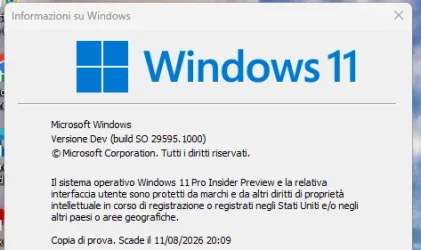
Edizione Windows 11 Pro Insider Anteprima
Scena Dev
Data installazione: ‎23/‎05/‎2026
Dati di scadenza della valutazione ‎11/‎08/‎2026 20:09
Costruisci il sistema operativo 29595.1000
Feature Pack Pacchetto di esperienze per funzionalità Windows 1000.26100.348.0
 

My Computer

System One

  • OS
    Windows 11 Pro Insider Preview Dev
    Computer type
    PC/Desktop
    Manufacturer/Model
    To be filled by O.E.M.
    CPU
    AMD Ryzen™ 5 5600G with Radeon Graphics 3.90 GHz
    Motherboard
    MSI B450 GAMING PLUS MAX
    Memory
    16,0 GB
    Graphics Card(s)
    NVIDIA GeForce GT 720, NVIDIA compatible
    Sound Card
    NVIDIA High Definition Audio
    Monitor(s) Displays
    BenQ GW2270 Color Profile.D6500
    Screen Resolution
    1920 x 1080
    Hard Drives
    Samsung SSD 850 EVO 250GB + CT1000BX500SSD1 + ST2000DM006-2DM164 + WDC WD5000AAKS-07TMA0 +WDC WD10EARX-00N0YB0
    PSU
    EVGA 600 W2, 80+ WHITE 600W, 3 Year Warranty, Power Supply 100-W2-0600-K2 (EU)
    Case
    RAIJINTEK Agos - mid tower - ATX
    Cooling
    Cooler Master Hyper 212 Evo heatsink + Fans: 2 front+1 back+1 up
    Keyboard
    Logitech Internet 350 Keyboard
    Mouse
    Logitech MX Revolution
    Internet Speed
    Download 159.29 Mbps - Upload 80.14 Mbps
    Browser
    Google Crome Dev
    Antivirus
    Microsoft Windows Security
I also have a random and infrequent explorer.exe crash. The taskbar disappears momentarily and then comes back.
Just wondering, do you you use this? :think:
Code:
reg add "HKCU\Software\Microsoft\Windows\CurrentVersion\Explorer\Advanced" /v "SeparateProcess" /t REG_DWORD /d "1" /f
reg add "HKCU\Software\Microsoft\Windows\CurrentVersion\Explorer" /v "DesktopProcess" /t REG_DWORD /d "1" /f
taskkill /im explorer.exe /f & explorer.exe
 

My Computer

System One

  • OS
    Home26H2Can
    Computer type
    PC/Desktop
    CPU
    AMD Ryzen 5 8600G (07/24)
    Motherboard
    ASROCK B650M-HDV/M.2 (07/24) BIOS 4.21 AGESA ComboAM5 1.3.0.1 (04/26)
    Memory
    2x32GB Kingston FURY DDR5 5600 MHz CL36 @5200 CL36 (07/24)
    Graphics Card(s)
    ASROCK Radeon RX 6600 Challenger D 8G @48FPS (08/24)
    Sound Card
    Creative Sound BlasterX AE-5 Plus (05/24)
    Monitor(s) Displays
    24" Philips 24M1N3200ZS/00 (05/24)
    Screen Resolution
    1920×1080@165Hz via DP1.4
    Hard Drives
    Kingston KC3000 NVMe 2TB (05/24)
    ADATA XPG GAMMIX S11 Pro 512GB (07/19)
    PSU
    Seasonic Core GM 550 Gold (04/24)
    Case
    Fractal Design Define 7 Mini with 3x Noctua NF-P14s/12@555rpm (04/24)
    Cooling
    Noctua NH-U12S with Noctua NF-P12 (04/24)
    Keyboard
    HP Pavilion Wired Keyboard 300 (07/24) + Rabalux 76017 Parker (01/24)
    Mouse
    Logitech M330 Silent Plus (01/26)
    Internet Speed
    500/100 Mbps via RouterOS (05/21) & TCP Optimizer
    Browser
    Edge, Brave for YouTube, LibreWolf for FB
    Antivirus
    NextDNS blocking 1/3 Traffic
    Other Info
    Phone: Motorola Moto G86 (02/26)
    Backup: Hasleo Backup Suite (PreOS)
    Headphones: Sennheiser RS170 (09/10)
    Chair: Huzaro Force 4.4 Grey Mesh (05/24)
    Notifier: Xiaomi Mi Band 9 Milanese (10/24)
    FlexCore USB-C 3.2 Gen 1 (M) to LAN (F) (08/25)
Loss of all logical drive names after the installation (networked) so if your drive was named Media, the name is back to being the pathed name.

I used to get that very occasionally on Dev builds but can not recall seeing it happen on this Canary branch.

Just wondering, do you you use this?
Nope, not familiar with those reg keys. It is pretty infrequent that explorer crashes and hopefully MS will get around to a fix in due course.
 

My Computer

System One

  • OS
    W11 Pro x64 ongoing Canary 29500 latest builds
    Computer type
    Laptop
    Manufacturer/Model
    Dell 7760 Mobile Precision 17"
    CPU
    Intel i5
    Motherboard
    Unknown
    Memory
    8Gb
    Graphics Card(s)
    Intel HD Graphics
    Sound Card
    Realtek
    Monitor(s) Displays
    Internal
    Hard Drives
    2 x 256Gb SSD
    PSU
    Dell 240 watt
    Mouse
    Dell Premier Bluetooth
    Internet Speed
    50Mbps
    Browser
    Edge
    Antivirus
    Default Microsoft Security
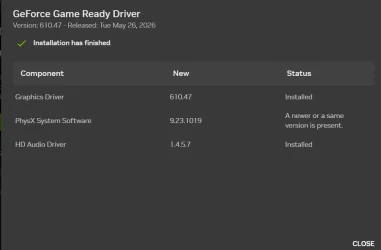
Update Nvidia Driver

Screenshot 2026-05-26 231744.webp
 

My Computers

System One System Two

  • OS
    Windows 11 Pro Insider OS Build 29599.1000
    Computer type
    PC/Desktop
    Manufacturer/Model
    Build Aswin😂😂👍
    CPU
    i9-9900 8C/16T Coffee Lake
    Motherboard
    MSI-B360 Gaming Pro Carbon-ATX(update bios 2D2(2021) to 2D0 (2022)
    Memory
    (2 x 8 GB) 16 GB DDR-4 @3000 Mhz Patriot Viper
    Graphics Card(s)
    Nvidea RTX-2080 Ti 11 GB asus
    Sound Card
    Speaker(Realtek audio)(standby) and Lg Speaker build in
    Monitor(s) Displays
    Monitors LG TV 43 inch 43NANO75TPA,(4K,60 Hz,WCG,HLG,HDR10+): Hdmi 2.0b x3
    Screen Resolution
    Desktop mode 4096 x 2160/60 Hz Active Signal Mode 4096 x 2160/60 Hz,HDR Enable: Destop Mode 4096x2160/60Hz Active Signal Mode 4096 x2160/60 Hz
    Hard Drives
    1.M2.Nvme SSD Gen 3 x4,1 TB KYO Utimate K350 (OS) with heat sink 2.M2.Nvme SSD gen 3 x 4-512 GB KYO ULTIMATE K350 with heat Sink 3. SSD SATA 500 GB WD 4.SSD SATA120 GB Kingston....5. HDD 1TB Seagate
    PSU
    850 w full modular 80 gold gamemax
    Case
    Aigo DarkFlash phantom ATX(with 8 RGB Fans(4 Front+ 2 Rear (exhaust)+ 2 bottom side) DR 12) Tempered glass -Full Tower.
    Cooling
    AIO gamemax(CPU liquid cooler) L240 RGB-Top side(exhaust)
    Keyboard
    Logitech
    Mouse
    logitech
    Internet Speed
    Cable LAN CAT 6 E(25 meters) ,TP-link switch adapter 5 ports 1000/1000 Mbps Download 141 Mbps Upload 141 Mbps, Intel® I219-V Gigabit LAN controller
    Browser
    edge stable
    Antivirus
    MS defender A/V
    Other Info
    This PC on second floor, GPON ONT (optic network terminal ISP term) on ist floor
    2021
    add 2 fans 120 mm in bottom side😊👍.oct
    2022
    Replace TP link switch adapter 100/100 to 1000/1000 may
    2023 jan
    detected 1 Ram 3200 Mhz Hyper X kingston problem -> replace both with patriot DDR4 3000 Mhz from ex i7-9700😁
    2023 jan
    update bios 2D2(2021) --->> 2D0 (2022)
    2023 March
    Change storage : SSD SATA ------>>>>M2.NVme SSD (OS)
    2023 April
    Change storage for OS Nvme 512GB ---->>> 1TB
    2024
    PSU 650 w 80 plus bronze -------> 850 w full modular 80 gold
    GTX 1060 6 GB galax-------> RTX 2080 Ti Asrock 2 x 8 pin
    update bios from 2D0------>>> 2E0
    change cable Hdmi 2.0b to hdmi 2.1 and resetting Nvidia control panel
    just testing after new processor come will replace with hdmi2.0b .

    26 March 2026 update bios from 2D0(2022) to 2E0 (2024)
  • Operating System
    Windows 11 Pro Insider OS ver 25 H2 26300.8553
    Computer type
    Laptop
    Manufacturer/Model
    Acer Nitro AN515-54
    CPU
    Intel core i5-9300H [email protected] GHz 4C/8T Coffee Lake
    Motherboard
    Manufacturer CFL , Model Octavia_CFS , Bios Version V1.33( 11/17/2020)
    Memory
    DDR4 16 GB 2 x 8 GB, 2666 Mhz Sk Hynix- Jedec 11 : CL : 20-19-19-43-61/1.2 V
    Graphics card(s)
    1. Intel graphic UHD 630 2. Nvidea Geforce GTX 1650 , 4 GB
    Sound Card
    1.Realtek Version 6.0.8929.1 2. NVIDIA Version 4.39.0.0 ( Virtual Audio Device ( Wave Extensible) (WDM)
    Monitor(s) Displays
    15.6"
    Screen Resolution
    1920 x 1080
    Hard Drives
    1.M2.Nvme SSD gen 3 x 4-1TB (OS) XPG SX8200 Pro with Heatsink 2. M2. SATA 1 TB 3. HDD 1 TB
    PSU
    Acer
    Case
    Acer
    Cooling
    Double Cooling Fans
    Keyboard
    1.Acer 2.Votre(wired)
    Mouse
    Optical mouse(FO)
    Internet Speed
    1. Cable Lan Cat 6E (25 meters) 2. Intel Wireless-AC 9560 160 Mhz 3. Realtek Gaming GBe Family cont (RJ45). TP-link switch adapter 1000/1000 Mbps Download : 187 Mbps Upload : 87 Mbps
    Browser
    Edge Stable
    Antivirus
    MS A/V
    Other Info
    This Laptop on second Floor , GPON ONT(optic network terminal ISP term ) on 1st Floor
    2022
    1. Upgraded from Windows 11 Home to Pro------May
    2. Replace TP link switch adapter 100/100 to 1000/1000→→→May
    2023
    3.Repale Storage(OS) from SATA to NVME---->> Feb
    4. ugrade ram 12 GB to 16 GB------>>>>April
    2024
    nvme 512GB replace to 1 TB
    M2 sata 240 GB replace to 1 TB
Quick question for those on this Canary branch re Macrium 8.1

I am suddenly finding that I can not restore images from running Macrium within Windows as I have done in the past. I get an 'error '2' message. This happened a few days ago and I put it down to having altered the partition structure of the drive. Still wondering I have made new full image files and tried a restore. They fail.

Long story short. Moving image file to an external HDD (it was originally located on an internal drive that is Bitlocker protected) and using Macrium USB rescue media worked. The external drive uses Bitlocker to go which I mention just for completeness. Restoring using USB media restores Bitlocker as OFF and without access to the other internal drive. Fortunately I have the codes to re enable Auto Unlock.

The big question. Has something broken with either Macrium and or Canary? I have used Macrium for ages and always run from within Windows by simply selecting the image file and selecting 'Restore'. I have never had to use recovery media before this.

I also tried using the Macrium boot menu and that fails in the same way with 'error 2' as it tries to load the image file.
 

My Computer

System One

  • OS
    W11 Pro x64 ongoing Canary 29500 latest builds
    Computer type
    Laptop
    Manufacturer/Model
    Dell 7760 Mobile Precision 17"
    CPU
    Intel i5
    Motherboard
    Unknown
    Memory
    8Gb
    Graphics Card(s)
    Intel HD Graphics
    Sound Card
    Realtek
    Monitor(s) Displays
    Internal
    Hard Drives
    2 x 256Gb SSD
    PSU
    Dell 240 watt
    Mouse
    Dell Premier Bluetooth
    Internet Speed
    50Mbps
    Browser
    Edge
    Antivirus
    Default Microsoft Security

My Computers

System One System Two

  • OS
    Windows 11 Pro for Workstations
    Computer type
    PC/Desktop
    Manufacturer/Model
    Custom self build
    CPU
    Intel i7-8700K 5 GHz
    Motherboard
    ASUS ROG Maximus XI Formula Z390
    Memory
    64 GB (4x16GB) G.SKILL TridentZ RGB DDR4 3600 MHz (F4-3600C18D-32GTZR)
    Graphics Card(s)
    ASUS ROG-STRIX-GTX1080TI-O11G-GAMING (11GB GDDR5X)
    Sound Card
    Integrated Digital Audio (S/PDIF)
    Monitor(s) Displays
    2 x Samsung Odyssey G75 27"
    Screen Resolution
    2560x1440
    Hard Drives
    1TB Samsung 990 PRO M.2,
    4TB Samsung 990 PRO M.2,
    TerraMaster F8 SSD Plus NAS
    PSU
    Seasonic Prime Titanium 850W
    Case
    Thermaltake Core P3 wall mounted
    Cooling
    Corsair Hydro H115i
    Keyboard
    Amazon Basics Wired Full Keyboard MD005
    Mouse
    Logitech MX Master 4
    Internet Speed
    2 Gbps Download and 100 Mbps Upload
    Browser
    Chrome and Edge
    Antivirus
    Microsoft Defender
    Other Info
    Logitech Z625 speaker system,
    Logitech BRIO 4K Pro webcam,
    HP Color LaserJet Pro MFP M477fdn,
    CyberPower CP1500PFCLCD
    Galaxy S23 Plus phone
  • Operating System
    Windows 11 Pro
    Computer type
    Laptop
    Manufacturer/Model
    Surface Laptop 7 Copilot+ PC
    CPU
    Snapdragon X Elite (12 core) 3.42 GHz
    Memory
    16 GB LPDDR5x-7467 MHz
    Monitor(s) Displays
    15" HDR
    Screen Resolution
    2496 x 1664
    Hard Drives
    1 TB SSD
    Internet Speed
    Wi-Fi 7 and Bluetooth 5.4
    Browser
    Chrome and Edge
    Antivirus
    Microsoft Defender

Latest Support Threads

Back
Top Bottom