UPDATE 6/12:

 www.elevenforum.com
As a reminder, these release notes apply to those who are in the Canary 29500 Series Channel. As we begin the transition to the updated Windows Insider Program, all new build release notes will be labeled under the new channel names, even though Insiders in the Canary 29500 Series Channel may not yet find themselves having transitioned to Experimental (Future Platforms). See the Windows Insider Blog for more details.
 www.elevenforum.com
 www.elevenforum.com


 blogs.windows.com
Check Windows Updates
ISO from Microsoft:
 www.elevenforum.com
UUP Dump:
64-bit ISO download:

ARM64 ISO download:
 www.elevenforum.com
Windows 11 Insider Experimental (Future Platforms) build 29610.1000 - June 12
Windows Insider Blog: Check Windows Updates UUP Dump: 64-bit ISO download: https://uupdump.net/selectlang.php?id=59bccb92-3b81-4c73-b997-d451dfcf532b ARM64 ISO download: https://uupdump.net/selectlang.php?id=dc33f538-2ad5-496c-b76a-677cc6bce585...
www.elevenforum.com
Windows Insider Blog:
As a reminder, these release notes apply to those who are in the Canary 29500 Series Channel. As we begin the transition to the updated Windows Insider Program, all new build release notes will be labeled under the new channel names, even though Insiders in the Canary 29500 Series Channel may not yet find themselves having transitioned to Experimental (Future Platforms). See the Windows Insider Blog for more details.
Microsoft improving your Windows Insider experience for Windows 11
Windows Insider Blog: Hello Windows Insiders, Today is the day we’re beginning to move to the new Experimental and Beta channels as announced earlier this month. As a reminder, most Insiders, those who are in the Dev and Beta channels today will transition to the new channels over time as...
www.elevenforum.com
Enable or Disable Get Latest Updates as soon as available in Windows 11
This tutorial will show you how to turn on or off "Get the latest updates as soon as they are available" in Windows 11. Starting with Windows 11 build 22621.1635, Microsoft added a new "Get the latest updates as soon as they are available" toggle under Settings > Windows Update. When you turn...
www.elevenforum.com
Changes and improvements gradually being rolled out
- This update includes platform changes in moving to a new active development build.
- Fixed an issue which was causing some Insiders to unexpectedly see an erroneous message saying they weren’t connected to internet (when they actually were) when signing into their Microsoft account in certain apps recently.
- This update improves CPU speed display on the Performance page of Task Manager for VMs, so it doesn’t show higher than unexpected numbers after resuming from hibernate.
Known issues
- We have identified an issue internally causing crashes on AMD machines supporting System Guard, meaning these devices in WIP will not be offered this week's Experimental (Future Platforms) build.
Reminder for Windows Insiders in the Canary 29500 Series Channel (soon transitioning to Experimental (Future Platforms))
- These builds can be unstable and may be released with limited documentation.
- The builds we release to the Canary 29500 Series Channel represent the latest platform changes early in the development cycle and should not be seen as matched to any specific release of Windows. Features and experiences included in these builds might never get released as we try out different concepts and get feedback. Features might change over time, be removed, or replaced, and never get released beyond Windows Insiders. Some of these features and experiences could show up in future Windows releases when they are ready.
- Many features in the Canary 29500 Series Channel are rolled out using Controlled Feature Rollout technology, starting with a subset of Insiders and ramping up over time as we monitor feedback to see how they land before pushing them out to everyone in this channel.
- The desktop watermark shown at the lower right corner of the desktop is normal for Windows Insider pre-release builds.
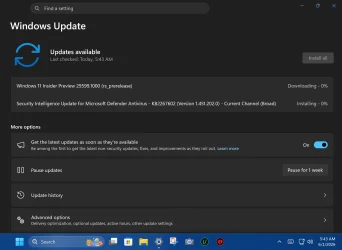
- For Windows Insiders who want to be the first to get features gradually rolled out to you, you can turn on the toggle to get the latest updates as they are available via Settings > Windows Update. Over time, we will increase the rollouts of features to everyone with the toggle turned on. Should you keep this toggle off, new features will gradually be rolled out to your PC over time once they are ready.
- Some features in active development we preview with Windows Insiders might not be fully localized and localization will happen over time as features are finalized. As you see issues with localization in your language, please report those issues to us via Feedback Hub.
Source:
Windows 11 Insider Experimental (Future Platforms) Preview Build 29599.1000 - Windows Insider Program
Release notes for Windows 11 Insider Experimental (Future Platforms) Preview Build 29599.1000
learn.microsoft.com
Announcing new builds for 29 May 2026
Hello Windows Insiders, This week we continue to expand the rollout of the new Windows Insider Program changes to devices in channels already announced. New builds this week Today we are releasing new Windows 11 Insider Preview B
blogs.windows.com
Check Windows Updates
ISO from Microsoft:
Download Official Windows 11 ISO file from Microsoft
This tutorial will show you how to download an official Windows Server or Windows 11 64-bit or ARM64 ISO file from Microsoft. Microsoft provides ISO files for Windows Server and Windows 11 to download. You can use these ISO files to clean install or in-place upgrade Windows 11. The Flight Hub...
www.elevenforum.com
UUP Dump:
64-bit ISO download:
Select language for Windows 11 Insider Preview 29599.1000 (rs_prerelease) amd64
Select language for Windows 11 Insider Preview 29599.1000 (rs_prerelease) amd64 on UUP dump. UUP dump lets you download Unified Update Platform files, like Windows Insider updates, directly from Windows Update.
uupdump.net
ARM64 ISO download:
Select language for Windows 11 Insider Preview 29599.1000 (rs_prerelease) arm64
Select language for Windows 11 Insider Preview 29599.1000 (rs_prerelease) arm64 on UUP dump. UUP dump lets you download Unified Update Platform files, like Windows Insider updates, directly from Windows Update.
uupdump.net
UUP Dump - Download Windows Insider ISO
UUP Dump is the most practical and easy way to get ISO images of any Insider Windows 10 or Windows 11 version, as soon as Microsoft has released a new build. UUP Dump creates a download configuration file according to your choices, downloads necessary files directly from Microsoft servers, and...
www.elevenforum.com
Last edited: