UPDATE 9/18:
 www.elevenforum.com


 blogs.windows.com
Check Windows Updates
ISO from Microsoft:
 www.elevenforum.com
UUP Dump:
64-bit ISO download:

ARM64 ISO download:
 www.elevenforum.com
Windows 11 Insider Experimental (Future Platforms) build 29671.1000 - Sept. 18
Microsoft Support: Source: Check Windows Updates ISO from Microsoft: https://www.elevenforum.com/t/download-official-windows-11-iso-file-from-microsoft.1009/#Three UUP Dump: 64-bit ISO download: https://uupdump.net/selectlang.php?id=27720ec5-c721-4278-8c33-2ba9b48f5ee9 ARM64 ISO...
www.elevenforum.com
Microsoft Support:
Changes and improvements gradually being rolled out*
- This update includes a small set of general improvements and fixes that improve the overall experience for Insiders running this build on their PCs.
[Windows Update]
- Fixed an underlying issue resulting in some Insiders on Arm64 PCs not being able to upgrade to the latest builds and automatically rolling back. As a reminder, 0xc1900101 is a generic error code that can have multiple root causes. If you continue having issues, file a new piece of feedback.
[Emoji]
- We're adding support for Emoji 17.0. This includes new emoji such as distorted face, fight cloud, and hairy creature. To try the new emoji, press the Windows key plus Period (.) to open the emoji panel and insert them from there.

Open Emoji Panel in Windows 11
This tutorial will show you how to open the Emoji Panel in Windows 11. An emoji is a pictogram, logogram, ideogram or smiley embedded in text. Windows 11 includes 3D Fluent emoji you can use from the Emoji Panel. Starting with Windows 11 build 22631.3810, Microsoft is adding support for Emoji...
www.elevenforum.com

Examples of new emoji added with Emoji 17.0. - As part of this effort, we've also made some slight adjustments to the design of some of our current emoji to improve consistency across platforms. This includes the saluting face, face with peeking eye, goose, lotus, and kissing cat emoji.
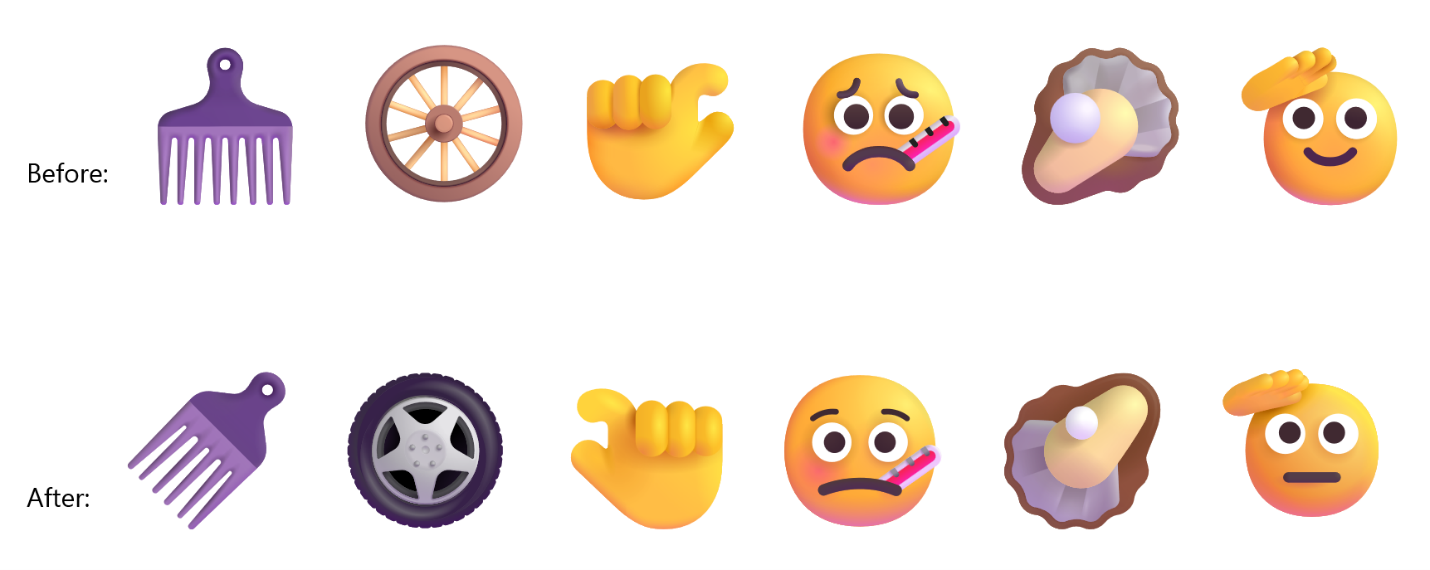
Before-and-after examples of updated emoji designs.
[Touchpad]
- Fixed an issue causing touchpad zoom gestures to not work correctly in certain apps after the latest updates.
[Remote Desktop]
- Fixed an underlying issue causing some Insiders to see graphics card error 0x11 when attempting to use Remote Desktop in the latest updates.
[Run]
- Improved Run reliability for Insiders using the modern Run dialog.
[Taskbar]
- Improved reliability of loading the system tray area of the taskbar.
[Network]
- Fixed an issue resulting in some Insiders seeing an unexpected "The service to detect this status is disabled" message when opening Network and Sharing Center after the latest updates.
- Fixed an underlying issue resulting in some Insiders not being able to connect to certain Wi-Fi types after the latest updates. File a new piece of feedback if you continue experiencing issues, including a recording of the issue if possible.
[Settings]
- The Bluetooth quick settings page is now navigable using gamepad input.
Known issues
- We're investigating an issue where VMware Workstation Pro 17.6.4 may display a blank window when reopening a virtual machine after it has been created and closed. We are working on a fix and will provide an update in a future build.
- We're also aware of and investigating reports of VMWare devices green screening
Reminder for Windows Insiders in the Experimental (Future Platforms) channel
- These builds can be unstable and might be released with limited documentation.
- The builds released to these channels represent the latest platform changes early in the development cycle and shouldn't be seen as matched to any specific release of Windows. Features and experiences included in these builds might never get released as we try out different concepts and get feedback. Features might change over time, be removed, or replaced, and never get released beyond Windows Insiders. Some of these features and experiences could show up in future Windows releases when they're ready.
- Many features are rolled out using Controlled Feature Rollout technology, starting with a subset of Insiders and ramping up over time. We monitor feedback to see how they land before pushing them out to everyone in this channel.
- The desktop watermark shown at the lower right corner of the desktop is normal for Windows Insider pre-release builds.
- Some features in active development we preview with Windows Insiders might not be fully localized, and localization will happen over time as features are finalized. As you see issues with localization in your language, report those issues to us via Feedback Hub.
Source:
Windows 11 Insider Experimental (Future Platforms) Preview Build 29667.1000 - Windows Insider Program
Release notes for Windows 11 Insider Experimental (Future Platforms) Preview Build 29667.1000
learn.microsoft.com
Announcing new builds for 11 September 2026
Hello Windows Insiders, Today, we’re releasing new Windows 11 Insider Preview builds to the Beta, Experimental, and Release Preview channels. New builds this week Select your channel below to view its release notes: B
blogs.windows.com
Check Windows Updates
ISO from Microsoft:
Download Official Windows 11 ISO file from Microsoft
This tutorial will show you how to download an official Windows Server or Windows 11 64-bit or ARM64 ISO file from Microsoft. Microsoft provides ISO files for Windows Server and Windows 11 to download. You can use these ISO files to clean install or in-place upgrade Windows 11. The Flight Hub...
www.elevenforum.com
UUP Dump:
64-bit ISO download:
Select language for Windows 11 Insider Preview 29667.1000 (rs_prerelease) amd64
Select language for Windows 11 Insider Preview 29667.1000 (rs_prerelease) amd64 on UUP dump. UUP dump lets you download Unified Update Platform files, like Windows Insider updates, directly from Windows Update.
uupdump.net
ARM64 ISO download:
Select language for Windows 11 Insider Preview 29667.1000 (rs_prerelease) arm64
Select language for Windows 11 Insider Preview 29667.1000 (rs_prerelease) arm64 on UUP dump. UUP dump lets you download Unified Update Platform files, like Windows Insider updates, directly from Windows Update.
uupdump.net
UUP Dump - Download Windows Insider ISO
UUP Dump is the most practical and easy way to get ISO images of any Insider Windows 10 or Windows 11 version, as soon as Microsoft has released a new build. UUP Dump creates a download configuration file according to your choices, downloads necessary files directly from Microsoft servers, and...
www.elevenforum.com
Last edited: