Windows 11 install resulted in 3 boot drives in BIOS


Chuck99

Well-known member
Member
Local time
7:55 PM
Posts
68
OS
Windows 11 Pro 25H2
I re-installed Window 11 over Windows 11 on an M.2 SSD. I wanted to do clean install, not a repair or update & thought I selected all the correct options.

One thing the install asked is which partition do I want to install in, which confused me. By default partition 3 was selected. I continued.

Later it asked if I wanted to continue with the update or delete everything first (or words to that effect). I wanted to delete everything.

When I thought everything was done it asked the same questions again. I thought something went wrong & went through the process again, only to have the install ask the same questions. Then I indicated to not erase everything & eventually finished.

Everything works, but do you think the install was really a clean one where it got rid all the previous data, settings, etc?

I now have 3 boot drives in BIOS which appear identical. How to I delete duplicates & does it matter which ones I delete?

Should I do another clean install of Windows? I don’t know why it kept steering down the path it did, but how do I make sure this doesn’t happen again?

Any help would be appreciated.
Thanks
 

My Computer

System One

  • OS
    Windows 11 Pro 25H2
    Computer type
    PC/Desktop
    Manufacturer/Model
    ASRock B760M Pro RS/D4 motherboard
    CPU
    Intel i5-14500
    Motherboard
    ASRock
    Memory
    16 GB
    Graphics Card(s)
    Intel
    Hard Drives
    1 TB Samsung M.2 SSD
    1 TB WD HDD
I re-installed Window 11 over Windows 11 on an M.2 SSD. I wanted to do clean install, not a repair or update & thought I selected all the correct options.

One thing the install asked is which partition do I want to install in, which confused me. By default partition 3 was selected. I continued.

Later it asked if I wanted to continue with the update or delete everything first (or words to that effect). I wanted to delete everything.

When I thought everything was done it asked the same questions again. I thought something went wrong & went through the process again, only to have the install ask the same questions. Then I indicated to not erase everything & eventually finished.

Everything works, but do you think the install was really a clean one where it got rid all the previous data, settings, etc?

I now have 3 boot drives in BIOS which appear identical. How to I delete duplicates & does it matter which ones I delete?

Should I do another clean install of Windows? I don’t know why it kept steering down the path it did, but how do I make sure this doesn’t happen again?

Any help would be appreciated.
Thanks


Do it again, and this time DELETE all the current partitions, THEN let the Windows installer do it's thing.
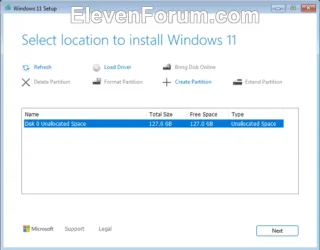
When it asks where to install it... choose the new unallocated space you just created, by deleting all the existing partitions.
Remember to unhook all other drives before the clean install.


After you delete all the current partitions, tell it to install Win 11, here...

Image1.webp


This is what a clean install should look like, when you're finished...

00000 Default Windows partitions.webp


The MSR partition is only visible in a 3rd party partitioning program. You won't see it in Disk Management.
Like this...


My Computers

System One System Two

  • OS
    Win 11 Home ♦♦♦26200.8457 ♦♦♦♦♦♦♦25H2
    Computer type
    PC/Desktop
    Manufacturer/Model
    Built by Ghot® [May 2020]
    CPU
    AMD Ryzen 7 3700X
    Motherboard
    Asus Pro WS X570-ACE (BIOS 5302)
    Memory
    G.Skill (F4-3200C14D-16GTZKW)
    Graphics Card(s)
    EVGA RTX 2070 (08G-P4-2171-KR)
    Sound Card
    Realtek ALC1220P / ALC S1220A
    Monitor(s) Displays
    Dell U3011 30"
    Screen Resolution
    2560 x 1600
    Hard Drives
    2x Samsung 860 EVO 500GB,
    WD 4TB Black FZBX - SATA III,
    WD 8TB Black FZBX - SATA III,
    DRW-24B1ST CD/DVD Burner
    PSU
    PC Power & Cooling 750W Quad EPS12V
    Case
    Cooler Master ATCS 840 Tower
    Cooling
    CM Hyper 212 EVO (push/pull)
    Keyboard
    Ducky DK9008 Shine II Blue LED
    Mouse
    Logitech Optical M-100
    Internet Speed
    300/300
    Browser
    Firefox (latest)
    Antivirus
    Bitdefender Total Security
    Other Info
    Speakers: Klipsch Pro Media 2.1
  • Operating System
    Windows XP Pro 32bit w/SP3
    Computer type
    PC/Desktop
    Manufacturer/Model
    Built by Ghot® (not in use)
    CPU
    AMD Athlon 64 X2 5000+ (OC'd @ 3.2Ghz)
    Motherboard
    ASUS M2N32-SLI Deluxe Wireless Edition
    Memory
    TWIN2X2048-6400C4DHX (2 x 1GB, DDR2 800)
    Graphics card(s)
    EVGA 256-P2-N758-TR GeForce 8600GT SSC
    Sound Card
    Onboard
    Monitor(s) Displays
    ViewSonic G90FB Black 19" Professional (CRT)
    Screen Resolution
    up to 2048 x 1536
    Hard Drives
    WD 36GB 10,000rpm Raptor SATA
    Seagate 80GB 7200rpm SATA
    Lite-On LTR-52246S CD/RW
    Lite-On LH-18A1P CD/DVD Burner
    PSU
    PC Power & Cooling Silencer 750 Quad EPS12V
    Case
    Generic Beige case, 80mm fans
    Cooling
    ZALMAN 9500A 92mm CPU Cooler
    Keyboard
    Logitech Classic Keybooard 200
    Mouse
    Logitech Optical M-BT96a
    Internet Speed
    300/300
    Browser
    Firefox 3.x ??
    Antivirus
    Symantec (Norton)
    Other Info
    Still assembled, still runs. Haven't turned it on for 15 years?

If you're dual-booting Win 10 and Win 11, you need to tell us that.


My Computers

System One System Two

  • OS
    Win 11 Home ♦♦♦26200.8457 ♦♦♦♦♦♦♦25H2
    Computer type
    PC/Desktop
    Manufacturer/Model
    Built by Ghot® [May 2020]
    CPU
    AMD Ryzen 7 3700X
    Motherboard
    Asus Pro WS X570-ACE (BIOS 5302)
    Memory
    G.Skill (F4-3200C14D-16GTZKW)
    Graphics Card(s)
    EVGA RTX 2070 (08G-P4-2171-KR)
    Sound Card
    Realtek ALC1220P / ALC S1220A
    Monitor(s) Displays
    Dell U3011 30"
    Screen Resolution
    2560 x 1600
    Hard Drives
    2x Samsung 860 EVO 500GB,
    WD 4TB Black FZBX - SATA III,
    WD 8TB Black FZBX - SATA III,
    DRW-24B1ST CD/DVD Burner
    PSU
    PC Power & Cooling 750W Quad EPS12V
    Case
    Cooler Master ATCS 840 Tower
    Cooling
    CM Hyper 212 EVO (push/pull)
    Keyboard
    Ducky DK9008 Shine II Blue LED
    Mouse
    Logitech Optical M-100
    Internet Speed
    300/300
    Browser
    Firefox (latest)
    Antivirus
    Bitdefender Total Security
    Other Info
    Speakers: Klipsch Pro Media 2.1
  • Operating System
    Windows XP Pro 32bit w/SP3
    Computer type
    PC/Desktop
    Manufacturer/Model
    Built by Ghot® (not in use)
    CPU
    AMD Athlon 64 X2 5000+ (OC'd @ 3.2Ghz)
    Motherboard
    ASUS M2N32-SLI Deluxe Wireless Edition
    Memory
    TWIN2X2048-6400C4DHX (2 x 1GB, DDR2 800)
    Graphics card(s)
    EVGA 256-P2-N758-TR GeForce 8600GT SSC
    Sound Card
    Onboard
    Monitor(s) Displays
    ViewSonic G90FB Black 19" Professional (CRT)
    Screen Resolution
    up to 2048 x 1536
    Hard Drives
    WD 36GB 10,000rpm Raptor SATA
    Seagate 80GB 7200rpm SATA
    Lite-On LTR-52246S CD/RW
    Lite-On LH-18A1P CD/DVD Burner
    PSU
    PC Power & Cooling Silencer 750 Quad EPS12V
    Case
    Generic Beige case, 80mm fans
    Cooling
    ZALMAN 9500A 92mm CPU Cooler
    Keyboard
    Logitech Classic Keybooard 200
    Mouse
    Logitech Optical M-BT96a
    Internet Speed
    300/300
    Browser
    Firefox 3.x ??
    Antivirus
    Symantec (Norton)
    Other Info
    Still assembled, still runs. Haven't turned it on for 15 years?
Do it again, and this time DELETE all the current partitions, THEN let the Windows installer do it's thing.
When it asks where to install it... choose the new unallocated space you just created, by deleting all the existing partitions.
Remember to unhook all other drives before the clean install.


After you delete all the current partitions, tell it to install Win 11, here...

View attachment 153462


This is what a clean install should look like, when you're finished...

View attachment 153464


The MSR partition is only visible in a 3rd party partitioning program. You won't see it in Disk Management.
Like this...


I have a portable version of MiniTool Partition Wizard on a USB drive. Could I use that to wipe out or format the M.2 SSD.

I am not dual booting.
 

My Computer

System One

  • OS
    Windows 11 Pro 25H2
    Computer type
    PC/Desktop
    Manufacturer/Model
    ASRock B760M Pro RS/D4 motherboard
    CPU
    Intel i5-14500
    Motherboard
    ASRock
    Memory
    16 GB
    Graphics Card(s)
    Intel
    Hard Drives
    1 TB Samsung M.2 SSD
    1 TB WD HDD
I have a portable version of MiniTool Partition Wizard on a USB drive. Could I use that to wipe out or format the M.2 SSD.

I am not dual booting.


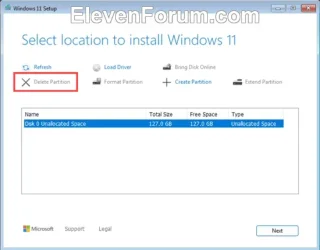
The Win 11 installer has a "Delete" option.
You don't want to format it, just leave it unallocated.
You can adjust partition sizes after Win 11 is installed.

The Windows 11 installer is one of the few things MS got right. ^^

It's greyed out (in this pic), because it was already used to create the unallocated space.
Image1.webp

During the install when you get to this page, you'll see your current Win 11 partitions.
Delete them all, so you have one big unallocated partition.

Then select the unallocated partition as the place to install Win 11, and click Next.
 

My Computers

System One System Two

  • OS
    Win 11 Home ♦♦♦26200.8457 ♦♦♦♦♦♦♦25H2
    Computer type
    PC/Desktop
    Manufacturer/Model
    Built by Ghot® [May 2020]
    CPU
    AMD Ryzen 7 3700X
    Motherboard
    Asus Pro WS X570-ACE (BIOS 5302)
    Memory
    G.Skill (F4-3200C14D-16GTZKW)
    Graphics Card(s)
    EVGA RTX 2070 (08G-P4-2171-KR)
    Sound Card
    Realtek ALC1220P / ALC S1220A
    Monitor(s) Displays
    Dell U3011 30"
    Screen Resolution
    2560 x 1600
    Hard Drives
    2x Samsung 860 EVO 500GB,
    WD 4TB Black FZBX - SATA III,
    WD 8TB Black FZBX - SATA III,
    DRW-24B1ST CD/DVD Burner
    PSU
    PC Power & Cooling 750W Quad EPS12V
    Case
    Cooler Master ATCS 840 Tower
    Cooling
    CM Hyper 212 EVO (push/pull)
    Keyboard
    Ducky DK9008 Shine II Blue LED
    Mouse
    Logitech Optical M-100
    Internet Speed
    300/300
    Browser
    Firefox (latest)
    Antivirus
    Bitdefender Total Security
    Other Info
    Speakers: Klipsch Pro Media 2.1
  • Operating System
    Windows XP Pro 32bit w/SP3
    Computer type
    PC/Desktop
    Manufacturer/Model
    Built by Ghot® (not in use)
    CPU
    AMD Athlon 64 X2 5000+ (OC'd @ 3.2Ghz)
    Motherboard
    ASUS M2N32-SLI Deluxe Wireless Edition
    Memory
    TWIN2X2048-6400C4DHX (2 x 1GB, DDR2 800)
    Graphics card(s)
    EVGA 256-P2-N758-TR GeForce 8600GT SSC
    Sound Card
    Onboard
    Monitor(s) Displays
    ViewSonic G90FB Black 19" Professional (CRT)
    Screen Resolution
    up to 2048 x 1536
    Hard Drives
    WD 36GB 10,000rpm Raptor SATA
    Seagate 80GB 7200rpm SATA
    Lite-On LTR-52246S CD/RW
    Lite-On LH-18A1P CD/DVD Burner
    PSU
    PC Power & Cooling Silencer 750 Quad EPS12V
    Case
    Generic Beige case, 80mm fans
    Cooling
    ZALMAN 9500A 92mm CPU Cooler
    Keyboard
    Logitech Classic Keybooard 200
    Mouse
    Logitech Optical M-BT96a
    Internet Speed
    300/300
    Browser
    Firefox 3.x ??
    Antivirus
    Symantec (Norton)
    Other Info
    Still assembled, still runs. Haven't turned it on for 15 years?
The Win 11 installer has a "Delete" option.
You don't want to format it, just leave it unallocated.
You can adjust partition sizes after Win 11 is installed.

The Windows 11 installer is one of the few things MS got right. ^^

It's greyed out (in this pic), because it was already used to create the unallocated space.
View attachment 153475

During the install when you get to this page, you'll see your current Win 11 partitions.
Delete them all, so you have one big unallocated partition.

Then select the unallocated partition as the place to install Win 11, and click Next.

Finally got around to re-installing Windows 11 & all is well.

During the first install from last week, the Internet was disconnected & I recall clicking a box indicating no Internet. Windows installed without updates being done. But today there was no option to select no Internet & at one point the install wanted to install a LAN driver. I could not proceed. So I connected the Internet & the install pointed me to the SSD for the driver, which of course was not there. But at least the “Next” button was available which had to be clicked on to proceed.

However it started updating Windows this time which I did not want to do yet until I locked down a few things. Anyway I have the latest version 25H2.

Thanks for all your help.
 

My Computer

System One

  • OS
    Windows 11 Pro 25H2
    Computer type
    PC/Desktop
    Manufacturer/Model
    ASRock B760M Pro RS/D4 motherboard
    CPU
    Intel i5-14500
    Motherboard
    ASRock
    Memory
    16 GB
    Graphics Card(s)
    Intel
    Hard Drives
    1 TB Samsung M.2 SSD
    1 TB WD HDD

My Computers

System One System Two

  • OS
    Win 11 Home ♦♦♦26200.8457 ♦♦♦♦♦♦♦25H2
    Computer type
    PC/Desktop
    Manufacturer/Model
    Built by Ghot® [May 2020]
    CPU
    AMD Ryzen 7 3700X
    Motherboard
    Asus Pro WS X570-ACE (BIOS 5302)
    Memory
    G.Skill (F4-3200C14D-16GTZKW)
    Graphics Card(s)
    EVGA RTX 2070 (08G-P4-2171-KR)
    Sound Card
    Realtek ALC1220P / ALC S1220A
    Monitor(s) Displays
    Dell U3011 30"
    Screen Resolution
    2560 x 1600
    Hard Drives
    2x Samsung 860 EVO 500GB,
    WD 4TB Black FZBX - SATA III,
    WD 8TB Black FZBX - SATA III,
    DRW-24B1ST CD/DVD Burner
    PSU
    PC Power & Cooling 750W Quad EPS12V
    Case
    Cooler Master ATCS 840 Tower
    Cooling
    CM Hyper 212 EVO (push/pull)
    Keyboard
    Ducky DK9008 Shine II Blue LED
    Mouse
    Logitech Optical M-100
    Internet Speed
    300/300
    Browser
    Firefox (latest)
    Antivirus
    Bitdefender Total Security
    Other Info
    Speakers: Klipsch Pro Media 2.1
  • Operating System
    Windows XP Pro 32bit w/SP3
    Computer type
    PC/Desktop
    Manufacturer/Model
    Built by Ghot® (not in use)
    CPU
    AMD Athlon 64 X2 5000+ (OC'd @ 3.2Ghz)
    Motherboard
    ASUS M2N32-SLI Deluxe Wireless Edition
    Memory
    TWIN2X2048-6400C4DHX (2 x 1GB, DDR2 800)
    Graphics card(s)
    EVGA 256-P2-N758-TR GeForce 8600GT SSC
    Sound Card
    Onboard
    Monitor(s) Displays
    ViewSonic G90FB Black 19" Professional (CRT)
    Screen Resolution
    up to 2048 x 1536
    Hard Drives
    WD 36GB 10,000rpm Raptor SATA
    Seagate 80GB 7200rpm SATA
    Lite-On LTR-52246S CD/RW
    Lite-On LH-18A1P CD/DVD Burner
    PSU
    PC Power & Cooling Silencer 750 Quad EPS12V
    Case
    Generic Beige case, 80mm fans
    Cooling
    ZALMAN 9500A 92mm CPU Cooler
    Keyboard
    Logitech Classic Keybooard 200
    Mouse
    Logitech Optical M-BT96a
    Internet Speed
    300/300
    Browser
    Firefox 3.x ??
    Antivirus
    Symantec (Norton)
    Other Info
    Still assembled, still runs. Haven't turned it on for 15 years?

Latest Support Threads

Back
Top Bottom