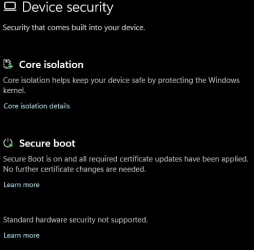
I noticed that Windows Security / Device Security intermittently is reporting the system does not meet hardware the specifications for enhanced hardware security.
2023 Certificates are updated, Windows is fully patched, TPM, Secure Boot are all enabled.
I have repaired the Windows Security App from inside the app and ran in Powershell as an Administrator Get-AppxPackage Microsoft.SecHealthUI | Reset-AppxPackage which did not fix the issue.
I uninstalled Webroot using Revo Uninstaller and back went to Windows Defender which did not fix the issue.
I have since noted the issue appears to be when the Computer wakes up from Sleep Mode.
Is there any setting I should look at to see if I something is wrong please?
2023 Certificates are updated, Windows is fully patched, TPM, Secure Boot are all enabled.
I have repaired the Windows Security App from inside the app and ran in Powershell as an Administrator Get-AppxPackage Microsoft.SecHealthUI | Reset-AppxPackage which did not fix the issue.
I uninstalled Webroot using Revo Uninstaller and back went to Windows Defender which did not fix the issue.
I have since noted the issue appears to be when the Computer wakes up from Sleep Mode.
Is there any setting I should look at to see if I something is wrong please?
My Computer
At a glance
Windows 11AMD Ryzen 8700G64 GBOnboard
- OS
- Windows 11
- Computer type
- PC/Desktop
- Manufacturer/Model
- Generic
- CPU
- AMD Ryzen 8700G
- Motherboard
- Gigabyte B650 UD AC
- Memory
- 64 GB
- Graphics Card(s)
- Onboard
- Sound Card
- Onboard
- Monitor(s) Displays
- Del U2723QE
- Screen Resolution
- 3840 x 2160
- Hard Drives
- Corsiar MP600 1TB
- PSU
- Silverstone 750 GOLD
- Case
- Silverstone FARA 513