Windows 11 pro running slow?


Stringman

New member
Local time
3:00 AM
Posts
2
OS
Windows 11 pro
Hi all,

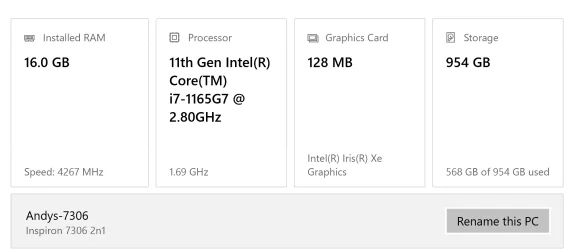
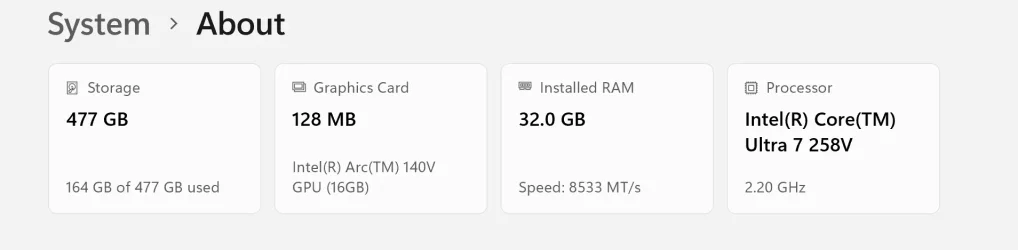
I have just got a new Samsung Galaxybook 5 pro (specs on photo1) This is replacing a 4 year old Dell 7306 2in1 (specs on photo 2)

I expected the Samsung to be much faster than the Dell but it seems to be the same if not slower.

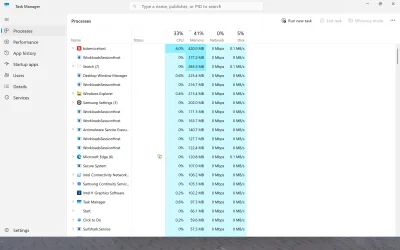
When I look at task manager it seems to be using 40+% just whilst idling. Is this normal?

The biggest culprits are Bitdefender (obviously) and workloadssession hosts.

I gather this is an AI Background process.

I dont use AI ( co pilot etc) so do I need these processes running? And if not can I get rid of them or anything else to improve the performance.

Or do I just need to manage my expectations lol

Thanks in advanceabout Dell 7306 2in1.webpabout GGalaxy book 5 pro.webpScreenshot (1).webp
 

My Computer My Computer

At a glance

Windows 11 pro
OS
Windows 11 pro
Computer type
Laptop
Manufacturer/Model
Samsung Galaxy book 5 pro
Uninstall Bitdefender and use Microsoft Defender.
 

My Computer My Computer

At a glance

Windows 11AMD Ryzen 8700G64 GBOnboard
OS
Windows 11
Computer type
PC/Desktop
Manufacturer/Model
Generic
CPU
AMD Ryzen 8700G
Motherboard
Gigabyte B650 UD AC
Memory
64 GB
Graphics Card(s)
Onboard
Sound Card
Onboard
Monitor(s) Displays
Del U2723QE
Screen Resolution
3840 x 2160
Hard Drives
Corsiar MP600 1TB
PSU
Silverstone 750 GOLD
Case
Silverstone FARA 513
Uninstall Bitdefender and use Microsoft Defender.
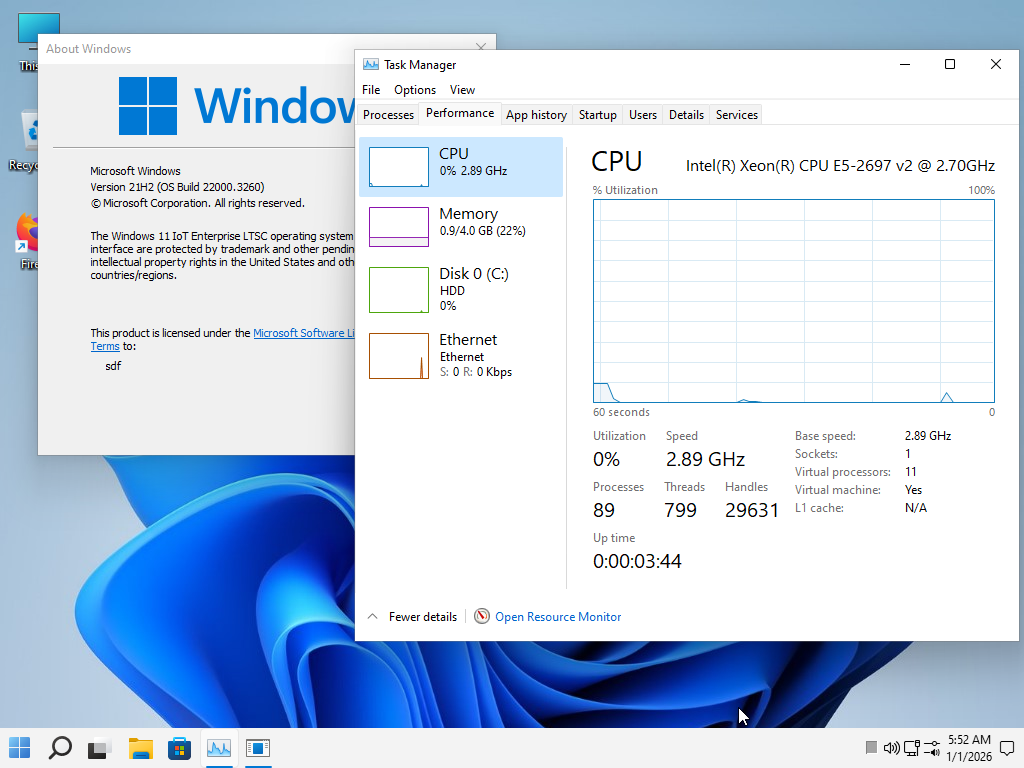
or using win11 lite old version without defender, edge and mitigation cpu
im using 21h2 lite very very speed, If you want to test this, the ISO of this version is ready in my signature.
fcajCX.png
 

My Computer My Computer

At a glance

Windows 11 Iot Enterprise 21h2 22000.3260xeon E5-2697v232gb 8x4gb ddr3 1333 mhzgtx 570 poit of view
OS
Windows 11 Iot Enterprise 21h2 22000.3260
Computer type
PC/Desktop
Manufacturer/Model
Asus
CPU
xeon E5-2697v2
Motherboard
rampage iv extreme
Memory
32gb 8x4gb ddr3 1333 mhz
Graphics Card(s)
gtx 570 poit of view
Sound Card
realtek HD (ALC898)
Monitor(s) Displays
samsung b2030
Screen Resolution
1600x900
Hard Drives
2tb hd 5400 rpm
3tb hd 5400 rpm
1tb nvme pcie 3.0
PSU
hx850w
Keyboard
mtek
Internet Speed
500/250 gpon
Browser
r3dfox 146.0
Antivirus
none
I dont use AI ( co pilot etc) so do I need these processes running? And if not can I get rid of them or anything else to improve the performance.

Or do I just need to manage my expectations lol
There's nothing wrong with gaming on that hardware. In fact it's adequate for most AAA games at ~medium settings at 1080p. Of course CoPilot can be removed, along with other annoying "features".
 

My Computer My Computer

At a glance

Windows 11 22H2 Pro (X-lite Micro 11 version)i7 13850HX (20 cores, 28 threads)32GB DDR5Intel UHD/ RTX 1000 ADA
OS
Windows 11 22H2 Pro (X-lite Micro 11 version)
Computer type
Laptop
Manufacturer/Model
Dell/ Precision 7680
CPU
i7 13850HX (20 cores, 28 threads)
Motherboard
Dell
Memory
32GB DDR5
Graphics Card(s)
Intel UHD/ RTX 1000 ADA
Sound Card
Realtek
Monitor(s) Displays
4K UHD Touchscreen
Screen Resolution
3840 x 2400
Hard Drives
Samsung 512GB system drive
WD Blue 1TB game drive
PSU
240W AC adapter, 1800W when docked
Internet Speed
1 gigabit symmetrical
Browser
Firefox, Librewolf
Antivirus
None. Manully configured so nobody except me can change any critical system files. (Don't ask how, it's probably against some rule somewhere)

Thanks all
I have dropped copilot and other "features"
I think my expectations were too high lol
 

My Computer My Computer

At a glance

Windows 11 pro
OS
Windows 11 pro
Computer type
Laptop
Manufacturer/Model
Samsung Galaxy book 5 pro
Back
Top Bottom