

AliA88
New member
- Local time
- 2:55 PM
- Posts
- 7
- OS
- Windows 11 24H2
Hi people I need some help please, thank you ever so much.
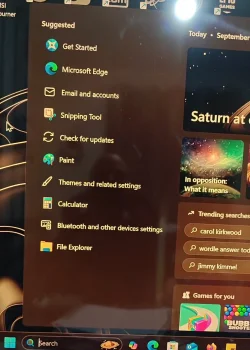
I have been having this issue for weeks now. When I first built this pc I never had this problem. I have been using it for months and never had any issues until recently. The problem is when I search something in the task bar search box, such as program or application, the program/application gets listed under recent, this is the correct behaviour. But when I turn my pc off (shutdown and turn off the socket switch) overnight the recently opened programs list changes back to default suggested list when I turn on the pc the next day, I don't understand why my searched applications/programs are cleared from recent. With more testing shutting down the pc and waiting a few mins and turning it back on the pc has no issues and my recent results are still there, the problem occurs overnight or over a multiple hours when the pc is turned off.
I have tried the following: re installed the OS full wipe and format of the Nvme, update everything on a clean os, reverting to older chipset drivers and installing new ones, resetting the search box, rebuilding the search index. Done all SFC scans, reset search in task manager.
I just want my recently opened programs to stay where they are.
Edit Specs: x870e, 7950x, 4080s, 32gb 6000mhzt, 2x 1TB Nvme, 3x 1TB sata ssds, 1000wat platinum Asus PSU.
I have been having this issue for weeks now. When I first built this pc I never had this problem. I have been using it for months and never had any issues until recently. The problem is when I search something in the task bar search box, such as program or application, the program/application gets listed under recent, this is the correct behaviour. But when I turn my pc off (shutdown and turn off the socket switch) overnight the recently opened programs list changes back to default suggested list when I turn on the pc the next day, I don't understand why my searched applications/programs are cleared from recent. With more testing shutting down the pc and waiting a few mins and turning it back on the pc has no issues and my recent results are still there, the problem occurs overnight or over a multiple hours when the pc is turned off.
I have tried the following: re installed the OS full wipe and format of the Nvme, update everything on a clean os, reverting to older chipset drivers and installing new ones, resetting the search box, rebuilding the search index. Done all SFC scans, reset search in task manager.
I just want my recently opened programs to stay where they are.
Edit Specs: x870e, 7950x, 4080s, 32gb 6000mhzt, 2x 1TB Nvme, 3x 1TB sata ssds, 1000wat platinum Asus PSU.
- Windows Build/Version
- 24h2
Attachments

Last edited:
My Computer
At a glance
Windows 11 24H2
- OS
- Windows 11 24H2
- Computer type
- PC/Desktop
- Manufacturer/Model
- Custom(x870e, 4090s, 32gb 6000mhzt, 1tb X2 Nvme, 4x 1tb sata ssds, 7950x Ryzen)






