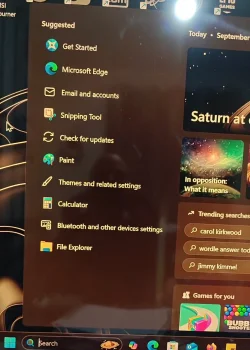
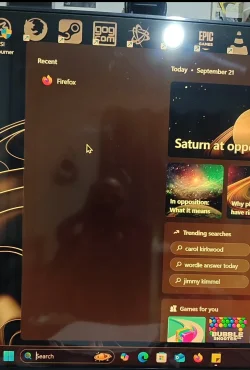
Windows 11 Recent Search results resets back to suggested list when pc has been off overnight.


AliA88

New member
Local time
6:19 PM
Posts
7
OS
Windows 11 24H2
Hi people I need some help please, thank you ever so much.

I have been having this issue for weeks now. When I first built this pc I never had this problem. I have been using it for months and never had any issues until recently. The problem is when I search something in the task bar search box, such as program or application, the program/application gets listed under recent, this is the correct behaviour. But when I turn my pc off (shutdown and turn off the socket switch) overnight the recently opened programs list changes back to default suggested list when I turn on the pc the next day, I don't understand why my searched applications/programs are cleared from recent. With more testing shutting down the pc and waiting a few mins and turning it back on the pc has no issues and my recent results are still there, the problem occurs overnight or over a multiple hours when the pc is turned off.

I have tried the following: re installed the OS full wipe and format of the Nvme, update everything on a clean os, reverting to older chipset drivers and installing new ones, resetting the search box, rebuilding the search index. Done all SFC scans, reset search in task manager.

I just want my recently opened programs to stay where they are.

Edit Specs: x870e, 7950x, 4080s, 32gb 6000mhzt, 2x 1TB Nvme, 3x 1TB sata ssds, 1000wat platinum Asus PSU.
 
Windows Build/Version
24h2

Attachments

  • Screenshot_2025-09-27-00-23-35-37_92460851df6f172a4592fca41cc2d2e6.webp
    Screenshot_2025-09-27-00-23-35-37_92460851df6f172a4592fca41cc2d2e6.webp
    146.3 KB · Views: 1
  • Screenshot_2025-09-27-00-27-36-77_92460851df6f172a4592fca41cc2d2e6.webp
    Screenshot_2025-09-27-00-27-36-77_92460851df6f172a4592fca41cc2d2e6.webp
    136.9 KB · Views: 1
Last edited:

My Computer My Computer

At a glance

Windows 11 24H2
OS
Windows 11 24H2
Computer type
PC/Desktop
Manufacturer/Model
Custom(x870e, 4090s, 32gb 6000mhzt, 1tb X2 Nvme, 4x 1tb sata ssds, 7950x Ryzen)
Check this setting.
Start > Settings > Personalization > Start and enable the toggles for Show most used apps, and Show recently opened items in Start, Jump Lists, and File Explorer.
 

My Computers My Computers

  • At a glance

    Windows 11 Pro 25H2 26200.8875i9-10900 10 core 20 threads32 gbnone-Intel UHD Graphics 630
    OS
    Windows 11 Pro 25H2 26200.8875
    Computer type
    PC/Desktop
    Manufacturer/Model
    Dell Optiplex 7080
    CPU
    i9-10900 10 core 20 threads
    Motherboard
    DELL 0J37VM
    Memory
    32 gb
    Graphics Card(s)
    none-Intel UHD Graphics 630
    Sound Card
    Integrated Realtek
    Monitor(s) Displays
    Benq 27
    Screen Resolution
    2560x1440
    Hard Drives
    2x1tb Solidigm m.2 nvme /External drives 512gb Samsung m.2 sata+2tb Kingston m2.nvme
    PSU
    500w
    Case
    MT
    Cooling
    Dell Premium
    Keyboard
    Logitech wired
    Mouse
    Logitech wireless
    Internet Speed
    so slow I'm too embarrassed to tell
    Browser
    #1 Edge #2 Firefox
    Antivirus
    Defender+MWB Premium
  • At a glance

    Windows 11 Pro 24H2 26200.8875AMD Ryzen 7 6800U32 gbintegrated
    Operating System
    Windows 11 Pro 24H2 26200.8875
    Computer type
    PC/Desktop
    Manufacturer/Model
    Beelink Mini PC SER5
    CPU
    AMD Ryzen 7 6800U
    Memory
    32 gb
    Graphics card(s)
    integrated
    Sound Card
    integrated
    Monitor(s) Displays
    Benq 27
    Screen Resolution
    2560x1440
    Hard Drives
    1TB Crucial nvme
    Keyboard
    Logitech wired
    Mouse
    Logitech wireless
    Internet Speed
    still too embarrassed to tell
    Browser
    Firefox
    Antivirus
    Defender
    Other Info
    System 3 is non compliant Dell 9020 i7-4770/24gb ram Win11 PRO 26200.8875
Hi thank you for your reply I have these options enabled, I checked I don't understand why this is happening. Any program I open gets listed under recent as shown in the picture it shows Firefox opened recently. When I turn my pc off overnight and turn it on the next day it's defaulted back to suggested.
 

My Computer My Computer

At a glance

Windows 11 24H2
OS
Windows 11 24H2
Computer type
PC/Desktop
Manufacturer/Model
Custom(x870e, 4090s, 32gb 6000mhzt, 1tb X2 Nvme, 4x 1tb sata ssds, 7950x Ryzen)
TBH I have never heard of this problem before so I am only speculating.

Both recents and jump lists are stored in your user account appdata folder (with some application recents stored in registry)

Recents path- C:\Users\username\AppData\Roaming\Microsoft\Windows\Recent

jump lists path -
AutomaticDestinations Jump List files are located in the user profile path C:\Users\username\AppData\Roaming\Microsoft\Windows\Recent\AutomaticDestinations

CustomDestinations jump list is located at
C:\Users\username\AppData\Roaming\Microsoft\Windows\Recent\CustomDestinations\*.customDestinations-ms

If you have not edited group policy or regedit to clear recents on shutdown, I would suspect corruption in your user account. To prove whether it's a windows problem or user account problem, create a new local user account to test with. Change it's type to administrator.
Restart and login to new user account. If the problem does not happen using this new account, it points to corruption in your user account rather than it being a windows problem.
 

My Computers My Computers

  • At a glance

    Windows 11 Pro 25H2 26200.8875i9-10900 10 core 20 threads32 gbnone-Intel UHD Graphics 630
    OS
    Windows 11 Pro 25H2 26200.8875
    Computer type
    PC/Desktop
    Manufacturer/Model
    Dell Optiplex 7080
    CPU
    i9-10900 10 core 20 threads
    Motherboard
    DELL 0J37VM
    Memory
    32 gb
    Graphics Card(s)
    none-Intel UHD Graphics 630
    Sound Card
    Integrated Realtek
    Monitor(s) Displays
    Benq 27
    Screen Resolution
    2560x1440
    Hard Drives
    2x1tb Solidigm m.2 nvme /External drives 512gb Samsung m.2 sata+2tb Kingston m2.nvme
    PSU
    500w
    Case
    MT
    Cooling
    Dell Premium
    Keyboard
    Logitech wired
    Mouse
    Logitech wireless
    Internet Speed
    so slow I'm too embarrassed to tell
    Browser
    #1 Edge #2 Firefox
    Antivirus
    Defender+MWB Premium
  • At a glance

    Windows 11 Pro 24H2 26200.8875AMD Ryzen 7 6800U32 gbintegrated
    Operating System
    Windows 11 Pro 24H2 26200.8875
    Computer type
    PC/Desktop
    Manufacturer/Model
    Beelink Mini PC SER5
    CPU
    AMD Ryzen 7 6800U
    Memory
    32 gb
    Graphics card(s)
    integrated
    Sound Card
    integrated
    Monitor(s) Displays
    Benq 27
    Screen Resolution
    2560x1440
    Hard Drives
    1TB Crucial nvme
    Keyboard
    Logitech wired
    Mouse
    Logitech wireless
    Internet Speed
    still too embarrassed to tell
    Browser
    Firefox
    Antivirus
    Defender
    Other Info
    System 3 is non compliant Dell 9020 i7-4770/24gb ram Win11 PRO 26200.8875
TBH I have never heard of this problem before so I am only speculating.

Both recents and jump lists are stored in your user account appdata folder (with some application recents stored in registry)

Recents path- C:\Users\username\AppData\Roaming\Microsoft\Windows\Recent

jump lists path -
AutomaticDestinations Jump List files are located in the user profile path C:\Users\username\AppData\Roaming\Microsoft\Windows\Recent\AutomaticDestinations

CustomDestinations jump list is located at
C:\Users\username\AppData\Roaming\Microsoft\Windows\Recent\CustomDestinations\*.customDestinations-ms

If you have not edited group policy or regedit to clear recents on shutdown, I would suspect corruption in your user account. To prove whether it's a windows problem or user account problem, create a new local user account to test with. Change it's type to administrator.
Restart and login to new user account. If the problem does not happen using this new account, it points to corruption in your user account rather than it being a windows problem.
Thank you for the reply. I just wanted to add I can shutdown the pc as many times as I want the recent list is always there. It's when the pc has been off for a very long time over night and I turn it on the next day in the afternoon this problem occurs. Say if I shut down the pc and come back 30 mins later it's fine. It's only after over night or a very long period of time this happens. I will test your method out and try another user, thank you for Ur reply
 

My Computer My Computer

At a glance

Windows 11 24H2
OS
Windows 11 24H2
Computer type
PC/Desktop
Manufacturer/Model
Custom(x870e, 4090s, 32gb 6000mhzt, 1tb X2 Nvme, 4x 1tb sata ssds, 7950x Ryzen)
Hey, I'm not sure it will work but considering both recents and jump lists are in the same folder, it would be worth trying to at least narrow it down to actually being a Windows problem,. Shut down at no time is supposed to clear these items unless the user, a group policy, registry change, or created task tells the PC to do so.

Something else....do you have any 3rd party cleaning app installed on your computer that might be set up to run on a schedule?
Search for and open "task scheduler" See if anything jumps out to you there that is set to automatically run...

If this proves to be a Windows problem you can do the normal file checking stuff like checking for corrupt system files.
Open a command prompt as administrator and type dism /online /cleanup-image /restorehealth
When complete restart. Then open command prompt as admin again and run sfc /scannow
Pay attention to the scan results to see if SFC found anything it could not repair.

The next step after that would be a repair install. Repair Install Windows 11 with an In-place Upgrade
 

My Computers My Computers

  • At a glance

    Windows 11 Pro 25H2 26200.8875i9-10900 10 core 20 threads32 gbnone-Intel UHD Graphics 630
    OS
    Windows 11 Pro 25H2 26200.8875
    Computer type
    PC/Desktop
    Manufacturer/Model
    Dell Optiplex 7080
    CPU
    i9-10900 10 core 20 threads
    Motherboard
    DELL 0J37VM
    Memory
    32 gb
    Graphics Card(s)
    none-Intel UHD Graphics 630
    Sound Card
    Integrated Realtek
    Monitor(s) Displays
    Benq 27
    Screen Resolution
    2560x1440
    Hard Drives
    2x1tb Solidigm m.2 nvme /External drives 512gb Samsung m.2 sata+2tb Kingston m2.nvme
    PSU
    500w
    Case
    MT
    Cooling
    Dell Premium
    Keyboard
    Logitech wired
    Mouse
    Logitech wireless
    Internet Speed
    so slow I'm too embarrassed to tell
    Browser
    #1 Edge #2 Firefox
    Antivirus
    Defender+MWB Premium
  • At a glance

    Windows 11 Pro 24H2 26200.8875AMD Ryzen 7 6800U32 gbintegrated
    Operating System
    Windows 11 Pro 24H2 26200.8875
    Computer type
    PC/Desktop
    Manufacturer/Model
    Beelink Mini PC SER5
    CPU
    AMD Ryzen 7 6800U
    Memory
    32 gb
    Graphics card(s)
    integrated
    Sound Card
    integrated
    Monitor(s) Displays
    Benq 27
    Screen Resolution
    2560x1440
    Hard Drives
    1TB Crucial nvme
    Keyboard
    Logitech wired
    Mouse
    Logitech wireless
    Internet Speed
    still too embarrassed to tell
    Browser
    Firefox
    Antivirus
    Defender
    Other Info
    System 3 is non compliant Dell 9020 i7-4770/24gb ram Win11 PRO 26200.8875
Hey, I'm not sure it will work but considering both recents and jump lists are in the same folder, it would be worth trying to at least narrow it down to actually being a Windows problem,. Shut down at no time is not supposed to clear these items unless the user, a group policy, registry change, or created task tells the PC to do so.

Something else....do you have any 3rd party cleaning app installed on your computer that might be set up to run on a schedule?
Search for and open "task scheduler" See if anything jumps out to you there that is set to automatically run...

If this proves to be a Windows problem you can do the normal file checking stuff like checking for corrupt system files.
Open a command prompt as administrator and type dism /online /cleanup-image /restorehealth
When complete restart. Then open command prompt as admin again and run sfc /scannow
Pay attention to the scan results to see if SFC found anything it could not repair.

The next step after that would be a repair install. Repair Install Windows 11 with an In-place Upgrade
No cleaning apps installed, I have tried the SFC scans and no avail, I also did a in place upgrade to still the same issue, but I do recall when I did a complete fresh install of 24h2 i.e I completely formatted the Nvme and re installed I opened a few programs and they were shown on the recent list. I hadn't installed any updates or driver's and I left the pc overnight and it was completely fine. So I do believe this is a update or driver causing this but I don't know which one. Also I can't find others with the same issue if a update is causing this which I believe it could be.
 

My Computer My Computer

At a glance

Windows 11 24H2
OS
Windows 11 24H2
Computer type
PC/Desktop
Manufacturer/Model
Custom(x870e, 4090s, 32gb 6000mhzt, 1tb X2 Nvme, 4x 1tb sata ssds, 7950x Ryzen)
I'm really hoping I'm right and it's a user account problem or you find some task running that is screwing you up.. If it is user account related, keep me posted and I can tell you how to safely get all your data moved into another account. Just tell me if you currently using a local or a Microsoft account and if you are syncing your personal files to Onedrive and I'll send you instructions?
 

My Computers My Computers

  • At a glance

    Windows 11 Pro 25H2 26200.8875i9-10900 10 core 20 threads32 gbnone-Intel UHD Graphics 630
    OS
    Windows 11 Pro 25H2 26200.8875
    Computer type
    PC/Desktop
    Manufacturer/Model
    Dell Optiplex 7080
    CPU
    i9-10900 10 core 20 threads
    Motherboard
    DELL 0J37VM
    Memory
    32 gb
    Graphics Card(s)
    none-Intel UHD Graphics 630
    Sound Card
    Integrated Realtek
    Monitor(s) Displays
    Benq 27
    Screen Resolution
    2560x1440
    Hard Drives
    2x1tb Solidigm m.2 nvme /External drives 512gb Samsung m.2 sata+2tb Kingston m2.nvme
    PSU
    500w
    Case
    MT
    Cooling
    Dell Premium
    Keyboard
    Logitech wired
    Mouse
    Logitech wireless
    Internet Speed
    so slow I'm too embarrassed to tell
    Browser
    #1 Edge #2 Firefox
    Antivirus
    Defender+MWB Premium
  • At a glance

    Windows 11 Pro 24H2 26200.8875AMD Ryzen 7 6800U32 gbintegrated
    Operating System
    Windows 11 Pro 24H2 26200.8875
    Computer type
    PC/Desktop
    Manufacturer/Model
    Beelink Mini PC SER5
    CPU
    AMD Ryzen 7 6800U
    Memory
    32 gb
    Graphics card(s)
    integrated
    Sound Card
    integrated
    Monitor(s) Displays
    Benq 27
    Screen Resolution
    2560x1440
    Hard Drives
    1TB Crucial nvme
    Keyboard
    Logitech wired
    Mouse
    Logitech wireless
    Internet Speed
    still too embarrassed to tell
    Browser
    Firefox
    Antivirus
    Defender
    Other Info
    System 3 is non compliant Dell 9020 i7-4770/24gb ram Win11 PRO 26200.8875
I'm really hoping I'm right and it's a user account problem or you find some task running that is screwing you up.. If it is user account related, keep me posted and I can tell you how to safely get all your data moved into another account. Just tell me if you currently using a local or a Microsoft account and if you are syncing your personal files to Onedrive and I'll send you instructions?
I am using a ms account and OneDrive isn't installed I removed it since I have no use for it. I never had this issue before I had this new rig for around 4 months now and it was literally like last month this started so I did a complete fresh install of 24h2, I don't have any cleaning software. The only software I have is the following: steam, gog, uplay, rockstar client for GTA V, epic store, battle.net, VLC player, Samsung magician for the 990 1tb SSD firmware updates but that is disable to start on boot optional features are off to in that software, MSI afterbuner, Firefox. That's my entire list. All windows updates installed and all updates from ms store installed, nothing downloaded from ms store when it comes to software and games. Thank you for your help I appreciate it. I will try the new account during the day and let you know.
 

My Computer My Computer

At a glance

Windows 11 24H2
OS
Windows 11 24H2
Computer type
PC/Desktop
Manufacturer/Model
Custom(x870e, 4090s, 32gb 6000mhzt, 1tb X2 Nvme, 4x 1tb sata ssds, 7950x Ryzen)
Hello,

I have exactly the same problem. Even after a fresh Windows 11 installation, the problem still occurs.

@AliA88 Has anything changed for you? Does the problem still exist?

Best regards and thank you
 

My Computer My Computer

At a glance

Windows 11 25H2Intel i7-12700KCrucial Ballistix 32GB, DDR4-3200, CL16-18-18-36Sapphire 6900XT 16GB Nitro+
OS
Windows 11 25H2
Computer type
PC/Desktop
Manufacturer/Model
Custom
CPU
Intel i7-12700K
Motherboard
Gigabyte Z690 Gaming X DDR4
Memory
Crucial Ballistix 32GB, DDR4-3200, CL16-18-18-36
Graphics Card(s)
Sapphire 6900XT 16GB Nitro+
Monitor(s) Displays
Philips 27 Monitor Zoll
Screen Resolution
2560 x 1440
Hard Drives
2x Samsung SSD 970 EVO Plus 1TB, M.2
Cooling
Arctic Liquid Freezer III
Back
Top Bottom