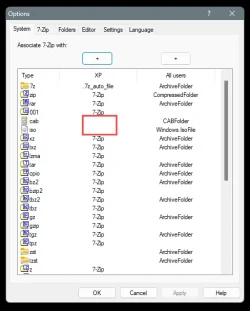
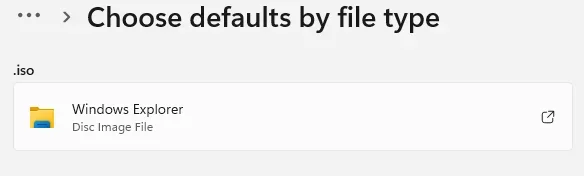
I am trying to mount a specific .iso file but Windows 11 - after like 60:seconds or so - returns "Sorry, there was a problem mounting the file":
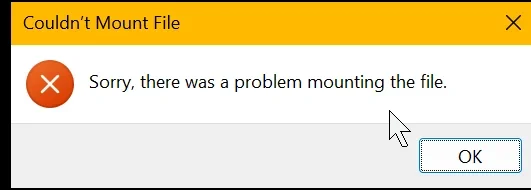
I searched left and right (in this forum and elsewhere) but I can't get this darn file mounted! >:-(
What I tried so far:
1. I ensured that I had all current Windows updates installed.
2. I restarted my system
3. I verified that I had unblocked the downloaded file (i.e. I removed the "mark of the web").
4. I checked for file's integrity calculating and verifying the expected hash using PowerShell and "Get-FileHash <filepath>": BAAEB6C90DD51648154B64C40C9E0C14D93A427F611A1BB49C8077FA2FF73364 is the expected hash for that file!
This, BTW, also proves that the file is fully readable and not corrupted.
5. I tried to open the file not via "Right-click -> Mount" (as I tried initially) but also via "Open with..." and selecting "Internet Explorer" and option "Always". I even verified the mount context is properly specified in the registry as:
6. I made sure that the service "vds" service ("Virtual Disk" - C:\WINDOWS\System32\vds.exe) is running.
7. I ran SFC /scannow (just so that I can check this off - since that suggestion otherwise always comes up).
8. I tried to mount the file via a PowerShell command-window:
(of course I replaced <image-path> with the actual path when doing so). That yielded at least an error message:
Any idea what that semaphore msg. is supposed to teach me - i.e. how I can unlock that semaphore?
9. I tried to mount other .iso-s (two images of former install-CDs that I happened to have on my system: office and visio). Same result: "Sorry, there was a problem mounting the file".
What else could I possibly check, do, or verify to get this darn .iso mounted?
PS.: The file I am trying to mount is actually the Windows 11 installation .iso (which I had used to upgrade from Windows 10 to Windows 11 back in last fall). From that .iso I need to copy out the "winre.wim"-file and "bootx64.efi" to update my laptop's recovery partition. As I recently had to learn my recovery partition contains code that is still signed with the old MS certificate (whose validity ended recently) which means it would most likely even fail to boot when needed.
To be able to recover also when things get bad on my laptop I wanted to update said files, so I can at least reliably boot from the recovery partition.
If MS would have properly gotten their act together the Windows updates re. the required certificate updates would also have taken care to properly update any recovery partitions being found and then users could have spared themselves such nuissance! :-(
I searched left and right (in this forum and elsewhere) but I can't get this darn file mounted! >:-(
What I tried so far:
1. I ensured that I had all current Windows updates installed.
2. I restarted my system
3. I verified that I had unblocked the downloaded file (i.e. I removed the "mark of the web").
4. I checked for file's integrity calculating and verifying the expected hash using PowerShell and "Get-FileHash <filepath>": BAAEB6C90DD51648154B64C40C9E0C14D93A427F611A1BB49C8077FA2FF73364 is the expected hash for that file!
This, BTW, also proves that the file is fully readable and not corrupted.
5. I tried to open the file not via "Right-click -> Mount" (as I tried initially) but also via "Open with..." and selecting "Internet Explorer" and option "Always". I even verified the mount context is properly specified in the registry as:
Code:
...
[HKEY_CLASSES_ROOT\Windows.IsoFile\shell\mount]
  "CommandStateSync"=""
  "ExplorerCommandHandler"="{9ab3b1c9-3225-4bb4-93b6-bfb3c0d93743}"
  "MultiSelectModel"="Document"

[HKEY_CLASSES_ROOT\Windows.IsoFile\shell\mount\command]
  @=hex(2):25,00,53,00,79,00,73,00,74,00,65,00,6d,00,52,00,6f,00,6f,00,74,00,25,\
  00,5c,00,45,00,78,00,70,00,6c,00,6f,00,72,00,65,00,72,00,2e,00,65,00,78,00,\
  65,00,00,00   [this corresponds to "%SystemRoot%\Explorer.exe"]
  "DelegateExecute"="{9ab3b1c9-3225-4bb4-93b6-bfb3c0d93743}"
...7. I ran SFC /scannow (just so that I can check this off - since that suggestion otherwise always comes up).
8. I tried to mount the file via a PowerShell command-window:
Code:
mountdiskimage -imagepath "<image-path>\Win11_25H2_EnglishInternational_x64.iso"
Code:
"Mount-DiskImage: The semaphore timeout period has expired."9. I tried to mount other .iso-s (two images of former install-CDs that I happened to have on my system: office and visio). Same result: "Sorry, there was a problem mounting the file".
What else could I possibly check, do, or verify to get this darn .iso mounted?
PS.: The file I am trying to mount is actually the Windows 11 installation .iso (which I had used to upgrade from Windows 10 to Windows 11 back in last fall). From that .iso I need to copy out the "winre.wim"-file and "bootx64.efi" to update my laptop's recovery partition. As I recently had to learn my recovery partition contains code that is still signed with the old MS certificate (whose validity ended recently) which means it would most likely even fail to boot when needed.
To be able to recover also when things get bad on my laptop I wanted to update said files, so I can at least reliably boot from the recovery partition.
If MS would have properly gotten their act together the Windows updates re. the required certificate updates would also have taken care to properly update any recovery partitions being found and then users could have spared themselves such nuissance! :-(
- Windows Build/Version
- 25H2 (OS Build 26200.8655)
Last edited:
My Computer
At a glance
Windows 11Intel 11th Gen (i7-1185G7)32 GB---
- OS
- Windows 11
- Computer type
- Laptop
- Manufacturer/Model
- MS
- CPU
- Intel 11th Gen (i7-1185G7)
- Motherboard
- It's a tablet...
- Memory
- 32 GB
- Graphics Card(s)
- ---
- Sound Card
- built-in
- Monitor(s) Displays
- built-in LCD & and ext. BENQ 4K
- Screen Resolution
- 2880x1920 & 3840x2160
- Hard Drives
- SSD / 1TB
- Browser
- Brave
- Antivirus
- none/Windows Defender