Windows 11 "The Component Store is Repairable"


PorkSnork

Member
Local time
4:07 AM
Posts
24
OS
Windows 11
Hi, I keep running into "The component store is repairable" when running "DISM /Online /Cleanup-Image /RestoreHealth".
When I run /RestoreHealth the process completes successfully but If I later use /ScanHealth it will result in showing the same error.
I seem to have to run it often and I am confused how it becomes repairable again so quickly after running the restore command.

Any advice would be thoroughly appreciated.
 
Windows Build/Version
Windows 11 24H2

My Computer My Computer

At a glance

Windows 11Intel i5 14600k32GB Teamgroup T-Force Delta RGB 3600MHzZotac Gaming RTX 5070 Solid OC 12gb
OS
Windows 11
Computer type
PC/Desktop
Manufacturer/Model
MSI
CPU
Intel i5 14600k
Motherboard
MSI Pro B660M-A Wifi DDR4
Memory
32GB Teamgroup T-Force Delta RGB 3600MHz
Graphics Card(s)
Zotac Gaming RTX 5070 Solid OC 12gb
Monitor(s) Displays
AOC 24G2W1G3, AOC 24G2W1G4
Screen Resolution
1080p
Hard Drives
BX500 1TB Sata SSD, ADATA Legend 800 2GB NVME
PSU
Corsair RM850e 850W 80+Gold Fully Modular
Case
CoolerMaster Masterbox NR400 Micro ATX
Cooling
DeepCool AK620 Zero Dark Dual Tower
Keyboard
Womier SK65 Custom mechanical keyboard
Mouse
Glorious Model I Gaming Mouse
Internet Speed
Download 53.70 Mbps, Upload 18.68 Mbps
Browser
Opera GX
Antivirus
Windows Defender
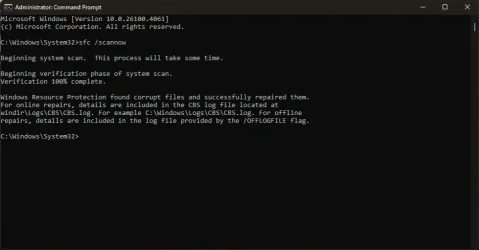
After running restore health are you also checking the system files?

sfc /scannow

Correct order is to restore health then check system files with sfc.
 

My Computer My Computer

At a glance

Windows 11 Pro
OS
Windows 11 Pro
After running restore health are you also checking the system files?

sfc /scannow

Correct order is to restore health then check system files with sfc.
Okay cool I haven't. Does it matter if I do SFC a few minutes after running /RestoreHealth or should I run restore again real quick?
 

My Computer My Computer

At a glance

Windows 11Intel i5 14600k32GB Teamgroup T-Force Delta RGB 3600MHzZotac Gaming RTX 5070 Solid OC 12gb
OS
Windows 11
Computer type
PC/Desktop
Manufacturer/Model
MSI
CPU
Intel i5 14600k
Motherboard
MSI Pro B660M-A Wifi DDR4
Memory
32GB Teamgroup T-Force Delta RGB 3600MHz
Graphics Card(s)
Zotac Gaming RTX 5070 Solid OC 12gb
Monitor(s) Displays
AOC 24G2W1G3, AOC 24G2W1G4
Screen Resolution
1080p
Hard Drives
BX500 1TB Sata SSD, ADATA Legend 800 2GB NVME
PSU
Corsair RM850e 850W 80+Gold Fully Modular
Case
CoolerMaster Masterbox NR400 Micro ATX
Cooling
DeepCool AK620 Zero Dark Dual Tower
Keyboard
Womier SK65 Custom mechanical keyboard
Mouse
Glorious Model I Gaming Mouse
Internet Speed
Download 53.70 Mbps, Upload 18.68 Mbps
Browser
Opera GX
Antivirus
Windows Defender
After restorehealth restart the computer and then run sfc
 

My Computers My Computers

  • At a glance

    Windows 11 ProAMD Ryzen 9 8945HS32GB DDR5 SO-DIMMIntegrated AMD Radeon 780M (4.00 GHz)
    OS
    Windows 11 Pro
    Computer type
    PC/Desktop
    Manufacturer/Model
    GMKtec K11
    CPU
    AMD Ryzen 9 8945HS
    Memory
    32GB DDR5 SO-DIMM
    Graphics Card(s)
    Integrated AMD Radeon 780M (4.00 GHz)
    Monitor(s) Displays
    Benq 2250HM
    Screen Resolution
    1920 x 1080
    Hard Drives
    1 TB PCIe 4.0 NVMe M.2 SSD
  • At a glance

    Windows 11 HomeIntel® Core™ Ultra 7 - 255H processor16 GB LPDDR5 SDRAMIntel Arc 140T onboard graphics
    Operating System
    Windows 11 Home
    Computer type
    Laptop
    Manufacturer/Model
    ASUS Zenbook 14 OLED 14" Laptop - UX3405CA-QL192W
    CPU
    Intel® Core™ Ultra 7 - 255H processor
    Memory
    16 GB LPDDR5 SDRAM
    Graphics card(s)
    Intel Arc 140T onboard graphics
    Screen Resolution
    1920 x 1200 (16:10 WUXGA resolution) OLED Touchscreen
    Hard Drives
    1TB SSD
After restorehealth restart the computer and then run sfc
No worries, Ill comment later tomorrow if this has fixed the issue. Thank you very much for your help!
 

My Computer My Computer

At a glance

Windows 11Intel i5 14600k32GB Teamgroup T-Force Delta RGB 3600MHzZotac Gaming RTX 5070 Solid OC 12gb
OS
Windows 11
Computer type
PC/Desktop
Manufacturer/Model
MSI
CPU
Intel i5 14600k
Motherboard
MSI Pro B660M-A Wifi DDR4
Memory
32GB Teamgroup T-Force Delta RGB 3600MHz
Graphics Card(s)
Zotac Gaming RTX 5070 Solid OC 12gb
Monitor(s) Displays
AOC 24G2W1G3, AOC 24G2W1G4
Screen Resolution
1080p
Hard Drives
BX500 1TB Sata SSD, ADATA Legend 800 2GB NVME
PSU
Corsair RM850e 850W 80+Gold Fully Modular
Case
CoolerMaster Masterbox NR400 Micro ATX
Cooling
DeepCool AK620 Zero Dark Dual Tower
Keyboard
Womier SK65 Custom mechanical keyboard
Mouse
Glorious Model I Gaming Mouse
Internet Speed
Download 53.70 Mbps, Upload 18.68 Mbps
Browser
Opera GX
Antivirus
Windows Defender

Attachments

  • Untitled.webp
    Untitled.webp
    28.4 KB · Views: 7

My Computer My Computer

At a glance

Windows 11Intel i5 14600k32GB Teamgroup T-Force Delta RGB 3600MHzZotac Gaming RTX 5070 Solid OC 12gb
OS
Windows 11
Computer type
PC/Desktop
Manufacturer/Model
MSI
CPU
Intel i5 14600k
Motherboard
MSI Pro B660M-A Wifi DDR4
Memory
32GB Teamgroup T-Force Delta RGB 3600MHz
Graphics Card(s)
Zotac Gaming RTX 5070 Solid OC 12gb
Monitor(s) Displays
AOC 24G2W1G3, AOC 24G2W1G4
Screen Resolution
1080p
Hard Drives
BX500 1TB Sata SSD, ADATA Legend 800 2GB NVME
PSU
Corsair RM850e 850W 80+Gold Fully Modular
Case
CoolerMaster Masterbox NR400 Micro ATX
Cooling
DeepCool AK620 Zero Dark Dual Tower
Keyboard
Womier SK65 Custom mechanical keyboard
Mouse
Glorious Model I Gaming Mouse
Internet Speed
Download 53.70 Mbps, Upload 18.68 Mbps
Browser
Opera GX
Antivirus
Windows Defender
1) Please post a link for these zipped files:

C:\windows\logs\CBS\CBS.log
C:\windows\logs\CBS\CbsPersist


2) Download to a new desktop folder:


3) Uninstall any of these non-Microsoft software:
a) antivirus
b) firewall


4) Detach non-windows disk drives


3) Mount the iso


4) Perform an in place upgrade repair:


My Computer My Computer

At a glance

Windows 10Intel(R) Core(TM) i7-4800MQ CPU @ 2.70GHz16 GB Total: Manufacturer : Samsung MemoryTyp...NVIDIA Quadro K3100M; Intel(R) HD Graphics 4600
OS
Windows 10
Computer type
Laptop
Manufacturer/Model
HP
CPU
Intel(R) Core(TM) i7-4800MQ CPU @ 2.70GHz
Motherboard
Product : 190A Version : KBC Version 94.56
Memory
16 GB Total: Manufacturer : Samsung MemoryType : DDR3 FormFactor : SODIMM Capacity : 8GB Speed : 1600
Graphics Card(s)
NVIDIA Quadro K3100M; Intel(R) HD Graphics 4600
Sound Card
IDT High Definition Audio CODEC; PNP Device ID HDAUDIO\FUNC_01&VEN_111D&DEV_76E0
Hard Drives
Model Hitachi HTS727575A9E364
Antivirus
Microsoft Defender
Other Info
Mobile Workstation
1) Please post a link for these zipped files:

C:\windows\logs\CBS\CBS.log
C:\windows\logs\CBS\CbsPersist


2) Download to a new desktop folder:


3) Uninstall any of these non-Microsoft software:
a) antivirus
b) firewall


4) Detach non-windows disk drives


3) Mount the iso


4) Perform an in place upgrade repair:

Here is the attached files EDIT*Sorry for taking so long to reply
 

Attachments

My Computer My Computer

At a glance

Windows 11Intel i5 14600k32GB Teamgroup T-Force Delta RGB 3600MHzZotac Gaming RTX 5070 Solid OC 12gb
OS
Windows 11
Computer type
PC/Desktop
Manufacturer/Model
MSI
CPU
Intel i5 14600k
Motherboard
MSI Pro B660M-A Wifi DDR4
Memory
32GB Teamgroup T-Force Delta RGB 3600MHz
Graphics Card(s)
Zotac Gaming RTX 5070 Solid OC 12gb
Monitor(s) Displays
AOC 24G2W1G3, AOC 24G2W1G4
Screen Resolution
1080p
Hard Drives
BX500 1TB Sata SSD, ADATA Legend 800 2GB NVME
PSU
Corsair RM850e 850W 80+Gold Fully Modular
Case
CoolerMaster Masterbox NR400 Micro ATX
Cooling
DeepCool AK620 Zero Dark Dual Tower
Keyboard
Womier SK65 Custom mechanical keyboard
Mouse
Glorious Model I Gaming Mouse
Internet Speed
Download 53.70 Mbps, Upload 18.68 Mbps
Browser
Opera GX
Antivirus
Windows Defender

My Computers My Computers

  • At a glance

    Windows 11 Enterprise 25H2 26200 7462Intel XEON E5-2699 v364GB Teamgroup UD4-3600NVIDIA GeForce GTX 1080 Ti
    OS
    Windows 11 Enterprise 25H2 26200 7462
    Computer type
    PC/Desktop
    Manufacturer/Model
    Custom Build
    CPU
    Intel XEON E5-2699 v3
    Motherboard
    ASUS X99-A
    Memory
    64GB Teamgroup UD4-3600
    Graphics Card(s)
    NVIDIA GeForce GTX 1080 Ti
    Sound Card
    Integrated
    Monitor(s) Displays
    ACER X34 Predator
    Screen Resolution
    3440 x 1440
    Hard Drives
    Crucial CT1000P 3P SSD8 1TB
    Crucial CT1000 BX500 SSD 1TB
    PSU
    GameMax Pro
    Case
    Fractal Design
    Cooling
    Corsair H110iGT + 6 140mm Fans
    Keyboard
    Corsair K4
    Mouse
    G-Skill G502
    Internet Speed
    300MBs
    Browser
    Chrome
    Antivirus
    OEM
    Other Info
    ASUS RT-AC87U Router
  • At a glance

    25H2 26200.50748GB
    Operating System
    25H2 26200.5074
    Computer type
    Laptop
    Manufacturer/Model
    ASUS X555LA
    Memory
    8GB
    Browser
    Chrome
    Antivirus
    OEM

My Computer My Computer

At a glance

Windows 11Intel i5 14600k32GB Teamgroup T-Force Delta RGB 3600MHzZotac Gaming RTX 5070 Solid OC 12gb
OS
Windows 11
Computer type
PC/Desktop
Manufacturer/Model
MSI
CPU
Intel i5 14600k
Motherboard
MSI Pro B660M-A Wifi DDR4
Memory
32GB Teamgroup T-Force Delta RGB 3600MHz
Graphics Card(s)
Zotac Gaming RTX 5070 Solid OC 12gb
Monitor(s) Displays
AOC 24G2W1G3, AOC 24G2W1G4
Screen Resolution
1080p
Hard Drives
BX500 1TB Sata SSD, ADATA Legend 800 2GB NVME
PSU
Corsair RM850e 850W 80+Gold Fully Modular
Case
CoolerMaster Masterbox NR400 Micro ATX
Cooling
DeepCool AK620 Zero Dark Dual Tower
Keyboard
Womier SK65 Custom mechanical keyboard
Mouse
Glorious Model I Gaming Mouse
Internet Speed
Download 53.70 Mbps, Upload 18.68 Mbps
Browser
Opera GX
Antivirus
Windows Defender
Only issue is that after this it still says when I scan again that "The component store is repairable"
You can kill that with an InPlace update.
 

My Computers My Computers

  • At a glance

    Windows 11 Enterprise 25H2 26200 7462Intel XEON E5-2699 v364GB Teamgroup UD4-3600NVIDIA GeForce GTX 1080 Ti
    OS
    Windows 11 Enterprise 25H2 26200 7462
    Computer type
    PC/Desktop
    Manufacturer/Model
    Custom Build
    CPU
    Intel XEON E5-2699 v3
    Motherboard
    ASUS X99-A
    Memory
    64GB Teamgroup UD4-3600
    Graphics Card(s)
    NVIDIA GeForce GTX 1080 Ti
    Sound Card
    Integrated
    Monitor(s) Displays
    ACER X34 Predator
    Screen Resolution
    3440 x 1440
    Hard Drives
    Crucial CT1000P 3P SSD8 1TB
    Crucial CT1000 BX500 SSD 1TB
    PSU
    GameMax Pro
    Case
    Fractal Design
    Cooling
    Corsair H110iGT + 6 140mm Fans
    Keyboard
    Corsair K4
    Mouse
    G-Skill G502
    Internet Speed
    300MBs
    Browser
    Chrome
    Antivirus
    OEM
    Other Info
    ASUS RT-AC87U Router
  • At a glance

    25H2 26200.50748GB
    Operating System
    25H2 26200.5074
    Computer type
    Laptop
    Manufacturer/Model
    ASUS X555LA
    Memory
    8GB
    Browser
    Chrome
    Antivirus
    OEM
You can kill that with an InPlace update.
So, update. After an In place upgrade and scanning health, I am still getting the error "The component store is repairable" it seems nothing has been fixed although, I am not encountering any issues because of this error from the look of things. I will run another restore health and sfc scan to see if it nips it in the bud permanently
 

My Computer My Computer

At a glance

Windows 11Intel i5 14600k32GB Teamgroup T-Force Delta RGB 3600MHzZotac Gaming RTX 5070 Solid OC 12gb
OS
Windows 11
Computer type
PC/Desktop
Manufacturer/Model
MSI
CPU
Intel i5 14600k
Motherboard
MSI Pro B660M-A Wifi DDR4
Memory
32GB Teamgroup T-Force Delta RGB 3600MHz
Graphics Card(s)
Zotac Gaming RTX 5070 Solid OC 12gb
Monitor(s) Displays
AOC 24G2W1G3, AOC 24G2W1G4
Screen Resolution
1080p
Hard Drives
BX500 1TB Sata SSD, ADATA Legend 800 2GB NVME
PSU
Corsair RM850e 850W 80+Gold Fully Modular
Case
CoolerMaster Masterbox NR400 Micro ATX
Cooling
DeepCool AK620 Zero Dark Dual Tower
Keyboard
Womier SK65 Custom mechanical keyboard
Mouse
Glorious Model I Gaming Mouse
Internet Speed
Download 53.70 Mbps, Upload 18.68 Mbps
Browser
Opera GX
Antivirus
Windows Defender
See if these steps make any difference:


1) Open administrative command prompt and copy and paste:

DISM /Online /Cleanup-Image /StartComponentCleanup

DISM /Online /Cleanup-Image /StartComponentCleanup /ResetBase


2) Run Tuneup plus > post a share link


Code:
2025-05-28 19:09:48, Info                  CBS    FLOW: Entering stage: CheckCsi
2025-05-28 19:10:33, Info                  CSI    0000000c Hashes for file member [l:16]'Task Manager.lnk' do not match.
 Expected: {l:32 ml:33 b:56fc544564946602b9d008ee854f2662e8e305136d1d189228ec73e51763dbfa}.
 Actual: {l:32 b:2d00b6df170550288cd3b28b95dabf19b4051feb8d08b9ba5836051ea50caaf5}.
2025-05-28 19:10:33, Info                  CSI    0000000d Warning: Unable to repair payload file ([l:16]'Task Manager.lnk') for component ([l:98 ml:140]'amd64_microsoft-windows-advancedtaskmanager_31bf3856ad364e35_10.0.26100.3912_none_4a73810a9bade185') from backups directory with disposition (2). A backup file may not exist or may be corrupt. Falling back to WU.
 

My Computer My Computer

At a glance

Windows 10Intel(R) Core(TM) i7-4800MQ CPU @ 2.70GHz16 GB Total: Manufacturer : Samsung MemoryTyp...NVIDIA Quadro K3100M; Intel(R) HD Graphics 4600
OS
Windows 10
Computer type
Laptop
Manufacturer/Model
HP
CPU
Intel(R) Core(TM) i7-4800MQ CPU @ 2.70GHz
Motherboard
Product : 190A Version : KBC Version 94.56
Memory
16 GB Total: Manufacturer : Samsung MemoryType : DDR3 FormFactor : SODIMM Capacity : 8GB Speed : 1600
Graphics Card(s)
NVIDIA Quadro K3100M; Intel(R) HD Graphics 4600
Sound Card
IDT High Definition Audio CODEC; PNP Device ID HDAUDIO\FUNC_01&VEN_111D&DEV_76E0
Hard Drives
Model Hitachi HTS727575A9E364
Antivirus
Microsoft Defender
Other Info
Mobile Workstation
See if these steps make any difference:


1) Open administrative command prompt and copy and paste:

DISM /Online /Cleanup-Image /StartComponentCleanup

DISM /Online /Cleanup-Image /StartComponentCleanup /ResetBase


2) Run Tuneup plus > post a share link


Code:
2025-05-28 19:09:48, Info                  CBS    FLOW: Entering stage: CheckCsi
2025-05-28 19:10:33, Info                  CSI    0000000c Hashes for file member [l:16]'Task Manager.lnk' do not match.
 Expected: {l:32 ml:33 b:56fc544564946602b9d008ee854f2662e8e305136d1d189228ec73e51763dbfa}.
 Actual: {l:32 b:2d00b6df170550288cd3b28b95dabf19b4051feb8d08b9ba5836051ea50caaf5}.
2025-05-28 19:10:33, Info                  CSI    0000000d Warning: Unable to repair payload file ([l:16]'Task Manager.lnk') for component ([l:98 ml:140]'amd64_microsoft-windows-advancedtaskmanager_31bf3856ad364e35_10.0.26100.3912_none_4a73810a9bade185') from backups directory with disposition (2). A backup file may not exist or may be corrupt. Falling back to WU.
Running Tuneup plus right now. I have already input the commands you posted just before and afterward performed a scanhealth, and it showed again that the component store is repairable :/
 

My Computer My Computer

At a glance

Windows 11Intel i5 14600k32GB Teamgroup T-Force Delta RGB 3600MHzZotac Gaming RTX 5070 Solid OC 12gb
OS
Windows 11
Computer type
PC/Desktop
Manufacturer/Model
MSI
CPU
Intel i5 14600k
Motherboard
MSI Pro B660M-A Wifi DDR4
Memory
32GB Teamgroup T-Force Delta RGB 3600MHz
Graphics Card(s)
Zotac Gaming RTX 5070 Solid OC 12gb
Monitor(s) Displays
AOC 24G2W1G3, AOC 24G2W1G4
Screen Resolution
1080p
Hard Drives
BX500 1TB Sata SSD, ADATA Legend 800 2GB NVME
PSU
Corsair RM850e 850W 80+Gold Fully Modular
Case
CoolerMaster Masterbox NR400 Micro ATX
Cooling
DeepCool AK620 Zero Dark Dual Tower
Keyboard
Womier SK65 Custom mechanical keyboard
Mouse
Glorious Model I Gaming Mouse
Internet Speed
Download 53.70 Mbps, Upload 18.68 Mbps
Browser
Opera GX
Antivirus
Windows Defender
Only issue is that after this it still says when I scan again that "The component store is repairable"
I did a sfc /scannow scan on my desktop PC last week which was fine. I had the same reply "The component store is repairable" using the dism scanhealth command. I then ran the dism restorehealth command which worked but the PC failed to boot and had to reciver from my Reflect backup! ChatGPT advises there are situtaions where the restorehealth command is not reliable.
 

My Computer My Computer

At a glance

Windows 11 ProCore i7-13700K64 GB Kingston Fury Beast DDR5Gigabyte GeForce RTX 2060 Super Gaming OC 8G
OS
Windows 11 Pro
Computer type
PC/Desktop
Manufacturer/Model
Self build
CPU
Core i7-13700K
Motherboard
Asus TUF Gaming Plus WiFi Z790
Memory
64 GB Kingston Fury Beast DDR5
Graphics Card(s)
Gigabyte GeForce RTX 2060 Super Gaming OC 8G
Sound Card
Realtek S1200A
Monitor(s) Displays
Viewsonic VP2770 & Dell (secondary)
Screen Resolution
2560 x 1440
Hard Drives
Kingston KC3000 2TB NVME SSD & SATA HDDs & SSD
PSU
EVGA SuperNova G2 850W
Case
Nanoxia Deep Silence 1
Cooling
Noctua NH-D14
Keyboard
Microsoft Digital Media Pro
Mouse
Logitech Wireless
Internet Speed
80 Mb / s
Browser
Chrome
Antivirus
Defender, Malwarebytes Free & AdwCleaner
“I find ChatGPT to be a superior Artificial Idiot” - Steve C, 18 January, 2025
 

My Computer My Computer

At a glance

Windows 11 Enterprise 25H2
OS
Windows 11 Enterprise 25H2
I did a sfc /scannow scan on my desktop PC last week which was fine. I had the same reply "The component store is repairable" using the dism scanhealth command. I then ran the dism restorehealth command which worked but the PC failed to boot and had to reciver from my Reflect backup! ChatGPT advises there are situtaions where the restorehealth command is not reliable.
The first error is known issue.


I haven't run across the failure with restorehealth like that. I would think that unless you ran the SFC /SCANNOW that the actual boot process wouldn't change regardless what happened to the system image in WinSxS. The SFC is what repairs the operating files from the WinSxS image folder.
 

My Computers My Computers

  • At a glance

    Win 11 Pro 25H2, Build 26200.9168Intel Core i5 14500, 14th Generation64GB DDR4GeForce RTX 4060
    OS
    Win 11 Pro 25H2, Build 26200.9168
    Computer type
    PC/Desktop
    Manufacturer/Model
    Home Brew
    CPU
    Intel Core i5 14500, 14th Generation
    Motherboard
    Gigabyte B760M G P WIFI
    Memory
    64GB DDR4
    Graphics Card(s)
    GeForce RTX 4060
    Sound Card
    Chipset Realtek
    Monitor(s) Displays
    LG 45" Ultragear & Acer 24" 1080p
    Screen Resolution
    5120x1440 & 1920x1080
    Hard Drives
    Crucial P310 2TB 2280 PCIe Gen4 3D NAND NVMe M.2 SSD (O/S)
    Silicon Power 2TB US75 NVMe PCIe Gen4 M.2 2280 SSD (backup)
    Crucial BX500 2TB 3D NAND (2nd backup)
    Seagate 4TB Ironwolf, rotating HDD archive files
    External off-line backup Drives: 2 NVMe 4TB drives in external enclosures
    PSU
    Thermaltake Toughpower GF3 750W
    Case
    LIAN LI LANCOOL 216 E-ATX PC Case
    Cooling
    Lots of fans!
    Keyboard
    Microsoft Comfort Curve 2000
    Mouse
    Logitech G305
    Internet Speed
    Verizon FiOS 1GB
    Browser
    Firefox
    Antivirus
    Malware Bytes & Windows Defender Security
  • At a glance

    Win 11 Pro 25H2, Build 26200.9168Intel Core i5 1440032GB DDR5Intel 700 Embedded GPU
    Operating System
    Win 11 Pro 25H2, Build 26200.9168
    Computer type
    PC/Desktop
    Manufacturer/Model
    Home Brew
    CPU
    Intel Core i5 14400
    Motherboard
    Gigabyte B760M DS3H AX
    Memory
    32GB DDR5
    Graphics card(s)
    Intel 700 Embedded GPU
    Sound Card
    Realtek Embedded
    Monitor(s) Displays
    27" HP 1080p
    Screen Resolution
    1920x1080
    Hard Drives
    Crucial P310 2TB 2280 PCIe Gen4 eD NAND PCIe SSD
    Samsung EVO 990 2TB NVMe Gen4 SSD
    Samsung 2TB SATA SSD
    PSU
    Thermaltake Smart BM3 650W
    Case
    Okinos Micro ATX Case
    Cooling
    Fans
    Keyboard
    Microsoft Comfort Curve 2000
    Mouse
    Logitech G305
    Internet Speed
    Verizon FiOS 1GB
    Browser
    Firefox
    Antivirus
    Malware Bytes & Windows Defender Security
  • Nimo N171 17" Laptop, (Intel i3-1215U, 16GB RAM, 2TB NVMe, Win11 Pro)
    Acemagic Vista Mini PC V1 (Intel N150, 16GB RAM, 1TB NVMe, Win11 Pro)
    HP ENVY h8-1540t, (24GB RAM, 2TB SSD, 2TB HDD, Win11 Pro)
The first error is known issue.


I haven't run across the failure with restorehealth like that. I would think that unless you ran the SFC /SCANNOW that the actual boot process wouldn't change regardless what happened to the system image in WinSxS. The SFC is what repairs the operating files from the WinSxS image folder.
Mighty ChatGPT says:

⚠️ So why did DISM cause a new problem?​

Here are the likely explanations, based on how DISM works and your symptoms:

🔹 1.​

  • DISM /RestoreHealth pulls clean system components either from:
    • Windows Update (default)
    • A local install.wim/esd file if you provide one
  • The replacements may be newer, or slightly mismatched, compared to the rest of your installed updates or drivers — especially if you're on a Preview, Insider, or non-standard install.

✅ Impact: This can cause subtle instability — like the login user context switching (WinLogon or user shell components) failing due to mismatched binaries or dependencies.

🔹 2.​

  • You had no functional issues before — so the "corruption" DISM fixed may have been:
    • Benign metadata inconsistencies (harmless mismatches)
    • Stale cache entries in the Component Store
  • DISM may replace DLLs or modules (like wcnagent.dll, .mui files etc. — as you saw in the log), which were not actually broken. Windows doesn’t always behave well if modules are replaced unexpectedly.

✅ Impact: If something like a shell extension, network service, or account switching handler relies on a specific version or behavior, you could get hangs, failed context switches, or login loops.

🔹 3.​

  • DISM doesn’t know or care about 3rd-party integrations.
  • If any account-switching hooks, drivers, or startup items rely on files DISM touched, you can get freezes or even BSODs — particularly when switching users triggers profile unload/reload events.

✅ Impact: The system appears to hang when switching accounts, but the root issue is in loading/unloading a component or dependency — now inconsistent due to the DISM repair.

🔹 4.​

  • If you recently had a Windows Update (especially a preview build, security patch, or driver update), and DISM reverted certain files, it may have caused driver or service mismatches.
  • You mentioned past Wi-Fi driver errors — if any system components tied to networking or user profiles were reverted, it could have exposed a previously dormant incompatibility.

✅ Why​

  • sfc /scannow only checks core system files — it doesn't validate version consistency across the entire OS.
  • SFC is less aggressive than DISM — it won’t replace things unless the hash is known to be wrong.
  • Your system was stable because it had working, though slightly nonstandard, components — DISM "fixed" them and broke the balance.

💡 Bottom Line:​


Just because DISM says something is repairable doesn’t mean it’s broken in practice.
  • If your PC was working perfectly and sfc /scannow showed no issues, running DISM /RestoreHealth was not needed and, in your case, introduced instability.
  • The so-called “corruption” DISM repaired likely involved non-critical, localised payload metadata — nothing that was harming performance or stability.

✅ Recommendation:​


Since:
  • Your system works perfectly now
  • sfc /scannow shows no issues
  • The Component Store "corruption" was minor and now avoided

→ Do not run DISM /RestoreHealth again unless you encounter actual system errors.
 

My Computer My Computer

At a glance

Windows 11 ProCore i7-13700K64 GB Kingston Fury Beast DDR5Gigabyte GeForce RTX 2060 Super Gaming OC 8G
OS
Windows 11 Pro
Computer type
PC/Desktop
Manufacturer/Model
Self build
CPU
Core i7-13700K
Motherboard
Asus TUF Gaming Plus WiFi Z790
Memory
64 GB Kingston Fury Beast DDR5
Graphics Card(s)
Gigabyte GeForce RTX 2060 Super Gaming OC 8G
Sound Card
Realtek S1200A
Monitor(s) Displays
Viewsonic VP2770 & Dell (secondary)
Screen Resolution
2560 x 1440
Hard Drives
Kingston KC3000 2TB NVME SSD & SATA HDDs & SSD
PSU
EVGA SuperNova G2 850W
Case
Nanoxia Deep Silence 1
Cooling
Noctua NH-D14
Keyboard
Microsoft Digital Media Pro
Mouse
Logitech Wireless
Internet Speed
80 Mb / s
Browser
Chrome
Antivirus
Defender, Malwarebytes Free & AdwCleaner
🖇️ Looks like you're trying to make some kind of point. 🖇️
 

My Computer My Computer

At a glance

Windows 11 Enterprise 25H2
OS
Windows 11 Enterprise 25H2

Latest Support Threads

Back
Top Bottom