Windows 11 "User's Files" desktop icons are different on laptop vs. desktop computers


redwolf1973

Well-known member
Local time
3:36 PM
Posts
2
OS
Windows 11
Hi All! I own 4 computers....2 laptops and 2 desktops. I currently have them all configured to show all of the system type icons on the desktop. On the 2 laptop computers, my "User's Files" icon are just plain folder icons. On the desktop computers, the "User's Files" icons are the plain folder icons with a little "Account" type picture inside. Please see the attached picture for what the latter icon looks like. My question is, why are they icons different on my laptops vs. my desktops? Any insight is appreciated!User's Files icon (desktop computer).jpg

 

My Computer My Computer

At a glance

Windows 11
OS
Windows 11
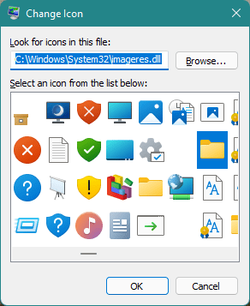
You can check in Settings, which exactly icon is used for your personal folder: find the Themes section, Desktop icon settings. The link there opens the Desktop Icon Settings dialog, select your user folder icon (User_name), click Change Icon... By default, on my desktop PC it's the icon from C:\Windows\System32\imageres.dll
You may have different icon image or your icon has different size, not 32x32 (small) like here. Large icons can have more details.

Change_icon.png
 

My Computer My Computer

At a glance

Windows 11 Pro 25H2AMD Rysen 5 4600H32 GB (2 x 16 GB Samsung SO-DIMM DDR4-3200)GeForce GTX 1650 Ti, 4 GB GDDR6
OS
Windows 11 Pro 25H2
Computer type
Laptop
Manufacturer/Model
Lenovo Legion 5-15ARH05
CPU
AMD Rysen 5 4600H
Memory
32 GB (2 x 16 GB Samsung SO-DIMM DDR4-3200)
Graphics Card(s)
GeForce GTX 1650 Ti, 4 GB GDDR6
Screen Resolution
1920x1080
Hard Drives
SSD M.2 512 GB SAMSUNG MZALQ512; SSD M.2 1 TB Seagate FireCuda 530
Mouse
Logitech M650L in Bluetooth mode
The image you posted is the exact icon that is being used on all 4 systems. I did notice that my 2 desktops have Windows 11 Pro and the laptops both have Windows 11 Home. I believe the icon size is the same across all computers, however, the display scale is higher on the desktops...maybe that is similiar to what you are describing?
 

My Computer My Computer

At a glance

Windows 11
OS
Windows 11
My system is Pro, but I doubt that the icons are different in Home. You can try to set the same display scale on all PCs and compare. Of course, the laptops usually have smaller screen size, so better to use larger scale. Or you can specifically set the same scale but larger icons and font size.
 

My Computer My Computer

At a glance

Windows 11 Pro 25H2AMD Rysen 5 4600H32 GB (2 x 16 GB Samsung SO-DIMM DDR4-3200)GeForce GTX 1650 Ti, 4 GB GDDR6
OS
Windows 11 Pro 25H2
Computer type
Laptop
Manufacturer/Model
Lenovo Legion 5-15ARH05
CPU
AMD Rysen 5 4600H
Memory
32 GB (2 x 16 GB Samsung SO-DIMM DDR4-3200)
Graphics Card(s)
GeForce GTX 1650 Ti, 4 GB GDDR6
Screen Resolution
1920x1080
Hard Drives
SSD M.2 512 GB SAMSUNG MZALQ512; SSD M.2 1 TB Seagate FireCuda 530
Mouse
Logitech M650L in Bluetooth mode
Its a bug of Windows with "Scale and layout" and Monitor DPI. My default settings its 100%, i changed to 102%. After that, all icons its perfect.
 

My Computer My Computer

At a glance

Windows 11
OS
Windows 11
See this post:
download the custom icon and change it
 

My Computer My Computer

At a glance

Windows 11
OS
Windows 11
Windows 11 has two Personal (User) folder icons. Both are suitable icons for Windows 11's folder icon.
 

My Computer My Computer

At a glance

Windows 7Processor: AMD Ryzen 7 - 1800X - 8 Core Proce...16 GB RAM.NVIDIA GeForce GTX 1060 6GB.
OS
Windows 7
Computer type
PC/Desktop
Manufacturer/Model
BIOS: BIOS Date: 08/20/18 12:33:01 Ver: 05.0000D.
CPU
Processor: AMD Ryzen 7 - 1800X - 8 Core Processor - (16 CPUs) - 3.6GHz.
Motherboard
AMD Ryzen 7 - 1800X - 8 Core Processor.
Memory
16 GB RAM.
Graphics Card(s)
NVIDIA GeForce GTX 1060 6GB.
Sound Card
NVIDIA/Realtek High Definition Audio.
Monitor(s) Displays
Generic PnP Monitor.
Screen Resolution
1920x1080.
Hard Drives
My desktop PC has two 8TB hard drives. I plan to add more 8TB hard drives in the future so that I can install Windows 8, 8.1, 10, and 11.
PSU
Current Setting: {5C67A112-A4C9-483F-B4A7-1D473BECAFDC} (Quality).
Case
Antec.
Cooling
N/A.
Keyboard
HID Keyboard Device.
Mouse
HID Compliant Mouse.
Internet Speed
Broadband 20MB.
Browser
Microsoft Edge, Internet Explorer, Google Chrome, Opera Web Browser.
Antivirus
Microsoft Security Essentials, Win/MS Defender, Malwarebytes.
Other Info
My desktop PC has a UEFI BIOS and TPM 2.0 system requirements which means that my system meets the minimum requirements to install Windows 11 in the future.

Latest Support Threads

Back
Top Bottom