Windows 11 version 23H2 End of Servicing on November 11, 2025


Today, November 11, 2025, Windows 11, version 23H2 (Home and Pro editions) has reached end of servicing. The November 2025 monthly security update is the last update available for these editions. Devices running these editions will no longer receive monthly security and preview updates containing protections from the latest security threats.

As always, we recommend that you update your devices to the latest version of Windows 11. For detailed information, see the Windows 11, version 23H2 reaching end of updates (Home, Pro) lifecycle page. For information about servicing timelines and lifecycle, see Windows 11 release information, Lifecycle FAQ - Windows, and Microsoft Lifecycle Policy search tool.

VersionServicing optionAvailability dateLatest revision dateLatest buildEnd of servicing: Home, Pro, Pro Education and Pro for WorkstationsEnd of servicing: Enterprise, Education, IoT Enterprise, and Enterprise multi-session
23H2General Availability Channel2023-10-312025-01-2922631.48302025-11-112026-11-10


 Read more:

 
Last edited:
startallback return to classic taskbar

54847040698_5b41e7a894_b.jpg
This looks worse than even Win11 taskbar.
 

My Computer My Computer

At a glance

Windows 11
OS
Windows 11
I will stay on 23H2 because 24H2 does not have the classic (Win10) taskbar.
EP taskbar does not suport clasic theme
What do you mean by 'classic theme'?

This is my Taskbar in Windows 10
Win10 taskbar in Win10.webp

This is my EP Taskbar in Windows 11
Win10 taskbar in Win11 EP.webp

I think they are the same.


Denis
 

My Computer My Computer

At a glance

Windows 11 Home x64 Version 25H2 Build 26200....
OS
Windows 11 Home x64 Version 25H2 Build 26200.8037
Clipboard_20251008.webp

As I said, the EP taskbar is not functionally-complete. The author promised to add support for the clasic theme last year, but it is still there. Also, EP taskbar is not compatible with many Windhawk mods. Also, EP overall looks unreliable, it throws a crash mesagebox on every session exit.

One can install a taskbar from Windows 10 on Win11, but it is buggy, the notifications crash it and the language indicator is vertical. I am staying on 23H2.
 
Last edited:

My Computer My Computer

At a glance

Windows 11
OS
Windows 11
Dude... that's so early. All the horror stories I've heard about 24H2... I just don't wanna... 23H2 works great.
Do you know, 24H2 works fine for vast majority of users. Listening to internet hearsay is just plain silly.

For every person who whinges, there are literally tens or hundreds who have no issues but of course people only post to complain never to praise.

Make an image backup of your current installation, upgrade to 24H2 and TRY IT YOURSELF!

You can always revert it you get issues.

Stop listenening to hearsay and try it yourself - the proof of the pudding is in the eating.
 

My Computer My Computer

At a glance

Windows 11 Pro + Win11 Canary VM.I9 13th gen i9-13900H 2.60 GHZ16 GB solderedIntegrated Intel Iris XE
OS
Windows 11 Pro + Win11 Canary VM.
Computer type
Laptop
Manufacturer/Model
ASUS Zenbook 14
CPU
I9 13th gen i9-13900H 2.60 GHZ
Motherboard
Yep, Laptop has one.
Memory
16 GB soldered
Graphics Card(s)
Integrated Intel Iris XE
Sound Card
Realtek built in
Monitor(s) Displays
laptop OLED screen
Screen Resolution
2880x1800 touchscreen
Hard Drives
1 TB NVME SSD (only weakness is only one slot)
PSU
Internal + 65W thunderbolt USB4 charger
Case
Yep, got one
Cooling
Stella Artois (UK pint cans - 568 ml) - extra cost.
Keyboard
Built in UK keybd
Mouse
Bluetooth , wireless dongled, wired
Internet Speed
900 mbs (ethernet), wifi 6 typical 350-450 mb/s both up and down
Browser
Edge
Antivirus
Defender
Other Info
TPM 2.0, 2xUSB4 thunderbolt, 1xUsb3 (usb a), 1xUsb-c, hdmi out, 3.5 mm audio out/in combo, ASUS backlit trackpad (inc. switchable number pad)

Macrium Reflect Home V8
Office 365 Family (6 users each 1TB onedrive space)
Hyper-V (a vm runs almost as fast as my older laptop)
Do you know, 24H2 works fine for vast majority of users. Listening to internet hearsay is just plain silly.

For every person who whinges, there are literally tens or hundreds who have no issues but of course people only post to complain never to praise.

Make an image backup of your current installation, upgrade to 24H2 and TRY IT YOURSELF!

You can always revert it you get issues.

Stop listenening to hearsay and try it yourself - the proof of the pudding is in the eating.
What to praise it for?
 

My Computer My Computer

At a glance

Windows 11
OS
Windows 11

My Computer My Computer

At a glance

Windows 11 Home x64 Version 25H2 Build 26200....
OS
Windows 11 Home x64 Version 25H2 Build 26200.8037
What to praise it for?
One thing to praise it for is the fact that its support will not expire in four weeks time.


Denis
 

My Computer My Computer

At a glance

Windows 11 Home x64 Version 25H2 Build 26200....
OS
Windows 11 Home x64 Version 25H2 Build 26200.8037
In December, go to the catalog and download the 23h2 cumulative version, which will be available for Win 23h2 Enterprise, and install it normally in the Pro or Home version. Should it work or not?
It doesn't work that way. The updates will be tagged for specific target editions. Otherwise it would be trivial to evade End of Servicing for another year.
 

My Computer My Computer

At a glance

Windows 7
OS
Windows 7

My Computer My Computer

At a glance

Windows 11 Pro + Win11 Canary VM.I9 13th gen i9-13900H 2.60 GHZ16 GB solderedIntegrated Intel Iris XE
OS
Windows 11 Pro + Win11 Canary VM.
Computer type
Laptop
Manufacturer/Model
ASUS Zenbook 14
CPU
I9 13th gen i9-13900H 2.60 GHZ
Motherboard
Yep, Laptop has one.
Memory
16 GB soldered
Graphics Card(s)
Integrated Intel Iris XE
Sound Card
Realtek built in
Monitor(s) Displays
laptop OLED screen
Screen Resolution
2880x1800 touchscreen
Hard Drives
1 TB NVME SSD (only weakness is only one slot)
PSU
Internal + 65W thunderbolt USB4 charger
Case
Yep, got one
Cooling
Stella Artois (UK pint cans - 568 ml) - extra cost.
Keyboard
Built in UK keybd
Mouse
Bluetooth , wireless dongled, wired
Internet Speed
900 mbs (ethernet), wifi 6 typical 350-450 mb/s both up and down
Browser
Edge
Antivirus
Defender
Other Info
TPM 2.0, 2xUSB4 thunderbolt, 1xUsb3 (usb a), 1xUsb-c, hdmi out, 3.5 mm audio out/in combo, ASUS backlit trackpad (inc. switchable number pad)

Macrium Reflect Home V8
Office 365 Family (6 users each 1TB onedrive space)
Hyper-V (a vm runs almost as fast as my older laptop)
Today, November 11, 2025, Windows 11, version 23H2 (Home and Pro editions) has reached end of servicing. The November 2025 monthly security update is the last update available for these editions. Devices running these editions will no longer receive monthly security and preview updates containing protections from the latest security threats.

As always, we recommend that you update your devices to the latest version of Windows 11. For detailed information, see the Windows 11, version 23H2 reaching end of updates (Home, Pro) lifecycle page. For information about servicing timelines and lifecycle, see Windows 11 release information, Lifecycle FAQ - Windows, and Microsoft Lifecycle Policy search tool.


My Computers My Computers

  • At a glance

    Windows 11 Pro for WorkstationsIntel i7-8700K 5 GHz64 GB (4x16GB) G.SKILL TridentZ RGB DDR4 3600...ASUS ROG-STRIX-GTX1080TI-O11G-GAMING (11GB GD...
    OS
    Windows 11 Pro for Workstations
    Computer type
    PC/Desktop
    Manufacturer/Model
    Custom self build
    CPU
    Intel i7-8700K 5 GHz
    Motherboard
    ASUS ROG Maximus XI Formula Z390
    Memory
    64 GB (4x16GB) G.SKILL TridentZ RGB DDR4 3600 MHz (F4-3600C18D-32GTZR)
    Graphics Card(s)
    ASUS ROG-STRIX-GTX1080TI-O11G-GAMING (11GB GDDR5X)
    Sound Card
    Integrated Digital Audio (S/PDIF)
    Monitor(s) Displays
    2 x Samsung Odyssey G75 27"
    Screen Resolution
    2560x1440
    Hard Drives
    1TB Samsung 990 PRO M.2,
    4TB Samsung 990 PRO M.2,
    TerraMaster F8 SSD Plus NAS
    PSU
    Seasonic Prime Titanium 850W
    Case
    Thermaltake Core P3 wall mounted
    Cooling
    Corsair Hydro H115i
    Keyboard
    Amazon Basics Wired Full Keyboard MD005
    Mouse
    Logitech MX Master 4
    Internet Speed
    2 Gbps Download and 100 Mbps Upload
    Browser
    Chrome and Edge
    Antivirus
    Microsoft Defender
    Other Info
    Logitech Z625 speaker system,
    Logitech BRIO 4K Pro webcam,
    HP Color LaserJet Pro MFP M477fdn,
    CyberPower CP1500PFCLCD
    Galaxy S23 Plus phone
  • At a glance

    Windows 11 ProSnapdragon X Elite (12 core) 3.42 GHz16 GB LPDDR5x-7467 MHz
    Operating System
    Windows 11 Pro
    Computer type
    Laptop
    Manufacturer/Model
    Surface Laptop 7 Copilot+ PC
    CPU
    Snapdragon X Elite (12 core) 3.42 GHz
    Memory
    16 GB LPDDR5x-7467 MHz
    Monitor(s) Displays
    15" HDR
    Screen Resolution
    2496 x 1664
    Hard Drives
    1 TB SSD
    Internet Speed
    Wi-Fi 7 and Bluetooth 5.4
    Browser
    Chrome and Edge
    Antivirus
    Microsoft Defender
Just got a Geekom mini PC from amazon a few days ago. (See system 1 specs) It actually had 23H2, but I was able to update it to 25H2 through Windows Update. I never had any major issues with 24H2 or 25H2.

That pc was probably built at least 1 year ago I assume.
 

My Computers My Computers

  • At a glance

    Windows 11 Pro 25H2AMD Ryzen 9 7940HS32 GBRadeon 780M Graphics
    OS
    Windows 11 Pro 25H2
    Computer type
    PC/Desktop
    Manufacturer/Model
    Geekom AX7 Pro
    CPU
    AMD Ryzen 9 7940HS
    Memory
    32 GB
    Graphics Card(s)
    Radeon 780M Graphics
    Monitor(s) Displays
    Dell S2425H 24"
    Screen Resolution
    1920 x 1080
    Hard Drives
    2 TB NVMe SSD
    Internet Speed
    100 Mbs
    Browser
    Microsoft Edge / Firefox
    Antivirus
    F-Secure Security Suite
    Other Info
    All secure boot certificates updated to CA 2023
    Windows Production PCA 2011 certificate has been revoked.
  • At a glance

    Windows 11 Pro 25H212th Gen Intel Core i7-12700 processor (12-Co...16 GBIntel(R) UHD Graphics 770 with shared graphic...
    Operating System
    Windows 11 Pro 25H2
    Computer type
    PC/Desktop
    Manufacturer/Model
    Dell Inspiron 3910
    CPU
    12th Gen Intel Core i7-12700 processor (12-Core, 25M Cache, 2.1GHz to 4.8GHz)
    Motherboard
    Dell 0KHP4K
    Memory
    16 GB
    Graphics card(s)
    Intel(R) UHD Graphics 770 with shared graphics memory
    Monitor(s) Displays
    Dell 27" Monitor S2721DS,
    Screen Resolution
    QHD 2560 x 1440 @ 75 Hz
    Hard Drives
    1TB M.2, PCIe NVMe, SSD
    Internet Speed
    100 Mbps
    Browser
    Edge
    Antivirus
    F-Secure Security Suite
    Other Info
    All secure boot certificates updated to CA 2023
    Windows Production PCA 2011 certificate has been revoked.
  • HP Laptop 15-fd0xxx
    OS: Windows 11 Home 25H2
    Processor: 13th Gen Intel(R) Core(TM) i7-1355U (1.70 GHz), 10 Cores, 12 Logical Processors
    BIOS Version: AMI F.26 4/22/2026
    RAM: 16 GB
    SSD: 1 TB
    Screen Resolution: 1920 x 1080
    All secure boot certificates updated to CA 2023 by factory.
It doesn't work that way. The updates will be tagged for specific target editions. Otherwise it would be trivial to evade End of Servicing for another year.
Today, November 11, 2025, Windows 11, version 23H2 (Home and Pro editions) has reached end of servicing. The November 2025 monthly security update is the last update available for these editions. Devices running these editions will no longer receive monthly security and preview updates containing protections from the latest security threats.

As always, we recommend that you update your devices to the latest version of Windows 11. For detailed information, see the Windows 11, version 23H2 reaching end of updates (Home, Pro) lifecycle page. For information about servicing timelines and lifecycle, see Windows 11 release information, Lifecycle FAQ - Windows, and Microsoft Lifecycle Policy search tool.


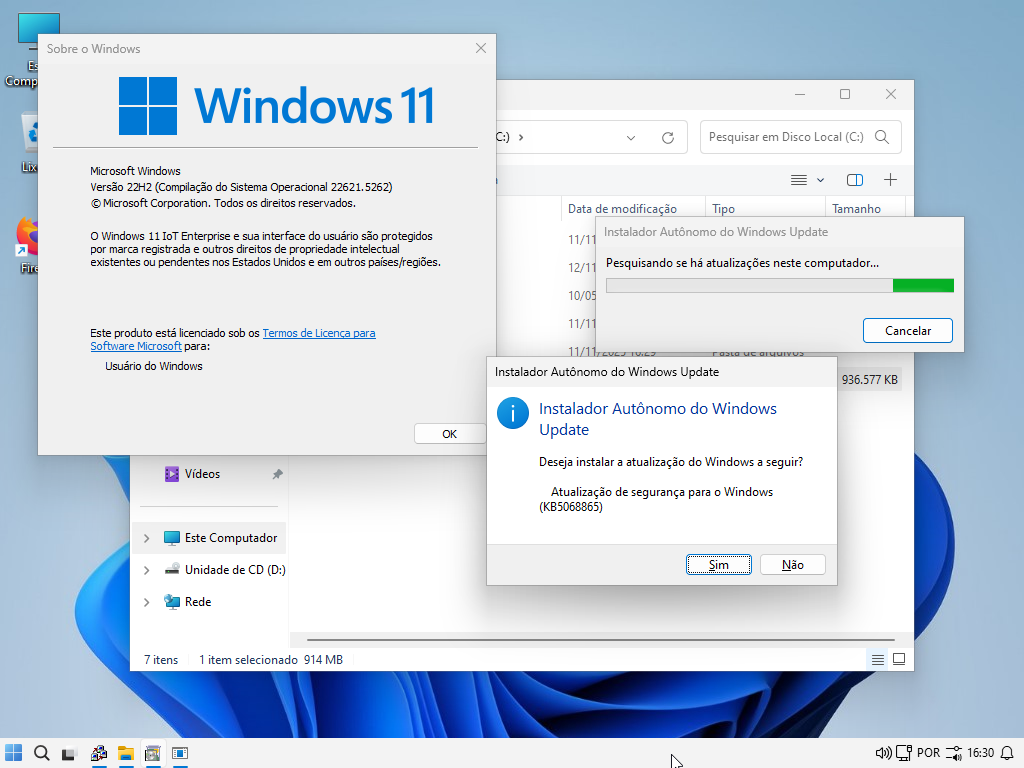
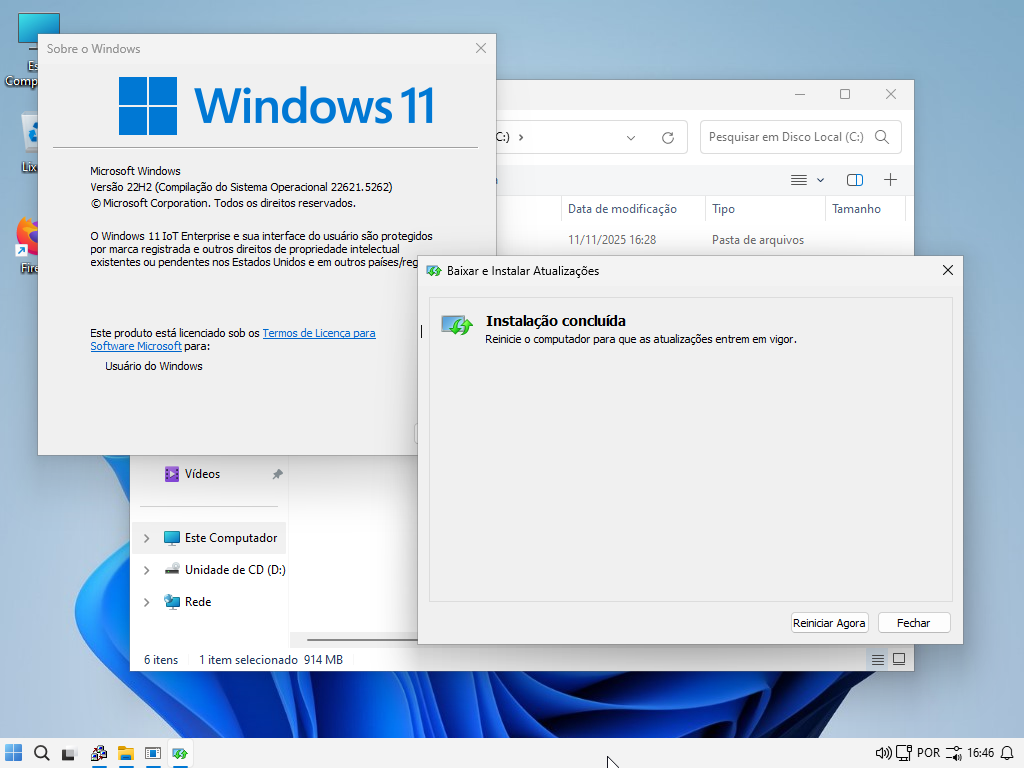
Well, my dear friends, I did a small test on the 11.22h2 IoT Enterprise. I downloaded the cumulative update released today and "tried" to install this 22h2 version, which in theory no longer has support (it ended last month), just to see what would happen. The result was that it installed normally. See the screenshots below. In other words, this "end of support" is somewhat fake; it's just not on Windows Update. But doing it manually, as I did here, it updated normally. What do you think of this?

NAqYw2.png


yrqANn.png

kQhcVW.png
 

My Computer My Computer

At a glance

Windows 11 Iot Enterprise 21h2 22000.3260xeon E5-2697v232gb 8x4gb ddr3 1333 mhzgtx 570 poit of view
OS
Windows 11 Iot Enterprise 21h2 22000.3260
Computer type
PC/Desktop
Manufacturer/Model
Asus
CPU
xeon E5-2697v2
Motherboard
rampage iv extreme
Memory
32gb 8x4gb ddr3 1333 mhz
Graphics Card(s)
gtx 570 poit of view
Sound Card
realtek HD (ALC898)
Monitor(s) Displays
samsung b2030
Screen Resolution
1600x900
Hard Drives
2tb hd 5400 rpm
3tb hd 5400 rpm
1tb nvme pcie 3.0
PSU
hx850w
Keyboard
mtek
Internet Speed
500/250 gpon
Browser
r3dfox 146.0
Antivirus
none
End of servicing does not mean the OS will suddenly stop working, or at least it shouldn't. However, MS certainly has a profit motive in creating a kill switch for machines running older versions of windows that don't have their latest spyware. Your data is valuable to Microsoft's partners... they want to "secure" it for you..
 

My Computer My Computer

At a glance

Windows 11 22H2 Pro (X-lite Micro 11 version)i7 13850HX (20 cores, 28 threads)32GB DDR5Intel UHD/ RTX 1000 ADA
OS
Windows 11 22H2 Pro (X-lite Micro 11 version)
Computer type
Laptop
Manufacturer/Model
Dell/ Precision 7680
CPU
i7 13850HX (20 cores, 28 threads)
Motherboard
Dell
Memory
32GB DDR5
Graphics Card(s)
Intel UHD/ RTX 1000 ADA
Sound Card
Realtek
Monitor(s) Displays
4K UHD Touchscreen
Screen Resolution
3840 x 2400
Hard Drives
Samsung 512GB system drive
WD Blue 1TB game drive
PSU
240W AC adapter, 1800W when docked
Internet Speed
1 gigabit symmetrical
Browser
Firefox, Librewolf
Antivirus
None. Manully configured so nobody except me can change any critical system files. (Don't ask how, it's probably against some rule somewhere)
Well, my dear friends, I did a small test on the 11.22h2 IoT Enterprise. I downloaded the cumulative update released today and "tried" to install this 22h2 version, which in theory no longer has support (it ended last month), just to see what would happen. The result was that it installed normally. See the screenshots below. In other words, this "end of support" is somewhat fake; it's just not on Windows Update. But doing it manually, as I did here, it updated normally. What do you think of this?
That means someone at MS didn't mark the update correctly. In the manifest, they can list which versions a KB can be applied to. In the past, some people have found MS hasn't followed their own guidelines and some updates can be installed on builds where it should not be supported.

But nothing is guaranteed if MS realizes their mistake. I know someone who keeps trying to apply every W10 LTSC update to every EOL'ed W10 release in the hope that it works. For some of them the update applies, others it doesn't.
 

My Computer My Computer

At a glance

Windows 7
OS
Windows 7
I will stay on 23H2 because 24H2 does not have the classic (Win10) taskbar.
I would like to do the same thing, so may I ask, how do you plan to keep your system secure, and/or use it whilst avoiding any security issues?

I'm assuming, of course, that you WILL continue with every-day surfing (I use mine for online financial management, as well as general purpose surfing)?

Would appreciate any comments/advice,

Loo
 

My Computer My Computer

At a glance

Win11 Pro 23H2 Final?...i3 gen 108GNVidia GTX
OS
Win11 Pro 23H2 Final?...
Computer type
PC/Desktop
Manufacturer/Model
DIY
CPU
i3 gen 10
Motherboard
MSI
Memory
8G
Graphics Card(s)
NVidia GTX
Sound Card
Integrated
Monitor(s) Displays
TV
Screen Resolution
HD
Hard Drives
SSD
Other Info
System fully W11 compliant (per WhyNotWin11 2.7.0.0.)
It is Local Account only and never knowingly been attached to a MS Account.
I would like to do the same thing, so may I ask, how do you plan to keep your system secure, and/or use it whilst avoiding any security issues?

I'm assuming, of course, that you WILL continue with every-day surfing (I use mine for online financial management, as well as general purpose surfing)?

Would appreciate any comments/advice,

Loo
Just install startallback and you're done with the classic taskbar
until Explorer removes ribbon
 

My Computer My Computer

At a glance

Windows 11 Iot Enterprise 21h2 22000.3260xeon E5-2697v232gb 8x4gb ddr3 1333 mhzgtx 570 poit of view
OS
Windows 11 Iot Enterprise 21h2 22000.3260
Computer type
PC/Desktop
Manufacturer/Model
Asus
CPU
xeon E5-2697v2
Motherboard
rampage iv extreme
Memory
32gb 8x4gb ddr3 1333 mhz
Graphics Card(s)
gtx 570 poit of view
Sound Card
realtek HD (ALC898)
Monitor(s) Displays
samsung b2030
Screen Resolution
1600x900
Hard Drives
2tb hd 5400 rpm
3tb hd 5400 rpm
1tb nvme pcie 3.0
PSU
hx850w
Keyboard
mtek
Internet Speed
500/250 gpon
Browser
r3dfox 146.0
Antivirus
none
Just install startallback and you're done with the classic taskbar
until Explorer removes ribbon
Thanks, but my query was about ongoing security (strategies) whilst remaining on 23H2... Not the taskbar...
 

My Computer My Computer

At a glance

Win11 Pro 23H2 Final?...i3 gen 108GNVidia GTX
OS
Win11 Pro 23H2 Final?...
Computer type
PC/Desktop
Manufacturer/Model
DIY
CPU
i3 gen 10
Motherboard
MSI
Memory
8G
Graphics Card(s)
NVidia GTX
Sound Card
Integrated
Monitor(s) Displays
TV
Screen Resolution
HD
Hard Drives
SSD
Other Info
System fully W11 compliant (per WhyNotWin11 2.7.0.0.)
It is Local Account only and never knowingly been attached to a MS Account.
Back
Top Bottom