
Solved Windows 11 Virgin Install - Now Thin Fonts


igHtymBa

Active member
Local time
4:41 AM
Posts
8
OS
Windows 11 Enterprise 24H2 26100.3037
Quick overview of my layout:

Samsung QN55Q80TAFXZA
NVIDIA GeForce RTX 3060 12GB
3840x2160 120hz Scale:300%

Just did a complete wipe, and virgin reinstall of Windows 11.

Everything went well, but now, the fonts are so thin, and sometimes faded out, even in the same sentence, that it is a major annoyance on the eyes, (see attached images).

Any leads, or suggestions?
Screenshot 2023-06-08 075016.pngScreenshot 2023-06-08 083902.png
 
Windows Build/Version
Windows 11 Enterprise x64 22H2 22621.1778

My Computer My Computer

At a glance

Windows 11 Enterprise 24H2 26100.3037Intel i9-12900K32GBNvidia GeForce RTX 3060 Ti
OS
Windows 11 Enterprise 24H2 26100.3037
Computer type
PC/Desktop
CPU
Intel i9-12900K
Motherboard
Gigabyte Z690 AORUS ELITE AX
Memory
32GB
Graphics Card(s)
Nvidia GeForce RTX 3060 Ti
Monitor(s) Displays
Samsung QN55Q80TAFXZA
Screen Resolution
4096x2160 @ 120Hz
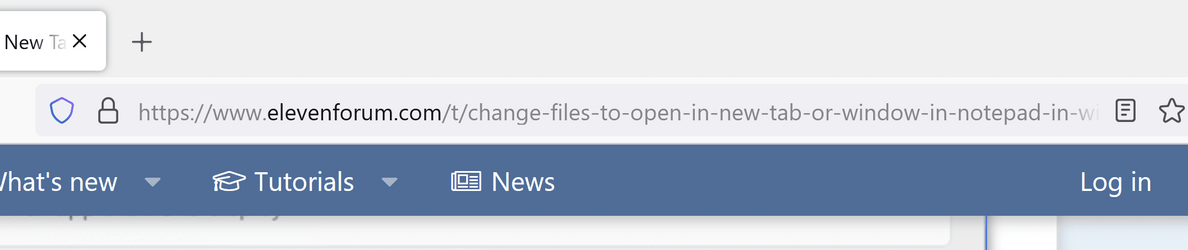
What you are showing in the browser is normal behavior. The text showing the site to which yuou are connected is highlighted with the rest being dimmed is on purpose. This makes the location to which you are connected stand out to help you see if a site might be illigitimate. For example, if you are connected to a site with a slightly misspelled name it would stand out in bold.

In the example above, you can very clearly see that you are connected to elevenforum.com with the rest being dimmed.
 

My Computers My Computers

  • At a glance

    Win11 Pro 25H2 (RTM+)Intel i7-14650HX32 GBNo GPU - Built-in Intel Graphics
    OS
    Win11 Pro 25H2 (RTM+)
    Computer type
    PC/Desktop
    Manufacturer/Model
    Acemagic
    CPU
    Intel i7-14650HX
    Memory
    32 GB
    Graphics Card(s)
    No GPU - Built-in Intel Graphics
    Sound Card
    Integrated
    Monitor(s) Displays
    Varies as machine will often be moved to locations with different monitors
    Screen Resolution
    Varies
    Hard Drives
    1 x 1TB Gen 4 NVMe SSD
    PSU
    120W Power Brick
    Keyboard
    Corsair K70 Max RGB Magnetic Keyboard
    Mouse
    Logitech MX Master 3
    Internet Speed
    1Gb Up / 1 Gb Down
    Browser
    Edge
    Antivirus
    Windows Defender
  • At a glance

    Win11 Pro 25H2 (RTM+)Intel i7-1255U16 GBIntel Iris Xe Graphics
    Operating System
    Win11 Pro 25H2 (RTM+)
    Computer type
    Laptop
    Manufacturer/Model
    Lenovo ThinkBook 13x Gen 2
    CPU
    Intel i7-1255U
    Memory
    16 GB
    Graphics card(s)
    Intel Iris Xe Graphics
    Sound Card
    Realtek® ALC3306-CG codec
    Monitor(s) Displays
    13.3-inch IPS Display
    Screen Resolution
    WQXGA (2560 x 1600)
    Hard Drives
    2 TB 4 x 4 NVMe SSD
    PSU
    USB-C / Thunderbolt 4 Power / Charging
    Keyboard
    Backlit, spill resistant keyboard
    Mouse
    Buttonless Glass Precision Touchpad
    Internet Speed
    1Gb Up / 1Gb Down
    Browser
    Edge
    Antivirus
    Windows Defender
    Other Info
    WiFi 6e / Bluetooth 5.1 / Facial Recognition / Fingerprint Sensor / ToF (Time of Flight) Human Presence Sensor
You can adjust that from...

Windows Settings - > Accessibly -> Text Size
 

My Computer My Computer

At a glance

WinDOS 25H2Intel & AMDSO-DIMM SK Hynix 15.8 GB Dual-Channel DDR4-26...nVidia RTX 2060 6GB Mobile GPU (TU106M)
OS
WinDOS 25H2
Computer type
Laptop
CPU
Intel & AMD
Memory
SO-DIMM SK Hynix 15.8 GB Dual-Channel DDR4-2666 (2 x 8 GB) 1329MHz (19-19-19-43)
Graphics Card(s)
nVidia RTX 2060 6GB Mobile GPU (TU106M)
Sound Card
Onbord Realtek ALC1220
Screen Resolution
1920 x 1080
Hard Drives
1x Samsung PM981 NVMe PCIe M.2 512GB / 1x Seagate Expansion ST1000LM035 1TB
You could also calibrate the ClearType setting from - Windows Settings - > Personalization -> Fonts - > Adjust ClearType Text
 

My Computer My Computer

At a glance

WinDOS 25H2Intel & AMDSO-DIMM SK Hynix 15.8 GB Dual-Channel DDR4-26...nVidia RTX 2060 6GB Mobile GPU (TU106M)
OS
WinDOS 25H2
Computer type
Laptop
CPU
Intel & AMD
Memory
SO-DIMM SK Hynix 15.8 GB Dual-Channel DDR4-2666 (2 x 8 GB) 1329MHz (19-19-19-43)
Graphics Card(s)
nVidia RTX 2060 6GB Mobile GPU (TU106M)
Sound Card
Onbord Realtek ALC1220
Screen Resolution
1920 x 1080
Hard Drives
1x Samsung PM981 NVMe PCIe M.2 512GB / 1x Seagate Expansion ST1000LM035 1TB
You're using a 55 in. monitor which isn't exactly the norm.. Always make sure your resolution is set to recommended settings (settings>system>display) and scale at 100% before you begin to tweak what you see on the screen. Then make changes a little at a time to reach a point where everything appears the best. Using accessibility to increase font size is not always ideal because it increases everything you see sometimes stretching things out of proportion to what looks best.. To change the appearance of different elements on the screen I use a little standalone app by Wintools called Advanced System Font Changer.

Make sure you are running the latest graphics driver.

The default font (segoe ui) may not be the best for your eyes and your setup. Experiment with other fonts. IMO a sans serif font is best. You can see the fonts installed in windows at control panel>fonts
Change Default System Font in Windows 11 Tutorial
 

My Computers My Computers

  • At a glance

    Windows 11 Pro 25H2 26200.8655i9-10900 10 core 20 threads32 gbnone-Intel UHD Graphics 630
    OS
    Windows 11 Pro 25H2 26200.8655
    Computer type
    PC/Desktop
    Manufacturer/Model
    Dell Optiplex 7080
    CPU
    i9-10900 10 core 20 threads
    Motherboard
    DELL 0J37VM
    Memory
    32 gb
    Graphics Card(s)
    none-Intel UHD Graphics 630
    Sound Card
    Integrated Realtek
    Monitor(s) Displays
    Benq 27
    Screen Resolution
    2560x1440
    Hard Drives
    2x1tb Solidigm m.2 nvme /External drives 512gb Samsung m.2 sata+2tb Kingston m2.nvme
    PSU
    500w
    Case
    MT
    Cooling
    Dell Premium
    Keyboard
    Logitech wired
    Mouse
    Logitech wireless
    Internet Speed
    so slow I'm too embarrassed to tell
    Browser
    #1 Edge #2 Firefox
    Antivirus
    Defender+MWB Premium
  • At a glance

    Windows 11 Pro 24H2 26200.8457AMD Ryzen 7 6800U32 gbintegrated
    Operating System
    Windows 11 Pro 24H2 26200.8457
    Computer type
    PC/Desktop
    Manufacturer/Model
    Beelink Mini PC SER5
    CPU
    AMD Ryzen 7 6800U
    Memory
    32 gb
    Graphics card(s)
    integrated
    Sound Card
    integrated
    Monitor(s) Displays
    Benq 27
    Screen Resolution
    2560x1440
    Hard Drives
    1TB Crucial nvme
    Keyboard
    Logitech wired
    Mouse
    Logitech wireless
    Internet Speed
    still too embarrassed to tell
    Browser
    Firefox
    Antivirus
    Defender
    Other Info
    System 3 is non compliant Dell 9020 i7-4770/24gb ram Win11 PRO 26200.8457

My Computers My Computers

  • At a glance

    Windows 11 Pro 25H2 26200.8655i9-10900 10 core 20 threads32 gbnone-Intel UHD Graphics 630
    OS
    Windows 11 Pro 25H2 26200.8655
    Computer type
    PC/Desktop
    Manufacturer/Model
    Dell Optiplex 7080
    CPU
    i9-10900 10 core 20 threads
    Motherboard
    DELL 0J37VM
    Memory
    32 gb
    Graphics Card(s)
    none-Intel UHD Graphics 630
    Sound Card
    Integrated Realtek
    Monitor(s) Displays
    Benq 27
    Screen Resolution
    2560x1440
    Hard Drives
    2x1tb Solidigm m.2 nvme /External drives 512gb Samsung m.2 sata+2tb Kingston m2.nvme
    PSU
    500w
    Case
    MT
    Cooling
    Dell Premium
    Keyboard
    Logitech wired
    Mouse
    Logitech wireless
    Internet Speed
    so slow I'm too embarrassed to tell
    Browser
    #1 Edge #2 Firefox
    Antivirus
    Defender+MWB Premium
  • At a glance

    Windows 11 Pro 24H2 26200.8457AMD Ryzen 7 6800U32 gbintegrated
    Operating System
    Windows 11 Pro 24H2 26200.8457
    Computer type
    PC/Desktop
    Manufacturer/Model
    Beelink Mini PC SER5
    CPU
    AMD Ryzen 7 6800U
    Memory
    32 gb
    Graphics card(s)
    integrated
    Sound Card
    integrated
    Monitor(s) Displays
    Benq 27
    Screen Resolution
    2560x1440
    Hard Drives
    1TB Crucial nvme
    Keyboard
    Logitech wired
    Mouse
    Logitech wireless
    Internet Speed
    still too embarrassed to tell
    Browser
    Firefox
    Antivirus
    Defender
    Other Info
    System 3 is non compliant Dell 9020 i7-4770/24gb ram Win11 PRO 26200.8457
Not sure anyone will believe this, not even myself, as I have no idea what happened, but it did.

Just for Kicks and Giggles I downloaded the program, suggested by glasskuter, Advanced System Font Changer, ran the program, but, I did not confirm anything, that is to say, I never hit Apply to anything, I just sniffed around the program. When I closed the program, everything was fixed. All my fonts are no longer thin, blurry, or see through. Same Font mind you, but now, they look correct.

Always two fold in these situations. Yes, your glad that you issue is fixed, but unhappy that you have no idea what fixed it.

Screenshot 2023-06-08 150357.png
 

My Computer My Computer

At a glance

Windows 11 Enterprise 24H2 26100.3037Intel i9-12900K32GBNvidia GeForce RTX 3060 Ti
OS
Windows 11 Enterprise 24H2 26100.3037
Computer type
PC/Desktop
CPU
Intel i9-12900K
Motherboard
Gigabyte Z690 AORUS ELITE AX
Memory
32GB
Graphics Card(s)
Nvidia GeForce RTX 3060 Ti
Monitor(s) Displays
Samsung QN55Q80TAFXZA
Screen Resolution
4096x2160 @ 120Hz
Quick overview of my layout:

Samsung QN55Q80TAFXZA
NVIDIA GeForce RTX 3060 12GB
3840x2160 120hz Scale:300%

Just did a complete wipe, and virgin reinstall of Windows 11.

Everything went well, but now, the fonts are so thin, and sometimes faded out, even in the same sentence, that it is a major annoyance on the eyes, (see attached images).

Any leads, or suggestions?
View attachment 61842View attachment 61843
Hi, I just tried to fix the overwhelming issue with performance lag, especially when opening new websites and/or pages or links thereafter. I suppose that belongs in a different thread, but interestingly enough, I came upon a YouTube video where the tech was going through a list of parameters that you may turn off to enhance performance. Upon doing this I too came up with the same problem -thin and blurry secondary fonts on various websites utilizing system fonts.
It turns out that I changed the settings in sysdm.cpl in system properties.
In advanced/settings the operating system would most likely have "The adjust for best performance" setting checked, which in turn turns every option on including the 3rd item from the bottom - "smooth edges on screen fonts". I had turned off this setting and chose "Adjust for best performance" and that's when I too experienced the bad resolution and thinning of screen fonts.
I turned the latter option (Adjust for best performance) back on, and the fonts appeared as they should again.

This YouTube link may be able to assist:

But, I still have many lag issues with very slow website loads. It most definitely feels deliberate. Windows 10 was just perfect. We are not even close to the operating efficiency of that operating system, with win11.
 

My Computer My Computer

At a glance

Windows 11
OS
Windows 11
Computer type
Laptop
Manufacturer/Model
HP
Back
Top Bottom




