Windows 11 windows resize


linguaccia22

Well-known member
Member
Local time
5:28 PM
Posts
99
Location
Italy
OS
Windows 11 Pro 24H2
Hi everyone, I can't figure out why I can't make Windows memorize the size of my windows anymore.

Before closing a Windows window I resize it to my liking but when I go to open it again the size is not the one I had chosen before closing it.
what can I do?

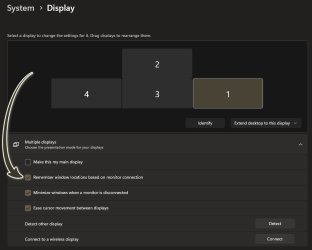
In display settings the line "Remember window positions based on monitor connection" is active.
 
Windows Build/Version
Windows 11 Pro 23H2 build 22631.3958

My Computer My Computer

At a glance

Windows 11 Pro 24H2Intel Core i7-7700K 4.2GHzCorsair Vengeance (32 GB) DDR4, 3000 MHzMSI GeForce GTX 1080 Ti
OS
Windows 11 Pro 24H2
Computer type
PC/Desktop
CPU
Intel Core i7-7700K 4.2GHz
Motherboard
MSI Z270 Tomahawk
Memory
Corsair Vengeance (32 GB) DDR4, 3000 MHz
Graphics Card(s)
MSI GeForce GTX 1080 Ti
Sound Card
built-in Realtek HD audio
Monitor(s) Displays
LG 21:9
Screen Resolution
2560x1080 75Hz
Hard Drives
Samsung 980 PRO, 1 TB
Samsung 960 EVO, 250 GB
Western Digital Red 4TB
PSU
Evga Supernova 650 G3 Gold
Case
Kolink Unity Arena ARGB Case Mid-Tower
Cooling
Corsair Hydro H100i CW-9060025-WW
Keyboard
Logitech G512
Mouse
Logitech G G502 HERO
Internet Speed
1 Gigabit/s
Browser
Microsoft Edge
Antivirus
Windows Security
That option is for multi-monitor users. What it does is remember the position of the windows on other monitors when you disconnect them, so they're there is the same place when reconnected.
 

My Computer My Computer

At a glance

Microsoft Windows 11
OS
Microsoft Windows 11
Computer type
PC/Desktop
In fact this thing happened to me yesterday when I connected a third monitor to my computer and since then I can no longer change the size of the windows.
So what could I do? Do I have to disable that item?
 

My Computer My Computer

At a glance

Windows 11 Pro 24H2Intel Core i7-7700K 4.2GHzCorsair Vengeance (32 GB) DDR4, 3000 MHzMSI GeForce GTX 1080 Ti
OS
Windows 11 Pro 24H2
Computer type
PC/Desktop
CPU
Intel Core i7-7700K 4.2GHz
Motherboard
MSI Z270 Tomahawk
Memory
Corsair Vengeance (32 GB) DDR4, 3000 MHz
Graphics Card(s)
MSI GeForce GTX 1080 Ti
Sound Card
built-in Realtek HD audio
Monitor(s) Displays
LG 21:9
Screen Resolution
2560x1080 75Hz
Hard Drives
Samsung 980 PRO, 1 TB
Samsung 960 EVO, 250 GB
Western Digital Red 4TB
PSU
Evga Supernova 650 G3 Gold
Case
Kolink Unity Arena ARGB Case Mid-Tower
Cooling
Corsair Hydro H100i CW-9060025-WW
Keyboard
Logitech G512
Mouse
Logitech G G502 HERO
Internet Speed
1 Gigabit/s
Browser
Microsoft Edge
Antivirus
Windows Security
Set the window to the size you want and then hold the shift key while closing the window. When you next open, it will remember the size set.

I do this now because windows open 'normally', ie not full screen even when thier shortcut properties are set to maximised.
 

My Computers My Computers

  • At a glance

    Windows 11 Pro 25H2 26200.9550AMD Ryzen 7 5825U with Radeon Graphics16GB
    OS
    Windows 11 Pro 25H2 26200.9550
    Computer type
    Laptop
    Manufacturer/Model
    Acemagic LX15PRO
    CPU
    AMD Ryzen 7 5825U with Radeon Graphics
    Motherboard
    BIOS CT_BI_AMI_LX15PRO_AB8139_A-004
    Memory
    16GB
    Screen Resolution
    1920 x 1080
    Hard Drives
    SSD 2TB
    Internet Speed
    30 Mbps
    Browser
    Brave
    Antivirus
    Webroot SecureAnywhere Complete beta
  • At a glance

    Windows 11 Pro 23H2 22631.2506Atom N450 1.66GHz2GB
    Operating System
    Windows 11 Pro 23H2 22631.2506
    Computer type
    Laptop
    Manufacturer/Model
    HP Mini 210-1090NR PC (bought in late 2009!)
    CPU
    Atom N450 1.66GHz
    Memory
    2GB
    Browser
    Brave
    Antivirus
    Webroot
  • Acer Swift SF114-34 laptop
    OS Windows 11 Pro 26200.8894
    CPU Pentium Silver N6000
    RAM 4GB
    BIOS v1.17
    SSD Samsung 970 EVO Plus SSD 2TB (an upgrade)
Set the window to the size you want and then hold the shift key while closing the window. When you next open, it will remember the size set.

I do this now because windows open 'normally', ie not full screen even when thier shortcut properties are set to maximised.
I tried this suggestion but in my case it doesn't work :(
 

My Computer My Computer

At a glance

Windows 11 Pro 24H2Intel Core i7-7700K 4.2GHzCorsair Vengeance (32 GB) DDR4, 3000 MHzMSI GeForce GTX 1080 Ti
OS
Windows 11 Pro 24H2
Computer type
PC/Desktop
CPU
Intel Core i7-7700K 4.2GHz
Motherboard
MSI Z270 Tomahawk
Memory
Corsair Vengeance (32 GB) DDR4, 3000 MHz
Graphics Card(s)
MSI GeForce GTX 1080 Ti
Sound Card
built-in Realtek HD audio
Monitor(s) Displays
LG 21:9
Screen Resolution
2560x1080 75Hz
Hard Drives
Samsung 980 PRO, 1 TB
Samsung 960 EVO, 250 GB
Western Digital Red 4TB
PSU
Evga Supernova 650 G3 Gold
Case
Kolink Unity Arena ARGB Case Mid-Tower
Cooling
Corsair Hydro H100i CW-9060025-WW
Keyboard
Logitech G512
Mouse
Logitech G G502 HERO
Internet Speed
1 Gigabit/s
Browser
Microsoft Edge
Antivirus
Windows Security
Update, I unplugged the third monitor and the Windows windows went back to how they were before and when I plug in the third monitor I can no longer manage the Windows windows.. why?
 

My Computer My Computer

At a glance

Windows 11 Pro 24H2Intel Core i7-7700K 4.2GHzCorsair Vengeance (32 GB) DDR4, 3000 MHzMSI GeForce GTX 1080 Ti
OS
Windows 11 Pro 24H2
Computer type
PC/Desktop
CPU
Intel Core i7-7700K 4.2GHz
Motherboard
MSI Z270 Tomahawk
Memory
Corsair Vengeance (32 GB) DDR4, 3000 MHz
Graphics Card(s)
MSI GeForce GTX 1080 Ti
Sound Card
built-in Realtek HD audio
Monitor(s) Displays
LG 21:9
Screen Resolution
2560x1080 75Hz
Hard Drives
Samsung 980 PRO, 1 TB
Samsung 960 EVO, 250 GB
Western Digital Red 4TB
PSU
Evga Supernova 650 G3 Gold
Case
Kolink Unity Arena ARGB Case Mid-Tower
Cooling
Corsair Hydro H100i CW-9060025-WW
Keyboard
Logitech G512
Mouse
Logitech G G502 HERO
Internet Speed
1 Gigabit/s
Browser
Microsoft Edge
Antivirus
Windows Security
Update, I unplugged the third monitor and the Windows windows went back to how they were before and when I plug in the third monitor I can no longer manage the Windows windows.. why?
Do you have this setting checked...

7586.jpg
 

My Computers My Computers

  • At a glance

    Windows 11 Pro
    OS
    Windows 11 Pro
    Computer type
    PC/Desktop
    Manufacturer/Model
    ASUS ROG Strix
  • At a glance

    Windows 11 Pro
    Operating System
    Windows 11 Pro
    Computer type
    Laptop
    Manufacturer/Model
    ASUS VivoBook
  • ASUS VivoBook 'Lite' ~ Windows 11 Home

Latest Support Threads

Back
Top Bottom