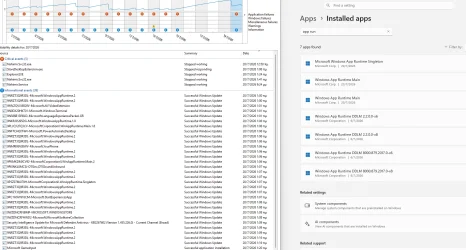
Hello! Does anybody knows what's going on with these sdk updates? I have already installed (to my Desktop PC and dell laptop) the June's latest windows app runtime main, singleton and DDLMs (x86 and x64) for both versions (2.2.0 and 1.8.9). I successfully received yesterday the latest windows app runtime and singleton updates (via ms store), except for the DDLMs which they were not updated.
I received these event viewer errors:
The Appx operation 'RemovePackageAsync' on 'Microsoft.WindowsAppRuntime.2_2.2.0.0_x64__8wekyb3d8bbwe' failed for user - Windows cannot remove framework Microsoft.WindowsAppRuntime.2_2.2.0.0_x64__8wekyb3d8bbwe because package(s) MicrosoftWindows.Client.WebExperience currently depends on the framework. Removing all packages that depend on the framework automatically removes the framework.. (Error: Package failed updates, dependency or conflict validation.)
'Microsoft.WindowsAppRuntime.2_8wekyb3d8bbwe' uninstall failed for user. Error: 'Package failed updates, dependency or conflict validation.' (0.0316277 seconds)
In a nutshell everything went fine regarding windows app runtime main (8000.921.1539.0 and 2.3.1) and singleton (2.3.0) as well BUT:
both DDLMs (8000.879.2017.0 and 2.2.0.0) weren't replaced by the newer ones because some apps (web experience pack) rely on them...That was the message from the event viewer!!! So I think that is fully normal and just leave the ms store to do the job all by itself! I do not think that every month when there is a windows app runtime sdk update, I will have also to download it manually and update the specific apps.. THE NORMAL THING here, regarding sdks is to just leave them alone and let ms store handle them!
In the meantime, reliability history shows no errors (regarding DDLMs) and everything went fine (all of them were successfully updated).
Am I right so as to ignore it and just let ms store to always do automatically the job?
I received these event viewer errors:
The Appx operation 'RemovePackageAsync' on 'Microsoft.WindowsAppRuntime.2_2.2.0.0_x64__8wekyb3d8bbwe' failed for user - Windows cannot remove framework Microsoft.WindowsAppRuntime.2_2.2.0.0_x64__8wekyb3d8bbwe because package(s) MicrosoftWindows.Client.WebExperience currently depends on the framework. Removing all packages that depend on the framework automatically removes the framework.. (Error: Package failed updates, dependency or conflict validation.)
'Microsoft.WindowsAppRuntime.2_8wekyb3d8bbwe' uninstall failed for user. Error: 'Package failed updates, dependency or conflict validation.' (0.0316277 seconds)
In a nutshell everything went fine regarding windows app runtime main (8000.921.1539.0 and 2.3.1) and singleton (2.3.0) as well BUT:
both DDLMs (8000.879.2017.0 and 2.2.0.0) weren't replaced by the newer ones because some apps (web experience pack) rely on them...That was the message from the event viewer!!! So I think that is fully normal and just leave the ms store to do the job all by itself! I do not think that every month when there is a windows app runtime sdk update, I will have also to download it manually and update the specific apps.. THE NORMAL THING here, regarding sdks is to just leave them alone and let ms store handle them!
In the meantime, reliability history shows no errors (regarding DDLMs) and everything went fine (all of them were successfully updated).
Am I right so as to ignore it and just let ms store to always do automatically the job?
- Windows Build/Version
- windows 11 25h2 latest July build
Attachments
Last edited:
My Computer
At a glance
win 11 pro 26 h2
- OS
- win 11 pro 26 h2
- Computer type
- PC/Desktop