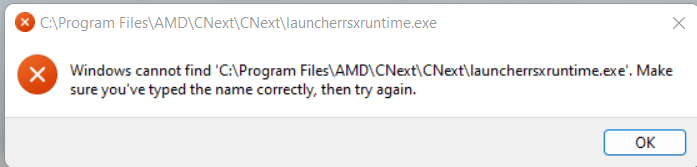
Solved Windows cannot access the specified device, path, or file. You may not have the appropriate permissions to access the item.


William654

Well-known member
Member
VIP
Local time
8:47 AM
Posts
839
OS
Windows 11
Hi

Sometimes I get this error on startup:

[Window Title]
C:\Program Files\AMD\CNext\CNext\launcherrsxruntime.exe

[Content]
Windows cannot access the specified device, path, or file. You may not have the appropriate permissions to access the item.

[OK]

I already granted full control to admin so what to do else ? I also see unknown/hidean accounts . should I delete them ?
 

Attachments
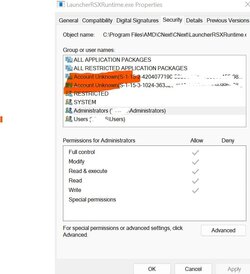
  • Screenshot 2022-05-26 205552.jpg
    Screenshot 2022-05-26 205552.jpg
    51.7 KB · Views: 7

My Computer My Computer

At a glance

Windows 115900x32 GB G.SkillRX 6800 XT
OS
Windows 11
Computer type
PC/Desktop
CPU
5900x
Motherboard
MAG X570S TOMAHAWK MAX WIFI
Memory
32 GB G.Skill
Graphics Card(s)
RX 6800 XT
Sound Card
Creative Sound Blaster Z
Monitor(s) Displays
BENQ and AOC QHD 120Hz
Screen Resolution
QHD
Hard Drives
2TB Intel 660p and 2TB Sabrent Rokect 4 plus nvme, 4TB HDD HGST
PSU
Corsair RM750
Case
Bloody rage
Cooling
Water cooling gamdias 240
Keyboard
razer ornata
Mouse
razer da v2
Browser
FF and Chrome
Antivirus
Malwarebytes
Have a look at Task Manager for startup AMD application disable it. You can also uninstall the application and reinstall it.
 

My Computer My Computer

At a glance

Windows 11AMD Ryzen 7 5700GMicron Technology DDR4-3200 16GBNVIDIA GeForce RTX 3060
OS
Windows 11
Computer type
PC/Desktop
Manufacturer/Model
HP Pavilion
CPU
AMD Ryzen 7 5700G
Motherboard
Erica6
Memory
Micron Technology DDR4-3200 16GB
Graphics Card(s)
NVIDIA GeForce RTX 3060
Sound Card
Realtek ALC671
Monitor(s) Displays
Samsung SyncMaster U28E590
Screen Resolution
3840 x 2160
Hard Drives
SAMSUNG MZVLQ1T0HALB-000H1
Have a look at Task Manager for startup AMD application disable it. You can also uninstall the application and reinstall it.
I disabled now Radeon software startup task. Hope I dont get it later
 

My Computer My Computer

At a glance

Windows 115900x32 GB G.SkillRX 6800 XT
OS
Windows 11
Computer type
PC/Desktop
CPU
5900x
Motherboard
MAG X570S TOMAHAWK MAX WIFI
Memory
32 GB G.Skill
Graphics Card(s)
RX 6800 XT
Sound Card
Creative Sound Blaster Z
Monitor(s) Displays
BENQ and AOC QHD 120Hz
Screen Resolution
QHD
Hard Drives
2TB Intel 660p and 2TB Sabrent Rokect 4 plus nvme, 4TB HDD HGST
PSU
Corsair RM750
Case
Bloody rage
Cooling
Water cooling gamdias 240
Keyboard
razer ornata
Mouse
razer da v2
Browser
FF and Chrome
Antivirus
Malwarebytes
You should install the latest version of the AMD Radeon software.
 

My Computer My Computer

At a glance

Windows 11AMD Ryzen 7 5700GMicron Technology DDR4-3200 16GBNVIDIA GeForce RTX 3060
OS
Windows 11
Computer type
PC/Desktop
Manufacturer/Model
HP Pavilion
CPU
AMD Ryzen 7 5700G
Motherboard
Erica6
Memory
Micron Technology DDR4-3200 16GB
Graphics Card(s)
NVIDIA GeForce RTX 3060
Sound Card
Realtek ALC671
Monitor(s) Displays
Samsung SyncMaster U28E590
Screen Resolution
3840 x 2160
Hard Drives
SAMSUNG MZVLQ1T0HALB-000H1

My Computer My Computer

At a glance

Windows 115900x32 GB G.SkillRX 6800 XT
OS
Windows 11
Computer type
PC/Desktop
CPU
5900x
Motherboard
MAG X570S TOMAHAWK MAX WIFI
Memory
32 GB G.Skill
Graphics Card(s)
RX 6800 XT
Sound Card
Creative Sound Blaster Z
Monitor(s) Displays
BENQ and AOC QHD 120Hz
Screen Resolution
QHD
Hard Drives
2TB Intel 660p and 2TB Sabrent Rokect 4 plus nvme, 4TB HDD HGST
PSU
Corsair RM750
Case
Bloody rage
Cooling
Water cooling gamdias 240
Keyboard
razer ornata
Mouse
razer da v2
Browser
FF and Chrome
Antivirus
Malwarebytes
Similar issue with same amd executable and W11

3newav5.png


Something calls it, I have checked registry and startup programs, it just isn't there. Also checked startup folder ( C:\[Users]AppData\Roaming\Microsoft\Windows\Start Menu\Programs\Startup ).
It is not a service, it is not in msconfig, it is not in scheduler.

CCleaner can't find the entry. There is no C:\Program Files\AMD\CNEXT\* folder.

After some additional registry search I found an exe entry at,

Computer\HKEY_LOCAL_MACHINE\SOFTWARE\Microsoft\Windows\CurrentVersion\AppModel\StateRepository\Cache\Activation\Data\223\launcherrsxruntime.exe

but not what calls it. Made a backup of the key, but I am not allowed to remove it.

Its not at Computer\HKEY_CURRENT_USER\Software\Microsoft\Windows\CurrentVersion\Run

I will not reinstall anything since I have specifically installed the driver only version of Radeon due to some game compatibility issues. Only need to figure out what is calling that exe that is not there every boot.


Ok. Sysinternals Process Explorer claims it is being called by C:\Windows\System32\sihost.exe launched by

C:\Program Files\WindowsApps\Microsoft.6365217CE6EB4_102.2206.13001.0_x64__8wekyb3d8bbwe\MicrosoftSecurityApp\MicrosoftSecurityApp.exe

Wonderful.
 
Last edited:

My Computer My Computer

At a glance

11AMD Ryzen 5 7600X Six-Core Processor2 x 16GB G.Skill F5-6000J3040G32G @ 6000Asus Strix Radeon RX 6750 XT
OS
11
Computer type
PC/Desktop
Manufacturer/Model
Homebrew
CPU
AMD Ryzen 5 7600X Six-Core Processor
Motherboard
GigaByte X870E AORUS ELITE WIFI7
Memory
2 x 16GB G.Skill F5-6000J3040G32G @ 6000
Graphics Card(s)
Asus Strix Radeon RX 6750 XT
Sound Card
Motherboards Realtek
Monitor(s) Displays
2 x Dell U2720Q | 1 Dell P2415Qb
Screen Resolution
2 x 3869x2160
Hard Drives
NVME GigaByte AG450E500G-G
NVME Samsung SSD 990 PRO 2TB
NVME KINGSTON SA2000M81000G
PSU
Lian-Li EDGE 850
Case
Lian-Li
Cooling
Noctua NH-D15 chromax | 1x Lian-li AIO GA II Trinity | 6x SL V2
Keyboard
Razer Huntsman v2 (Optical)
Mouse
Raze Basilisk v3
Internet Speed
100/100
Browser
Vivaldi
Antivirus
Bitdefender Gravityzone
Found it in a xml file only accessible by TrustedInstaller.

C:\Program Files\WindowsApps\AdvancedMicroDevicesInc-RSXCM_22.10.0.0_x64__fhmx3h6dzfmvj\AppxManifest.xml
I guess I will have to start over anyways.

So dear olde windows load files from xml nowadays....

maybe safe mode...
 

My Computer My Computer

At a glance

11AMD Ryzen 5 7600X Six-Core Processor2 x 16GB G.Skill F5-6000J3040G32G @ 6000Asus Strix Radeon RX 6750 XT
OS
11
Computer type
PC/Desktop
Manufacturer/Model
Homebrew
CPU
AMD Ryzen 5 7600X Six-Core Processor
Motherboard
GigaByte X870E AORUS ELITE WIFI7
Memory
2 x 16GB G.Skill F5-6000J3040G32G @ 6000
Graphics Card(s)
Asus Strix Radeon RX 6750 XT
Sound Card
Motherboards Realtek
Monitor(s) Displays
2 x Dell U2720Q | 1 Dell P2415Qb
Screen Resolution
2 x 3869x2160
Hard Drives
NVME GigaByte AG450E500G-G
NVME Samsung SSD 990 PRO 2TB
NVME KINGSTON SA2000M81000G
PSU
Lian-Li EDGE 850
Case
Lian-Li
Cooling
Noctua NH-D15 chromax | 1x Lian-li AIO GA II Trinity | 6x SL V2
Keyboard
Razer Huntsman v2 (Optical)
Mouse
Raze Basilisk v3
Internet Speed
100/100
Browser
Vivaldi
Antivirus
Bitdefender Gravityzone
Found it in a xml file only accessible by TrustedInstaller.

C:\Program Files\WindowsApps\AdvancedMicroDevicesInc-RSXCM_22.10.0.0_x64__fhmx3h6dzfmvj\AppxManifest.xml
I guess I will have to start over anyways.

So dear olde windows load files from xml nowadays....

maybe safe mode...
I got same error few days ago, simple solution open Win11 settings --> startup apps --> uncheck Radeon software startup task
 

My Computer My Computer

At a glance

Windows 115900x32 GB G.SkillRX 6800 XT
OS
Windows 11
Computer type
PC/Desktop
CPU
5900x
Motherboard
MAG X570S TOMAHAWK MAX WIFI
Memory
32 GB G.Skill
Graphics Card(s)
RX 6800 XT
Sound Card
Creative Sound Blaster Z
Monitor(s) Displays
BENQ and AOC QHD 120Hz
Screen Resolution
QHD
Hard Drives
2TB Intel 660p and 2TB Sabrent Rokect 4 plus nvme, 4TB HDD HGST
PSU
Corsair RM750
Case
Bloody rage
Cooling
Water cooling gamdias 240
Keyboard
razer ornata
Mouse
razer da v2
Browser
FF and Chrome
Antivirus
Malwarebytes
I got same error few days ago, simple solution open Win11 settings --> startup apps --> uncheck Radeon software startup task
Problem is that is not the one. I do not have Radeon Software installed. Only the drivers.
 

My Computer My Computer

At a glance

11AMD Ryzen 5 7600X Six-Core Processor2 x 16GB G.Skill F5-6000J3040G32G @ 6000Asus Strix Radeon RX 6750 XT
OS
11
Computer type
PC/Desktop
Manufacturer/Model
Homebrew
CPU
AMD Ryzen 5 7600X Six-Core Processor
Motherboard
GigaByte X870E AORUS ELITE WIFI7
Memory
2 x 16GB G.Skill F5-6000J3040G32G @ 6000
Graphics Card(s)
Asus Strix Radeon RX 6750 XT
Sound Card
Motherboards Realtek
Monitor(s) Displays
2 x Dell U2720Q | 1 Dell P2415Qb
Screen Resolution
2 x 3869x2160
Hard Drives
NVME GigaByte AG450E500G-G
NVME Samsung SSD 990 PRO 2TB
NVME KINGSTON SA2000M81000G
PSU
Lian-Li EDGE 850
Case
Lian-Li
Cooling
Noctua NH-D15 chromax | 1x Lian-li AIO GA II Trinity | 6x SL V2
Keyboard
Razer Huntsman v2 (Optical)
Mouse
Raze Basilisk v3
Internet Speed
100/100
Browser
Vivaldi
Antivirus
Bitdefender Gravityzone
At the end I had to reinstall the driver > full package. The uninstall and install the minimal package.
Actually went a lot faster than I first thought.

Solved.
 

My Computer My Computer

At a glance

11AMD Ryzen 5 7600X Six-Core Processor2 x 16GB G.Skill F5-6000J3040G32G @ 6000Asus Strix Radeon RX 6750 XT
OS
11
Computer type
PC/Desktop
Manufacturer/Model
Homebrew
CPU
AMD Ryzen 5 7600X Six-Core Processor
Motherboard
GigaByte X870E AORUS ELITE WIFI7
Memory
2 x 16GB G.Skill F5-6000J3040G32G @ 6000
Graphics Card(s)
Asus Strix Radeon RX 6750 XT
Sound Card
Motherboards Realtek
Monitor(s) Displays
2 x Dell U2720Q | 1 Dell P2415Qb
Screen Resolution
2 x 3869x2160
Hard Drives
NVME GigaByte AG450E500G-G
NVME Samsung SSD 990 PRO 2TB
NVME KINGSTON SA2000M81000G
PSU
Lian-Li EDGE 850
Case
Lian-Li
Cooling
Noctua NH-D15 chromax | 1x Lian-li AIO GA II Trinity | 6x SL V2
Keyboard
Razer Huntsman v2 (Optical)
Mouse
Raze Basilisk v3
Internet Speed
100/100
Browser
Vivaldi
Antivirus
Bitdefender Gravityzone
Back
Top Bottom