bamagull
Well-known member
- Local time
- 8:40 AM
- Posts
- 6
- OS
- windows 11
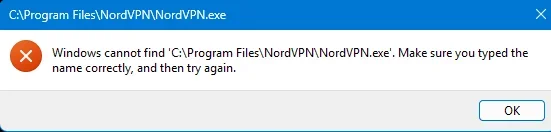
When I try to open NORDVPN I get the file not found message shown in the pic. I have had this problem with other files. When I look in File Explorer, it is there. Please advise.
system info

system info
- Windows Build/Version
- 24h2
My Computer
At a glance
windows 11AMD Ryzen 9 9950X3D 16-Core Processor, 4300 M...32gigNVIDIA GeForce RTX 5080
- OS
- windows 11
- Computer type
- PC/Desktop
- Manufacturer/Model
- custom
- CPU
- AMD Ryzen 9 9950X3D 16-Core Processor, 4300 Mhz 16 core
- Motherboard
- ROG STRIX X870E-E GAMING WIFI7 R2
- Memory
- 32gig
- Graphics Card(s)
- NVIDIA GeForce RTX 5080
- Sound Card
- Realtek USB Audio
- Hard Drives
- Samsung SSD 9100 Pro 2TB
WDC WD10EZEX-08M2NA0 USB Device
Model Lexar SL600 SCSI Disk Device
- Case
- Corsair 5400 Air cool