Windows Defender or 3rd Party Security Software?


EB2XR6

Active member
Member
VIP
Local time
2:18 AM
Posts
514
OS
Windows 11
I have been a long time Webroot user, recently I have had lots of computer performance issues and discovered it was Webroot Secure Anywhere.
Last night I bit the bullet wiped the Computer fresh install of Windows and I am using Windows Defender.
Are people using Defender or a 3rd Party Suite?
Websites are pushing Norton but prior to using Webroot I tried Norton and don't think I would go back there.
If I decide to buy a 3rd party suite what are the current recommendations please?
 

My Computer

System One

  • OS
    Windows 11
    Computer type
    PC/Desktop
    Manufacturer/Model
    Generic
    CPU
    AMD Ryzen 8700G
    Motherboard
    Gigabyte B650 UD AC
    Memory
    64 GB
    Graphics Card(s)
    Onboard
    Sound Card
    Onboard
    Monitor(s) Displays
    Del U2723QE
    Screen Resolution
    3840 x 2160
    Hard Drives
    Corsiar MP600 1TB
    PSU
    Silverstone 750 GOLD
    Case
    Silverstone FARA 513
lots of answers here. What does Windows Defender lack, what can’t it do?
Personally, on my main PB I use Malwarebytes Premium+Defender because they work so well in tandem with each other in real time, but the only reason I do is I have a lifetime license to MWB. On all my other machines I run only Defender and manually scan ever so often using Malwarebytes Free.
 

My Computers

System One System Two

  • OS
    Windows 11 Pro 25H2
    Computer type
    PC/Desktop
    Manufacturer/Model
    Dell Optiplex 7080
    CPU
    i9-10900 10 core 20 threads
    Motherboard
    DELL 0J37VM
    Memory
    32 gb
    Graphics Card(s)
    none-Intel UHD Graphics 630
    Sound Card
    Integrated Realtek
    Monitor(s) Displays
    Benq 27
    Screen Resolution
    2560x1440
    Hard Drives
    2x1tb Solidigm m.2 nvme /External drives 512gb Samsung m.2 sata+2tb Kingston m2.nvme
    PSU
    500w
    Case
    MT
    Cooling
    Dell Premium
    Keyboard
    Logitech wired
    Mouse
    Logitech wireless
    Internet Speed
    so slow I'm too embarrassed to tell
    Browser
    #1 Edge #2 Firefox
    Antivirus
    Defender+MWB Premium
  • Operating System
    Windows 11 Pro 24H2 26200.8457
    Computer type
    PC/Desktop
    Manufacturer/Model
    Beelink Mini PC SER5
    CPU
    AMD Ryzen 7 6800U
    Memory
    32 gb
    Graphics card(s)
    integrated
    Sound Card
    integrated
    Monitor(s) Displays
    Benq 27
    Screen Resolution
    2560x1440
    Hard Drives
    1TB Crucial nvme
    Keyboard
    Logitech wired
    Mouse
    Logitech wireless
    Internet Speed
    still too embarrassed to tell
    Browser
    Firefox
    Antivirus
    Defender
    Other Info
    System 3 is non compliant Dell 9020 i7-4770/24gb ram Win11 PRO 26200.8457
Microsoft Security (Defender)
 

My Computers

System One System Two

  • OS
    Windows 11 Pro
    Computer type
    Laptop
    Manufacturer/Model
    Dell XPS 16 DA16260
    CPU
    Intel Series 3 Core Ultra X9 388H
    Memory
    64GB LPDDR5x 9600 MT/s
    Graphics Card(s)
    Intel Arc graphics B390 Panther Lake
    Monitor(s) Displays
    16" 3.2K Tandem OLED Infinity Edge
    Screen Resolution
    3200 x 2000 16:10 236 PPI
    Hard Drives
    1 Terabyte M.2 PCIe NVMe SSD
    Case
    Black Anodized Aluminum
    Cooling
    Vapor Chamber Cooling
    Mouse
    None
    Internet Speed
    942 Mbps Netgear Mesh + 2 Satellites
    Browser
    Microsoft Edge (Chromium)
    Antivirus
    Windows Security (Defender)
    Other Info
    NPU delivering 67 TOPS
    Microsoft 365 subscription
    Microsoft OneDrive 1TB Cloud
    Microsoft Visual Studio
    Microsoft Visual Studio Code
    Microsoft Sysinternals Suite
    Microsoft BitLocker
    Microsoft Copilot
    Dell Support Assist
    Dell Command | Update
    Macrium Reflect X subscription
    1Password Password Manager
    Amazon Kindle for PC
    Lightroom/Photoshop subscription
    Interactive Brokers Trader Workstation
  • Operating System
    Windows 11 Pro
    Computer type
    Laptop
    Manufacturer/Model
    Microsoft Surface Laptop 7
    CPU
    Snapdragon® X Elite (12 Core) with Hexagon NPU delivering 45 TOPS
    Memory
    32GB LPDDR5x 8448 MT/s
    Graphics card(s)
    Integrated Adreno GPU
    Sound Card
    Omnisonic speakers with Dolby Atmos spatial sound
    Monitor(s) Displays
    13.8″ PixelSense Flow touchscreen 120 Hz 600 NIT
    Screen Resolution
    2304 × 1536 (201 PPI), 3:2 aspect ratio
    Hard Drives
    1 TB PCIe NVMe Gen 4 SSD
    Case
    Black Anodized Aluminum
    Cooling
    Vapor Chamber Cooling
    Mouse
    None
    Internet Speed
    942 Mbps Netgear Mesh + 2 Satellites
    Browser
    Microsoft Edge (Chromium)
    Antivirus
    Windows Security (Defender)
    Other Info
    Microsoft 365 subscription (Office)
    Microsoft OneDrive 1TB Cloud
    Microsoft Visual Studio 2026
    Microsoft Visual Studio Code
    Interactive Brokers Trader Workstation
    Lightroom/Photoshop subscription
    1Password Password Manager
    Microsoft Sysinternals
    Amazon Kindle for PC
    Microsoft BitLocker
    Microsoft Copilot
I use Webroot Secure anywhere Complete. I find their tech support is brilliant. It is so lightweight. It fails some tests when reviewed because it does not use signatures, it waits for bad actions and then intervenes.
 

My Computers

System One System Two

  • OS
    Windows 11 Pro 25H2 26200.8524
    Computer type
    Laptop
    Manufacturer/Model
    Acemagic LX15PRO
    CPU
    AMD Ryzen 7 5825U with Radeon Graphics
    Memory
    16GB
    Screen Resolution
    1920 x 1080
    Hard Drives
    SSD 2TB
    Internet Speed
    30 Mbps
    Browser
    Brave
    Antivirus
    Webroot Secure Anywhere
    Other Info
    System 3

    Acer Swift SF114-34 laptop
    OS Windows 11 Pro 26200.8524
    CPU Pentium Silver N6000
    RAM 4GB
    SSD Samsung 970 EVO Plus SSD 2TB (an upgrade)
  • Operating System
    Windows 11 Pro 23H2 22631.2506
    Computer type
    Laptop
    Manufacturer/Model
    HP Mini 210-1090NR PC (bought in late 2009!)
    CPU
    Atom N450 1.66GHz
    Memory
    2GB
    Browser
    Brave
    Antivirus
    Webroot
I personally am using Windows Defender, along with Malwarebytes Browser Guard, uBlock Origin, and NextDNS for my main computer, and I am using Avast (Free) on a computer with an "elevated" risk.

Based on AV-Comparatives test results and comments from a "hobbyist" security forum, Windows Defender (along with the browser's security extensions) performs as well as other major AVs, with "some" more technical people saying that the advantages of other major AVs will be minimal. However, if you want something that seems to do well in many categories, ESET might be a good bet, albeit expensive. Bitdefender is another favorite but may be "slow" in some settings, which you won't know until you test it out on your machine with a "break-in" run-through procedure to ensure it's performing at maximum.
 

My Computer

System One

  • OS
    Windows 11 Pro 25H2
    Computer type
    PC/Desktop
I use Webroot Secure anywhere Complete. I find their tech support is brilliant. It is so lightweight. It fails some tests when reviewed because it does not use signatures, it waits for bad actions and then intervenes.
Webroot is killing my system not sure what is going on, when the system boots Microsoft Security Centre spends several minutes scanning trying to decide what Security Software it using and the computer is slow. I also noticed at times Webroot was not recognised at all and Defender was providing security.
With Webroot installed if I signed out of the Windows Account, the keyboard was no longer recognised and I could not sign back in.
I even tried Webroot on fresh Windows Installs and it was still garbage.
There have other complaints on there Forum as well re performance issues, not being able to log back in etc.
 

My Computer

System One

  • OS
    Windows 11
    Computer type
    PC/Desktop
    Manufacturer/Model
    Generic
    CPU
    AMD Ryzen 8700G
    Motherboard
    Gigabyte B650 UD AC
    Memory
    64 GB
    Graphics Card(s)
    Onboard
    Sound Card
    Onboard
    Monitor(s) Displays
    Del U2723QE
    Screen Resolution
    3840 x 2160
    Hard Drives
    Corsiar MP600 1TB
    PSU
    Silverstone 750 GOLD
    Case
    Silverstone FARA 513
I’m using Kaspersky Plus because it performs well on my system – it’s been stable, easy to use and I haven’t experienced any bugs or performance issues. I’m aware the Australian Government doesn’t allow Kaspersky on government systems, but that restriction does not apply to home users. Since it’s not banned for personal use in Australia and I’ve had no issues with it, I’m comfortable continuing to use it.


Regarding other forum posters comments about its location and history – yes, the company is based in Moscow and the founder did previously work in a military-linked role many years ago. That’s publicly known and not disputed. However, there’s no official finding that the software has been misused or that home users are at risk. The government’s ban on official systems is precautionary, not the result of proven wrongdoing.


I respect that people will have different views based on ethics or risk tolerance. For me personally, I base it on how the software performs and the fact it remains legally available to consumers here. Until it stops working well or is banned for home users, I’m happy to keep using it
 

My Computers

System One System Two

  • OS
    Windows 11 Pro 25H2 26200.7627
    Computer type
    PC/Desktop
    Manufacturer/Model
    Gigababyte X870E Aorus Pro Rev 1.1
    CPU
    Ryzen 7 9800X3D
    Motherboard
    Gigababyte X870E Aorus Pro Rev 1.1
    Memory
    G.Skill Trident Z5 RGB DDR5-6000 32GB (2×16GB) CL30 2 x 16gb
    Graphics Card(s)
    RTX 5080 Palit Gaming Pro
    Sound Card
    Steel Series Arctis 1 Gaming Head phones
    Monitor(s) Displays
    Asus ROG Strix 27″ QHD OLED XG27AQDMG & Phillips 272V8
    Screen Resolution
    2560 X1440 27 Inch 240 HZ Asus
    PSU
    Corsair RM1000X
    Case
    Corsair CC750D (CC-9011078) Obsidian 750D Airflow Edition Black Full Tower ATX Case
    Cooling
    Corsair iCUE LINK TITAN 360 RX RGB
    Keyboard
    Razer BlackWidow V4 X Razer™ Yellow Mechanical Switches
    Mouse
    Logitech G502X Plus
    Internet Speed
    HFC 2000/100
    Browser
    Opera GX
    Antivirus
    Kaspersky Plus
  • Operating System
    Windows 11 23H2 22631.2715
    Computer type
    Laptop
    Manufacturer/Model
    Dell XPS EVO 13.3" RNX9305C01AUSB
    CPU
    Intel i5-1135G7
    Motherboard
    Dell
    Memory
    8 GB
    Graphics card(s)
    Intel Iris Xe Graphics
    Monitor(s) Displays
    LED
    Screen Resolution
    1920 x 1080
    Hard Drives
    256GB SSD
    Other Info
    https://www.thegoodguys.com.au/dell-xps-evo-133-inches-win-11-laptop-rnx9305c01ausb
I use Tinywall, since it blocks running apps/etc. until whitelisted, blocks even windows update if setup correctly.
 

My Computer

System One

  • OS
    Win11
    Computer type
    PC/Desktop
    Manufacturer/Model
    Mine 1.5
    CPU
    7800X3D
    Motherboard
    ASUS B650 Tuf with wifi.
    Memory
    32gb G.Skill
    Graphics Card(s)
    4070 Ti Super
    Monitor(s) Displays
    1x Nixeus NX_EDG27, 2x Dell S2440L (16:9)
    Screen Resolution
    1440p
    Hard Drives
    C:\NVME (500GB), D:\Seagate (2TB), E:\ & F:\ SSD 990EVO (1TB)
    PSU
    Corsair HX1000i
    Case
    Phanteks Enthoo Primo w/10 140mm SP Fans
    Cooling
    Artic TF2 420
    Keyboard
    Corsair 1000
    Mouse
    Steel Series Prime Wireless
    Internet Speed
    20 MB/s
    Browser
    Firefox 64
    Antivirus
    not telling!
    Other Info
    https://i.imgur.com/aoz3vWY.jpg?2
Webroot is killing my system not sure what is going on, when the system boots Microsoft Security Centre spends several minutes scanning trying to decide what Security Software it using and the computer is slow. I also noticed at times Webroot was not recognised at all and Defender was providing security.
With Webroot installed if I signed out of the Windows Account, the keyboard was no longer recognised and I could not sign back in.
I even tried Webroot on fresh Windows Installs and it was still garbage.
There have other complaints on there Forum as well re performance issues, not being able to log back in etc.

I had an issue with the keyboard not working. If I uninstalled the keyboard drivers and rebooted, it worked again. Booting into safe mode and then bootng normally also fixed it. Webroot connected to my laptop and took some data. They came back with a modified program which works. To say Webroot is garbage is unfair. Why not contact their support. It seems tha t Webroot is not correctly installed as you say Defender is protecting you.
There will probably be an update soon.
 

My Computers

System One System Two

  • OS
    Windows 11 Pro 25H2 26200.8524
    Computer type
    Laptop
    Manufacturer/Model
    Acemagic LX15PRO
    CPU
    AMD Ryzen 7 5825U with Radeon Graphics
    Memory
    16GB
    Screen Resolution
    1920 x 1080
    Hard Drives
    SSD 2TB
    Internet Speed
    30 Mbps
    Browser
    Brave
    Antivirus
    Webroot Secure Anywhere
    Other Info
    System 3

    Acer Swift SF114-34 laptop
    OS Windows 11 Pro 26200.8524
    CPU Pentium Silver N6000
    RAM 4GB
    SSD Samsung 970 EVO Plus SSD 2TB (an upgrade)
  • Operating System
    Windows 11 Pro 23H2 22631.2506
    Computer type
    Laptop
    Manufacturer/Model
    HP Mini 210-1090NR PC (bought in late 2009!)
    CPU
    Atom N450 1.66GHz
    Memory
    2GB
    Browser
    Brave
    Antivirus
    Webroot
i had an issue with the keyboard not working. If I uninstalled the keyboard drivers and rebooted, it worked again. Booting into safe mode and then bootng normally also fixed it. Webroot connected to my laptop and took some data. They came back with a modified program which works. To say Webroot is garbage is unfair. Why not contact their support. It seems tha t Webroot is not correctly installed as you say Defender is protecting you.
There will probably be an update soon.
I mentioned in another post I have contacted support.
It is a long weekend in the USA.
WIll not hear back for days.
The Garbage reference is about the System performance with Webroot installed.
Previously never had any issues with Performance, been using it since the late 2000's.
I did a couple of fresh installs of Windows and after the Windows Updates had finished installing rebooted, installed Webroot and noticed issues.
I had a look at Windows Security / Virus and Threat Protection and it had a spinning blue circle underneath which lasted for several minutes before Webroot was found to be the App. Another instance the System defaulted to Defender with Webroot Installed.
 

My Computer

System One

  • OS
    Windows 11
    Computer type
    PC/Desktop
    Manufacturer/Model
    Generic
    CPU
    AMD Ryzen 8700G
    Motherboard
    Gigabyte B650 UD AC
    Memory
    64 GB
    Graphics Card(s)
    Onboard
    Sound Card
    Onboard
    Monitor(s) Displays
    Del U2723QE
    Screen Resolution
    3840 x 2160
    Hard Drives
    Corsiar MP600 1TB
    PSU
    Silverstone 750 GOLD
    Case
    Silverstone FARA 513

For domestic computers this argument surely has run out of steam.The major threat these days is via SCAMS rather than HACKS etc. Even those sites such as that one still flying the Jolly Roger after all these years don't want junk on their sites. WD is as good as it gets these days having almost military strength.

Many 3rd party stuff was developed to solve problems in the early 2000's and before -- both Windows OS itself and the software has moved on considerably.

People also using comparative software are deluding themselves since this stuff is done usually a few weeks before current dates - so is ALWAYS likely to be behind the times - especially as WD is updated often several times a week and potentially a new threat could appear at any time.

If you need or feel you have to use 3rd party stuff (note DOMESTIC and HOME computers -- business is another issue entirely) - then if it helps your peace of mind -- OK can't answer that - but as a technical solution it buys you ZILCH and can often cause more problems than it solves.

Cheers
jimbo
 

My Computer

System One

  • OS
    Windows XP,11 Linux Fedora Rawhide pre-release 45
    Computer type
    PC/Desktop
    CPU
    2 X Intel i7
    Screen Resolution
    4KUHD X 2
There may be some truth in what you say. ;-)
 

My Computers

System One System Two

  • OS
    Windows 11 Pro 25H2 26200.8524
    Computer type
    Laptop
    Manufacturer/Model
    Acemagic LX15PRO
    CPU
    AMD Ryzen 7 5825U with Radeon Graphics
    Memory
    16GB
    Screen Resolution
    1920 x 1080
    Hard Drives
    SSD 2TB
    Internet Speed
    30 Mbps
    Browser
    Brave
    Antivirus
    Webroot Secure Anywhere
    Other Info
    System 3

    Acer Swift SF114-34 laptop
    OS Windows 11 Pro 26200.8524
    CPU Pentium Silver N6000
    RAM 4GB
    SSD Samsung 970 EVO Plus SSD 2TB (an upgrade)
  • Operating System
    Windows 11 Pro 23H2 22631.2506
    Computer type
    Laptop
    Manufacturer/Model
    HP Mini 210-1090NR PC (bought in late 2009!)
    CPU
    Atom N450 1.66GHz
    Memory
    2GB
    Browser
    Brave
    Antivirus
    Webroot
Are people using Defender or a 3rd Party Suite?
All you need is Microsoft Defender Antivirus (formerly Windows Defender).

Wikipedia:

During a December 2017 test of various anti-malware software carried out by AV-TEST on Windows 10, Windows Defender earned 6 out of 6 points in detection rate of various malware samples, earning its "AV-TEST Certified" seal.

During a February 2018 "Real-World Protection Test" performed by AV-Comparatives, Windows Defender achieved a 100% detection rate of malicious URL samples, along with 3 false positive results.

An AV-TEST test of Windows Defender in October 2019 demonstrated it provides excellent protection both against viruses and 0-day / malware attacks.

On December 1, 2021, AV-TEST gave Defender a maximum protection score of 34 points after successfully managing to detect ten out of ten ransomware samples in a lab test.

edit:

Key new security features in Windows 11 25H2 include:
  • Administrator Protection This new feature bolsters security by requiring Windows Hello (PIN, fingerprint, or facial recognition) verification for apps or services requesting administrator privileges via User Account Control (UAC) prompts. This helps prevent malware from gaining elevated access without explicit, secure user approval and ensures that all administrative actions are intentional.
  • Third-Party Passkey Integration The update improves support for third-party passkey providers, such as 1Password, allowing users to securely store and use passkeys within Windows Hello. This integration supports the FIDO2 standard and promotes a shift toward phishing-resistant, passwordless authentication methods across various services.
  • Default File Preview Security File Explorer now automatically disables the preview feature for files downloaded from the internet to mitigate a potential vulnerability that could be exploited when previewing unsafe files.
  • Removal of Legacy Tools For better security, the update removes legacy and potentially insecure tools like PowerShell 2.0 and Windows Management Instrumentation Command-line (WMIC).
  • Kernel Hardening Some parts of the Windows kernel have been rewritten in the Rust programming language, which provides memory safety guarantees and helps improve overall system reliability and security.
 
Last edited:

My Computers

System One System Two

  • OS
    Windows 11 Pro
    Computer type
    PC/Desktop
    CPU
    AMD Ryzen 9 9950X3D
    Motherboard
    ASRock B650E Taichi Lite
    Memory
    Kingston FURY Beast 64GB (2x32GB) DDR5 6000MT/s
    Graphics Card(s)
    ASUS TUF Gaming Radeon RX 9070 OC Edition 16GB GDDR6
    Hard Drives
    Solidigm P44 Pro 2TB M.2 NVMe SSD
  • Operating System
    Windows 11 Home
    Computer type
    Laptop
    Manufacturer/Model
    Lenovo Legion Pro 7i Gen 10 16"
    CPU
    Intel Core Ultra 9 275HX
    Memory
    64GB (2x 32GB) DDR5-6400
    Graphics card(s)
    NVIDIA GeForce RTX 5080 16GB GDDR7 Laptop GPU
    Hard Drives
    2x 1TB M.2 NVMe SSD (SK Hynix)
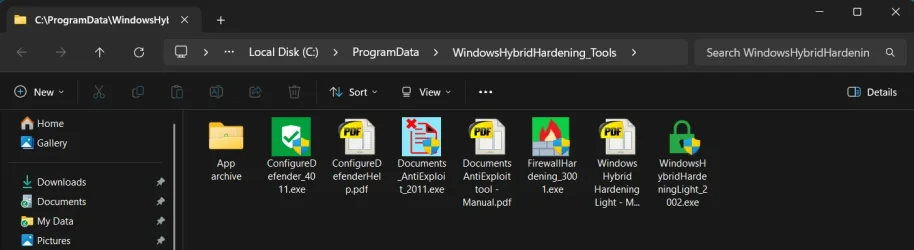
I use the default Windows/Microsoft Defender. I also use a couple of Andy Ful's Defender utilities to harden Defender a bit. At the moment, I use Windows Hybrid Hardening Light (WHHL), even though the stock Windows Defender works just fine the way it is.

Screenshot 2025-11-28 075835.webp
 

My Computers

System One System Two

  • OS
    Win 11 Pro
    Computer type
    PC/Desktop
    Manufacturer/Model
    ABS (Newegg)
    CPU
    Intel(R) Core(TM) i5-10400F CPU @ 2.90GHz
    Motherboard
    ASUSTeK COMPUTER INC. PRIME B560M-A AC Rev 1.xx
    Memory
    Corsair VENGEANCE® LPX 32GB (2 x 16GB) DDR4 DRAM 3600MHz
    Graphics Card(s)
    MSI NVIDIA GeForce RTX 3060 Ti
    Sound Card
    Realtek Digital Output (Realtek(R) Audio)
    Monitor(s) Displays
    Viewsonic VS 2725 -2k 27"
    Screen Resolution
    2560x1440 100hz
    Hard Drives
    T-FORCE TM8FP800 1TB + a couple SATA SSDs
    PSU
    Gigabyte P650E
    Case
    DeepCool Matrexx 50 mid-tower
    Cooling
    Assassin X 120 Refined SE and 5 Thermalright TL-C12C case fans
    Keyboard
    Redragon K655 or K720
    Mouse
    CoolerMaster MM711 or Redragon M612
    Internet Speed
    Starlink: speed varies
    Browser
    Brave (default), Chrome (for ATG), Edge (for ATMS)
    Antivirus
    Windows Defender
    Other Info
    An assortment of "land fill, obsolete" computers all running Linux Mint 22 (at the moment).
  • Operating System
    Linux Mint 22.2 Cinnamon
    Computer type
    PC/Desktop
    Manufacturer/Model
    Hewlett-Packard HP ProDesk 600 G1 SFF
    CPU
    i5 4590
    Motherboard
    HP
    Memory
    16 GB
    Graphics card(s)
    Intel(R) HD Graphics 4600
    Sound Card
    Realtek High Definition Audio
    Monitor(s) Displays
    Generic 24"
    Hard Drives
    Samsung SSD 860 EVO 500GB
    Hitachi HUA722010CLA330
    WDC WD40EZAZ-19SF3B0
    PSU
    Factory 240 watt
    Case
    Low Profile Desktop
    Cooling
    Factory cooling
    Keyboard
    HP
    Mouse
    HP
    Internet Speed
    Starlink
    Browser
    Brave
    Antivirus
    ?
    Other Info
    This is my media server

Latest Support Threads

Back
Top Bottom