Solved Windows Defender states it took action against threats / No history of virus in the events log


aagha

Well-known member
Local time
9:27 PM
Posts
30
OS
Win 11
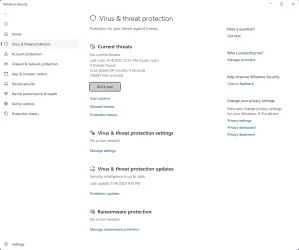
Hi - Windows Defender quick virus scan displays a message stating that it took an action, but there is no evidence of anything in either the Scan History or in the Event Viewer.

Edit: Worth noting that this has been happening for months, and no matter what, nothing ever shows here.


1762291632964.webp

Here's examples of issues coming up in Notifications, but not showing up in the Protection history:

1762294947434.webp
 
Windows Build/Version
Win 11 Pro 25H2 26200.7019
Last edited:

My Computer

System One

  • OS
    Win 11
    Computer type
    Laptop
    Manufacturer/Model
    Lenovo
    CPU
    Ryzen 7 6900 HS
    Memory
    32 GB RAM
    Graphics Card(s)
    RTX 3050ti
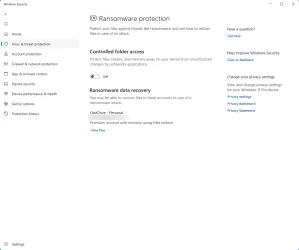
What happens when you click on the notifications? What are your Defender settings, e.g, for controlled folder access? Have you used any Windows tweaking software, group policy, etc.?

You can try resetting Windows Security by running this command as administrator:
Code:
Get-AppxPackage Microsoft.SecHealthUI -AllUsers | Reset-AppxPackage
 
Last edited:

My Computer

System One

  • OS
    Windows 11 Pro 25H2 26200.7840
    Computer type
    Laptop
    Manufacturer/Model
    Lenovo IdeaPad L340
    CPU
    Intel Core i3-8145U
    Memory
    16GB
    Hard Drives
    500 GB M2 1 TB HDD
    Internet Speed
    400 MB
    Browser
    Chrome | Edge
    Antivirus
    Microsoft Defender | Block unknown executables | Various ASR rules enabled | Smart App Control
Clicking on a notification takes me here:

1762302263656.webp


Controlled Folder Access:
1762302310915.webp

For Windows tweaking, ages ago I installed O&O ShutUp10++, but always was able to see the Protection History.

Ran the command you suggested. Will reboot and see if the history comes next time I see an event. Thanks.
 

My Computer

System One

  • OS
    Win 11
    Computer type
    Laptop
    Manufacturer/Model
    Lenovo
    CPU
    Ryzen 7 6900 HS
    Memory
    32 GB RAM
    Graphics Card(s)
    RTX 3050ti
Your problem may be either corrupted Windows Security or Protection History. You may also need to clear protection history again, but I'm not sure.
 

My Computer

System One

  • OS
    Windows 11 Pro 25H2 26200.7840
    Computer type
    Laptop
    Manufacturer/Model
    Lenovo IdeaPad L340
    CPU
    Intel Core i3-8145U
    Memory
    16GB
    Hard Drives
    500 GB M2 1 TB HDD
    Internet Speed
    400 MB
    Browser
    Chrome | Edge
    Antivirus
    Microsoft Defender | Block unknown executables | Various ASR rules enabled | Smart App Control
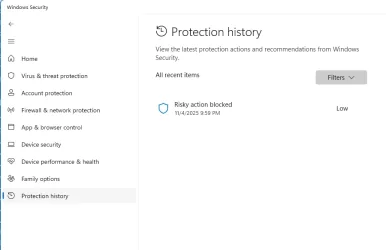
This seemed to work after a reboot! Thanks!

Code:
Get-AppxPackage Microsoft.SecHealthUI -AllUsers | Reset-AppxPackage

1762371503978.webp
 

My Computer

System One

  • OS
    Win 11
    Computer type
    Laptop
    Manufacturer/Model
    Lenovo
    CPU
    Ryzen 7 6900 HS
    Memory
    32 GB RAM
    Graphics Card(s)
    RTX 3050ti

My Computer

System One

  • OS
    Windows 11 Pro 25H2 26200.7840
    Computer type
    Laptop
    Manufacturer/Model
    Lenovo IdeaPad L340
    CPU
    Intel Core i3-8145U
    Memory
    16GB
    Hard Drives
    500 GB M2 1 TB HDD
    Internet Speed
    400 MB
    Browser
    Chrome | Edge
    Antivirus
    Microsoft Defender | Block unknown executables | Various ASR rules enabled | Smart App Control

Latest Support Threads

Back
Top Bottom