- Local time
- 8:20 PM
- Posts
- 775
- OS
- W11 Pro x64 ongoing Canary 29500 latest builds
It's a genuine question. Around 2 months ago I suddenly stopped being offered new builds via Windows Update. Up until then it had been flawless with each new build being offered. I do still get other updates such as security and drivers etc but not any new builds. I believe there may be a hardware block possibly related to some real issues I encountered when Fast Start was enabled. PC is a Dell Mobile Precision Workstation.
I have been updating since this started by using either UUPDUMP or Microsoft ISO's. Following the initial failure to receive new builds I did a true clean install to see if that resolved anything but there was no change.
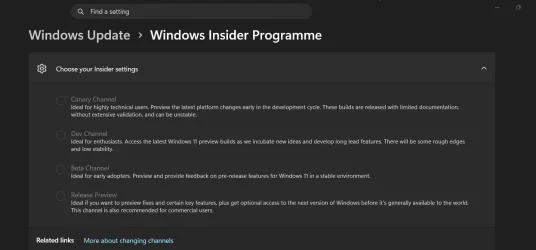
I'm curious what you all see on your Insider Settings. All my options are greyed out. I know there is no place to go from these builds as they have the highest build number of any but I would have thought it should show Dev at the least seeing as Winver reports 'Dev 29634.1000'
This is what I see for the latest 29634 build installed (updated to) today. Do you see the same or not?
I have been updating since this started by using either UUPDUMP or Microsoft ISO's. Following the initial failure to receive new builds I did a true clean install to see if that resolved anything but there was no change.
I'm curious what you all see on your Insider Settings. All my options are greyed out. I know there is no place to go from these builds as they have the highest build number of any but I would have thought it should show Dev at the least seeing as Winver reports 'Dev 29634.1000'
This is what I see for the latest 29634 build installed (updated to) today. Do you see the same or not?
My Computer
At a glance
W11 Pro x64 ongoing Canary 29500 latest buildsIntel i58GbIntel HD Graphics
- OS
- W11 Pro x64 ongoing Canary 29500 latest builds
- Computer type
- Laptop
- Manufacturer/Model
- Dell 7760 Mobile Precision 17"
- CPU
- Intel i5
- Motherboard
- Unknown
- Memory
- 8Gb
- Graphics Card(s)
- Intel HD Graphics
- Sound Card
- Realtek
- Monitor(s) Displays
- Internal
- Hard Drives
- 2 x 256Gb SSD
- PSU
- Dell 240 watt
- Mouse
- Dell Premier Bluetooth
- Internet Speed
- 50Mbps
- Browser
- Edge
- Antivirus
- Default Microsoft Security