BladeSlasher
Member
- Local time
- 5:38 AM
- Posts
- 1
- OS
- Windows 11 Pro
Windows Servicing Regression Report: KB5085516 Causing Locked WinSxS Space
Summary
The out‑of‑band (OOB) cumulative update KB5085516, released March 21, 2026, appears to have deployed a forward‑compatible Servicing Stack Update (SSU) from the 26200 branch onto a stable‑channel Windows 11 system. This caused a servicing regression where:
• DISM cleanup no longer works
• WinSxS contains several gigabytes of locked, unreclaimable data
• /ResetBase and /StartComponentCleanup complete successfully but do nothing
Update Details
• Update: KB5085516 (Out‑of‑band cumulative update)
• Release Date: March 21, 2026
• Purpose: Fix Microsoft account sign‑in failures caused by KB5079473
• Build numbers applied by KB5085516:
– Windows 11 25H2 → 26200.8039
– Windows 11 24H2 → 26100.8039
• My system received: 26200.8039
System Details
• Windows 11 stable channel (not enrolled in Insider Program)
• Registry confirms no Insider participation:
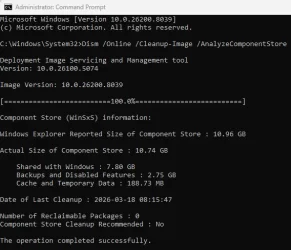
• Servicing Stack Version (from DISM):
• OS Build: Stable retail build (not 26200‑series)
Problem Description
After KB5085516 installed, the system began reporting a future‑branch servicing stack version (26200.8039) that should not be deployed to stable systems. This introduced future component manifests and rollback‑protected packages that DISM cannot remove.
Observed behavior:
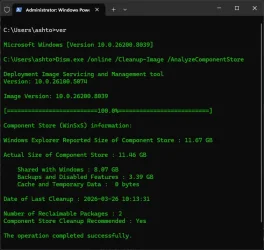
• DISM reports 2 reclaimable packages
• DISM reports “Cleanup Recommended: Yes”
• Running cleanup commands:
Both complete successfully, but:
• No packages are removed
• WinSxS size does not change
• Reclaimable packages remain permanently locked
Reproduction Steps
1. Fresh install or reset Windows 11
2. Allow KB5085516 to install during OOBE or first boot
3. Run:
4. Observe servicing stack version: 10.0.26200.8039
5. Run cleanup commands:
6. Re-run AnalyzeComponentStore
7. Reclaimable packages remain; cleanup does not work
Expected Behavior
• Stable-channel systems should not receive future-branch SSUs
• DISM cleanup should remove reclaimable packages
• WinSxS should shrink after /ResetBase
Actual Behavior
• KB5085516 deployed a 26200-series SSU to a stable system
• DISM cleanup pipeline is now non-functional
• WinSxS contains ~3.39 GB of locked, unreclaimable data
• DISM repeatedly reports cleanup recommended, but cleanup cannot proceed
Impact
• Permanent loss of several gigabytes of disk space
• Component Store cannot be serviced or reduced
• DISM cleanup functionality is partially broken
• Indicates incorrect targeting of an OOB emergency update
• Long-term servicing health may degrade
Request
Please investigate whether KB5085516 incorrectly deployed a 26200-series Servicing Stack Update to stable-channel systems, resulting in locked WinSxS space and a broken DISM cleanup pipeline.
Summary
The out‑of‑band (OOB) cumulative update KB5085516, released March 21, 2026, appears to have deployed a forward‑compatible Servicing Stack Update (SSU) from the 26200 branch onto a stable‑channel Windows 11 system. This caused a servicing regression where:
• DISM cleanup no longer works
• WinSxS contains several gigabytes of locked, unreclaimable data
• /ResetBase and /StartComponentCleanup complete successfully but do nothing
Update Details
• Update: KB5085516 (Out‑of‑band cumulative update)
• Release Date: March 21, 2026
• Purpose: Fix Microsoft account sign‑in failures caused by KB5079473
• Build numbers applied by KB5085516:
– Windows 11 25H2 → 26200.8039
– Windows 11 24H2 → 26100.8039
• My system received: 26200.8039
System Details
• Windows 11 stable channel (not enrolled in Insider Program)
• Registry confirms no Insider participation:
Code:
HKLM\SOFTWARE\Microsoft\WindowsSelfHost\Applicability
→ No BranchName, Ring, or ContentType
Code:
10.0.26200.8039Problem Description
After KB5085516 installed, the system began reporting a future‑branch servicing stack version (26200.8039) that should not be deployed to stable systems. This introduced future component manifests and rollback‑protected packages that DISM cannot remove.
Observed behavior:
• DISM reports 2 reclaimable packages
• DISM reports “Cleanup Recommended: Yes”
• Running cleanup commands:
Code:
Dism.exe /online /Cleanup-Image /StartComponentCleanup
Dism.exe /online /Cleanup-Image /StartComponentCleanup /ResetBase• No packages are removed
• WinSxS size does not change
• Reclaimable packages remain permanently locked
Reproduction Steps
1. Fresh install or reset Windows 11
2. Allow KB5085516 to install during OOBE or first boot
3. Run:
Code:
Dism.exe /online /Cleanup-Image /AnalyzeComponentStore5. Run cleanup commands:
Code:
/StartComponentCleanup
/ResetBase7. Reclaimable packages remain; cleanup does not work
Expected Behavior
• Stable-channel systems should not receive future-branch SSUs
• DISM cleanup should remove reclaimable packages
• WinSxS should shrink after /ResetBase
Actual Behavior
• KB5085516 deployed a 26200-series SSU to a stable system
• DISM cleanup pipeline is now non-functional
• WinSxS contains ~3.39 GB of locked, unreclaimable data
• DISM repeatedly reports cleanup recommended, but cleanup cannot proceed
Impact
• Permanent loss of several gigabytes of disk space
• Component Store cannot be serviced or reduced
• DISM cleanup functionality is partially broken
• Indicates incorrect targeting of an OOB emergency update
• Long-term servicing health may degrade
Request
Please investigate whether KB5085516 incorrectly deployed a 26200-series Servicing Stack Update to stable-channel systems, resulting in locked WinSxS space and a broken DISM cleanup pipeline.
- Windows Build/Version
- 26200.8039
Attachments
My Computer
At a glance
Windows 11 ProIntel i5-1140032GB SAMSUNG DDR4 XMPNVIDIA RTX3060 12GB
- OS
- Windows 11 Pro
- Computer type
- PC/Desktop
- Manufacturer/Model
- Asus Prime B650M
- CPU
- Intel i5-11400
- Motherboard
- Asus Prime B650M
- Memory
- 32GB SAMSUNG DDR4 XMP
- Graphics Card(s)
- NVIDIA RTX3060 12GB
- Hard Drives
- 1TB WD BLACK SN750 NvME
1TB MX500 SATA SSD
1TB WD BLUE HDD
- Case
- MSI Ageis R
- Internet Speed
- 1Gbit Fiber Optic